

 Netflix Basic
全国范围内安装
签购
| UniFi Maxis Astro Njoi |
常问问题
在这里找到您要的答案。
我们提供一站式服务为您申请Astro和Broadband。不必开车,排队和在销售柜台等候。 我们可以帮助您处理您的申请。
我们不收取额外费用。 无需提供信用卡信息。 费用与您在销售柜台申请的费用相同。
首先,您可以在线申请,我们将在工作时间内立即与您联系。 通过WhatsApp/电子邮件/传真发送您的身份证-IC(马来西亚公民)/ 护照(外国人)的复印件给我们。 收到所有资料后,我们将立即处理您的申请。
一旦收到您的完整资料,我们将在工作时间内立即处理您的申请。一旦您的申请获得批准,服务提供商的承包商将与您联系以进行安装预约。
ASTRO 和宽频收费同时在一张账单,享受更大的节省和无忧的账单支付。 在24个月的合约期内,您可以每月以折扣价享受 Astro 和宽频。
Astro 提供多种电视配套,包括娱乐、体育、电影和儿童配套。您可以选择符合您观看需求的配套,并在适用情况下添加额外的串流应用服务。
可以,您可以只订阅 Astro 电视配套而无需绑定宽频。不过,将 Astro 电视与光纤宽频绑定可享有更好的每月优惠,并且只需支付一张综合账单,更加方便。
对于小型家庭以及轻度上网和串流使用者,100Mbps 通常已足够。较大家庭、游戏玩家或重度串流用户则可选择 500Mbps 或 1Gbps 配套,以获得更流畅的多设备使用体验。
大多数 Astro 电视和光纤宽频配套都附带 24 个月合约期。如在合约期满前取消服务,可能会产生提前终止费用。
可以,您可在符合资格及覆盖范围的情况下随时升级电视配套或宽频速度。根据升级情况,可能需要重新计算合约期限。
您的每月账单将由 Astro 直接发出。您可通过电子邮件接收账单,或通过 Astro 账户在线查看。绑定配套用户将收到电视与宽频服务的综合账单。
付款方式包括网上银行、自动扣款、信用卡或 Astro 提供的其他认可付款渠道。我们的团队将在申请过程中为您提供协助。
如果您遇到任何服务中断问题,可联系 Astro 客户服务寻求技术协助。大多数情况下可远程解决,如有需要将安排技术人员上门处理。
可以,迁移服务需视新地址是否在服务覆盖范围内而定。根据您的配套,可能会产生迁移费用及合约调整。
不需要,提交申请时无需提供信用卡资料。服务获批后,付款安排将由 Astro 直接处理。
部分 Astro 电视配套可根据当前促销及服务情况添加串流服务等附加项目。可能需支付额外月费。
是的,光纤安装时通常会提供 WiFi 路由器。路由器型号可能会根据所选宽频速度配套而有所不同。
可以,我们会在处理您的申请前确认您地址的服务覆盖范围,以确保该地区可安装宽频服务。
马来西亚公民需提供 MyKad 复印件。外籍人士则需在提交宽频申请时提供护照复印件。
申请获批后,服务提供商通常会在 2 至 7 个工作日内联系您安排宽频安装预约。
大多数 Astro 宽频配套附带 24 个月合约期,从安装日期开始计算。如您搬迁,可能需要在新地址重新签订 24 个月合约。
可以,您可在新地址具备服务覆盖的情况下迁移宽频服务。合约期限可能会从新安装日期起重新计算 24 个月。
可以,您可申请在家中调整宽频设备位置。若属于非标准安装,可能会产生额外费用,并需在评估后直接支付给安装人员。
可以,您可转用 Astro 宽频。为避免服务中断,建议在终止现有宽频合约前先开通新的宽频服务。
标准安装在促销期间可能免费,但非标准安装(如设备迁移或复杂布线)可能会产生额外费用,并需直接支付给安装人员。
Your cloud recording space will revert to 200 hours by default. If your current recordings exceed 200 hours, the system will delete the exceeded hours once you have stopped the Astro GO+ subscription starting with the oldest recordings first.
No, the Service Tax is a tax payable entirely to the Government. Astro acts as a collection agent for the Government.
Yes, customers will be charged 8% Service Tax on switching fee for any services rendered on or after 1st March 2024.
For existing Astro Fibre customers with the WiFi 6 Huawei K562e router, youwould need to upgrade to the latest RG21 router in order to access the AstroFibre with a one-off fee of RM300 (excluding SST). For any enquiries, please contact our Customer ContactCentre at 03 - 9543 1543and an Astro agent will be available to assist you immediately.
Yes, a third party is allowed to make the advance payment on your behalf. In the case of refund, the amount will be returned to the owner of the third-party account (source of payment).
All streaming apps willbe made available on the Ultra Box first, followed by the Ulti Box. If youwould like to upgrade to the Ultra Box, please visit product.astro.com.my/tv or reach us via WhatsApp by typing “Hi” at 03-9543 3838 forassistance.
No additional fees will be charged upon your relocation. However, you are required to notify Astro of your move. Please refer to Astro's General T&Cs for more information.
STEP 1
On your remote, press the ... button and the Channel Guide page will be displayed on your screen.

STEP 2
Select the channel you would like to remove as favourite and press "OK".

STEP 3
Select "Remove from Favourite" and press "OK".

STEP 4
You are successfully removed the channel from favourite list when this screen appears.

You will be contacted by an Astro representative within two working days to advise you on the next course of action.
Yes, you will. Customers who purchased Astro First / Astro Best / Pay-per-View event in February 2024 with a viewing period in March 2024 will be charged an 8% Service Tax in their next bill.
For customers with the Ultra or Ulti Box, please ensure to provide your latest contact details to our Astro agent during the call to terminate your account, this includes your mobile number and house address. If you still need further help, please contact us at 03-9543 3838.
You will be charged 8% Service Tax on Astro Pay TV services rendered on or after 1st March 2024, whereas your Astro Fibre including Mesh will remain at 6% Service Tax.
Please refer to the Welcome Card inside the Plug & Play Box package and scan the QR code. You may choose to watch either the self-installation video or the Augmented Reality (AR) Installation Video to activate your Plug & Play Box. You can also download the Installation Guide from the Astro Get Started Page.
Please install and activate your Plug & Play Box within 7 days of receiving your Plug & Play Box and Astro SIM card. If you are unable to activate your Plug & Play Box within 7 days, the Plug & Play Box will be automatically activated by Astro on the 8th day.
The billing and warranty of the Plug & Play Box shall begin on the same date of which the Plug & Play Box is activated.
In the event that you have ordered more than one (1) Plug & Play Box, please refer to the Astro SIM card letter (included with the Astro SIM card delivery) to match the right Astro SIM card to the respective Plug & Play Box. Each Astro SIM card has been paired with a specific Plug & Play Box, thus the correct matching of box and SIM card is required for it to work properly.
Upon submitting your application, you will receive the eKYC link via SMS/email/astro.com.my to complete the eKYC verification within 3 days.
You will only be able to watch Astro GO and/or Multiroom Smart TV on up to 2 devices at the same time as opposed to 4 devices with Astro GO+.
Your cloud recording storage will also decrease from 1500 hours down to 200 hours. Your stored recordings/downloaded shows that exceed 200 hours will also be removed.
No, you will not be able to manage your account with the Astro Fibre App. However, you may download the “MyAstro” app on your mobile device now to manage your Astro account in a fast and easy way.
In support of the environment, customers are encouraged to opt for bill statements delivered for free via email or SMS for better savings as the Paper Bill Charge will be revised from RM7.00 to RM10.00 per bill/month, starting 1st August 2022. The Paper Bill Charge will be waived for customers who opt for e-Billing as their preferred bill delivery method.
Please fill up the forms below for processing your request:
Transfer of Equiment Ownership Form
STEP 1
Press "HOME" button on your remote control.

STEP 2
Navigate to Preferences and press "OK".

STEP 3
Navigate to Language and press "OK".

STEP 4
Choose your language preferences and press "OK".

STEP 5
Select Yes, continue and press "OK" to confirm on the changes.
Otherwise, select No, go back to cancel.

The Astro Fibre app is a newly introduced mobile application exclusively for Astro Fibre customers to allow them to schedule when each user can access the internet, share network access to guests in a secure manner, easy device management, amongst many other features for a better WiFi experience. For more information about this app, please visit here.
Mesh WiFi network refers to a unified wireless network that is formed by utilizing inter-connected WiFi nodes (Mesh devices) placed throughout the house.
When Band Steering is enabled, only one SSID network name with one password is available. Example:
i.SSID: SSID, Password: 12345678
At this point in time, the Disney+ Hotstar app on the Ultra or Ulti Box does not support Dolby audio. We are working to enable this in a future update.
STEP 1
On your remote, press the HOME button and the home menu will be displayed on top of your screen.

STEP 2
Navigate to Settings.

STEP 3
Navigate to Subtitles and press "OK".

STEP 4
Navigate to your preferred selection and press "OK".

STEP 1
On your remote, press the HOME button and the home menu will be displayed on top of your screen.

STEP 2
Navigate to Settings.

STEP 3
Navigate to Remote Control Settings and press "OK".

STEP 4
Follow the steps appear on the screen to sync your Astro remote.

Astro introduces Liga Malaysia for all Astro customers to watch the Malaysian Football League’s Liga Malaysia competitions LIVE, comprising Perlawanan Sumbangsih (Piala Sultan Haji Ahmad Shah), Liga Super, Piala FA and Piala Malaysia live in HD on Astro Arena (CH801), Arena Bola channels (CH803 and CH804) and stream on Astro GO until further notice.
Not all shows/channels will be available on the Plug & Play Box as this depends on contractual rights with specific guidelines on the entitlement of these shows/channels and what you have as a part of your subscription.
- Customers subscribing to Plug & Play Box with or without Astro Broadband will not have access to 1 (one) Channel - NHK World
Please be assured that we are continuously working hard to make more content available on the Plug & Play Box.
If you prefer to have all these channels, we recommend that you choose the Satellite dish option for the Ultra or Ulti Box.
Unavailable channels are as below:

Yes, a charge of up to RM20.00 may be imposed upon reconnection.
We would need you to run few tests in order for us to understand your issue and to assist you in fixing the problem.
You may proceed with the troubleshooting steps below which should not require any longer than 15 minutes.
- Please run each of the tests according to your your Laptop/PC Software.
- Compile the pictures / screenshots of your test results in one file (i.e Microsof Word document, PDF file) and attach them in the Support Ticket below in order for us to assist you further:
- List of websites effected.
- Run the Speed Test via LAN (cable) and Wi-Fi connection - Please click here for Speed Test guideline.
- Run the Traceroute Test - Please click here for Traceroute Test guideline.
- Run the Ping Test - Please click here for Ping Test guideline.
- Once you/ve gathered all the results, kindly send them all through the Feedback Form below.
Quick Info
A Speedtest is a service that provides free analysis of Internet access parameters, such as connection data rate.
A Ping Test shows how long it takes for packets to reach host.
A Traceroute Test traces the route of packets to destination host from our server.
STEP 1
On your remote, press the Home button and the menu will be displayed on top of your screen.
STEP 2
Navigate to Settings.
STEP 3
Navigate to Restore and press "OK".
STEP 4
Navigate to Restore Factory Settings and press "OK".

STEP 5
Enter your PIN to access this setting. (Default PIN is 0000).
STEP 6
Navigate to Restore and press "OK" to confirm your selection.
Otherwise, navigate to Cancel, go back to remain the settings.
STEP 7
Please wait while the box restoring defaults and will reboot once complete.
STEP 8
Your box will automatically restart and display this screen.
Click here to follow New Installation Settings guide for Satellite
Click here to follow New Installation Settings guide for Plug and Play
For more information about the Astro Fibre App, you may click here for a detailed user guide.
For Astro Ultra Box or Ulti Boxes, you will be able to see an itemised charge called "Box Fee” in your Astro bill.
The amount you're charged depends on:
- Your contract period and how long's left of your minimum term from the date your subscriptions end, calculated in months.
- Your current box type - Ultra or Ulti/Other Astro Boxes
- The packages you subscribe to, including App services such as Disney+ Hotstar and Netflix
Each Astro customer can subscribe to a maximum of one (1) Multiroom (Smart TV) subscription. If you need additional Multiroom access, you may subscribe to Multiroom (Astro Box). All subscription has to be used within the same location as per the main subscription.
-The Mesh unit can only be used indoors. It can be mounted onto a wall or be placed horizontally on a desktop. Do not install it in other mode, such as on the ceiling.
-Keep a clearance of at least 10 cm around the device to ensure proper ventilation.
-Keep the device away from electrical appliances that generate strong magnetic or electric fields, such as microwave ovens.
We apologise for the inconvenience caused. If you have not receive the upgraded speed within 48 hours after the service activation, please call Astro’s Contact Centre at 03-9543 1543 and an Astro agent will be available to assist you immediately.
For any NJOI-related information, please visit the NJOI Help & Support page at https://purchase.njoi.com.my/en-support
Starting 21 June 2022, all new digital sign-ups for TV packs on astro.com.my will now include access to the Astro GO app within an hour upon checkout of your first month subscription fees (excluding tax). Install the app on your smartphones, tablets or computers and you can start streaming even before your Astro box arrives!
Please ensure that you have subscribed to PVR recording service.
If you're subscribed to PVR recording service, follow below steps.
Let's check your hard disk connectivity.
STEP 1
On your remote, press the “HOME” button and the home menu will be displayed at the bottom of your screen.

STEP 2
Navigate to SETTINGS and press “OK”.

STEP 3
Navigate to STB DIAGNOSTICS and press “OK”.

STEP 4
From the General tab, take a look at the HDD Status.

If status is "Connected", press red button to reboot you decoder.
Wait until the box is on, then try to record any program.
If issue persist, please submit the issue on our Feedback Form and attach a picture of your General tab of the STB Diagnostics for assistance.
If status is "Disconnected", please submit your Feedback Form and attach a picture of your General tab of the STB Diagnostics for assistance.
You will be able to check your balance, switch to e-billing, request for payment barcode and request for reconnect at standard telco rate.
The default PIN is 0000. You may change your PIN to a secure one by doing this at Settings, under your Preferences, select PIN Management, enter your old PIN or default PIN and proceed to create a new PIN.


You may proceed with the following troubleshooting steps and it shouldn't take you much longer than 15 min
1. Please standby a computer/laptop to access to the internet and connection must be via LAN cable (connect the LAN cable to the Yellow port at Tplink Router and direct to the computer/laptop).
2. You may open any web browser such as Google Chrome, Internet Explorer, Mozilla Firefox and etc.
3. On the address bar, please go to tplinkwifi.net and to access to below login page. Type the Username and Password, then click "Login".

The default login of the router is available on the sticker at the back of the router. If you have done a configuration on your router previously, the password may be different.

For example, below is the login details of the above router:
Username: admin
Password: TIMECE24
4. Once you have successfully login, the router's web-based setup page will appear. Please follow below steps for the configuration.

5. From the top menu, choose Advanced and click the Wireless tab on the left menu. Then, select Wireless Settings from the sub menu. Below screen will appear for 2.4GHz selection.

i. Please ensure to tick Enable Wireless Radio function.

ii. To change the channel, click the drop-down arrow for Channel, then select your desired channel.
Choose between 1 to 13 (Suggested channels : 1,6,11). Then, click "Save" for the changes to take place.

iii. Click Save for the changes to take place. The router will auto reboot and connection will re-establish after few minutes.

iv. Next, select 5GHz to make changes on the wireless channel for 5GHz.
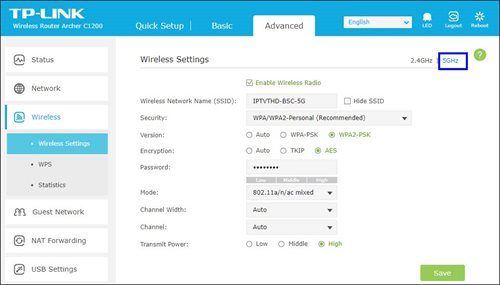
v. Click the drop-down arrow for Channel, then select your desired channel from the selection.

vi. Click Save for the changes to take place. The router will auto reboot and connection will re-establish after few minutes.

Step 1: Launch the app on your Smart TV.
Step 2: You will be able to see a welcome screen with a QR code and URL.

Step 3: Scan the QR code or go to astro.com.my/tvapp on your mobile and enter your unique code (e.g. FSJV-SMBS) displayed on the TV screen

Step 4: At the login page, you will need to log in with your Astro ID (registered email or mobile number) and password.
(If you do not have an Astro ID, click on "Create now"
to sign up and link to your Astro account – check the following on the steps)

Step 5: Once you have successfully logged in on your mobile, the Astro app will launch on your Smart TV screen. You can continue to browse and watch your favourite shows on the Smart TV.
While this technology has its benefits, different devices at home have different reaction and response to changes in signal strength and quality, and it's almost impossible to predict if they will make good band choices due to the interaction between the devices and the Wifi router. Some smart home devices also recommend that band steering is not used due to various reasons such as needing a constant consistent connection, ability to only connect to a particular band, registration of the respective MAC address, etc..
Example:
As single SSID is used, the device may remain on a weak 5GHz network instead of switching over to stronger 2.4GHz network.
For Platinum Pack and Multiroom Smart TV customers, Astro GO+ will be automatically added to your subscription.
If you're trying to visit a website and it won't load, but others do, there could be a variety of causes. If the site itself is down, there's not much you can do but wait.
If you can load the site on other computers or devices (make sure you try different means of connecting to the internet), there may be an issue with your computer or network.
There are some quick fixes that will solve most problems, but you may have to get your hands a little dirty.
1. Try loading the site on a different device.
Try loading the website on your phone or on another computer. If the website loads on the other device, the problem lies with your computer.
If the website doesn't load on another device, the problem is either with the network or the website itself.
2. Restart your computer.
Oftentimes, a simple reboot will fix the problem you're having. Reboot your computer and test the website again.
3. Try loading the site in a different browser.
There may be some settings configured incorrectly on your browser. Try a different web browser to see if you can load the website.
4. Temporarily disable your antivirus program.
Your antivirus software may be interfering with your ability to load certain websites.
Try disabling the software and then loading the site again. Make sure you enable it again once you have identified the problem.
5. Reset your modem and router.
Traffic to or from a certain website may be getting tripped up by your modem or router. Resetting these devices may allow you to access the website again.
6. Check your computer's date and time settings.
If your date or time is set incorrectly, you may not be able to connect to secure (https://) websites.
Check your computer or mobile device's clock to make sure that it is set to the correct time and date.
In the event the problem persists, please provide below details for further escalation:
i. List of websites effected.
ii. Run the Speed Test via LAN (cable) and Wi-Fi connection - Please click here for Speed Test guideline.
iii. Run the Traceroute Test - Please click here for Traceroute Test guideline.
iv. Run the Ping Test - Please click here for Ping Test guideline.
Once you've gathered all the results, kindly send them all through the Feedback Form below.
Quick Info
A Speedtest is a service that provides free analysis of Internet access parameters, such as connection data rate.
A Ping Test shows how long it takes for packets to reach host.
A Traceroute Test traces the route of packets to destination host from our server.
Please note that your request to opt out has been processed, and payment for Disney+ Hotstar is not required. Your bill adjustment will be reflected in your next bill.
Activate your Disney+ Hotstar access with your Astro subscription, using the steps below:
- Step 1 - Create- and verify your Astro ID at astro.com.my/astroID. If you already have an existing Astro ID, go to Step 2.
- Step 2 - Goto astro.com.my/Disney. Login with your Astro ID, activate with your mobile number and verify with a one time passcode (OTP) sent to your mobile number.
- Step 3 - Download the Disney+ Hotstar app or login via web, and sign in with the mobile number provided in Step 2. Start streaming!
You will need to have an Astro subscription before you can subscribe to Disney+ Hotstar as an add-on service via Astro or enjoy any Astro bundle promotions. Please click here to subscribe to our Movies, Premium 1, Premium 3 or Platinum Pack to enjoy all your favourite Global and Malaysian hits for even better value and savings!
Your account may be under suspension. To resolve this issue, proceed to submit report via WhatsApp or Feedback Form.
