
A free satellite TV service from Astro. Watch lifetime entertainment, news, learning & information and more.

Pictures for illustration only.
Enjoy free access to 15+ TV channels & 10+ radio channels.
* Subject to Astro terms & conditions.


Step-1 |
Step-2 |
Step-3 |
Choose a plan & sign-up online. |
Sit back & wait for installation. |
Enjoy your new Astro / Broadband! |
Explore our TV Pack which includes a variety of entertainment channels.

The must-watch local and international content made for everyone in the family.

The best local & international cartoons & educational entertainment.

Global movies and series packed with action, drama and big thrills.

Latest breaking news & current affairs whilst you discover secrets of the world.

Witness every major league & live sports events, plus family entertainment.

The ultimate all-in-one entertainment with movies, sports & a variety of streaming apps.
Good for working from home and streaming. Get connected at 100Mbps and enjoy uninterrupted streaming, gaming, and browsing.

FREE Modem
FREE WiFi-6 Router
Unlimited data
| What is included? |
Entertainment Pack RM49.99 |
100Mbps Astro Fibre RM99.00 |
| What is included? |
Entertainment Pack + Kids RM59.98 |
100Mbps Astro Fibre RM99.00 |
| What is included? |
Entertainment Pack + Blockbuster RM59.98 |
100Mbps Astro Fibre RM99.00 |
| What is included? |
Entertainment Pack + News & Documentaries RM64.98 |
100Mbps Astro Fibre RM99.00 |
| What is included? |
Sports Pack RM99.99 |
100Mbps Astro Fibre RM99.00 |
| What is included? |
Epic Pack RM199.99 |
100Mbps Astro Fibre RM99.00 |
Ideal for small families for 4K streaming & gaming. Get connected at 500Mbps and enjoy fast and stable internet for all your needs.

FREE Modem
FREE WiFi-6 Router
Unlimited data
| What is included? |
Entertainment Pack RM49.99 |
500Mbps Astro Fibre RM149.00 |
| What is included? |
Entertainment Pack + Kids RM59.98 |
500Mbps Astro Fibre RM149.00 |
| What is included? |
Entertainment Pack + Blockbuster RM59.98 |
500Mbps Astro Fibre RM149.00 |
| What is included? |
Entertainment Pack + News & Documentaries RM64.98 |
500Mbps Astro Fibre RM149.00 |
| What is included? |
Sports Pack RM99.99 |
500Mbps Astro Fibre RM149.00 |
| What is included? |
Epic Pack RM199.99 |
500Mbps Astro Fibre RM149.00 |
Perfect for medium-sized families for work and play. Get connected at 1Gbps and experience ultra-fast internet speeds.

FREE Modem
FREE WiFi-7 Router
Unlimited data
| What is included? |
Entertainment Pack RM49.99 |
1Gbps Astro Fibre RM229.00 |
| What is included? |
Entertainment Pack + Kids RM59.98 |
1Gbps Astro Fibre RM229.00 |
| What is included? |
Entertainment Pack + Blockbuster RM59.98 |
1Gbps Astro Fibre RM229.00 |
| What is included? |
Entertainment Pack + News & Documentaries RM64.98 |
1Gbps Astro Fibre RM229.00 |
| What is included? |
Sports Pack RM99.99 |
1Gbps Astro Fibre RM229.00 |
| What is included? |
Epic Pack RM199.99 |
1Gbps Astro Fibre RM229.00 |
Ultimate high-speed internet for everyone and everything. Get connected at 2Gbps and enjoy lightning-fast internet speeds.

FREE Modem
FREE WiFi-7 Router
Unlimited data
| What is included? |
Entertainment Pack RM49.99 |
2Gbps Astro Fibre RM319.00 |
| What is included? |
Entertainment Pack + Kids RM59.98 |
2Gbps Astro Fibre RM319.00 |
| What is included? |
Entertainment Pack + Blockbuster RM59.98 |
2Gbps Astro Fibre RM319.00 |
| What is included? |
Entertainment Pack + News & Documentaries RM64.98 |
2Gbps Astro Fibre RM319.00 |
| What is included? |
Sports Pack RM99.99 |
2Gbps Astro Fibre RM319.00 |
| What is included? |
Epic Pack RM199.99 |
2Gbps Astro Fibre RM319.00 |



A free satellite TV service from Astro. Watch lifetime entertainment, news, learning & information and more.
Pictures for illustration only.
New decoder only without satellite dish & cabling. You must have Astro/Njoi satellite dish and cable installed and working properly.
Including installation.
New decoder complete with satellite dish & cabling.
Including installation.


Unlimited quota, unifi TV and high performance Wireless Router with unifi fibre broadband.
Reliable broadband plans that enable next-level business growth.
Supports up to 2-3 users on 5 devices.
Supports up to 6 users on 10 devices.
Supports up to 10 heavy users on multiple devices.
Supports up to 10 power users on multiple devices.
Ultimate support for up to 10 power users on multiple devices.
Good for Working From Home and streaming.
100Mbps/50Mbps
Free Standard Router (RG5)
100Mbps/50Mbps
Free Standard Router (RG5)
 Netflix Basic
Suitable for full HD streaming & browsing.
300Mbps/50Mbps
Free WiFi-6 Combo Box
300Mbps/50Mbps
Free WiFi-6 Combo Box
Netflix Basic
Ideal for small families for 4K streaming & gaming.
500Mbps/100Mbps
Free WiFi-6 Combo Box
500Mbps/100Mbps
Free WiFi-6 Combo Box
Netflix Standard
Perfect for medium-sized families for work and play.
1Gbps/500Mbps
Free WiFi-6 Combo Box
1Gbps/500Mbps
Free WiFi-6 Combo Box
Netflix Standard
Ultimate high-speed internet for everyone and everything.
2Gbps/1Gbps
Free WiFi-6 Combo Box
2Gbps/1Gbps
Free WiFi-6 Combo Box
Netflix Standard

Reliable broadband plans that enable next-level business growth.
Supports up to 2-3 users on 5 devices.
Supports up to 2-3 users on 5 devices.
Fixed IP.
Supports up to 6 users on 10 devices.
Supports up to 6 users on 10 devices.
Fixed IP.
Supports up to 10 heavy users on multiple devices.
Supports up to 10 heavy users on multiple devices.
Fixed IP.
Supports up to 10 power users on multiple devices.
Supports up to 10 power users on multiple devices.
Fixed IP.
Good for Working From Home and streaming.
Free WiFi-6 Router
Free WiFi-6 Router
Unlimited voice call
Suitable for full HD streaming & browsing.
Free WiFi-6 Router
Free WiFi-6 Router
Unlimited voice call
Ideal for small families for 4K streaming & gaming.
Free WiFi-6 Router
Free WiFi-6 Router
Unlimited voice call
Perfect for medium-sized families for work and play.
Free WiFi-6 Router
Free WiFi-6 Router
Unlimited voice call
Ultimate high-speed internet for everyone and everything.
Free WiFi-6 Router
Free WiFi-6 Router
Unlimited voice call
Applying for
| Astro Njoi UniFi Maxis |
Find your answers here.
We provide one stop service to apply Astro and Broadband for you.
You can avoid driving and queuing at the sales counter. We are the dealer that can help you to handle your application from the beginning to the end.
We do not charge you when you apply from us. There is no credit card information required to apply here. Charges are the same as you apply from the sales counter.
First, you can apply online, we will get back to you immediately during business hour. WhatsApp/Email/Fax us your Photocopy of IC (for malaysian) / Passport (for foreigners). When we receive all the information, we will proceed with your application immediately.
Once we receive your application with complete information, we will process your application immediately during business hour. The contractor from the service provider will then contact you for installation appointment once your application is approved.
Enjoy greater savings and hassle-free bill payment in one single bill for both Astro and Broadband. You get to enjoy Astro and Broadband at discounted price every month over the contract period of 24 months.
Astro offers multiple TV packs including Entertainment, Sports, Movies and Kids options. You can choose a pack that matches your viewing preferences and add optional streaming apps where available.
Yes, you may subscribe to Astro TV packs without bundling broadband. However, bundling Astro TV with Fibre Broadband may provide better monthly savings and convenience with a single bill.
For small households with light streaming and browsing, 100Mbps is usually sufficient. Larger families, gamers or heavy streamers may benefit from 500Mbps or 1Gbps plans for smoother performance across multiple devices.
Most Astro TV and Fibre broadband plans come with a 24-month contract. Early termination charges may apply if cancellation is made before the contract ends.
Yes, you may upgrade your TV pack or broadband speed at any time, subject to eligibility and coverage. A new contract period may apply depending on the upgrade.
Your monthly bill will be issued directly by Astro. You may receive it via email or access it through your Astro account. Bundled customers will receive a single combined bill for TV and broadband services.
Payment methods may include online banking, auto debit, credit card or other approved payment channels provided by Astro. Our team can guide you during the registration process.
If you experience any service interruption, you may contact Astro customer support for technical assistance. In many cases, issues can be resolved remotely or a technician will be arranged if necessary.
Yes, relocation is subject to service availability at your new address. Relocation charges and contract adjustments may apply depending on your plan.
No, you do not need a credit card to submit your application. Payment setup will be arranged directly with Astro after your service is approved.
Selected Astro TV packs allow optional add-ons such as streaming services depending on current promotions and availability. Additional monthly charges may apply.
Yes, a WiFi router is typically provided during fibre installation. The router model may vary depending on the selected broadband speed plan.
Yes, we will check the service coverage at your address before proceeding with your application to ensure broadband is available at your location.
For Malaysians, please provide a copy of your MyKad. For foreigners, provide a copy of your passport when submitting your broadband application.
After your application is approved, the service provider typically contacts you within 2 to 7 working days to arrange the broadband installation appointment.
Most Astro Broadband plans come with a 24-month contract starting from your installation date. If you relocate, a new 24-month contract may apply at your new address.
Yes, you can relocate your broadband service, subject to service availability at the new address. Your contract may reset for another 24 months from the new installation date.
Yes, you may request to relocate broadband devices within your home. Non-standard installation charges may apply and are payable to the installer directly after assessment.
Yes, you can switch to Astro Broadband. To avoid service interruption, it is recommended to activate the new service before terminating your current broadband contract.
Standard installations may be free during promotions, but non-standard installations (e.g., device relocation or complex wiring) may incur extra charges payable directly to the installer.
STEP 1
Choose your language preferences for both Menu Language and Info Language. Then, press "OK".

STEP 2
Select you box operating mode and press "OK".

STEP 3
Select the resolution supports by your TV and press "OK".
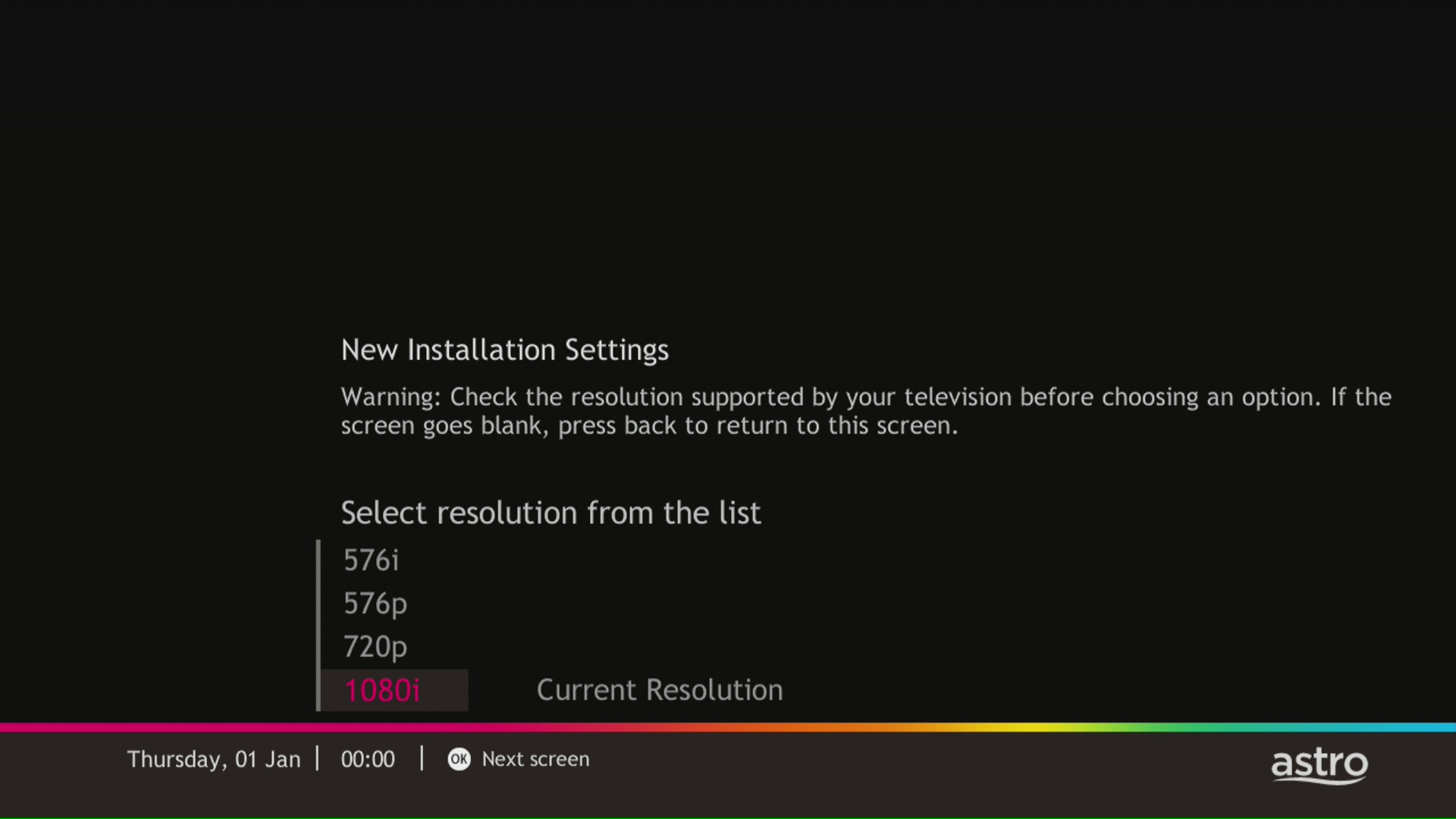
STEP 4
Press "OK" to proceed to the next screen.
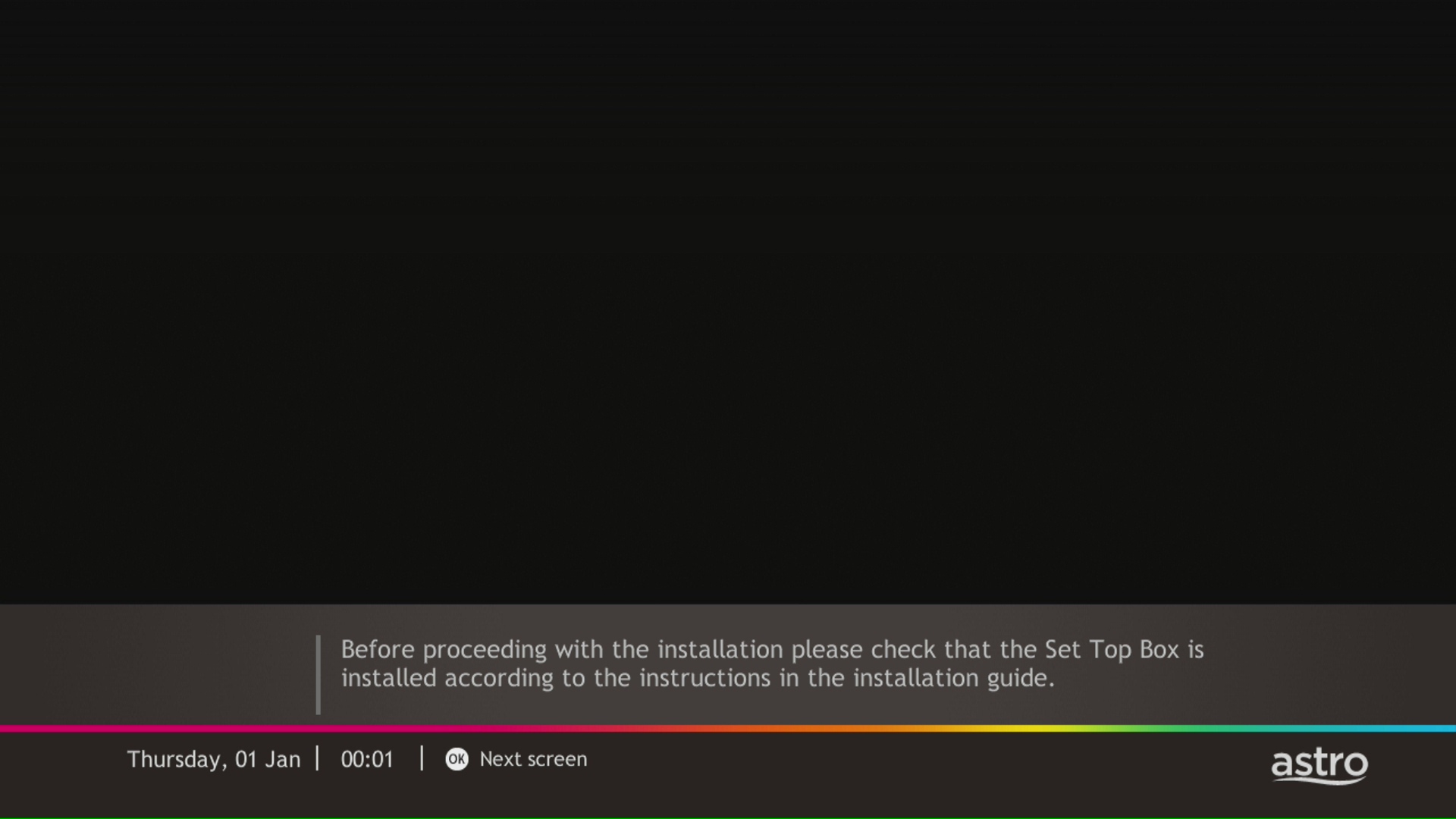
STEP 5
Please select the LNB type and press "OK".

STEP 6
Select this as the Entry Point and press "OK" to confirm your selection.

STEP 7
Signal reading results for Tuner 1 and Tuner 2 screen will be displayed. Then, press "OK" to proceed to next screen.

STEP 8
Select Yes, continue and press "OK" to connect to Wi-Fi network.
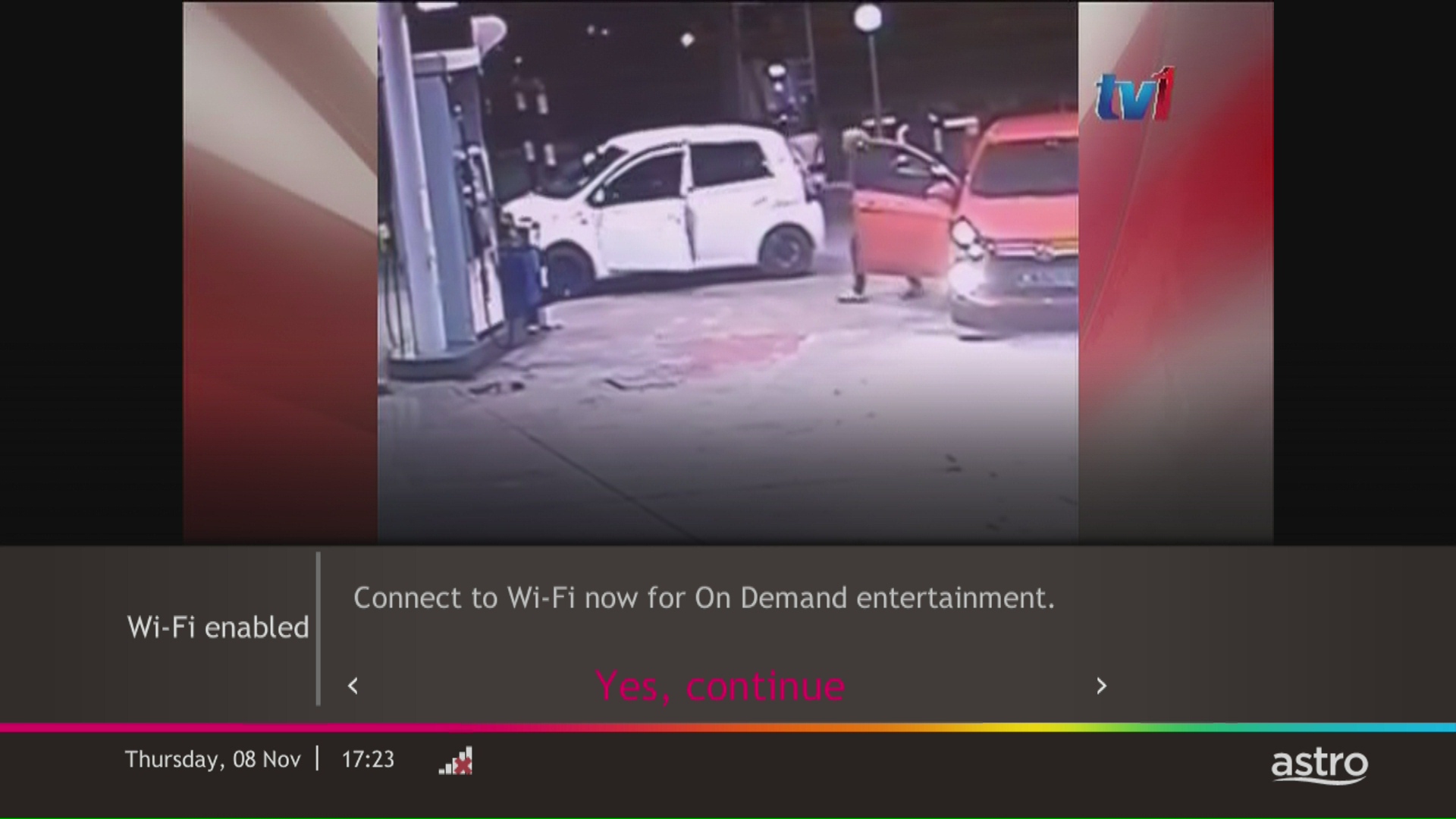
STEP 9
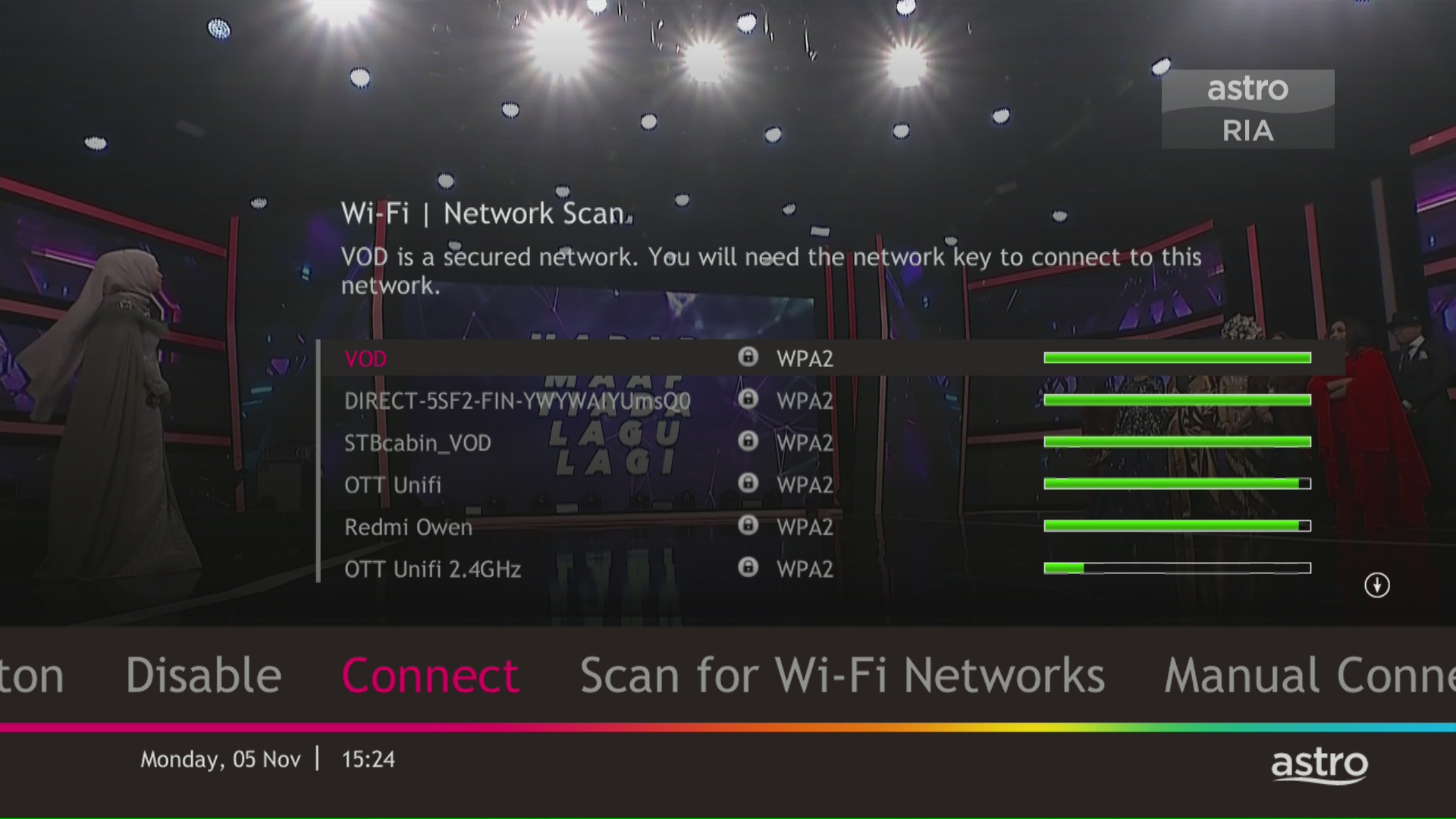
Please wait while the box scanning for the available Wi-Fi network.
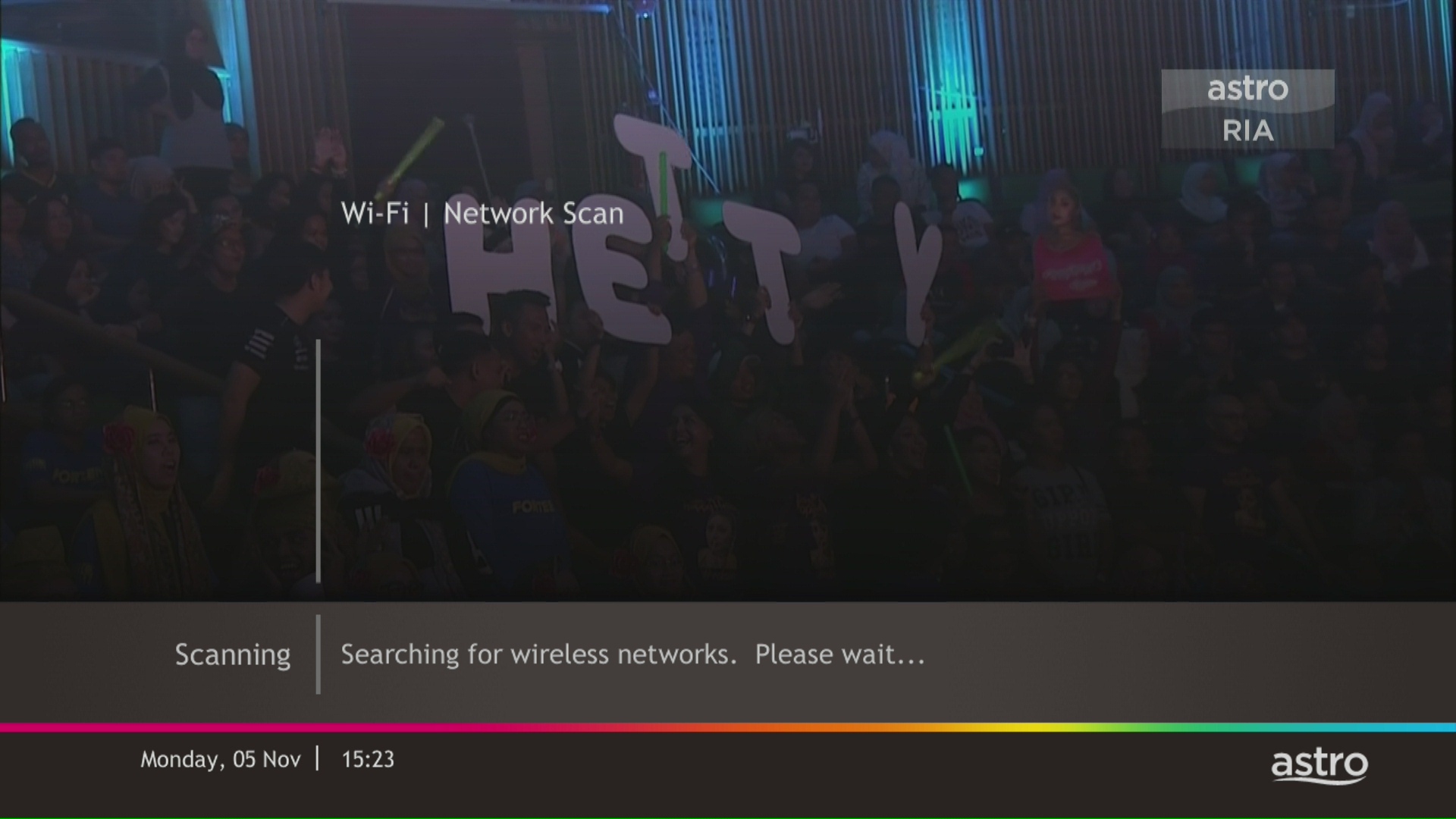
STEP 10
Select your Wi-Fi network and navigate to "Connect".
STEP 11
Please enter the password to connect to your network and press "OK".

STEP 12
You are successfully connected when this screen appears.

STEP 1
On your remote, press the ... button and the Channel Guide page will be displayed on your screen.

STEP 2
Select the channel you would like to remove as favourite and press "OK".

STEP 3
Select "Remove from Favourite" and press "OK".

STEP 4
You are successfully removed the channel from favourite list when this screen appears.

STEP 1
On your remote, press the HOME button and the home menu will be displayed on top of your screen.

STEP 2
Navigate to Settings.

STEP 3
Navigate to HDMI Audio and press "OK".

STEP 4
Navigate to your preferred selection and press “OK”.

The fee is a one-time activation fee that will be charged when you subscribe to the Plug & Play Box.
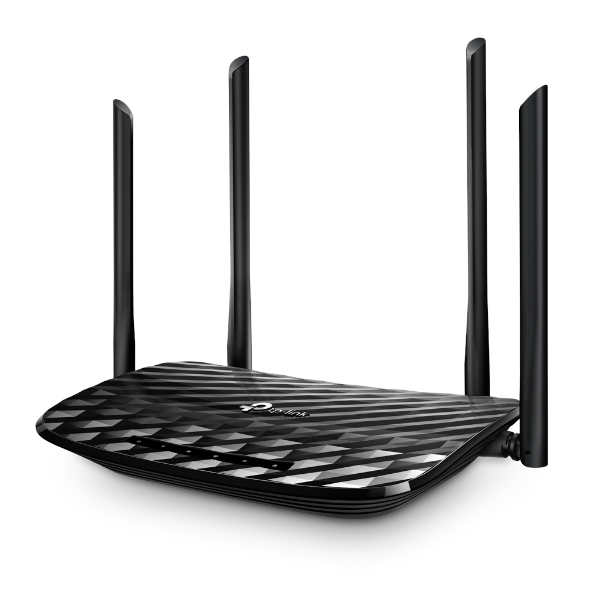

The default login of the router is available on the sticker at the back of the router. If you have done a configuration on your router previously, the password may be different
4. Once you have successfully login, the router's web-based setup page will appear. Please follow below steps for the configuration.

5. From the top menu, choose Basic and then click Wireless tab on the left menu to access to below screen.

6. Since this is a dual band router, you will have 2 Wireless Network Names (SSID) i.e. 2.4GHz and 5GHz. You may connect to any of the SSID, preferably with a stronger signal available.
7. You may change the Wireless Network Name (SSID) and the Password to follow your preferences, then click "Save" for the changes to take place.
Please reconnect to the new wireless name with the new password once completed.
Please ensure that you are using the correct ID for eKYC submission.
For Malaysians :
1. Please ensure you are using MyKad or MyTentera.
2. Capture the front and back of your ID.
3. Ensure that there is no glare when capturing the photo.
4. Ensure that are capturing it in a bright room to have the highest picture quality.
5. Please do not cover your ID when capturing it, as it may impact the OCR Optical Character Recognition accuracy.
For Malaysian Permanent Resident and Other Nationality :
1. Please use Passport only.
2. Please capture your whole passport, which has your personal information on it and your signature.
3. Ensure that there is no glare when capturing the photo.
4. Please do not cover your ID with your when capturing it, as it may impact the OCR Optical Character Recognition accuracy.
Wider WiFi coverage:
-All areas across the house will enjoy optimal coverage with multiple Mesh WiFi units located in areas with sub-optimal coverage to form a larger WiFi network.
Stable connection;
-Consistent coverage of optimal WiFi signal will ensure a stable connection as the Mesh unit will automatically connect your devices to the strongest WiFi signal around your house.
Yes, customers whose accounts are suspended but resumed within 24 months from their offer period start date will still be able to enjoy the internet speed upgrade upon service resumption. However, the speed upgrade offer period will not be extended despite the suspension period.
Unfortunately, customers whose accounts are suspended but resumed after 24 months from their offer period start date will not be able to receive the free speed upgrade.
Netflix is a streaming entertainment service that offers a wide variety of award-winning TV programmes, films, anime, documentaries and more - on thousands of internet-connected devices. There's always something new to discover, and more TV shows and movies are added every month. The more you watch, the better Netflix gets at recommending TV shows and movies you'll love.
Astro customers with an internet-connected Ultra Box or Ulti Box can access the Netflix app and watch Netflix content via their Astro Box. For more information about Netflix, visit the Netflix website.
Tune to channel 200 - select on "My Account".Your Total amount due will be stated under the "Bill Summary" section.

**Please note that this feature requires your box to be connected to your home Wi-Fi. Alternatively you can perform the SMS steps displayed on the screen to check your bill amount.
For customers whose sign-up speed is 50Mbps, 100Mbps or 500Mbps, you will get to enjoy your upgraded speed of 100Mbps/500Mbps/800Mbps for 24 months.
You may report the incident on WhatsApp at 03-9543 3838 by typing PNP and our access our user guide or request for further help from our dedicated agents. Please have your Airway Bill tracking numbers ready for validation. If a replacement box/Astro SIM card is deemed necessary, a new Box and a new Astro SIM card will be couriered to your service address.
Broadband Deal bundle are recommended packages offered to customers with higher rebate as compared to Broadband Non-Deal bundle.
Yes, however we do advise keeping your subscription while your TV is being fixed to avoid having to download the app again.
Astro wants to give our members the convenience of having all their favourite series, exciting originals, vernacular signatures, live sports and local blockbuster movies in one place. Astro customers will be able to enjoy greater convenience by having Netflix bundled with their Astro subscription, consolidating the subscriptions, and providing easy access for payment in a single bill, at the best value.
By changing from a 12-months commitment period to 24-months, there will not be any cancellation fee applicable. You will start a new contract with 24-months commitment and receive the corresponding discount for that duration.
To be eligible, you'll need to be an Active Astro Pay TV customer with a valid Astro ID.
An Active Astro customer refers to a subscriber of the Astro Service, whose account is current and active with no outstanding payments due and who has not breached the Astro subscription agreement nor given any instructions to terminate and/or suspend his/her subscription to the Astro Service.
Each account you hold is entitled to one (1) tier status based on the longest active smartcard.
Please refer below to set up your Ultra/Ulti Plug & Play Box.
To connect via LAN cable:
Note: If you have a two-in-one modem & router, you can skip Step ii).
To connect via Wi-Fi:
Remove your LAN cable from your old Astro box, and do not plug it into your new Plug & Play Box.
Please contact us through one of our platforms found here or Self-serve by logging in to Astro Self-Service Portal within 3-7 days before moving out and we will sort everything out for you!
You will need to have an Astro subscription before you can subscribe to Disney+ Hotstar as an add-on service via Astro or enjoy any Astro bundle promotions. Please click here to subscribe to our Movies, Premium 1, Premium 3 or Platinum Pack to enjoy all your favourite Global and Malaysian hits for even better value and savings!
For Residential Astro Pay TV customers: Yes, you are allowed to change your package to the one that best suits your entertainment needs. You may make the following pack changes:
For these changes, you will remain on same contract duration, or you can choose to change to longer commitment. If you downgrade your packs, you will be charged a cancellation fee for pack, and you can then choose a new contract for the new pack. Kindly note additional contract details for Disney+ Hotstar and Netflix.
(Please refer to the section "Changes to your Astro Contract" for more details)
Auto-debit payment will be debited from your account 5-7 working days after your billing cycle date.
If your auto-debit payment is unsuccessful, you will receive an SMS alert.
After order submission, the Plug & Play Box and Astro SIM card will be couriered separately to your service address. The delivery dates with the tracking numbers will be communicated via SMS.
The Plug & Play Box and Astro SIM card should arrive within 3-working days after your order submission. You may self-install your box by following the guide here.
Users can easily access all their streaming Apps such as Netflix, Disney+ Hotstar, Viu etc by clicking the “APPS” button on their remote control. After clicking this button, they will be brought to the Apps rail under the home page.
We want to ensure that only the authorised account owner can have access to their Astro account. This activity ensures that only you can log in and access all the details tied to your Astro account.
Should there be any changes in plans we will keep our customers informed on any new development.
You will receive an email within 45 minutes of payment made to let you know whether your advance payment is successful or not. If your payment has failed, you may call Astro's Contact Centre at 03-9543 3838 or wait for an Astro representative to be in contact with you within 2 working days to assist you with your order.
Of course not! It is a value added service introduced for your convenience. You will only be billed for any package take ups or service upgrades, which will be reflected in your next Astro invoice.
Please check your internet speed and connection status via internet connection test. If your internet is working fine and the issue persists, proceed to submit report via WhatsApp or Feedback Form.
Yes, penalty fee of RM200/Mesh WiFi will be imposed if customer fails to return the device(s). The courier company would make two attempts to retrieve the Mesh WiFi unit within a period of 30 days, failing which the penalty would be imposed.
The Ultra/Ulti Plug & Play Box comes with a one-year box hardware warranty.
For self-installation, there is a warranty seal at the bottom of the Ultra/Ulti Plug & Play Box, which must not be removed or tampered with as this would void the one-year Ultra/Ulti box hardware warranty.
Advance payment is only applicable to Astro TV pack purchases. If you subscribe to an Astro Fibre+TV bundle, only one month of your TV subscription fee (excluding tax) is required to be paid upon sign-up. The full tax amount and the first-month subscription fee for Astro Fibre will be paid on your first month's bill.
Step 1: Open your My Astro app
Step 2: Select "Astro Rewards"
Step 3: Scroll through your rewards to see what you're entitled to
Step 4: Select the rewards that take your fancy and follow the instructions stated on how to redeem them (redemption instructions may vary based on reward)
STEP 1
On your remote, press the HOME button and the home menu will be displayed on top of your screen.

STEP 2
Navigate to Settings.

STEP 3
Navigate to Remote Control Settings and press "OK".

STEP 4
Follow the steps appear on the screen to sync your Astro remote.

If your account is suspended or disconnected, you will retain the existing subscription when you reconnect. However, if you plan to make any changes after the reconnection, you can only select from the new packs.
All Astro customers and non-customers who have an Astro ID will no longer be able to log in to our digital platforms using their usernames. Users will experience this change if they currently do not use an email address or mobile number to login, for example: johndoe2023.
Please contact the courier agent directly to change the retrieval date from the initially agreed date and time.
STEP 1
Press "HOME" button on your remote control.

STEP 2
Navigate to Settings and press "OK".

STEP 3
Navigate to STB Diagnostics and press "OK".

STEP 4
Take a look at the Smart Card Status.

Liga Malaysia is available for all customers with a HD enabled box including Zapper, DMT5, Ulti Box and Ultra Box.
Please use your Astro ID to log in to the Astro Fibre App. If you do not have an Astro ID, kindly follow the simple steps here to create one.
The Ultra Box is Astro's latest generation of 4K UHD enabled box with Cloud recording feature, redesigned new interface, and UHD resolution. Just connect the all-new Ultra Box to the internet and take control of your entertainment and explore over 110,000 videos that are waiting to be streamed, anytime. With the ability to record as many shows as you want simultaneously.
The new interface on Astro Ultra Box offers an enhanced viewing experience with a brand-new look and feel with features such as:
· New Home Screen - Everything you see is yours
· Discover VOD - Discover 110k videos, stream anytime, anywhere including in 4K UHD
· Search - Search faster and easier
· Play from Start - You missed the start? Just restart
· Stop Here, Continue There - Stop on one screen and continue on another device
· Multi-Screen - Stream seamlessly across any device
· Cloud Recording - Record all the programmes you want at the same time
. **Continuous viewing - Enable to continue watching your favorite shows during raining
Note: ** Except 4K UHD, Astro First and all radio channels
You will be able to view your new package(s) within 24 hours of subscribing. Please note that if you are an Astro customer subscribing to HD channels, you will have to connect an HDMI cable to your TV before you will be able to enjoy the channels.
Of course not! It is a value-added service introduced for your convenience.
STEP 1
On your remote, press the HOME button and the home menu will be displayed on top of your screen.
STEP 2
Navigate to Settings.
STEP 3
Navigate to Network Settings and press "OK".

STEP 4
Navigate to Network Diagnostics and press "OK".

STEP 5
Network Diagnostics screen will be displayed accordingly.

There are no switching fees apply when existing Astro customer move to new packs.
You can be assured that your data are safe with us. Astro implemented sufficient security measures to protect customer data and fully comply to Personal Data Protection Act
Yes, all Astro customers with a Disney+ Hotstar subscription can access the app on the Ultra/Ulti Box. To access the app, please refer here.


You may proceed with the following troubleshooting steps and it shouldn’t take you much longer than 15 minutes.
1. Please standby computer/laptop to access to the internet and connection must be via LAN cable (connect the LAN cable to the blue port in Cisco Router and direct to computer/laptop).
2. You may open any web browser such as Google Chrome, Internet Explorer, Mozilla Firefox and etc.
3. On the address bar, please go to http://192.168.1.1 and below page will appear.

4. Type the Username and Password as below. Then click "OK". (These are the defaults, if you have done previous configuration on your router the password may be different).
Username: admin
Password: admin (or time123)

5. Click "OK" when a Warning prompt that says,” Using this advanced utility to change your router settings could disable your network” appears. Below display will appears.

6. On the setup page, click the Wireless tab then click on the Basic Wireless Settings sub-tab.

7. On the Configuration View section, click the Manual radio button. Choosing the Manual setup will allow you to adjust your wireless channel according to your preference.

8. Click Wireless Security to view the security settings of your wireless network. Take note of the Security Mode and the Passphrase.

For the example below, the Security Mode used is WPA2/WPA Mixed Mode.
The Wireless name is called Network Name (SSID) and the Passphrase is your wireless password.

9. Now that you have the Wireless name and Password, you are ready to connect your wireless computers and devices to the network.
10. You may change the Network Name (SSID) and the Passphrase to follow your preferences and please ensure save the changes made. Please reconnect to the new wireless name with the new password once completed.
For information about the Disney+ Hotstar app functions and specifications, please visit help.hotstar.com or email disneyplus.my@hotstar.com.
Kindly note that affected customers will be adequately informed 30 days prior to the implementation via SMS which are sent out in phases (Starting 1 July), with scheduled announcements across WhatsApp, My Astro app, and Astro website.


