

 Netflix Basic
Nationwide Installation
Applying for
| UniFi Maxis Astro Njoi |
Frequently Asked Questions
Find your answers here.
We provide one stop service to apply Astro and Broadband for you.
You can avoid driving and queuing at the sales counter. We are the dealer that can help you to handle your application from the beginning to the end.
We do not charge you when you apply from us. There is no credit card information required to apply here. Charges are the same as you apply from the sales counter.
First, you can apply online, we will get back to you immediately during business hour. WhatsApp/Email/Fax us your Photocopy of IC (for malaysian) / Passport (for foreigners). When we receive all the information, we will proceed with your application immediately.
Once we receive your application with complete information, we will process your application immediately during business hour. The contractor from the service provider will then contact you for installation appointment once your application is approved.
Enjoy greater savings and hassle-free bill payment in one single bill for both Astro and Broadband. You get to enjoy Astro and Broadband at discounted price every month over the contract period of 24 months.
Astro offers multiple TV packs including Entertainment, Sports, Movies and Kids options. You can choose a pack that matches your viewing preferences and add optional streaming apps where available.
Yes, you may subscribe to Astro TV packs without bundling broadband. However, bundling Astro TV with Fibre Broadband may provide better monthly savings and convenience with a single bill.
For small households with light streaming and browsing, 100Mbps is usually sufficient. Larger families, gamers or heavy streamers may benefit from 500Mbps or 1Gbps plans for smoother performance across multiple devices.
Most Astro TV and Fibre broadband plans come with a 24-month contract. Early termination charges may apply if cancellation is made before the contract ends.
Yes, you may upgrade your TV pack or broadband speed at any time, subject to eligibility and coverage. A new contract period may apply depending on the upgrade.
Your monthly bill will be issued directly by Astro. You may receive it via email or access it through your Astro account. Bundled customers will receive a single combined bill for TV and broadband services.
Payment methods may include online banking, auto debit, credit card or other approved payment channels provided by Astro. Our team can guide you during the registration process.
If you experience any service interruption, you may contact Astro customer support for technical assistance. In many cases, issues can be resolved remotely or a technician will be arranged if necessary.
Yes, relocation is subject to service availability at your new address. Relocation charges and contract adjustments may apply depending on your plan.
No, you do not need a credit card to submit your application. Payment setup will be arranged directly with Astro after your service is approved.
Selected Astro TV packs allow optional add-ons such as streaming services depending on current promotions and availability. Additional monthly charges may apply.
Yes, a WiFi router is typically provided during fibre installation. The router model may vary depending on the selected broadband speed plan.
Yes, we will check the service coverage at your address before proceeding with your application to ensure broadband is available at your location.
For Malaysians, please provide a copy of your MyKad. For foreigners, provide a copy of your passport when submitting your broadband application.
After your application is approved, the service provider typically contacts you within 2 to 7 working days to arrange the broadband installation appointment.
Most Astro Broadband plans come with a 24-month contract starting from your installation date. If you relocate, a new 24-month contract may apply at your new address.
Yes, you can relocate your broadband service, subject to service availability at the new address. Your contract may reset for another 24 months from the new installation date.
Yes, you may request to relocate broadband devices within your home. Non-standard installation charges may apply and are payable to the installer directly after assessment.
Yes, you can switch to Astro Broadband. To avoid service interruption, it is recommended to activate the new service before terminating your current broadband contract.
Standard installations may be free during promotions, but non-standard installations (e.g., device relocation or complex wiring) may incur extra charges payable directly to the installer.
Payment via cheque will take 3 - 5 working days to be posted. If you require faster payment posting, we recommend you to pay online via Astro Quick Pay.
Astro wants to give our members the convenience of having all their favourite series, exciting originals, vernacular signatures, live sports and local blockbuster movies in one place. Astro customers will be able to enjoy greater convenience by having Netflix bundled with their Astro subscription, consolidating the subscriptions, and providing easy access for payment in a single bill, at the best value.
Payment for Astro services will not increase. However, the Service Tax applicable will be increased from 6% to 8% and this will result in an increase in the total amount payable.
STEP 1
On your remote, press the HOME button.

STEP 2
Navigate to SETTINGS icon and press "OK".

STEP 3
Navigate to Manage Satellite Frequency and press “OK”.

STEP 4
Choose to Update Satellite Frequency and press “OK”.

STEP 5
Choose "Confirm" to continue Satellite Frequency Update and press “OK”.

STEP 6
Satellite Frequency Update progress screen will be displayed.
The updates will take approximately 20 minutes.

STEP 7
The status will be displayed once update is complete.

We encourage customers to ensure their TV compatibility with the Astro Multiroom (Smart TV) app first before making any purchase here.
If you are still experiencing any issues, please contact us at wecare@astro.com.my or call or WhatsApp us at 03-9543 3838 and our agents will be happy to assist you.
STEP 1
On your remote, press the HOME button and the home menu will be displayed on top of your screen.

STEP 2
Navigate to Settings.

STEP 3
Navigate to TV Settings and press “OK”.

STEP 4
Navigate to your preferred selection and press “OK”.

STEP 5
Navigate to Save and press "OK" to confirm your selection.

For Platinum Pack and Multiroom Smart TV customers, Astro GO+ is included in your subscription at no extra charge. For customers on other packages, you will be able to add-on Astro GO+ to your subscription for RM 5.99/month.
Starting 9 November 2021, you will need to subscribe to the new packages to add on Multiroom to your subscription. Your new package will require a minimum primary subscription fee of RM100.
This is to ensure our customers receive the best possible attention and service via our new packages. We thank you for your understanding.
By adding a Netflix account to your Astro bill, your Netflix account is already activated. No additional steps for activation are required.
Astro Fibre is Astro’s own internet service that enables you to enjoy Astro content while staying connected with high-speed fibre broadband. Customers can enjoy substantial savings by choosing your desired broadband speed to accompany your Astro TV packages. Customers can choose from two types of Astro Fibre offering:
- Astro Fibre Bundle offers the best value proposition of 50Mbps to 800Mbps high-speed broadband bundled with Astro TV content packages including access to leading streaming services, creating a one-stop entertainment solution for its customers.
- Astro Fibre is a standalone high-speed broadband service of 100Mbps to 800Mbps offering a powerful WiFi system leveraging the latest WiFi 6 router and a flexible mesh proposition.
STEP 1
Switch OFF the power of your Ultra / Ulti box and make sure that the adapter's power light is off.

STEP 2
Switch ON the power of your Ultra / Ulti box and make sure that the adapter's power light is on.

STEP 3
On your remote control, press the standby button repeatedly until the Startup Options appear on TV.

STEP 4
Press "1".

STEP 5
Press "1".

STEP 6
The Software Update progress screen will appears.
The update will take 10 - 15 minutes to complete.
Please be patience.

All existing or new Astro customers who meet the following criteria may upgrade to the Ultra Box:
- Have an internet connection at home (recommended>10Mbps speed)
- Maintain a minimum subscription with a HD + Recording service
If you live in a high-rise building, please call us at 03- 7481 8000 to check if your building can support the Ultra Box. If your high-rise building allows for the set-up of individual dishes you will be able to upgrade to the Ultra Box, subject to the criteria above.
If you would like to access our 4K UHD content via the Astro UHD channel 805 and UHD content on VOD, Astro Best and Astro First. We also recommend:
- 4K UHD supported TV that is HDCP2.2 compliant
- Internet connection of at least 30Mbps
Note: If you do not have an internet connection at home, you may take up the Ultra Box bundled with Astro™'s broadband package with rebates of up to RM30/month. For more details and to sign up for Astro & Broadband, please click here.
Your access to Astro GO will depend on the subscription pack that you are subscribed to. Not all shows/channels will be available on Astro GO as this depends on contractual rights with specific guidelines on the entitlement of these shows/channels. We are continuously working hard to make more content available on Astro GO.
You may navigate around the menu on the side bar on Astro GO app, or top bar on the Astro GO web version to find shows available.


Menu Guide
- Home: Check out all the recommended content or watch your subscribed TV channels via the Channel Guide at the bottom of your home screen.
- Catch Up: Missed an episode of your favourite series? Fret not, Catch Up on the latest episode of your favourite shows on Astro GO.
- Boxsets: Watch complete seasons and series from our On Demand library anytime anywhere.
- Movies: Watch recent and popular movies on your devices! You can access a large catalogue of On Demand movies, according to your subscription.
- Kids: Catch all the cartoons, animations and a variety of shows for kids of all ages.
- Sports: Watch the biggest sporting shows LIVE on your mobile device, anytime anywhere.
- Store: Other than your subscribed packages, you can also purchase and watch your favourite Pay-Per-View movies and other Astro exclusive content (not available on iOS devices).
STEP 1
In the Kids Profile, press the Home button on your remote and the home menu will be displayed.
STEP 2
Navigate to Profile.
STEP 3
The Profile Selection Screen will be displayed.
STEP 4
Choose an Adult Profile.
STEP 5
Switching from a Kids to an Adult Profile will require you to enter a 4-digit PIN.
Please enter your PIN to proceed. If you have not set up your PIN, the default code is 0000.
STEP 6
After entering the PIN, you will be able to enter the Adult Profile.
For customers who wish to have their physical tax invoices reprinted, there will be a flat fee of RM10.00 levied as part of the process which has been implemented since year 2015.
Please fill up the forms below for processing your request:
Transfer of Equiment Ownership Form
Tap on the "Account' screen on the navigation bar and scroll to the "Subscription' section. Tap on "TV Pack' to view your pack, box, multiroom, and Astro GO information.

Step 1:
Type ASTRO EBILL <Your 10-Digit Smart Card Number> <Your Email Address>
Example: ASTRO EBILL 0156123412 abcdabcd@gmail.com
Step 2:
Send SMS to 66688
Note: This request must be sent from account holder’s mobile/primary number
*Standard telco charges and Terms & Conditions apply
No, Astro Fibre is only available for a 24-month contract period upon sign-up.
Step 1: Launch the app on your Smart TV.
Step 2: You will be able to see a welcome screen with a QR code and URL.

Step 3: Scan the QR code or go to astro.com.my/tvapp on your mobile and enter your unique code (e.g. FSJV-SMBS) displayed on the TV screen

Step 4: At the login page, you will need to log in with your Astro ID (registered email or mobile number) and password.
(If you do not have an Astro ID, click on "Create now"
to sign up and link to your Astro account – check the following on the steps)

Step 5: Once you have successfully logged in on your mobile, the Astro app will launch on your Smart TV screen. You can continue to browse and watch your favourite shows on the Smart TV.
Yes, from now till 31 May 2022, new customers who sign up for the Platinum Pack on a 24-month contract get to enjoy 60 days on Astro including complimentary access to Sports Extra for 24 months.
For further details on Platinum Pack, please click bit.ly/PlatinumPack60DaysOnUs. Alternatively, new customers on the Movies Pack can enjoy 30 days access to the pack on us.
For more details, please click bit.ly/MoviesPack30DaysOnUs.
No, the Astro Fibre App is available for Astro Fibre customers with the RG21 router only.
Absolutely not. Astro wants to give our members the convenience of having all their favourite series, exciting originals, vernacular signatures, live sports and local blockbuster movies all in one place.
Disney+ Hotstar app is now available to Astro customers on the Ultra and Ulti Box will be able to enjoy the app on the big screen and stream all their favourite blockbuster movies from Hollywood to Hallyu and award-winning shows from Disney, Marvel, Star Wars, Pixar, National Geographic, FX and 20th Century Studios!
Starting 23 August 2022, Astro customers will progressively be able to access Disney+ Hotstar via the Ulti Box, in addition to the Ultra Box, mobile app and website.
Yes, customers whose accounts are suspended but resumed within 24 months from their offer period start date will still be able to enjoy the internet speed upgrade upon service resumption. However, the speed upgrade offer period will not be extended despite the suspension period.
Unfortunately, customers whose accounts are suspended but resumed after 24 months from their offer period start date will not be able to receive the free speed upgrade.
1. Ensure power cable is connected tightly.
2. Try to use another power socket / power source to eliminate faulty power sockets/power sources which could cause the issue.

3. If the issue persists, submit your feedback form for further assistance.
If you subscribe to Astro Fibre between 1 October 2023 to 23 November 2023, you may still get the speed boost by calling in to our Customer Contact Centre at 03-9543 3838 and re-contracting with us. Kindly note that your account will restart with a new 24-month contract.
Please provide your primary mobile number via My Astro Portal, or send it to one of our platforms found here.
Note:
- Any changes of contact details to be requested by account holder only.
- Only account holder's contact to be updated as primary mobile number in the system.
You may contact Astro's Contact Centre (03 - 9543 1543) to process the cancellation.
The Mesh WiFi device(s) needs to be returned upon service termination via an arranged pick-up by our installers.
Not all shows/channels will be available on the Plug & Play Box as this depends on contractual rights with specific guidelines on the entitlement of these shows/channels and what you have as a part of your subscription.
- Customers subscribing to Plug & Play Box with or without Astro Broadband will not have access to 1 (one) Channel - NHK World
Please be assured that we are continuously working hard to make more content available on the Plug & Play Box.
If you prefer to have all these channels, we recommend that you choose the Satellite dish option for the Ultra or Ulti Box.
Unavailable channels are as below:

For customers whose sign-up speed is 50Mbps, 100Mbps or 500Mbps, you will get to enjoy your upgraded speed of 100Mbps/500Mbps/800Mbps for 24 months.
Unfortunately, only Astro Fibre customers who subscribe from 24 November 2023 to 31 May 2024 are eligible for this free speed upgrade. However, you may still get the speed boost by calling in to our Customer Contact Centre at 03-9543 3838 and re-contracting with us. Kindly note that your account will restart with a new 24-month contract.
For any technical issues, you may visit Astro's Help & Support page or contact Astro via WhatsApp at 03-9543 3838 by typing PNP.
Call our contact centre 03-9543 3838 or visit us at astro.com.my.
We have taken into account customer feedback when introducing these new packs. While we understand the value customers see in purchasing their preferred channels individually, the packaging of media drives the economies of scale necessary to offer content at an affordable price to all our customers.
Other than the New Astro Packs that offer great value, customers may purchase selected channels or packages as content add-on such as Korean Pack, Horror Pack etc.
For customers that would like to subscribe to Multiroom with a box installation,
(i) customers on the old packages (example Family Pack, Starter Pack, Value Pack, Super Pack or Super Pack Plus) will have to subscribe to our new packages first by sending "Switch" to 03-9543 3838 via WhatsApp;
(ii) customers on the new Astro packages can subscribe by visiting product.astro.com.my/multiroom or WhatsApp "Hi" to 03-9543 3838.


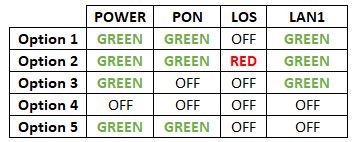

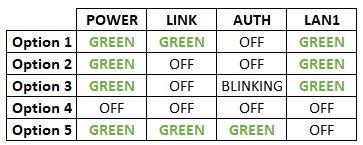
Option 1
- Please turn off all devices (Modem and Router). By restarting your modem, you can isolate the possibility of overloaded processes in the modem, which would impact its performance.
- Ensure both cables on Modem (LAN Port 1) and Router (Internet Port) are properly connected.
Modem connection

Router connection


3. Please make sure the LAN cable is connected properly from router (Port 1-4 - LAN port) to PC/ Laptop.
4. If you have change the password in Selfcare Time portal recently, please change the router configuration follows the new password made in Selfcare, but if you didn't make any changes, please go to Step 5.
5. If the issue persists, submit your feedback form and attach your modem light indicator picture/video for further assistance.
Option 2/ Option 3
- Please turn off all devices (Modem and Router). By restarting your modem, you can isolate the possibility of overloaded processes in the modem, which would impact its performance.
- Gently remove fiber optic cable and blow / wipe the tip of the fiber cable. This is to clean up the cable in order to avoid any interferences.
- Re-insert the fiber cable to the optical port behind the modem.
- Ensure both cables on Modem (LAN Port 1) and Router (Internet Port) are properly connected.
Modem Connection

Router Connection


5. Make Sure both cables on Modem (LAN Port 4/ LAN Port 3 for second decoder) and Astro Decoder (Network Port) are properly inserted.


6. Switch on modem and router and please wait for 2 minutes to stabilise the devices after reboot.
5. If the issue persists, submit your feedback form and attach your modem light indicator picture/video for further assistance.
Option 4
1. Ensure Modem/Router are connected tightly to the power socket.
2. Try to use another power socket / power source to eliminate faulty power sockets/power sources which could cause the issue.
3. If the issue persists, submit your feedback form for further assistance.
Option 5
1. Please ensure LAN cable is directly connected to modem port LAN 1.

2. Please use different LAN port if LAN 1 port is still off / not working.
3. If the issue persists, submit your feedback form for further assistance.
Astro Fibre is only available with Fibre infrastructure and does not support copper wire infrastructure.
You may use the same feedback form and choose below options.
Category: I would like to request for refund
Sub Category: Request for Refund
Please check SMS received on the unsuccessful payment status and should you require further clarification contact your issuing bank for clarification or contact us via WhatsApp.
You require at least two devices to form a Mesh WiFi network which are Astro Fibre WiFi router and a Mesh WiFi unit.
The Mesh unit will link to the WiFi router to form the Mesh WiFi network. You may connect up to 5 Mesh WiFi units for optimal WiFi coverage in your home.
The warranty period will be 24 months.
Yes, we will schedule for the equipment collection after you have discontinued Astro & Broadband services. If equipment is damaged or lost, penalty fee of RM 530 (inclusive of Govt. Tax) will be charged.
Customers with a Netflix Premium account are allowed to watch on up to 4 supported devices in 4K UHD and Netflix Spatial Audio. In addition, Netflix Premium subscribers are also allowed to download shows to watch offline on 6 devices at a time.
No, you can remain in your current pack, however starting 9 November 2021, you would need to subscribe to the new packages to make any changes to your subscription. We strongly encourage customers to switch to the new packs to enjoy the best content experience from Astro.
You do not need to request for a reconnection as our system will detect your payment and process it immediately, provided you paid via a real-time payment channel.
Click here for a full list of our payment channels.
Once you have received the eKYC link via SMS/email/astro.com.my, you can proceed to follow the instructions on the screen. You can check out the step-by-step image below for more info.
For MyKad/MyPR/MyTentera :

For Passport :

Once you have received the eKYC link, you need to complete the verification within 3 days.
For customers subscribed to our New Astro Packs (for example: Primary, Entertainment or Sports Packs), you will be charged a one-off switching fee of RM10 (excl. govt tax) if you decide to switch to another ala-carte add-on with a lower fee. For example, removing Korean add-on (RM9.99/month) and purchasing Horror add-on (RM5.99/month) will incur a RM10 (excl. govt tax) switching fee to your account.
For customers subscribed to our Old Astro Packs (for example: Super or Dynasty Packs), there will be a one-off switching fee of RM10 (excl. govt tax) if you decide to switch to another ala-carte add-on with a lower or same fee. For example, removing Korean add-on (RM9.99/month) and purchasing Horror add-on (RM5.99/month) OR Kids add-on (RM9.99/month) will incur a RM10 (excl. govt tax) switching fee to your account.
