

 Netflix Basic
Nationwide Installation
Applying for
| UniFi Maxis Astro Njoi |
Frequently Asked Questions
Find your answers here.
We provide one stop service to apply Astro and Broadband for you.
You can avoid driving and queuing at the sales counter. We are the dealer that can help you to handle your application from the beginning to the end.
We do not charge you when you apply from us. There is no credit card information required to apply here. Charges are the same as you apply from the sales counter.
First, you can apply online, we will get back to you immediately during business hour. WhatsApp/Email/Fax us your Photocopy of IC (for malaysian) / Passport (for foreigners). When we receive all the information, we will proceed with your application immediately.
Once we receive your application with complete information, we will process your application immediately during business hour. The contractor from the service provider will then contact you for installation appointment once your application is approved.
Enjoy greater savings and hassle-free bill payment in one single bill for both Astro and Broadband. You get to enjoy Astro and Broadband at discounted price every month over the contract period of 24 months.
Astro offers multiple TV packs including Entertainment, Sports, Movies and Kids options. You can choose a pack that matches your viewing preferences and add optional streaming apps where available.
Yes, you may subscribe to Astro TV packs without bundling broadband. However, bundling Astro TV with Fibre Broadband may provide better monthly savings and convenience with a single bill.
For small households with light streaming and browsing, 100Mbps is usually sufficient. Larger families, gamers or heavy streamers may benefit from 500Mbps or 1Gbps plans for smoother performance across multiple devices.
Most Astro TV and Fibre broadband plans come with a 24-month contract. Early termination charges may apply if cancellation is made before the contract ends.
Yes, you may upgrade your TV pack or broadband speed at any time, subject to eligibility and coverage. A new contract period may apply depending on the upgrade.
Your monthly bill will be issued directly by Astro. You may receive it via email or access it through your Astro account. Bundled customers will receive a single combined bill for TV and broadband services.
Payment methods may include online banking, auto debit, credit card or other approved payment channels provided by Astro. Our team can guide you during the registration process.
If you experience any service interruption, you may contact Astro customer support for technical assistance. In many cases, issues can be resolved remotely or a technician will be arranged if necessary.
Yes, relocation is subject to service availability at your new address. Relocation charges and contract adjustments may apply depending on your plan.
No, you do not need a credit card to submit your application. Payment setup will be arranged directly with Astro after your service is approved.
Selected Astro TV packs allow optional add-ons such as streaming services depending on current promotions and availability. Additional monthly charges may apply.
Yes, a WiFi router is typically provided during fibre installation. The router model may vary depending on the selected broadband speed plan.
Yes, we will check the service coverage at your address before proceeding with your application to ensure broadband is available at your location.
For Malaysians, please provide a copy of your MyKad. For foreigners, provide a copy of your passport when submitting your broadband application.
After your application is approved, the service provider typically contacts you within 2 to 7 working days to arrange the broadband installation appointment.
Most Astro Broadband plans come with a 24-month contract starting from your installation date. If you relocate, a new 24-month contract may apply at your new address.
Yes, you can relocate your broadband service, subject to service availability at the new address. Your contract may reset for another 24 months from the new installation date.
Yes, you may request to relocate broadband devices within your home. Non-standard installation charges may apply and are payable to the installer directly after assessment.
Yes, you can switch to Astro Broadband. To avoid service interruption, it is recommended to activate the new service before terminating your current broadband contract.
Standard installations may be free during promotions, but non-standard installations (e.g., device relocation or complex wiring) may incur extra charges payable directly to the installer.

| Step 1: Visit https://id.astro.com.my/ and click on “Forgot Astro ID?” | Step 2: Enter your Account/Smartcard Number. If you do not know where to find it, click on “Where to find your Account/ Smartcard Number” |
Note: Only Astro customers whose Astro ID is linked to their subscription can retrieve their Astro ID this way. Otherwise, you would need to create a new account.
No. Starting 1 April 2024, for new customers and current customers looking to switch their Asian Favourites, our Asian Favourites options will be:
- Viu Premium
- Indonesian Favourites
- Indian Favourites
TVB content will continue to be available via TVB Jade (CH310) and Astro AOD (CH311) as well as On Demand. If you would like to subscribe to the TVBAnywhere+ app, you may still do so by purchasing it directly from TVB.
Please first ensure Disney+ Hotstar access is included and has been activated as part of your Astro subscription. Once you have completed your activation process, you can enjoy Disney+ Hotstar on the Ultra box with these simple steps:
- Step 1 -Press "Home' on your Astro remote control. On the apps rail, select "Disney+ Hotstar' app > OK > My Account
Please use your Astro ID that was registered with your Astro Fibre subscription to log in to the Astro Fibre App.
If you choose to self-install the Plug& Play Box, then no installation fee will be charged. However, there will be an activation fee (please refer to the table below)

If you choose to have an installer to install the Plug & Play Box, then an installation fee will also apply.
STEP 1
On your remote, press the HOME button and the home menu will be displayed on top of your screen.

STEP 2
Navigate to Settings.

STEP 3
Navigate to Parental Control and press "OK".

STEP 4
Please enter your PIN (Default PIN is 0000).

STEP 5
Navigate to your preferred category to block and press "OK".

Further details on pricing, billing and availability will be confirmed in coming months. Look out for more details and register your interest via https://astro.com.my/Netflix
Customers with HD boxes can subscribe to the All-New Astro Pack without a box upgrade except if the customer request to move to OTT bundled pack which is mandatory to upgrade to Ulti or Ultra.
Note: OTT is referring to either Netflix, D+H or both.
Service will be resumed after you make payment within 45 days. The monthly subscription fee to be prorated accordingly and a reconnection fee of up to RM20 (exclusive of SST) will be applied upon service resumption.
If payment is made within 45 days from your bill cycle date, Astro & Broadband services will be resumed within 3 hours of payment received. Your following month's bill will be prorated accordingly.
Find out more about the reconnection fee here.
If you would like more information or to provide feedback on Astro Rewards, kindly reach out to us at 03 9543 3838 or visit one of our Astro service centres.
After service termination of your Astro Fibre service, we will call you via your registered mobile number (up to 3 times over 3 days) to schedule an arranged pick-up by one of our Astro agents. Our agent will then come to your doorstep, dismantle the devices for you and retrieve them.
Note: Upon termination of your service, customers are required to return their old Astro Fibre devices to Astro. Failure to do so will incur a fee of RM200 (WiFi Router), RM500 (Fibre Modem) and RM200 (Mesh WiFi Unit - if applicable) for each unit. All prices stated are exclusive of Govt. tax.
You will not be able to switch between channels, use the app as a remote control, view favorite channels and programmes, use programme showtime reminder, and remote record feature.
In the new bill layout, there are three tax indicators for customer to refer: S1 (8%), S2 (6%), and N (non-taxable item). Each item list will be marked in accordance with the tax indicator below:
Yes, the current service tax law does not exempt services provided to customers residing in Labuan, Langkawi, and Tioman.
Yes, provided that your Plug & Play Box has not been activated and no later than 7 days upon receiving both the Plug & Play Box and Astro SIM card. In the event that you have activated your Plug & Play Box and wish to cancel, a contract penalty fee will apply.
We will reach out to you for a suitable time to pick up the Plug & Play Box and Astro SIM card.
Yes, you can switch to Astro Fibre and all the devices provisioned will be maintained (Fibre modem & WiFi router) with the new Astro Fibre subscription. However, your Astro TV package will be removed/terminated.
An early cancellation fee will be applied if you are still within the 24-month contract. Please refer to the Astro Fibre's cancellation details.
Please follow the steps below to retrieve your Astro ID:
Note: Only Astro customers whose Astro ID is linked to their subscription can retrieve their Astro ID this way. Otherwise, you would need to create a new account.
STEP 1
On your remote, press the HOME button and the home menu will be displayed on top of your screen.
STEP 2
Navigate to Settings.
STEP 3
Navigate to Network Settings and press "OK".

STEP 4
Navigate to Network Diagnostics and press "OK".

STEP 5
Network Diagnostics screen will be displayed accordingly.

Please follow the steps below:
Step 1: Fill in Transfer of Equipment Ownership Form (Part A & Part B)
Step 2: Provide an Undertaking Letter if current account holder deceased or un-contactable. (Note: Copy of death certificate is required if account holder deceased).
Step 3: Provide a copy of new applicant NRIC for Malaysian or copy of passport for non-Malaysian or copy of IMM13 Pass with at least 6 months validity for Refugee. (Note: ASTRO name should be displayed on the top left corner on both sides of the identity card copy).
Step 4: A full payment to be made on any outstanding balance for all related accounts (if any).
Step 5: Submit all documents via feedback form .
Step 6: Customer will expect a call from our validation team (Note: Turnaround time for transfer of equipment ownership is 3-5 working days upon receiving all complete documentation).
Note:
1. There might be a loss of transmission during the processing of transfer equipment ownership, split or merge of equipment.
2. Recorded program will be removed for PVR user.
3. A full payment to be made on any outstanding balance for all related accounts.
4. New account holder agreed to continue the remaining contract from previous owner account (if any).
5. Auto debit will be voided upon acknowledgment of transfer equipment ownership (if any).
Additional requirement for New Owner
Capping of applicant age is 21
Malaysians aged < 26 years old and Non-Malaysian - requires copy of utility bill (Phone, Internet, Water or Electricity)
Customers who subscribe to the Movies, Premium 1, Premium 3 or Platinum Pack will be able to access Disney+ Hotstar immediately and start streaming all their favourite Global, Regional and Malaysian hits upon activation.
Yes, you will. Customers who purchased Astro First / Astro Best / Pay-per-View event in February 2024 with a viewing period in March 2024 will be charged an 8% Service Tax in their next bill.
If you are subscribed to Netflix via a bundle, Netflix comes by default as part of your entitlement.
If you are subscribed to Netflix as an a-la carte, the cancellation of Netflix can only be done via Netflix's Website, etc). This change will reflect in your next bill. From mid-December 2021 you may also cancel Netflix add-on through Astro Call Center.
You can request for a password reset by clicking on "Forgot My Password' at the login page.
Please contact Astro Customer Call Center via 03-95433838
The amount you're charged depends on:
- Your contract period and how long's left of your minimum term from the date your subscriptions end, calculated in months.
- Your current box type - Ultra or Ulti/Other Astro Boxes
- The packages you subscribe to, including App services such as Disney+ Hotstar and Netflix
Astro is continuously improving our user interface and introducing new features to our platforms to ensure that your Astro experience is more seamless, efficient and user-friendly.
For details on our latest interface, Picture-in-Picture mode and auto-start interactive mode on Astro GO, please click here.
In addition, we have also recently introduced a new look to the Title Information Page, the ability to disable the Profile Selection Screen and adjustable auto-standby timing. For more information, please click here.
You may check your bills and outstanding via:
- Channel 200 from your Astro Box.
- Astro Self Self-Serve Portal or MyAstro App via this link.
- WhatsApp "Payment" to 03 9543 3838 and follow the steps provided.
For more information about the Astro Fibre App, you may click here for a detailed user guide.
The balance will be credited into your account, which will be reflected when you receive your next bill. The balance credit will be used to offset your bill balance.
You may reach out to Astro's customer service at 03-95433838 if you think there's an error regarding your redemption or rewards.
STEP 1
Switch off the power of your box and make sure that the adapter’s power light is off.
STEP 2
Unplug the HDMI cable from your TV and plug it back in securely to other available HDMI port.
STEP 3
Switch on the power for your box and make sure that the adapter’s power light is on.
Please wait for 5 minutes.
STEP 4
Turn on your box. Do select the correct TV input.
You should no longer be experiencing this problem.

Astro Fibre installation will come with 1 unit of TM fibre modem and 1 WiFi router with 24 months warranty period.
While warranty period for Mesh WiFi will be treated as one-to-one swap for faulty Mesh units at any point of time during your service tenure with active Mesh subscription.
There will be no installation fee for both Astro Box and Ultra Box. The Multiroom (second decoder) must be installed at the same registered address as your primary subscription.
Once your Plug & Play Box has been activated, a courier service will reach out to you within TWO (2) weeks for a time for them to pick up the old Astro box and SIM card/Smartcard.
- Ensure that all cables have been plugged out of the old Astro box. To remove the white satellite cable from your old Astro box, simply hold the cable, twist, and gently pull.
- Set aside these items to be ready for our delivery partner to pick up from you:
- Old Astro Box
- Old Astro Smartcard/SIM Card (leave this in your Astro Box)
- When a courier arrives at your residence, do confirm that they are collecting items on behalf of Astro.
- Allow the courier to check the serial number of the Astro box.
- Hand them all the items for return, and you're done!
Kindly note that affected customers will be adequately informed 30 days prior to the implementation via SMS which are sent out in phases (Starting 1 July), with scheduled announcements across WhatsApp, My Astro app, and Astro website.
Once you have received the eKYC link via SMS/email/astro.com.my, you can proceed to follow the instructions on the screen. You can check out the step-by-step image below for more info.
For MyKad/MyPR/MyTentera :

For Passport :

Your Astro GO email will be delivered to you within an hour upon checkout. Please click the link provided to set up your password and download the Astro GO app on your device by clicking here (Google Play Store) or here (iOS App Store). If you want to stream it directly via your computer or laptop, Astro GO is also available at astrogo.astro.com.my. Log in with your Astro ID and start streaming!
Yes, however we do advise keeping your subscription while your TV is being fixed to avoid having to download the app again.
Your access to Astro GO will depend on the subscription pack that you are subscribed to. Not all shows/channels will be available on Astro GO as this depends on contractual rights with specific guidelines on the entitlement of these shows/channels. We are continuously working hard to make more content available on Astro GO.
You may navigate around the menu on the side bar on Astro GO app, or top bar on the Astro GO web version to find shows available.


Menu Guide
- Home: Check out all the recommended content or watch your subscribed TV channels via the Channel Guide at the bottom of your home screen.
- Catch Up: Missed an episode of your favourite series? Fret not, Catch Up on the latest episode of your favourite shows on Astro GO.
- Boxsets: Watch complete seasons and series from our On Demand library anytime anywhere.
- Movies: Watch recent and popular movies on your devices! You can access a large catalogue of On Demand movies, according to your subscription.
- Kids: Catch all the cartoons, animations and a variety of shows for kids of all ages.
- Sports: Watch the biggest sporting shows LIVE on your mobile device, anytime anywhere.
- Store: Other than your subscribed packages, you can also purchase and watch your favourite Pay-Per-View movies and other Astro exclusive content (not available on iOS devices).
Please refer to these FAQs for more information.
Yes, if a device is faulty due to customer's negligence, it is subject to a penalty fee for each device:
- WiFi router: RM200
- Fibre modem: RM500
- Mesh WiFi: RM200/unit
Yes, a charge of up to RM20.00 may be imposed upon reconnection.
There are 2 methods of setting maturity ratings restriction on Netflix:
Method 1 – Create a Kids Profile in Netflix App on Ultra/Ulti Box
- On the Netflix home menu, select “Switch Profile”
- Select Add Profile.
- Name the profile.
- Select Kids. Kids profiles have a logo 'Kids' on the profile icon so they are easy to identify.
- Select Continue. The new profile will show on the list of profiles on your account.
Method 2 – Manually set Viewing Restrictions for each profile
- Go to https://www.netflix.com/profiles/manage
- Select a Profile.
- Under Maturity Settings, select Edit.
- Enter your Netflix password.
- You may select the desired Maturity Rating settings or add a particular title restrictions for the profile.
- Select Save.
For more information kindly visit:
- https://help.netflix.com/en/node/114275
- https://help.netflix.com/en/node/114276
Please contact us through one of our platforms found here or Self-serve by logging in to Astro Self-Service Portal within 3-7 days before moving out and we will sort everything out for you!
The New Astro First serves as the one-stop, ultimate home cinema offering the biggest and latest local and international blockbuster films where you can:-
- Enjoy value for money viewing for local and international movies from only RM15* per movie or RM17* for UHD movies (*excluding tax).
- Stream each rented movie for as many times as you like within 48 hours* (*unless stated otherwise) anytime, anywhere via On Demand on your Astro Box or Astro GO.
- Watch local/regional movies or international movies from Hollywood studios as recent as 2 weeks or 3 months respectively from Malaysia's cinematic release, in addition to exclusive titles only available on Astro First.
STEP 1
On your remote, press the HOME button and the home menu will be displayed on top of your screen.

STEP 2
Navigate to Settings.

STEP 3
Navigate to S/PDIF Audio and press "OK".

STEP 4
Navigate to your preferred selection and press “OK”.

No, Astro GO is a free app for Astro customers. The content available on Astro GO will depend on the subscription pack that you are subscribed to.
If you do not have an Astro subscription, please click here to find out packages available.
Connect your PVR to Wi-Fi and enjoy access to our library of Video On Demand. Replay old seasons, catch-up latest episodes of your favourite shows, anytime you want. To connect your PVR, follow the steps below:
STEP 1
On your remote, press the “HOME” button and the home menu will be displayed at the bottom of your screen.

STEP 2
Navigate to SETTINGS and press “OK”.

STEP 3
Navigate to STB DIAGNOSTICS and press “OK”.

STEP 4
Navigate to Network and press "OK".

STEP 5
Navigate to Wi-Fi and press "OK".
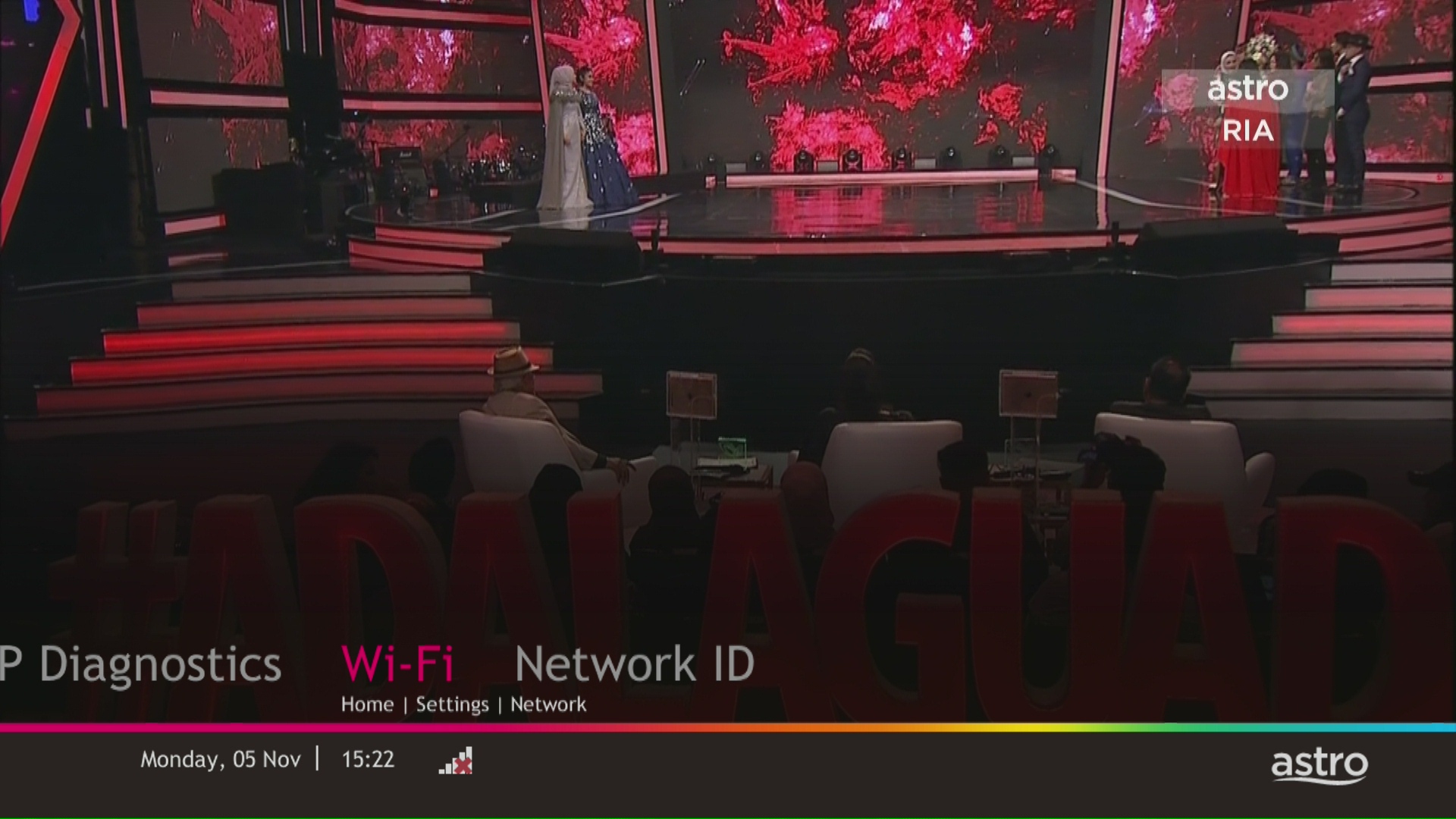
STEP 6
Select New Connection and press "OK".
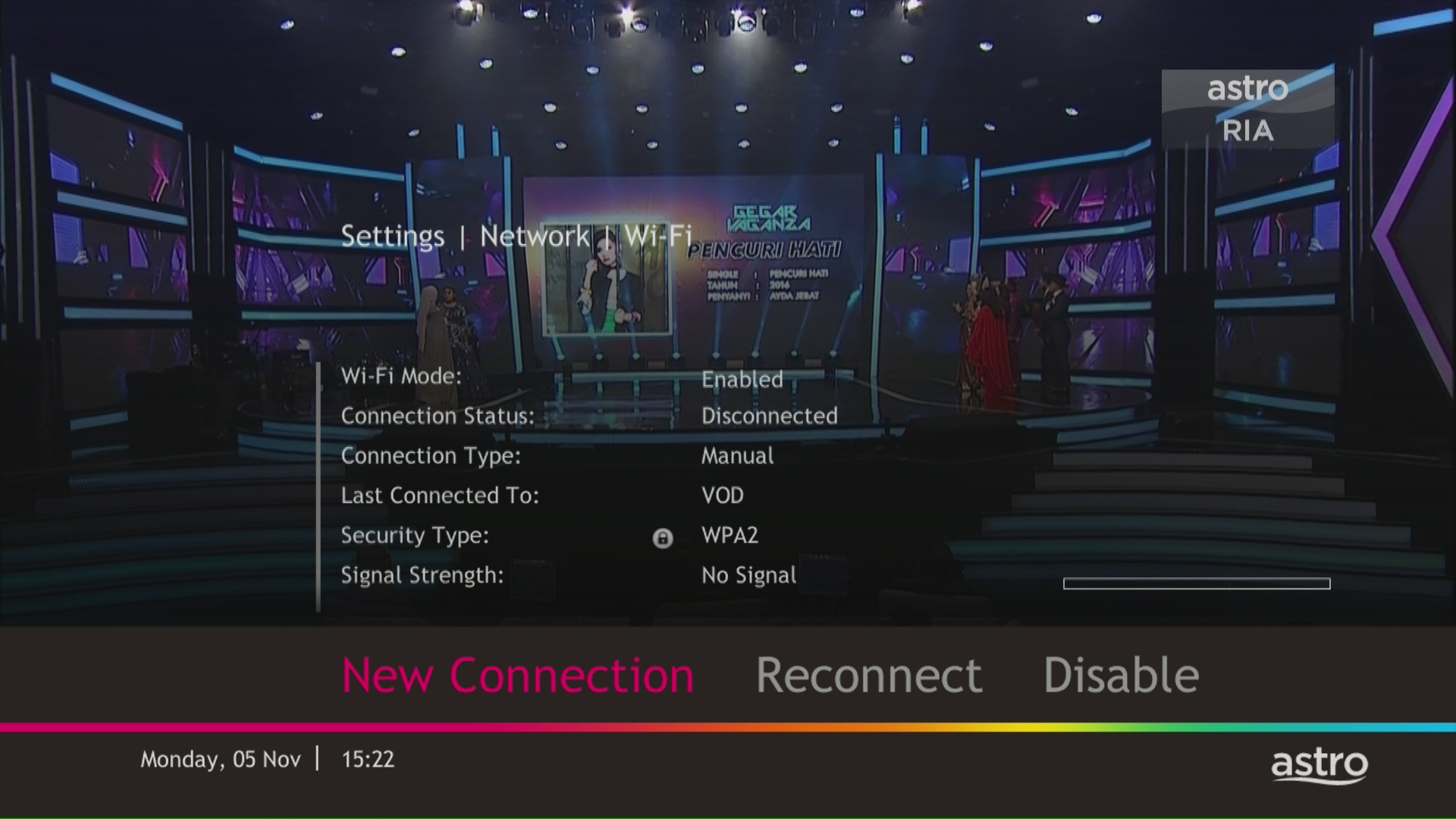
STEP 7
Select your Wi-Fi network and navigate to "Connect".

STEP 8
Please enter the password to connect to your network and press "OK".

STEP 9
You are successfully connected when this screen appears.

Should there be any changes in plans we will keep our customers informed on any new development.
Please provide your primary mobile number via My Astro Portal, or send it to one of our platforms found here.
Note:
- Any changes of contact details to be requested by account holder only.
- Only account holder's contact to be updated as primary mobile number in the system.
