

 Netflix Basic
Nationwide Installation
Applying for
| UniFi Maxis Astro Njoi |
Frequently Asked Questions
Find your answers here.
We provide one stop service to apply Astro and Broadband for you.
You can avoid driving and queuing at the sales counter. We are the dealer that can help you to handle your application from the beginning to the end.
We do not charge you when you apply from us. There is no credit card information required to apply here. Charges are the same as you apply from the sales counter.
First, you can apply online, we will get back to you immediately during business hour. WhatsApp/Email/Fax us your Photocopy of IC (for malaysian) / Passport (for foreigners). When we receive all the information, we will proceed with your application immediately.
Once we receive your application with complete information, we will process your application immediately during business hour. The contractor from the service provider will then contact you for installation appointment once your application is approved.
Enjoy greater savings and hassle-free bill payment in one single bill for both Astro and Broadband. You get to enjoy Astro and Broadband at discounted price every month over the contract period of 24 months.
Astro offers multiple TV packs including Entertainment, Sports, Movies and Kids options. You can choose a pack that matches your viewing preferences and add optional streaming apps where available.
Yes, you may subscribe to Astro TV packs without bundling broadband. However, bundling Astro TV with Fibre Broadband may provide better monthly savings and convenience with a single bill.
For small households with light streaming and browsing, 100Mbps is usually sufficient. Larger families, gamers or heavy streamers may benefit from 500Mbps or 1Gbps plans for smoother performance across multiple devices.
Most Astro TV and Fibre broadband plans come with a 24-month contract. Early termination charges may apply if cancellation is made before the contract ends.
Yes, you may upgrade your TV pack or broadband speed at any time, subject to eligibility and coverage. A new contract period may apply depending on the upgrade.
Your monthly bill will be issued directly by Astro. You may receive it via email or access it through your Astro account. Bundled customers will receive a single combined bill for TV and broadband services.
Payment methods may include online banking, auto debit, credit card or other approved payment channels provided by Astro. Our team can guide you during the registration process.
If you experience any service interruption, you may contact Astro customer support for technical assistance. In many cases, issues can be resolved remotely or a technician will be arranged if necessary.
Yes, relocation is subject to service availability at your new address. Relocation charges and contract adjustments may apply depending on your plan.
No, you do not need a credit card to submit your application. Payment setup will be arranged directly with Astro after your service is approved.
Selected Astro TV packs allow optional add-ons such as streaming services depending on current promotions and availability. Additional monthly charges may apply.
Yes, a WiFi router is typically provided during fibre installation. The router model may vary depending on the selected broadband speed plan.
Yes, we will check the service coverage at your address before proceeding with your application to ensure broadband is available at your location.
For Malaysians, please provide a copy of your MyKad. For foreigners, provide a copy of your passport when submitting your broadband application.
After your application is approved, the service provider typically contacts you within 2 to 7 working days to arrange the broadband installation appointment.
Most Astro Broadband plans come with a 24-month contract starting from your installation date. If you relocate, a new 24-month contract may apply at your new address.
Yes, you can relocate your broadband service, subject to service availability at the new address. Your contract may reset for another 24 months from the new installation date.
Yes, you may request to relocate broadband devices within your home. Non-standard installation charges may apply and are payable to the installer directly after assessment.
Yes, you can switch to Astro Broadband. To avoid service interruption, it is recommended to activate the new service before terminating your current broadband contract.
Standard installations may be free during promotions, but non-standard installations (e.g., device relocation or complex wiring) may incur extra charges payable directly to the installer.
Astro introduces Liga Malaysia for all Astro customers to watch the Malaysian Football League’s Liga Malaysia competitions LIVE, comprising Perlawanan Sumbangsih (Piala Sultan Haji Ahmad Shah), Liga Super, Piala FA and Piala Malaysia live in HD on Astro Arena (CH801), Arena Bola channels (CH803 and CH804) and stream on Astro GO until further notice.
Once you have received the eKYC link via SMS/email/astro.com.my, you can proceed to follow the instructions on the screen. You can check out the step-by-step image below for more info.
For MyKad/MyPR/MyTentera :

For Passport :

It will take around 10 to 15 minutes before you are able to view your purchase.
Yes, a third party is allowed to make the advance payment on your behalf. In the case of refund, the amount will be returned to the owner of the third-party account (source of payment).
Astro & Broadband offers Astro content with Astro Fibre, Maxis Fibre Broadband and Allo City Broadband for customers to enjoy the best entertainment through Astro while staying connected with high-speed internet.
With the current Astro & Broadband plans, customers will enjoy substantial savings by choosing their desired broadband speed from 30Mbps - 800Mbps to accompany their Astro packages.
Service Tax will not be imposed on any CSR projects accounts. Any tax payable will be borne by Astro.
No, the eKYC verification process must be done by the individual themselves, using their MyKad and selfie in real-time.
Step 1:
Type ASTRO<space>BAL<space>10-Digit Astro Account No.
Example: ASTRO BAL 08XXXXXXXX
*Standard telco charges and Terms and Conditions apply
Step 2:
Send SMS to 66688
Step 1: Download the My Astro app from either the App Store, Google Play or HUAWEI AppGallery.
Step 2: Sign in with your Astro ID.
Step 3: Select "Rewards" on the home screen to get started.
Watch this tutorial to learn how to create your Astro ID.
Yes, customers who have upgraded their packages or reconnected their Astro service in February 2024 will be charged with 8% Service Tax from 1st March 2024, for services period on or after 1st March 2024.
This convenient option allows you to complete your registration without the need to provide hard copy documents physically to the sales agent. The identity verification process helps to secure your Account and protect it from unauthorised usage.
You may utilise your credit balance to offset future billing on your Astro account, or contact us here for further enquiries.
The Personal Video Recorder (PVR) is Astro's High Definition (HD)decoder which comes with a recording function and can be connected to Wi-Fi to access videos on demand. The PVR comes with the following features:
HIGH DEFINITION (HD):High Definition offers greater detail than Standard Definition including vibrant colour and multi-dimensional audio.
CONTROL LIVE TV: Record, Pause, Play & Rewind your favourite TV programmes at any moment. The PVR comes with storage capacity of 500GB (200 hours of HD recording)
ON DEMAND: Experience the new way of watching Astro. Gain access to a library of up to 50,000 On Demand titles that you can pick and watch instantly.
The Multiroom (Smart TV) will mirror the subscription entitlement as per your primary subscription. However, NHK World, Radio, Sky News channels and 3rd party apps such as Netflix, Disney+ Hotstar are not available via the Multiroom (Smart TV).
Astro Channel 200 is a self-service portal that helps you upgrade your packages and purchase add-ons instantly.
1. Tune to Astro channel 200 - select "Add-Ons"

2. Select the option for Monthly Subscription
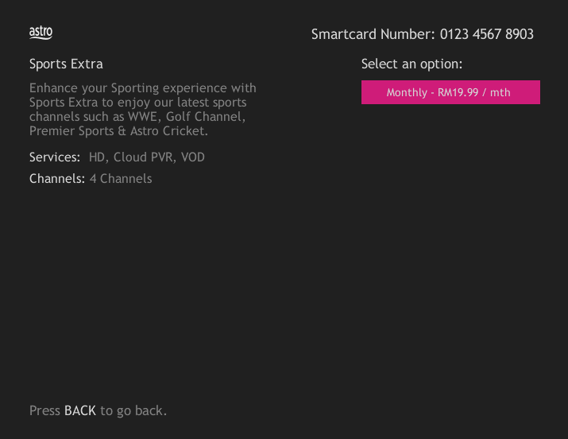
3. Send the WhatsApp code as per displayed on the TV screen

STEP 1
On your remote, press the HOME button and the home menu will be displayed on top of your screen.

STEP 2
Navigate to Settings.

STEP 3
Navigate to STB Diagnostics and press "OK".

STEP 4
Select Advanced Diagnostics and press "OK".

STEP 5
Details information of Advanced Diagnostics screen will be displayed.

STEP 6
Press down arrow on your remote to get more information.

Please note that only one Disney+ Hotstar access is bundled to each Movies Pack subscription which allows two concurrent streams on Disney+ Hotstar.
Photograph or scan your payment receipt, and send it to one of our contact platforms found here.
Of course not! It is a value-added service introduced for your convenience.
For TV packs only, 24-months contract commitment period. However, if in addition to the TV packs, if you would like to also sign-up for Broadband, the contract commitment will be 24 months as well. If you're an existing customer, your existing remaining contract duration (if any) will not be carried over to the new contract except for existing Disney+ Hotstar (3 Months Pack) and Multiroom subscription contract durations which will be carried over upon the migration to new packs.
Note: If you are subscribing to a bundle pack which includes Netflix or Disney+ Hotstar for the first time, you are required to maintain the respective app as part of your bundle selection for a minimum of 12 months, otherwise a cancellation fee will apply.
STEP 1
On your remote, press the HOME button and the menu will be displayed on top of your screen.
STEP 2
Navigate to Settings.
STEP 3
Navigate to Network Settings and press “OK”.
STEP 4
Navigate to Test Connection and press “OK”.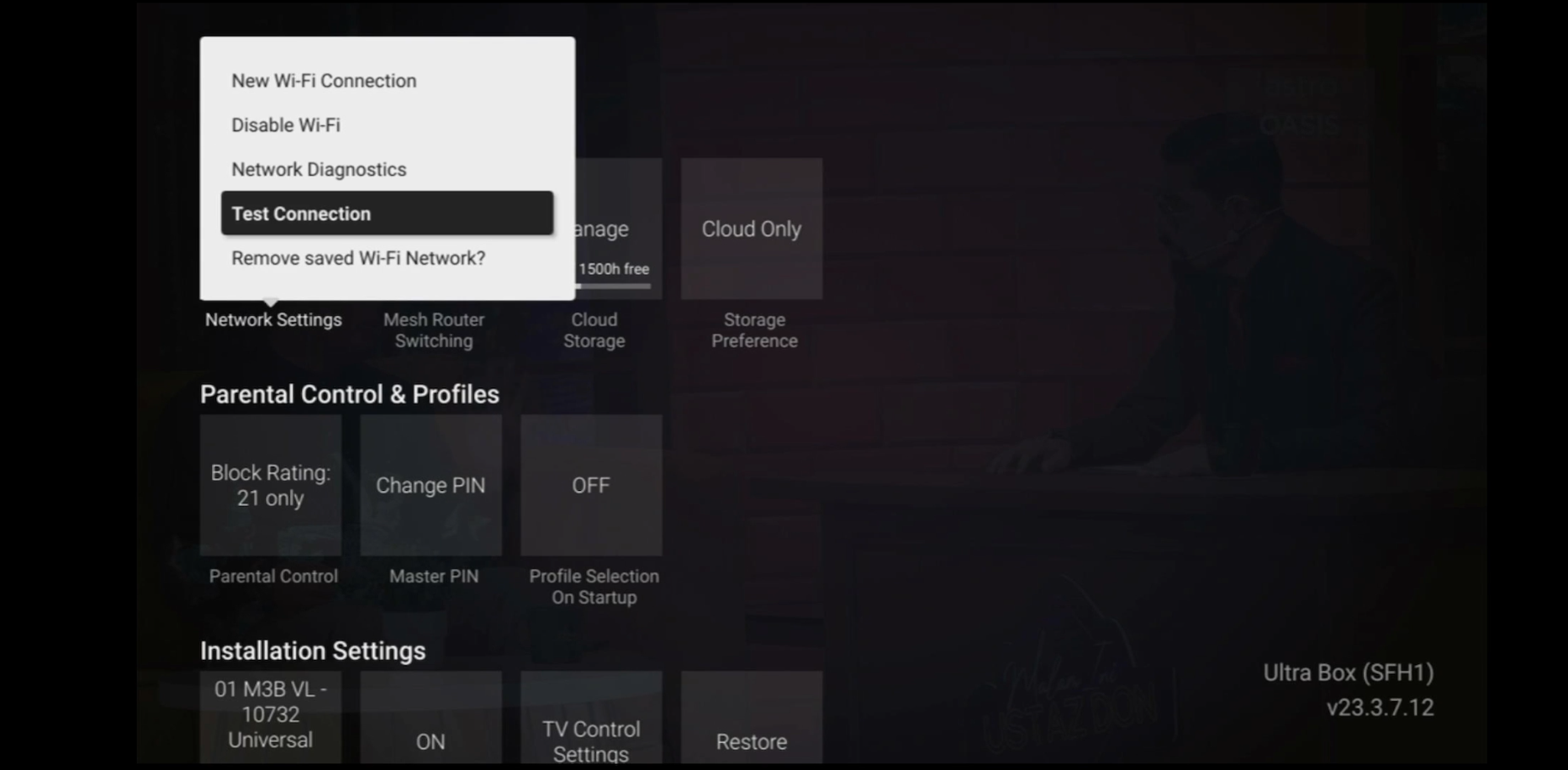
STEP 5
Test Connection results will be displayed on the screen.
Please first ensure Disney+ Hotstar access is included and has been activated as part of your Astro subscription. Once you have completed your activation process, you can enjoy Disney+ Hotstar on the Ultra box with these simple steps:
- Step 1 -Press "Home' on your Astro remote control. On the apps rail, select "Disney+ Hotstar' app > OK > My Account
Please follow the steps in Q5, then continue with the steps below:
| Step 1: Click the “Email” or “Mobile Number” field to edit. Then, enter your updated detail(s). | Step 2: Complete the verification by entering the code sent to your new email address or mobile number. | Step 3: Congratulations! You have successfully updated your contact detail! |
Please contact Astro Customer Call Center via 03-95433838
This Service Tax is imposed on customers of Pay TV broadcasting services by the Government. As such the Service Tax will be passed on to the customers.
For technical visit, the current fees will remain unchanged i.e.: 8% Service Tax absorbed by Astro. As for installation fees, current fees will remain unchanged i.e.: 6% Service Tax has already been included in installation fees, as 2% will be absorbed by Astro.
STEP 1
Check the Audio settings on your box and set to Auto.
Refer guide to change Digital Audio Settings.
STEP 2
If issue persist, check if there is any 3rd party device (sound system/hdmi splitter) connected between box and TV.
STEP 3
If using 3rd party devices, bypass/remove 3rd party device and make sure HDMI cable connected directly from box to TV.
STEP 4
If issue persist, connect to Live Agent via WhatsApp for help.
Starting 1 April, access to TVBAnywhere+ is no longer available to Astro customers. However, you can continue to enjoy TVB content via On Demand and TVB Jade (CH310) and Astro AOD (CH311). If you would like to subscribe to the TVBAnywhere+ app, you may still do so by purchasing it directly from TVB.
Yes. You can make payment using your credit card via My Astro Portal:
- For One-time payment: All Master/Visa 3D secured debit/credit cards for one-time payment issued by banks in Malaysia
- For Auto-Debit: All Master/Visa/AMEX debit/credit cards issued by banks in Malaysia
Video On Demand is FREE* for all Astro customers with connected Astro boxes (Ultra Box, Ulti Box, HD-PVR &PVR boxes). Aside from our extensive library of more than 110,000 video, you can also enjoy blockbuster movies on a pay-per-view basis.
Please note that your default pin is 0000 to make any purchases.
*Entitlement is based on subscription package.
You would have to create a new Astro ID with your email address or mobile number and link your Astro subscription. Please follow the steps in the link here
Tap on the "Content' tab on the navigation bar. Select "Channels' and the channel of interest and you may view the scheduled programmes of the day. To switch between days, choose a channel and tap on a particular day (E.g. Mon, Tues, Wed). You may also view the showtimes of the day and up to the next six days.

To check your contract, please visit My Astro.
Astro Fibre is only available with Fibre infrastructure and does not support copper wire infrastructure.
Upon completion of the termination process, customer will receive one last closing bill stating the total amount due to Astro according to their billing option.
For customers who had opted to switch their billing option to e-bill or SMS bill, they will receive their final bill accordingly.
For customers who opted for paper bill, they will receive the final bill via paper bill. (The Paper Bill Charge will be applied).
For any access related queries on Disney+ Hotstar, please call or WhatsApp "DH Help
You may check your bills and outstanding via:
- Channel 200 from your Astro Box.
- Astro Self Self-Serve Portal or MyAstro App via this link.
- WhatsApp "Payment" to 03 9543 3838 and follow the steps provided.
Non-standard Broadband installation covers the scenario where additional cables and drilling is required to complete your Astro & Broadband installation or by installing the cable in the walls/ceilings. There are additional fees applied for the additional requirements as follows:

No, the quality of your video depends on the speed and reliability of your internet.
Please rest assured that streamingapps labelled with "coming soon"
will be available on Astro in the near future.Please visit product.astro.com.my/appsfor more information on the streaming apps available on Astro or follow oursocial media to get notified on latest launches.
Facebook: @Astro
Instagram: @astromalaysia
Twitter: @astroonline
Kindly take note that streaming appslabelled with “coming soon” will be made available on Astro once they areready. Astro reserves the right to delay or cancel streaming app launches, ifnecessary.
When playing content from the Video On Demand library, a 15-second or 30-second video advertisement(s) will be shown before the On Demand programme starts. All advertisements will display a countdown to indicate the time remaining on the advertisement(s) and will not be skippable.
To find out more information on Astro GO advertising, please click here.
Astro TV customers
No, you will not be required to take on a new contract after moving. If you still have an existing contract, the contract will continue.
Broadband / IPTV customers
Yes, your contract will be renewed to a new 24-month contract.
No, eligible customers will not be charged for this speed upgrade. Your speed plan will be upgraded automatically for 24 months, depending on your subscription. After the FREE speed upgrade period, your Astro Fibre plan will return to its regular speed.
If you add on the Mesh WiFi during your initial order of Astro Fibre, there is no additional installation fee. If you order the Mesh WiFi as an add-on at a later time, you will have to pay RM49 per installer visit. However, if you choose to have the Mesh WiFi delivered via courier in order to self-install your Mesh WiFi, there will be no installation or delivery fee charged.
If band steering is enabled, you do not need to worry about which frequency band that your devices are connected to because the WiFi router will make the assessment and direct each device to appropriate frequency band.
However, it is important to note that quality and signal strength are not guaranteed due to unpredictability given that it is completely up to the connected devices and the WiFi router to intelligently decide on which band to connect.
Activate your Disney+ Hotstar access with your Astro subscription, using the steps below:
- Step 1 - Create- and verify your Astro ID at astro.com.my/astroID. If you already have an existing Astro ID, go to Step 2.
- Step 2 - Goto astro.com.my/Disney. Login with your Astro ID, activate with your mobile number and verify with a one time passcode (OTP) sent to your mobile number.
- Step 3 - Download the Disney+ Hotstar app or login via web, and sign in with the mobile number provided in Step 2. Start streaming!
Your Disney+ Hotstar will be paused and will only resume once your Astro service is reinstated.
The amount you're charged depends on:
- Your contract period and how long's left of your minimum term from the date your subscriptions end, calculated in months.
- Your current box type - Ultra or Ulti/Other Astro Boxes
- The packages you subscribe to, including App services such as Disney+ Hotstar and Netflix
No, the Mesh WiFi add-on with Astro Fibre is available as subscription service and will not be tied to any device contract.
