
A free satellite TV service from Astro. Watch lifetime entertainment, news, learning & information and more.

Pictures for illustration only.
Enjoy free access to 15+ TV channels & 10+ radio channels.
* Subject to Astro terms & conditions.


Step-1 |
Step-2 |
Step-3 |
Choose a plan & sign-up online. |
Sit back & wait for installation. |
Enjoy your new Astro / Broadband! |
A free satellite TV service from Astro. Watch lifetime entertainment, news, learning & information and more.
Pictures for illustration only.
New decoder only without satellite dish & cabling. You must have Astro/Njoi satellite dish and cable installed and working properly.
Including installation.
New decoder complete with satellite dish & cabling.
Including installation.
Applying for
| Njoi Astro UniFi Maxis |
Find your answers here.
We provide one stop service to apply Astro and Broadband for you.
You can avoid driving and queuing at the sales counter. We are the dealer that can help you to handle your application from the beginning to the end.
We do not charge you when you apply from us. There is no credit card information required to apply here. Charges are the same as you apply from the sales counter.
First, you can apply online, we will get back to you immediately during business hour. WhatsApp/Email/Fax us your Photocopy of IC (for malaysian) / Passport (for foreigners). When we receive all the information, we will proceed with your application immediately.
Once we receive your application with complete information, we will process your application immediately during business hour. The contractor from the service provider will then contact you for installation appointment once your application is approved.
Enjoy greater savings and hassle-free bill payment in one single bill for both Astro and Broadband. You get to enjoy Astro and Broadband at discounted price every month over the contract period of 24 months.
Astro offers multiple TV packs including Entertainment, Sports, Movies and Kids options. You can choose a pack that matches your viewing preferences and add optional streaming apps where available.
Yes, you may subscribe to Astro TV packs without bundling broadband. However, bundling Astro TV with Fibre Broadband may provide better monthly savings and convenience with a single bill.
For small households with light streaming and browsing, 100Mbps is usually sufficient. Larger families, gamers or heavy streamers may benefit from 500Mbps or 1Gbps plans for smoother performance across multiple devices.
Most Astro TV and Fibre broadband plans come with a 24-month contract. Early termination charges may apply if cancellation is made before the contract ends.
Yes, you may upgrade your TV pack or broadband speed at any time, subject to eligibility and coverage. A new contract period may apply depending on the upgrade.
Your monthly bill will be issued directly by Astro. You may receive it via email or access it through your Astro account. Bundled customers will receive a single combined bill for TV and broadband services.
Payment methods may include online banking, auto debit, credit card or other approved payment channels provided by Astro. Our team can guide you during the registration process.
If you experience any service interruption, you may contact Astro customer support for technical assistance. In many cases, issues can be resolved remotely or a technician will be arranged if necessary.
Yes, relocation is subject to service availability at your new address. Relocation charges and contract adjustments may apply depending on your plan.
No, you do not need a credit card to submit your application. Payment setup will be arranged directly with Astro after your service is approved.
Selected Astro TV packs allow optional add-ons such as streaming services depending on current promotions and availability. Additional monthly charges may apply.
Yes, a WiFi router is typically provided during fibre installation. The router model may vary depending on the selected broadband speed plan.
Yes, we will check the service coverage at your address before proceeding with your application to ensure broadband is available at your location.
For Malaysians, please provide a copy of your MyKad. For foreigners, provide a copy of your passport when submitting your broadband application.
After your application is approved, the service provider typically contacts you within 2 to 7 working days to arrange the broadband installation appointment.
Most Astro Broadband plans come with a 24-month contract starting from your installation date. If you relocate, a new 24-month contract may apply at your new address.
Yes, you can relocate your broadband service, subject to service availability at the new address. Your contract may reset for another 24 months from the new installation date.
Yes, you may request to relocate broadband devices within your home. Non-standard installation charges may apply and are payable to the installer directly after assessment.
Yes, you can switch to Astro Broadband. To avoid service interruption, it is recommended to activate the new service before terminating your current broadband contract.
Standard installations may be free during promotions, but non-standard installations (e.g., device relocation or complex wiring) may incur extra charges payable directly to the installer.
Starting 23 March 2023, all Astro customers can subscribe to ZEE5 Premium via Astro as an add-to bill service for only RM10.60/month and enjoy the app’s exciting content offerings on the big screen via the Ultra Box, Ulti Box, website or on-the-go via the ZEE5 mobile app, available on Android and iOS devices.
1. What is ZEE5?
ZEE5 is an Indian subscription video on demand and over-the-top streaming service run by Zee Entertainment Enterprises. With the app, subscribers can enjoy over 170,000 hours of on demand content from originals, movies, TV shows, music and more across 18 languages including English, Tamil, Hindi and Punjabi – all in a single destination.
2. How can Astro customers enjoy ZEE5?
Starting 23 March 2023, Astro customers will be able to enjoy ZEE5 Premium’s exciting content offerings for only RM10.60/month on the big screen via their Ultra and Ulti Box, website or on the-go via the ZEE5 mobile app, available on Android and IOS devices.
For more details on the ZEE5 Premium Membership, please refer to Q12 – Q16.
3. How can I subscribe to ZEE5 via Astro?
All new and existing Astro Pay TV customers can subscribe to ZEE5 Premium for only RM10.60/month by visiting www.astro.com.my/zee5.
Please follow the steps below to subscribe:
Step 1: Go to www.astro.com.my/zee5
Step 2: Log in with your Astro ID
Step 3: Key in your email address and proceed to add ZEE5 to your bill
Step 4: Now, enjoy all your favourite shows on ZEE5!
4. How do I access ZEE5 on my Ultra/Ulti Box?
After successfully adding ZEE5 Premium to your bill, follow the simple steps below to stream ZEE5 on your Ultra/Ulti Box:
Step 1: Go to your Astro Home Page and click “ZEE5” under the Apps rail
Step 2: Scan the QR code on screen with your mobile device
Step 3: Log in with an existing ZEE5 ID or sign up for a new account. Then, enter the activation code displayed on your TV screen into the ZEE5 mobile app.
Step 4: Now, enjoy streaming ZEE5 on your Ultra/Ulti Box!
Please ensure that the email address used to log in to the app is the same one used to purchase your ZEE5 premium subscription.
5. Is ZEE5 on the Ultra/Ulti Box the same as the ZEE5 mobile app and website?
You will be able to watch the same video on demand content on your Ultra/Ulti Box as the ZEE5 mobile app or website. However, ZEE5 live channels are currently not available on the Ultra/Ulti Box. Please stay tuned for updates!
6. Can I access the ZEE5 app outside of Malaysia?
No, your ZEE5 app is accessible within Malaysia only.
7. Can I download content on the ZEE5 app for offline viewing?
Yes, you can download ZEE5’s content on your device for offline viewing if you have subscribed to ZEE5 Premium. This feature is not available if you are not a Premium member. However, kindly note that some content is subjected to copyright which disables the download function on those selected videos.
8. What is the storage requirement for content downloading?
The storage requirement is dependent on the type of videos users are downloading as the space needed varies between titles.
9. How many devices can I use to stream ZEE5 at the same time?
You can access your ZEE5 Premium account on up to five (5) devices at a time, including your Ultra/Ulti Box. To ensure a smoother streaming experience, please sign out from any unused devices.
10. Are there any subtitles or dubbing available for the content on ZEE5?
Yes, to enable subtitles or dubbing in your desired language, click on the subtitles/dubbing selection option at the bottom right corner of the video player, then click on the language you desire.
11. Can I change the interface language of the ZEE5 app?
Yes, you can. Click on Menu > Language and choose your preferred language. Then, click “SAVE”.
12. What is a ZEE5 Premium subscription?
ZEE5 offers a wide range of exclusive content that is available only for ZEE5 premium members, which includes ZEE5 Originals, world-renowned Hollywood flicks, blockbuster Hindi cinemas, superhit regional movies across 18 different languages, American TV shows, documentaries, dubbed movies in regional languages and so much more. With a premium membership, you can enjoy all these exciting content with a seamless ad-free experience.
13. How much does a ZEE5 Premium subscription cost?
Astro customers can enjoy a special offer of RM10.60/month (RRP RM14.90/month) including tax when they subscribe to ZEE5 Premium via Astro.
14. When can I start enjoying my ZEE5 Premium subscription?
You will be able to enjoy all the content on ZEE5 immediately upon successful purchase from the Astro website. You may enjoy your Premium privileges from the ZEE5 app on your Ultra Box, Ulti Box, mobile devices (Android & iOS), Apple TV, Android TV, as well as on Web (www.Zee5.com).Please ensure that the email address used to log in to the app is the same one used to purchase your ZEE5 premium subscription.
15. How do I cancel my ZEE5 Premium subscription?
You may cancel your ZEE5 Premium subscription here. Kindly note that we will not be able to offer a refund if you do decide to leave the ZEE5 app before your subscription period ends.
16. Will there be any penalty fees if I cancel my ZEE5 Premium subscription?
No, your subscription will be terminated at the end of your Astro billing date. Until then, you will still be able to access ZEE5 premium.
17. Who may I contact if I encounter any problems with the ZEE5 app?
If you require assistance with the app:
1. Submit an in-app feedback form via the ZEE5 website: https://www.zee5.com/contactUs/
If you have issues on billing and entitlement, you may contact Astro’s Customer Service by:
1. Submitting a feedback form here: www.astro.com.my/contactus/form; or
2. Reaching to us via WhatsApp by typing “Hi” at 03-95433838 for assistance
18. Will my personal information be protected?
Yes, Astro is bounded by the PDPA. All information received will be used in accordance with our Privacy Notice
Please close and re-launc hthe Astro Fibre app, and you will be able to log in.
STEP 1
On your remote, press the HOME button and the home menu will be displayed on top of your screen.

STEP 2
Navigate to Settings.

STEP 3
Navigate to TV Settings and press “OK”.

STEP 4
Navigate to your preferred selection and press “OK”.

STEP 5
Navigate to Save and press "OK" to confirm your selection.

For customers whose sign-up speed is 50Mbps, 100Mbps or 500Mbps, you will get to enjoy your upgraded speed of 100Mbps/500Mbps/800Mbps for 24 months.
From 8 October 2021 onwards, Astro will be ceasing the daily passes (e.g. 3, 5, 7 & 30 days passes). Please subscribe to the relevant packs to continue enjoying your favourite content. Stay tuned for more exciting offers. Thank you.
For customers that would like to subscribe to Multiroom with a box installation,
(i) customers on the old packages (example Family Pack, Starter Pack, Value Pack, Super Pack or Super Pack Plus) will have to subscribe to our new packages first by sending "Switch" to 03-9543 3838 via WhatsApp;
(ii) customers on the new Astro packages can subscribe by visiting product.astro.com.my/multiroom or WhatsApp "Hi" to 03-9543 3838.
Starting 9 June 2023, Viu Premium will be added as an option as part of our Asian Favourites along side Chinese, Indian and Indonesian Favourites. Astro customers on the Entertainment, EntertainmentPlus, Premium 2, Premium 3 and Platinum Packs will be able to choose Viu Premium as their Asian Favourites selection and stream the app for FREE. While customers on other TV Packs may purchase Viu Premium as an add-on to their subscription for as low as RM8.40/month (RRP: RM17.90). After successfully adding Viu Premium to your subscription, all Ultra and Ulti Box customers can access the app on their Astro Box, www.viu.com and the Viu mobile app to enjoy all the best KDramas, popular local hits, popular Thai and Indonesian shows and so much more! For further information and updates on Viu,
please visit: www.astro.com.my/Viu .
You have exceeded the maximum number of registered devices allowed. To manage devices on Astro GO, go to Settings > Registered Devices to view / remove devices from the list of registered devices to your account.
If you are still having issues, proceed to submit report via WhatsApp or Feedback Form.
For Astro Fibre subscription, should you choose to discontinue/terminate the Astro Fibre service before the expiry of the contract (24 months), you will be subjected to an early cancellation fee of RM100 x Remaining months of the contract period for your Broadband services.
All Astro Fibre devices provisioned (Fibre modem, WiFi router and Mesh) will need to be returned upon termination. Our team will schedule the collection of equipment after your Broadband services have been terminated.
If equipment is damaged, lost or cannot be retrieved, penalty fees will be applied (excluding Service Tax) accordingly.
STEP 1
On your remote, press the HOME button and the home menu will be displayed on top of your screen.

STEP 2
Navigate to Settings.

STEP 3
Navigate to Audio and press "OK".

STEP 4
Navigate to your preferred selection and press “OK”.

Astro is an official distributor of Disney+ Hotstar, the dedicated streaming home of global, and Malaysian Hits. Astro customers can now subscribe to Disney+ Hotstar through our Movies, Premium 1, Premium 3 or Platinum Pack and enjoy award-winning entertainment with Disney+ Hotstar alongside Astro's much-loved local content for even better value and savings. Now, customers can enjoy Disney+ Hotstar on their Ultra or Ulti Box, mobile app or web! In addition, customers who have multiple primary Astro accounts will be entitled to multiple entitlements to Disney+ Hotstar.
Netflix is available to IPTV customers on the Ultra Box and Ulti Box. Non-Ultra Box customers will not be able to access Netflix on CH741. Please upgrade to the Ultra Box/Ulti Box to access Netflix on the Ultra Box.
STEP 1
On your remote, press the HOME button and the home menu will be displayed on top of your screen.

STEP 2
Navigate to Settings.

STEP 3
Navigate to STB Diagnostics and press "OK".

STEP 4
Select Household Diagnostics and press "OK".

STEP 5
Details information of Household Diagnostics screen will be displayed.

You must subscribe to an Astro subscription (NJOI customers are not eligible) in order to get the Ulti Box.
The eligibility criteria for the Ulti Box are as follows:
New Customers
All new Astro customers with a monthly subscription fee of below RM100 will be entitled to select the Ulti Box upon signing up for Astro’s packages.
Existing Customers (Box Upgrade for Primary or Multiroom)
Existing customers are required to have an internet connection at home with a recommended internet speed of 10Mbps and above in order to upgrade your existing box to Ulti Box.
Note:
· Existing Ultra Box customers are not eligible for a swap to the Ulti Box.
· If your existing box is a PVR, you will lose access to all the recordings stored in the PVR
Multiroom (New subscription)
Customers subscribing for an additional multiroom subscription are entitled to select the Ulti Box as part of the subscription.
Your documents will be handled in compliance with standards set by PDPA (Personal Data Protection Act 2010) and will not be used for other means without your specific consent.
STEP 1
Press "HOME" button on your remote control.

STEP 2
Navigate to Settings and press "OK".
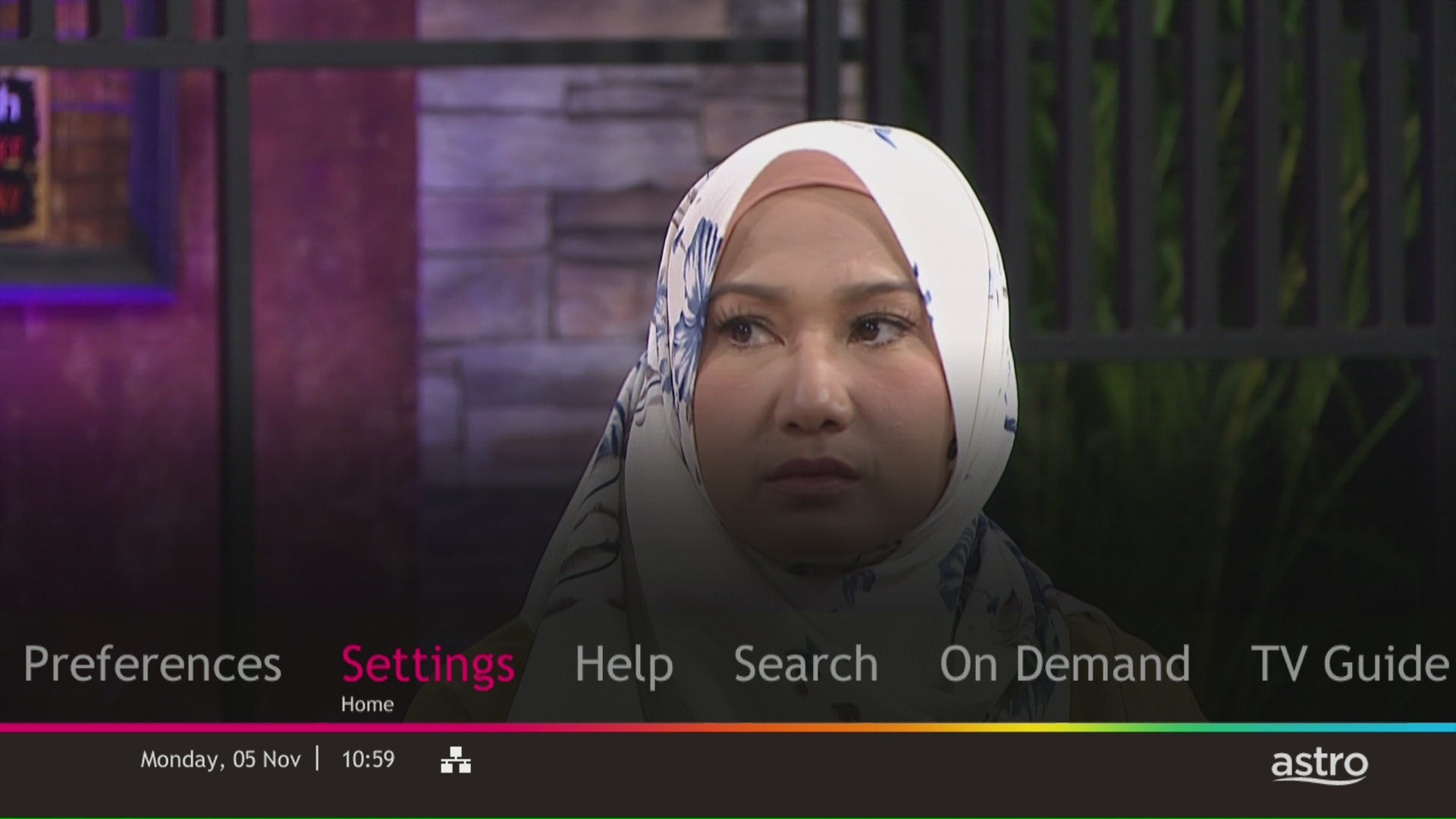
STEP 3
Navigate to Display and press "OK".
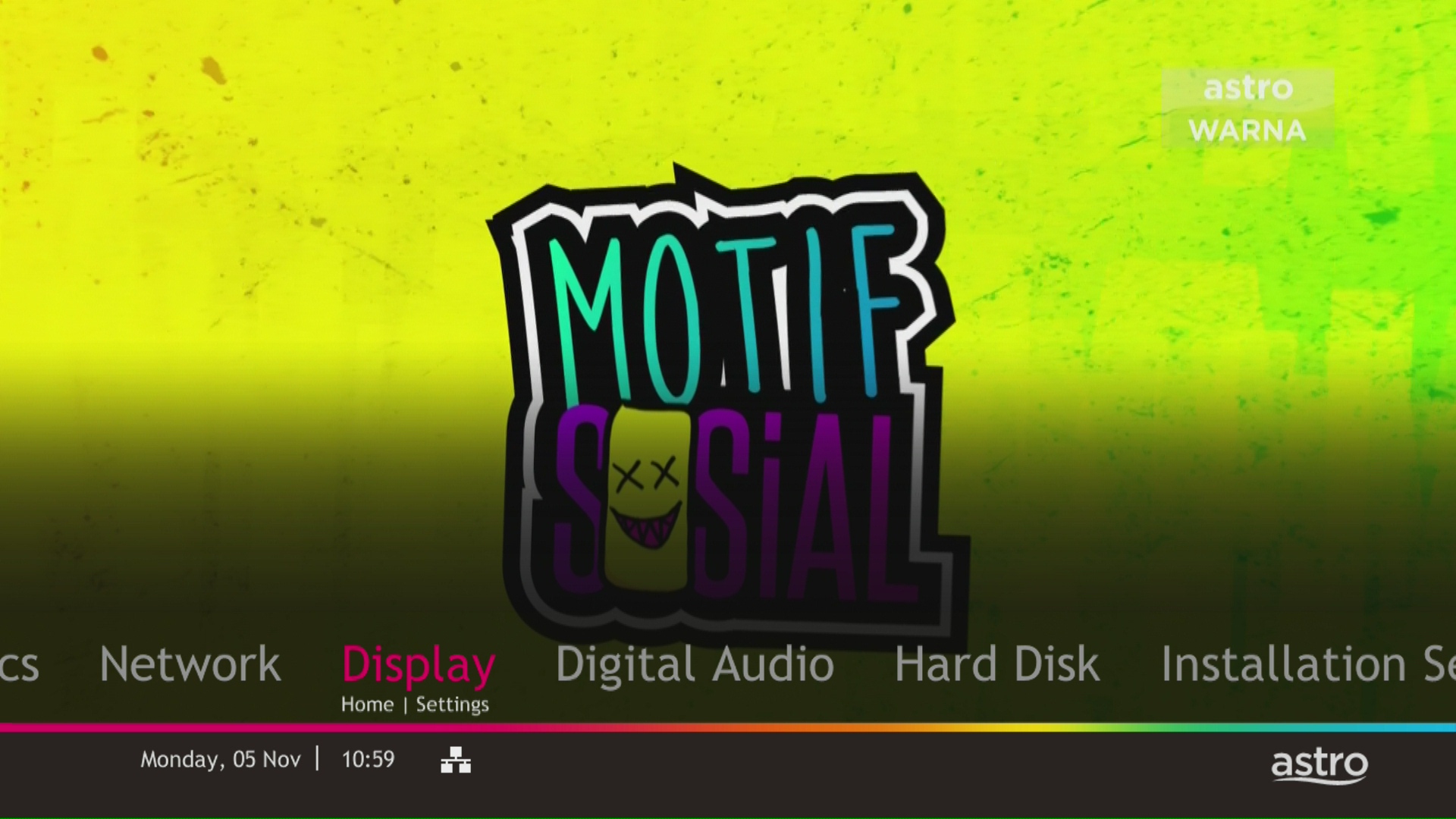
STEP 4
Navigate to TV Settings and press "OK".

STEP 5
Navigate to Conversion for 4:3 Input Video, select your preferred selection and press “OK”.

STEP 6
Select Yes, continue and press "OK" to confirm on the changes.
Otherwise, select No, go back to cancel.

Yes, provided that your Plug & Play Box has not been activated and no later than 7 days upon receiving both the Plug & Play Box and Astro SIM card. In the event that you have activated your Plug & Play Box and wish to cancel, a contract penalty fee will apply.
We will reach out to you for a suitable time to pick up the Plug & Play Box and Astro SIM card.
Although it is possible to pair the second mesh node unit with the first mesh, customers are advised to follow similar steps in setting up the Mesh Network by pairing the mesh unit with the WiFi router instead.
Yes, the subscription will be reflected on all your set-top box provided they are registered under our Multiroom service.
No there will not be any penalty.
For the Multiroom subscription on a box setup, if your subscription is within the 24-month contractual period. Then a pro-rated penalty of RM600 will be applied for any Astro box except for Ultra Box, which the penalty will be RM1,000.
Visit our page to find out about our new packs.
Connect your PVR to Wi-Fi and enjoy access to our library of Video On Demand. Replay old seasons, catch-up latest episodes of your favourite shows, anytime you want. To connect your PVR, follow the steps below depending on your box type:
(a) Wi-Fi Enabled PVR (DMT5)

· Press the “Home” button and select “Settings” > “Network” > “Wi-Fi”
· Allow the PVR to scan Wi-Fi networks available and subsequently choose your home Wi-Fi network > Enter your Wi-Fi password if required
· Once connected, the icon below will appear on the screen.

Tip: Use the alpha-numeric keyboard on your Astro Remote to key in your password
· Press the “Home” button and select “On Demand” to start watching videos on demand!
(b) Non-Wi-Fi Enabled PVR (HD PVR)

There are two ways to connect your HD PVR decoder to your home Wi-Fi
(i) Using the Ethernet (LAN) cable
· Plug in the LAN cable from your modem into the PVR network port
· Once connected, the icon below will appear on the screen
· Press the “Home” button and select “On Demand” to start watching videos on demand!
(ii) Using an Astro Wi-Fi dongle as per shown below

Step 1 - Plugin the Wi-Fi dongle into the front USB part of your PVR decoder.
Step 2 - A prompt will appear stating "Do you wish to connect to a wireless network?", select "Yes, continue."
Step 3 - Once connected, the Wi-Fi icon will appear on the screen. Now you are ready to download and enjoy Astro's on demand entertainment.
Step 4 - Press the “Home” button and select “On Demand” to start watching videos on demand!
*The Wi-Fi dongle is only applicable for the non-Wi-Fi enabled PVR (as per the picture).
Not to worry, you will only need to verify your Astro ID once. After that, you may log in to your account as usual.
You may use the same feedback form and choose below options.
Category: I would like to request for refund
Sub Category: Request for Refund
As our customers deserve the best entertainment experience, Astro is refreshing its content and packages to offer more choice, value, flexibility, and better experience in a streaming world as part of the new Astro experience.
The all-new Astro packs are designed for customers in the streaming and connected world, where they can stream all the shows they love on Ultra Box and Ulti Box. Customers can now enjoy their favourite shows all on Astro, from global streaming services like Netflix, Disney+ Hotstar, HBO GO, iQIYI, TVBAnywhere+ as well as all Astro's flagship shows and the best of live sports in one place, on the big screen. Our new packages offer unbeaten value, a greater variety of content and greater convenience, all made better with our Astro & Broadband for better connectivity.
Astro's Plug & Play Box is our latest box where users can enjoy the latest Astro box simply by connecting it to the TV and internet. There is no longer a need to schedule or pay for an installation. By connecting your Plug & Play Box to home broadband, you will be able to-do the following:
Other features include pause on TV and continue watching on the Astro GO app, enhanced search capabilities and more.
You may reach out to Astro's customer service at 03-95433838 if you think there's an error regarding your redemption or rewards.
If you would like for more information, kindly visit our Multiroom page via Astro website https://www.astro.com.my/multiroom
To view the terms and conditions, click here.
The payment will take some time to reflect in My Astro app and web account. If you experience any further issues or it is still not reflecting in My Astro, please reach out to us via WhatsApp at 03-9543 3838 for more details.
If you are interested to upgrade your box, you can do so via Astro's retailers or online as follows:
I. Visit https://hub.astro.com.my/#5
II. Select `Box Upgrade` and log in with your Astro ID
III. Select the box you would like to upgrade
For any technical issues, you may visit Astro's Help & Support page or contact Astro via WhatsApp at 03-9543 3838 by typing PNP.
If you are facing technical issues, please contact us at wecare@astro.com.my or call/WhatsApp us at 03-9543 3838.
Astro & Broadband comes with 24-month contract commitment.
1. Tune to Astro channel 200 - select "Add-Ons"

2. Select the option for Monthly Subscription
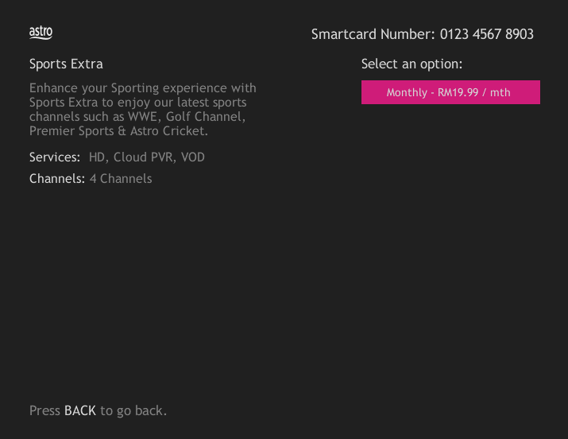
3. Send the WhatsApp code as per displayed on the TV screen

Yes, you will be able to access Disney+ Hotstar even if you remain on your existing Movies/Starter Plus/Value Plus Packs.
Astro is an official distributor of Disney+ Hotstar, the dedicated streaming home for global, and Malaysian hits. Astro customers can now subscribe to Disney+ Hotstar through the new, bigger and more diverse Packs, i.e.: Movies, Premium 1, Premium 3 or Platinum Pack. The streaming service brings together blockbuster movies from Hollywood to Hallyu and award-winning content from Disney, Marvel, Star Wars, Pixar, National Geographic, FX, 20th Centuary Studios and more including exclusive premieres from leading Malaysian studios. Take your family entertainment to the next level with Disney+ Originals like I am Groot, Prey, Baymax, Obi-Wan Kenobi, She-Hulk, IN THE SOOP: Friendcation and more - with the convenience of one monthly bill for all your entertainment needs.
Movies Pack, Premium 1, Premium 3 and Platinum customers as well as customers on the Starter Plus Pack, Value Plus Pack, and Disney+ Hotstar (3-months Pass) can enjoy Disney+ Hotstar on Astro.
Customers can subscribe to Disney+ Hotstar via astro.com.my/Disney, as well as via authorised retailers and dealers.
You can add a new Netflix account to your bill through CH 741 or clicking the Netflix button on the remote control. Please enter the email address you would like to use for Netflix subscription and ensure the Billing partner is Astro.
If you would like to transfer your existing Netflix Account to be charged under Astro bill, please follow the steps below:
All existing or new Astro customers who meet the following criteria may upgrade to the Ultra Box:
If you live in a high-rise building, please call us at 03- 7481 8000 to check if your building can support the Ultra Box. If your high-rise building allows for the set-up of individual dishes you will be able to upgrade to the Ultra Box, subject to the criteria above.
If you would like to access our 4K UHD content via the Astro UHD channel 805 and UHD content on VOD, Astro Best and Astro First. We also recommend:
Note: If you do not have an internet connection at home, you may take up the Ultra Box bundled with Astro™'s broadband package with rebates of up to RM30/month. For more details and to sign up for Astro & Broadband, please click here.
Astro Rewards is your free loyalty programme - a way for us to say thank you for being with us.
We're always adding new and exciting gifts, deals, and experiences for you - all ready and waiting in the My Astro app for you, right at your fingertips. Here's the best part, the longer you're with us, the better your rewards!
You will receive an email within 45 minutes of payment made to let you know whether your advance payment is successful or not. If your payment has failed, you may call Astro's Contact Centre at 03-9543 3838 or wait for an Astro representative to be in contact with you within 2 working days to assist you with your order.
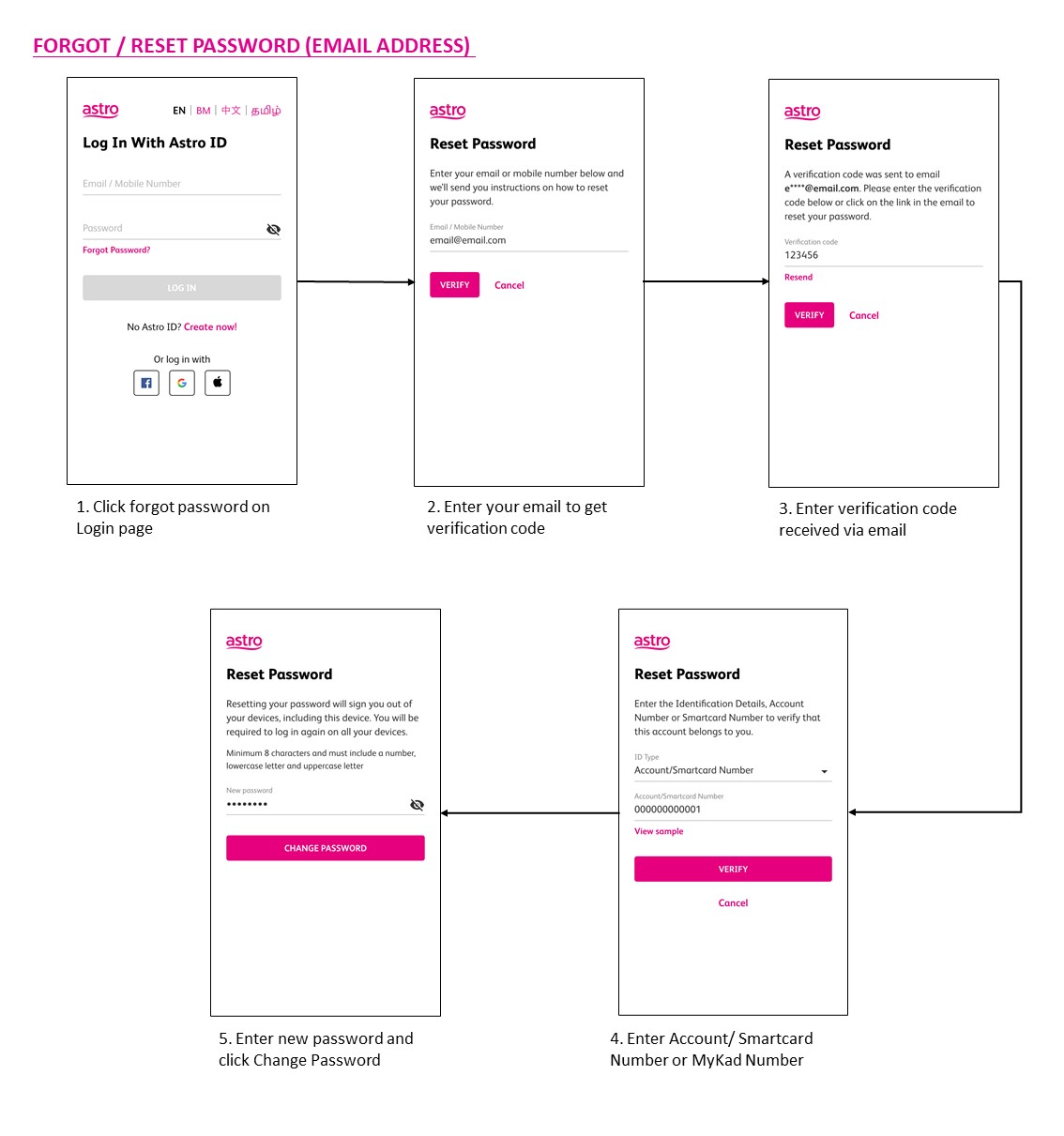
You may use the 'forgot password' recovery feature on the login page. Just enter the email address/ mobile number you signed up with and we will send you a recovery email.

If you have NOT made any changes to your Astro pack on or after 9th November 2021, you can enjoy up to four (4) concurrent streams on Astro GO anywhere, anytime. However, if you have Astro GO+ as part of your subscription, you will be upgraded to four (4) concurrent streams.
For customers with the Ultra or Ulti Box, please ensure to provide your latest contact details to our Astro agent during the call to terminate your account, this includes your mobile number and house address. If you still need further help, please contact us at 03-9543 3838.
Please rest assured that streamingapps labelled with "coming soon"
will be available on Astro in the near future.Please visit product.astro.com.my/appsfor more information on the streaming apps available on Astro or follow oursocial media to get notified on latest launches.
Facebook: @Astro
Instagram: @astromalaysia
Twitter: @astroonline
Kindly take note that streaming appslabelled with “coming soon” will be made available on Astro once they areready. Astro reserves the right to delay or cancel streaming app launches, ifnecessary.
Yes, your charges during the deferment days will be pro-rated and reflected in your next bill. Please note that due to the recent requested change in your Astro account, the expiry date for your Disney+ Hotstar (3-months pass) subscription has been deferred to xxx (date) to consolidate the final monthly subscription pricing.
You can recover your Netflix login here or at astro.com.my/Netflix
Step 1: Head to astro.com.my/Netflix
Step 2: At the FAQ section look for "How to recover my Netflix login email and password
Step 1: Separate Your Wi-Fi Network Name
First, you need to set up your Wi-Fi to Dual-band in order to be less susceptible to interference, and allows you to choose between the 2.4GHz or 5GHz bands when connecting a device. A Wi-Fi frequency of 5GHz is best when you are near your router, and 2.4GHz is best for when you are far from your router.
Below are details for a standard login based on a standard router issued by ISP (Telekom Malaysia, Maxis, and Time dot Com)

Step 2: Factory reset your Ultra Box by following the steps below.
a. Press the Home button on your remote

b. Go to your settings page

c. Scroll down and select Reset/Restore

d. Select restore factory settings and proceed

e. Enter your PIN to access restore factory settings (default pin: 0000)

f. Choose restore and wait until the box reboots automatically. This may take around 2 minutes and you will see the Astro logo again when it's done.

STEP 1
On your remote, press the ... button and the Channel Guide page will be displayed on your screen.

STEP 2
Select the channel you would like to unlock and press "OK".

STEP 3
Select "Unlock Channel" and press "OK".

STEP 4
Enter the PIN to unblock the channel.

STEP 5
You are successfully unlocked the channel when this screen appears.

Please contact Astro Customer Call Center via 03-95433838
To be eligible, you'll need to be an Active Astro Pay TV customer with a valid Astro ID.
An Active Astro customer refers to a subscriber of the Astro Service, whose account is current and active with no outstanding payments due and who has not breached the Astro subscription agreement nor given any instructions to terminate and/or suspend his/her subscription to the Astro Service.
Each account you hold is entitled to one (1) tier status based on the longest active smartcard.

