Perkhidmatan TV satelit percuma dari Astro. Nikmati hiburan, berita, pembelajaran, maklumat dan banyak lagi.

Gambar untuk ilustrasi sahaja.
Nikmati percuma ke 15+ saluran TV & 10+ saluran radio.
* Tertakluk kepada terma dan syarat Astro.


Langkah-1 |
Langkah-2 |
Langkah-3 |
Pilih pakej & mendaftar dalam talian. |
Duduk kembali & tunggu pemasangan. |
Nikmati Astro / Broadband baru anda! |
Perkhidmatan TV satelit percuma dari Astro. Nikmati hiburan, berita, pembelajaran, maklumat dan banyak lagi.
Gambar untuk ilustrasi sahaja.
Dekoder baru sahaja tanpa piring satelit & kabel. Anda mesti ada piring satelit Astro/Njoi dan kabel terpasang dan berfungsi baik.
Termasuk pemasangan.
Dekoder baru lengkap dengan piring satelit & kabel.
Termasuk pemasangan.
Mendaftar untuk
| Njoi Astro UniFi Maxis |
Cari jawapan anda di sini.
Kami menyediakan perkhidmatan untuk mendaftar Astro dan Broadband untuk anda.
Anda boleh mengelakkan memandu dan beratur di kaunter jualan. Kami adalah peniaga yang boleh memproseskan pendaftaran anda dalam talian.
Anda tidak akan dicaj untuk mendaftar di sini. Tidak ada maklumat kad kredit yang diperlukan. Caj adalah sama seperti yang anda mendaftar di kaunter jualan.
Yang pertama, anda boleh mendaftar dalam talian di sini, kami akan menghubungi anda dengan segera semasa waktu perniagaan. WhatsApp / E-mel / Fax salinan fotokopi IC (untuk warganegara Malaysia) / Pasport (untuk orang asing) kepada kami. Apabila kami menerima semua maklumat, kami akan memproses pendaftaran anda segera.
Sebaik sahaja kami menerima pendaftaran anda dengan maklumat lengkap, kami akan memproses permohonan anda dengan segera pada waktu perniagaan. Kontraktor dari pembekal perkhidmatan kemudian akan menghubungi anda untuk pelantikan pemasangan setelah permohonan anda diluluskan.
Nikmati penjimatan yang lebih besar dan pembayaran bil tanpa gangguan dalam satu bil untuk Astro dan Broadband. Anda dapat menikmati Astro dan Broadband dengan harga potongan setiap bulan sepanjang tempoh kontrak 24 bulan.
Astro menawarkan pelbagai pakej TV termasuk Hiburan, Sukan, Filem dan Kanak-kanak. Anda boleh memilih pakej yang sesuai dengan pilihan tontonan anda serta menambah aplikasi penstriman pilihan jika tersedia.
Ya, anda boleh melanggan pakej TV Astro tanpa menggabungkan broadband. Namun, menggabungkan TV Astro dengan Fibre Broadband boleh memberikan penjimatan bulanan yang lebih baik serta kemudahan satu bil sahaja.
Untuk isi rumah kecil dengan penggunaan penstriman dan pelayaran ringan, 100Mbps biasanya mencukupi. Keluarga besar, pemain permainan dalam talian atau pengguna penstriman berat mungkin mendapat manfaat daripada pelan 500Mbps atau 1Gbps untuk prestasi lebih lancar pada pelbagai peranti.
Kebanyakan pelan TV dan Fibre broadband Astro disertakan dengan kontrak 24 bulan. Caj penamatan awal mungkin dikenakan sekiranya pembatalan dibuat sebelum tamat tempoh kontrak.
Ya, anda boleh menaik taraf pakej TV atau kelajuan broadband pada bila-bila masa, tertakluk kepada kelayakan dan liputan kawasan. Tempoh kontrak baharu mungkin dikenakan bergantung kepada naik taraf tersebut.
Bil bulanan anda akan dikeluarkan terus oleh Astro. Anda boleh menerimanya melalui emel atau mengaksesnya melalui akaun Astro anda. Pelanggan pakej gabungan akan menerima satu bil gabungan untuk perkhidmatan TV dan broadband.
Kaedah pembayaran termasuk perbankan dalam talian, debit automatik, kad kredit atau saluran pembayaran lain yang diluluskan oleh Astro. Pasukan kami boleh membantu anda semasa proses pendaftaran.
Jika anda mengalami gangguan perkhidmatan, anda boleh menghubungi khidmat pelanggan Astro untuk bantuan teknikal. Dalam kebanyakan kes, masalah boleh diselesaikan dari jauh atau juruteknik akan dijadualkan jika perlu.
Ya, pemindahan tertakluk kepada ketersediaan perkhidmatan di alamat baharu anda. Caj pemindahan dan pelarasan kontrak mungkin dikenakan bergantung kepada pelan anda.
Tidak, anda tidak memerlukan kad kredit untuk menghantar permohonan. Pengaturan pembayaran akan dibuat terus dengan Astro selepas perkhidmatan anda diluluskan.
Pakej TV Astro terpilih membenarkan tambahan pilihan seperti perkhidmatan penstriman bergantung kepada promosi semasa dan ketersediaan. Caj bulanan tambahan mungkin dikenakan.
Ya, router WiFi biasanya disediakan semasa pemasangan fibre. Model router mungkin berbeza bergantung kepada pelan kelajuan broadband yang dipilih.
Ya, kami akan menyemak liputan perkhidmatan di alamat anda sebelum meneruskan permohonan untuk memastikan broadband tersedia di kawasan anda.
Bagi warganegara Malaysia, sila sediakan salinan MyKad anda. Bagi warga asing, sila sediakan salinan pasport semasa menghantar permohonan broadband.
Selepas permohonan anda diluluskan, penyedia perkhidmatan biasanya akan menghubungi anda dalam tempoh 2 hingga 7 hari bekerja untuk menetapkan janji temu pemasangan broadband.
Kebanyakan pelan Astro Broadband disertakan dengan kontrak 24 bulan bermula dari tarikh pemasangan. Jika anda berpindah, kontrak 24 bulan baharu mungkin dikenakan di alamat baharu.
Ya, anda boleh memindahkan perkhidmatan broadband tertakluk kepada ketersediaan perkhidmatan di alamat baharu. Kontrak anda mungkin diperbaharui untuk 24 bulan lagi bermula dari tarikh pemasangan baharu.
Ya, anda boleh memohon untuk memindahkan peranti broadband di dalam rumah. Caj pemasangan bukan standard mungkin dikenakan dan perlu dibayar terus kepada pemasang selepas penilaian dibuat.
Ya, anda boleh bertukar ke Astro Broadband. Untuk mengelakkan gangguan perkhidmatan, disarankan untuk mengaktifkan perkhidmatan baharu sebelum menamatkan kontrak broadband sedia ada.
Pemasangan standard mungkin percuma semasa tempoh promosi, namun pemasangan bukan standard (contohnya pemindahan peranti atau pendawaian kompleks) mungkin dikenakan caj tambahan yang perlu dibayar terus kepada pemasang.
Astro Quick Pay ialah kaedah mudah untuk menyemak Ringkasan Bil anda, Status Akaun dan membayar bil Astro mengikut keselesaan anda dengan pembayaran segera, terus dari rumah. Lawati Astro Quick Pay untuk membayar bil anda sekarang.
Sila pastikan anda:
a. Sediakan kad pengenalan asal andaš MyKad (Depan ; Belakang) dengan anda (Warganegara Malaysia)
b. Sediakan Pasport asal anda & Visa dengan anda. (Bukan Warganegara Malaysia)
c. Dalam persekitaran yang terang
Starting 27 September 2023, Astro customers may purchase Qalbox by Muslim Pro as an add-on for an exclusive price of only RM9.50/month inc. of SST (RRP: RM12.90/month). After successfully adding Qalbox to your subscription, all Ultra and Ulti Box customers can access the app on their Astro Box, the Muslim Pro mobile app, www.qalbox.com, as well as enjoy premium Muslim Pro features on the app. Please visit https://product.astro.com.my/apps/qalboxmuslimpro for more information.
1. What is Qalbox by Muslim Pro?
Qalbox by Muslim Pro is a Muslim-friendly entertainment streaming service that is accessible via the Muslim Pro app. It hosts an extensive library of content that celebrates Muslim identities and cultures worldwide and aims to create a global platform for Muslim creatives and filmmakers.
2. What is the difference between Muslim Pro and Qalbox?
Muslim Pro is the go-to Muslim lifestyle app, recognised by millions of Muslims globally ashaving the most accurate prayer time and athan/azan application for salah (prayer). Muslim Pro has a full suite of features that help Muslims practise their religion and deen more purposefully with features such as a Qibla finder, reading and listening to the Quran, a digital tasbih and more.Meanwhile, Qalbox is a streaming service by Muslim Pro to enjoy Muslim-friendly movies, TV series, animations and more. After purchasing Qalbox as an add-on, Astro customers can stream the app on their Ultra/Ulti Box, www.qalbox.com or via the Muslim Pro mobile app.
3. Why should I subscribe to Qalbox by Muslim Pro with Astro?
For an Astro-exclusive price of only RM9.50/month inc. SST (RRP: RM12.90/month), you can look forward to a wide range of content genres, including acquired and original scripted programmes, movies, documentaries, children's animations, as well as Quranic recitations and supplications (du'a). From classic movies on history, origins and civilizations of Muslims to titles that showcase modern Muslim life across the globe - viewers can immerse themselves in the experiences of other Muslims' varied journeys, struggles, and triumphs.
Additionally, you can also enjoy Premium Muslim Pro features on the mobile app which allow users to access all in-app features without any advertisements, download audio recitations of the Quran to listen offline, and add the Muslim Pro widget to their smartphone Home Page to view all prayer times, amongst many other features.
4. Where can I access Qalbox by Muslim Pro?
If you are subscribed to Qalbox by Muslim Pro, you can access your favourite Islamic content on your big screen TV via the Ultra/Ulti Box, www.qalbox.com or the Muslim Pro app.
5. What happened to my Qalbox by Muslim Pro Premium free trial?
Your free trial of Qalbox by Muslim Pro Premium subscription with Astro has ended on 26 September 2023. We hope you have enjoyed it! You may continue streaming the app by adding it to your bill for an exclusive price of only RM9.50/month inc. of SST (RRP: RM12.90/month).
6. How do I subscribe to Qalbox by Muslim Pro Premium as an Astro customer?
Astro customers may purchase Qalbox as an add-on via their Ultra or Ulti Box, My Astro app, www.astro.com.my, or by contacting our Customer Contact Centre at 03-9543 3838 (call/WhatsApp). Please follow the detailed steps below if you require guidance on how to purchase:
a) Ultra or Ulti Box
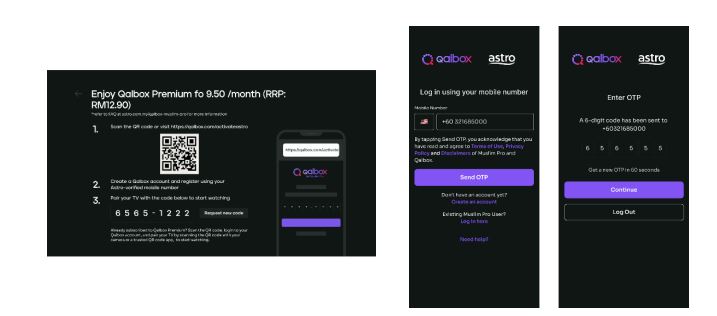
Step 1: Open œQalbox by Muslim Pro under the apps rail at your Home Page. Click on any show posters to proceed with the purchase.

Step 2: Provide your Astro verified mobile number and enter the OTP to proceed
*if you have activated your Qalbox Premium free trial, please ensure the same mobile number is used

Step 3: Scan the QR on screen to log in/create a new Qalbox account and pair it with your TV
b) My Astro app
Step 1: Open the My Astro app and select œAstro Store in the bottom menu. Then, select œApps > œQalbox by Muslim Pro > œGet it Now
Step 2: Log in with your Astro ID. Then, enter your Astro verified mobile number and perform the OTP verification to purchase

Step 3: Log in to the Qalbox mobile app using the same phone number as Step 2

Step 4: Once complete, launch Qalbox on your Ultra or Ulti Box and pair your account to your TV

c) Astro Website (www.astro.com.my)
Step 1: Visit www.astro.com.my and select œProduct & Services. Then, go to œApps > œQalbox by Muslim Pro > œGet it Now
Step 2: Log in with your Astro ID. Then, enter your Astro verified mobile number and perform the OTP verification to purchase
Step 3: Log in to the Qalbox mobile app using the same phone number as Step 2
Step 4: Once complete, launch Qalbox on your Ultra or Ulti Box and pair your account to your TV

7. I already have a Qalbox account from the free trial; how do I purchase the add-on with the same account?
Simply pick up where you left off by following the steps in Q6 and purchase the Qalbox by Muslim Pro add-on. Please ensure that the mobile number used to purchase the add-on is the same mobile number used when registering for the free trial.
8. I have my own Qalbox account outside of Astro; can I stream it on my Ultra/Ulti Box?
Yes, you can! Just follow these simple steps to stream your Qalbox account on your Ultra/Ulti Box:
Step 1: Open œQalbox by Muslim Pro under the Apps rail at your Box home page.
Step 2: Select œGo to Qalbox by Muslim Pro app then scan the QR code on screen to log in to your existing account.

Step 4: Finally, enter the pairing code displayed on your TV screen to pair your account to your Ultra/Ulti Box.
9. How do I enjoy Qalbox by Muslim Pro on the website and mobile app?
a) Qalbox Website: After subscribing through any of the methods under Q6, you will automatically be able to enjoy the app at www.qalbox.com.
b) Muslim Pro mobile app:
Step 1: Download the Muslim Pro app from the Apple App Store or Google Play Store
Step 2: Click œLog In at the bottom right corner. Then, select œContinue with Email/Phone
Step 3: Switch to the œPhone tab and enter your name and mobile number
Step 4: After clicking Continue, enter the OTP code sent to your device for verification purposes
Step 5: Enter your email address and create a password
Step 6: Now, enjoy Muslim-friendly shows on the app! Simply use the same email or phone number provided to log in in the future
10. How many devices can I use to stream Qalbox by Muslim Pro at the same time?
You can access your Qalbox by Muslim Pro account on up to five (5) devices at a time. To ensure a smoother streaming experience, please sign out from any unused devices.
11. Can I download content on Qalbox by Muslim Pro for offline viewing?
At the moment, offline downloading of content is not available.
12. Are there any subtitles or dubbing available for the content on Qalbox by Muslim Pro?
Presently, Qalbox offers subtitles in English, Bahasa Malaysia, Bahasa Indonesia, and French for selected content. Their commitment is to expand subtitle availability to encompass an even broader array of languages for all content. At this time, dubbing services are also available for selected content and they are actively exploring options to enhance accessibility and cater to the preferences of viewers.
13. Can I access Qalbox by Muslim Pro outside of Malaysia?
Yes, simply download the Muslim Pro app and log in using your registered mobile number for Qalbox. You may be required to provide your email address and password for additional security. Once done, you may access Qalbox immediately.
14. What is a Qalbox by Muslim Pro Premium subscription?
With the Qalbox by Muslim Pro Premium subscription, users can enjoy all the Muslim-friendly content on Qalbox and stream them on up to 5 devices at the same time. Additionally, users will also be able to enjoy Muslim Pro premium features on the mobile app which includes accessing all in-app features without any advertisements, download audio recitations of the Quran to listen offline, and add the Muslim Pro widget to their smartphone Home Page to view all prayer times, amongst many other features.
15. I don't have an Ultra/Ulti Box; can I still subscribe to Qalbox by Muslim Pro with Astro?
If you are not an Ultra or Ulti Box customer, you may still subscribe to Qalbox by Muslim Pro and enjoy:
a) Qalbox on the mobile app and website
b) Muslim Pro features via Muslim Pro app
16. Who may I contact if I encounter any problems with Qalbox by Muslim Pro?
Please reach out to the Qalbox team by emailing them at support@muslimpro.com if you have any enquiries or require assistance with the app.If you would like to contact Astro, you may reach out to our Customer Service Centre by:
1. Submitting a feedback form here: www.astro.com.my/contactus/form; or
2. Reaching to us via WhatsApp by typing œHi at 03-9543 3838 for assistance
17. Will my personal information be protected?
Yes, Astro is bounded by the PDPA. All information received will be used in accordance with our Privacy Notice
LANGKAH 1
Matikan suis dekoder anda dan pastikan lampu pada adaptor terpadam.

LANGKAH 2
Hidupkan kembali suis dekoder anda dan pastikan lampu adaptor menyala.

LANGKAH 3
Tekan butang "Standby" berulang kali pada alat kawalan jauh sehingga Startup Options tertera pada TV.

LANGKAH 4
Tekan "1".

LANGKAH 5
Tekan "1".

LANGKAH 6
Skrin Software Update akan tertera.
Kemas kini akan mengambil masa 10-15 minit untuk diselesaikan.
Sila bersabar.

Astro Rewards terbuka kepada semua pelanggan *Aktif Astro PayTV dan ahli keluarga terdekat mereka
* "Pelanggan Aktif Astro" merujuk pelanggan Perkhidmatan Astro dan akaun mereka yang terkini dan aktif tanpa bayaran tertunggak dan tidak melanggar perjanjian langganan Astro atau memberikan apa-apa arahan untuk tamatkan dan/atau gantungkan langganan Perkhidmatan Astro pada tarikh pemakluman pemenang. Pemenang mesti terus aktif sebagai pelanggan Astro sehingga tarikh mengambil hadiah.
1) Muat turun aplikasi Astro dari stor aplikasi yang tersedia di Smart TV anda.
2) Ikuti langkah-langkah di bawah bergantung pada jenama Smart TV anda.


Pelanggan yang melanggan pek Astro berikut akan menikmati Disney+ Hotstar secara automatik sebagai sebahagian daripada pek mereka yang lebih baharu, lebih besar dan lebih baik
Kadar cukai perkhidmatan untuk langganan Astro TV akan dinaikkan daripada 6% kepada 8%. Walau bagaimanapun, cukai perkhidmatan untuk Astro Fibre yang tergolong dalam kategori perkhidmatan telekomunikasi akan kekal pada kadar 6%.
Tidak. Penebusan hendaklah dilakukan oleh pemilik akaun sahaja. Walau bagaimanapun, jika pemilik akaun tiada, ahli keluarga terdekat juga boleh melakukan penebusan dengan syarat pemilik akaun bersetuju dan memberikan kebenaran untuk menebus ganjaran menggunakan bukti kelayakan akaunnya.
LANGKAH 1
Tutup dekoder anda pada soket dan pastikan lampu adapter terpadam.

LANGKAH 2
Kenal pasti lokasi Kad Pintar di bahagian depan atau kanan dan keluarkan secara perlahan. Pastikan lampu adapter terpadam.

LANGKAH 3
Bersihkan cip emas pada Kad Pintar dengan kain yang kering dan lembut.

LANGKAH 4
Pastikan cip emas menghadap ke atas sebelum memasukkan semula sepenuhnya.

LANGKAH 5
Hidupkan dekoder anda semula pada soket dan pastikan lampu adapter menyala. Sila tunggu 5 minit.

LANGKAH 6
Hidupkan dekoder anda. Anda seharusnya tidak lagi mengalami masalah ini.
Jika isu berterusan, sila serahkan isu ini melalui Borang Maklum Balas dan lampirkan gambar tab Umum daripada Diagnostik STB untuk bantuan.

Astro GO+ adalah servis tambahan untuk:
Terokalah ribuan filem dan siri yang menambat hati. Koleksi kami sentiasa bertambah. Kalau anda mahu menikmati lebih banyak filem di samping langganan sedia ada anda, tekan butang Utama dan pilih On Demand. Gunakan kekunci anak panah untuk skrol ke Store. Pilihlah mana-mana filem untuk disewa selama tempoh hingga 48 jam.
LANGKAH 1
Tutup dekoder anda pada soket dan pastikan lampu adapter terpadam.
LANGKAH 2
Kenal pasti lokasi Kad Pintar di bahagian depan atau kanan dan keluarkan secara perlahan. Pastikan lampu adapter terpadam.
LANGKAH 3
Bersihkan cip emas pada Kad Pintar dengan kain yang kering dan lembut.
LANGKAH 4
Pastikan cip emas menghadap ke atas sebelum memasukkan semula sepenuhnya.
LANGKAH 5
Hidupkan dekoder anda semula pada soket dan pastikan lampu adapter menyala. Sila tunggu 5 minit.
LANGKAH 6
Hidupkan dekoder anda. Anda seharusnya tidak lagi mengalami masalah ini.
Jika isu berterusan, sila serahkan isu ini melalui Borang Maklum Balas dan lampirkan gambar tab Umum daripada Diagnostik STB untuk bantuan.
Kelajuan Internet rumah yang disyorkan untuk tontonan yang lancar ialah 10Mbps.
LANGKAH 1
Pada alat kawalan jauh anda, tekan butang HOME dan menu laman utama akan dipaparkan di bahagian atas skrin anda.
LANGKAH 2
Pergi ke Settings.
LANGKAH 3
Pilih Saluran yang anda mahu tambah sebagai kegemaran dan tekan "OK".
LANGkAH 4
Pilih "Add to Favourite" dan tekan "OK"
LANGKAH 5
Anda telah berjaya menambah saluran ke senarai kegemaran bila skrin ini muncul.
LANGKAH 6
Saluran yang anda pilih akan bertanda hati selepas ditambah sebagai kegemaran
Ikuti langkah-langkah di bawah untuk set semula kata laluan anda:
LANGKAH 1
Pada alat kawalan jauh, tekan butang "HOME" dan menu laman utama akan dipaparkan di bahagian bawah skrin anda.

LANGKAH 2
Pergi ke Tetapan dan tekan “OK”.

LANGKAH 3
Pergi ke STB Diagnostics dan tekan “OK”.

LANGKAH 4
Pergi ke Network dan tekan "OK".

LANGKAH 5
Pergi ke Wi-fi dan tekan "OK".

LANGKAH 6
Pilih Sambungan Baru dan tekan "OK".
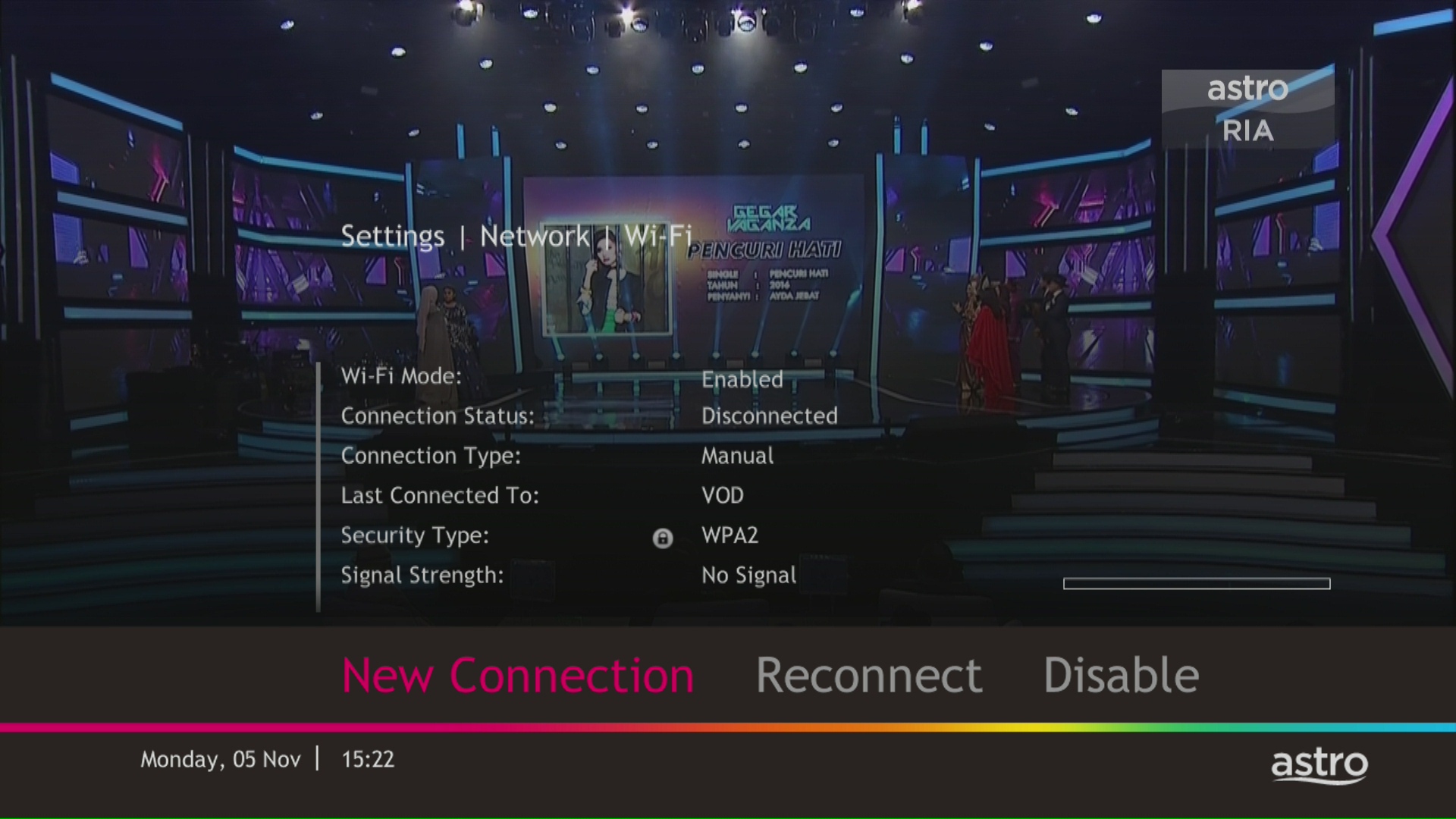
LANGKAH 7
Sila tunggu sementara dekoder mengimbas rangkaian Wi-fi yang tersedia.

LANGKAH 8
Pilih rangkaian Wi-fi anda dan pergi ke "Sambung ".

LANGKAH 9
Sila masukkan kata laluan untuk menyambung kepada rangkaian anda dan tekan "OK".

LANGKAH 10
Sambungan anda berjaya apabila skrin ini terpapar.

Langkah 1: Asingkan Nama Rangkaian Wi-Fi Anda
Mula-mula, anda perlu menyediakan Wi-Fi anda kepada Dwi-jalur agar kurang terdedah kepada gangguan dan membolehkan anda memilih antara jalur 2.4GHz atau 5GHz apabila menyambungkan peranti. Kekerapan Wi-Fi 5GHz adalah yang terbaik apabila anda berada berhampiran router anda dan 2.4GHz adalah yang terbaik apabila anda berada jauh dari router anda.
Di bawah ialah butiran untuk log masuk standard berdasarkan rooter standard yang dikeluarkan oleh ISP (Telekom Malaysia, Maxis dan Time dot Com)

Langkah 2: Tetapkan semula tetapan asal Ultra Box anda dengan mengikut langkah di bawah.
a. Tekan butang 'Home' pada alat kawalan jauh anda

b. Pergi ke halaman tetapan anda

c. Tatal ke bawah dan pilih Restore/Reset

d. Pilih Restore Factory Setting dan teruskan

e. Masukkan PIN anda untuk mengakses Restore Factory Setting (Default Pin: 0000)

f. Pilih Restore dan tunggu sehingga kotak reboot semula secara automatik. Ini mungkin mengambil masa kira-kira 2 minit dan anda akan melihat logo Astro sekali lagi apabila ia selesai.

Streaming app entitlement is dependent onthe TV Pack you are subscribed to, with some streaming apps available on Astroas an add-to-bill service. Please visit product.astro.com.my/apps to seeif you are entitled to your favourite streaming app once it is launched!
LANGKAH 1
Semak tetapan Audio pada dekoder anda dan tetapkan kepada Auto.
Rujuk panduan Digital Audio Settings.
LANGKAH 2
Sekiranya isu berlanjutan, semak sekiranya ada peranti tambahan (sound system/hdmi splitter) disambungkan antara dekoder dan TV.
LANGKAH 3
Sekiranya ada, ganti sambungan peranti tambahan tadi dengan memastikan kabel HDMI disambungkan terus dari dekoder ke TV.
LANGKAH 4
Sekiranya isu masih berlanjutan, sila dapatkan bantuan dari ejen Khidmat Pelanggan kami.
Anda boleh teruskan dengan Langkah bantuan asas teknikal sekiranya cuaca dalam keadaan baik atau anda boleh cuba semula kemudian.
LANGKAH 1
Tekan butang "HOME" dan Menu Utama akan terpapar dibawah skrin TV anda. 
LANGKAH 2
Pergi ke SETTINGS dan tekan Butang "OK".
LANGKAH 3
Pergi ke STB DIAGNOSTICS dan tekan butang "OK".
LANGKAH 4
Semak bacaan % kekuatan signal yang terpapar di sebelah atas kiri skrin anda.
Sekiranya bacaan signal adalah lebih tinggi daripada 65%, teruskan di WhatsApp untuk bantuan selanjutnya .
Jika bacaan lebih rendah daripada 65 %, sila teruskan dengan LANGKAH 5. 
LANGKAH 5
Matikan suis decoder anda dan pastikan lampu adapter tidak menyala. 
LANGKAH 6
Longgarkan dan tarik keluar kabel satelit daripada dekoder.
LANGKAH 7
Pasang semula kabel satelit ke dekoder dengan kemas dan ketat.
LANGKAH 8
Hidupkan semula suis decoder dan pastikan lampu adapter menyala.
Sila tunggu selama 5 minit.
LANGKAH 9
Hidupkan decoder dan anda sepatutnya tidak lagi mengalami masalah ini.
Sekiranya masalah masih sama, sila hantar gambar skrin pada "General Tab" di STB Diagnostics untuk bantuan lanjut.
Piring Centralized
Sekiranya masalah masih sama dan anda menggunakan piring satelit berpusat, sila rujuk pihak pengurusan Bangunan sebelum menghubungi ejen kami.
Sila abaikan peringatan jika bayaran telah dibuat dan periksa jika anda mempunyai apa-apa baki yang belum dijelaskan di Astro Quick Pay.
Jika anda ada lebih daripada satu kad yang berdaftar untuk bayaran OTP, anda akan diminta untuk memilih kad yang khusus digunakan untuk transaksi tersebut.
Pautan eKYC hanya sah selama 3 hari untuk melengkapkan proses pengesahan eKYC. Anda dikehendaki untuk membuat permohonan akaun Astro yang baharu.
Sila pastikan anda mengambil dekoder, piring satelit, Kad pintar, alat kawalan jauh dan semua peralatan lain selepas penanggalan dilakukan oleh juruteknik.
Anda perlu mendapatkan semula alamat e-mel/nombor telefon bimbit. Sila ikuti langkah di Soalan 7 untuk berbuat demikian. Kemudian, ikuti langkah di Soalan 5 dan 6 untuk menyemak atau mengemas kini butiran e-mel/nombor telefon bimbit anda. Sila gunakan alamat e-mel/nombor telefon bimbit anda yang dikemas kini sebagai ID Astro untuk log masuk.
Nota: Hanya pelanggan Astro yang ID Astronya dipautkan kepada langganan boleh mendapatkan ID Astro mereka dengan cara ini. Jika tidak, anda perlu cipta Astro ID baharu.
LANGKAH 1
Pada alat kawalan jauh anda, tekan butang HOME.

LANGKAH 2
Navigasi ke Update Satellite Frequency dan tekan "OK".

LANGKAH 3
Pilih Test Satellite Frequency dan tekan “OK”.

LANGKAH 4
Pilih Ya, teruskan dan tekan "OK" untuk memulakan ujian.
Jika tidak, pilih Tidak, kembali untuk membatalkan.

LANGKAH 5
Skrin status Satellite FrequencyTest akan tertera.

LANGKAH 6
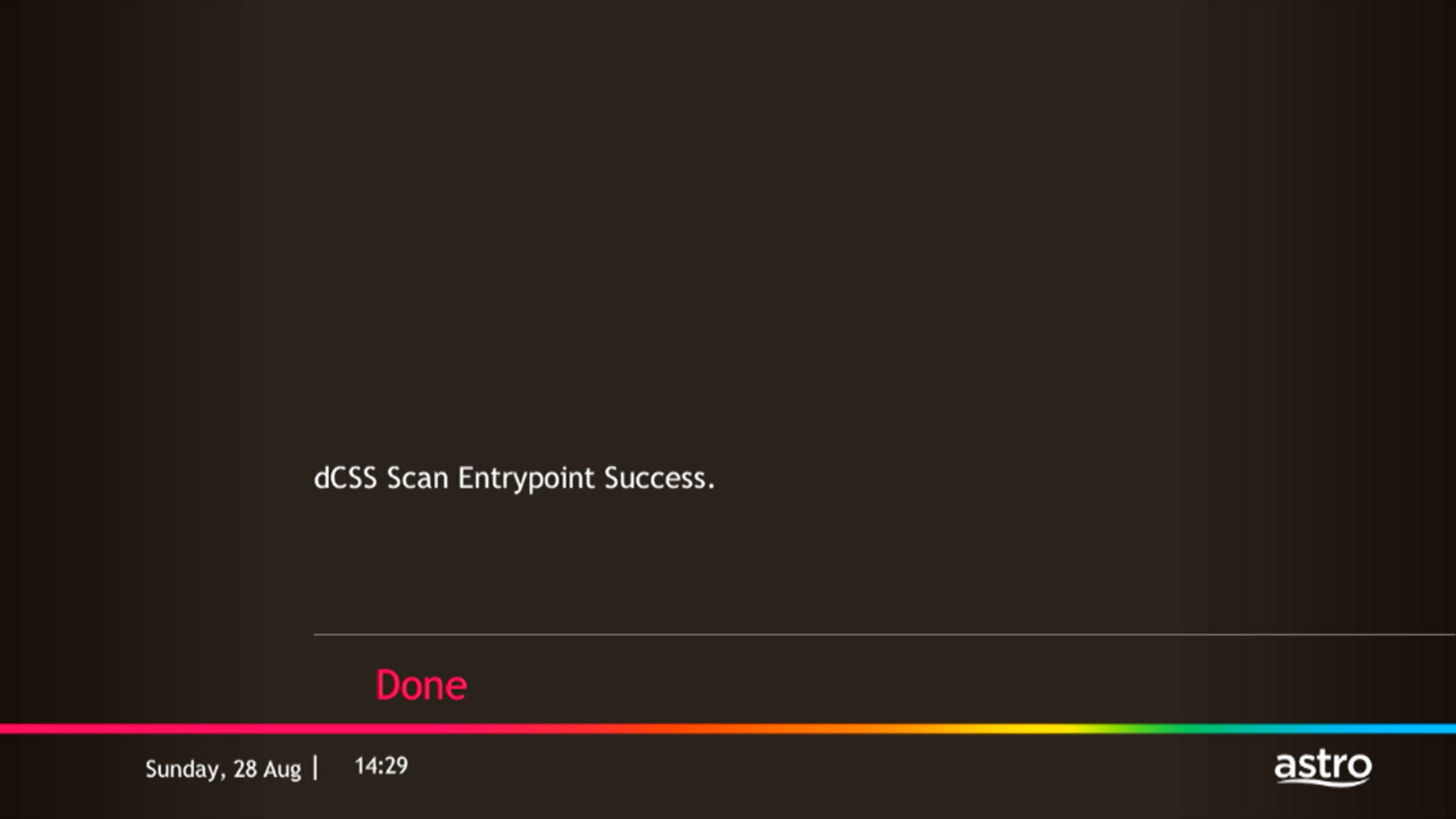
Keputusan ujian akan dipaparkan setelah selesai.
Tekan "OK" untuk kembali ke saluran.
LANGKAH 1
Pada alat kawalan jauh anda, tekan butang HOME dan menu laman utama akan dipaparkan di bahagian atas skrin anda.

LANGKAH 2
Pergi ke Settings.

LANGKAH 3
Pergi ke HDMI Audio dan tekan "OK".

LANGKAH 4
Pergi ke pilihan anda dan tekan "OK".

Cipta Astro ID anda pada bila-bila masa dengan mengikuti langkah-langkah mudah ini:
Ada satu akses Disney+ Hotstar sahaja untuk setiap langganan Movies Pack yang boleh buat dua strim serentak di Disney+ Hotstar.
Setiap pelanggan Astro boleh melanggan maksimum satu (1) langganan Multiroom (Smart TV). Jika anda memerlukan akses Multiroom tambahan, anda boleh melanggan Multiroom (Astro Box). Semua langganan perlu digunakan di lokasi yang sama seperti langganan utama.
Tempoh promosi Kempen Speed Upgrade Astro Fibre adalah dari 24 November 2023 hingga 31 Mei 2024.
1. What is WeTV?
WeTV is a global video on demand and over-the-top streaming service, providing the best premium entertainment including Chinese, Indonesian, Korean, Thai, Japanese and Malaysian series and movies to fans of Asian entertainment.
2. Can I stream WeTV for free on my Ultra/Ulti Box?
All Ultra/Ulti Box customers may watch selected WeTV titles for free on their Astro Box.
Simply follow these steps:
Step 1: Go to your Ultra/Ulti Box Home Page and select “WeTV†under the Apps rail
Step 2: Click play on any non-VIP titles/episodes and start streaming!
Note: No login is required to stream free content on WeTV.
3. How can Astro customers enjoy WeTV?
Astro customers can subscribe to WeTV VIP via Astro as an add-to-bill service for only RM10.50/month (RRP RM11.90) to enjoy the app on their big screen TV via the Ultra/Ulti Box, wetv.vip or on the go with the WeTV mobile app which is available on Android and iOS devices.
For more details on the WeTV VIP Membership, please refer to Q12 - Q17.
4. How do I subscribe to WeTV VIP via Astro?
All new and existing Astro TV customers can subscribe to WeTV VIP for only RM10.50/month by following the steps below:
Step 1: Go to www.astro.com.my/WeTV and select “Get WeTV nowâ€
Step 2: Log in with your Astro ID
Step 3: Key in your mobile number and proceed to add WeTV to your bill
Step 4: Once you have validated your mobile number via the OTP code, you will be able to enjoy VIP-exclusive shows on WeTV!
5. How do I access WeTV VIP on my Ultra/Ulti Box?
After completing the subscription process in Q4, follow the simple steps below to access WeTV VIP on your Ultra/Ulti Box:
Step 1: Go to your Ultra/Ulti Box Home Page and select "WeTV" under the Apps rail
Step 2: Click "Log in" and scan the QR code on your TV with your mobile device to download/launch the WeTV app
Step 3: On your mobile device, create a new account or log in using your registered mobile number and click "Login Authorization" to pair your device to your TV
Step 4: Once pairing is complete, please press the back button on your remote to start enjoying VIP-exclusive shows!
Important note: Please ensure that the mobile number used to log in to the app is the same one used to purchase your WeTV VIP subscription. Email login is not applicable for Astro Billing WeTV VIP customers.
*We highly encourage our customers to only use their device’s built-in camera to scan the QR code if available. Alternatively, only use QR code scanner apps that are from a trusted 3rd party provider. By using an untrusted QR code scanner app, you assume all responsibility for any damages or losses that may occur.
6. I already have a WeTV subscription, what will happen if I use the same mobile number to subscribe to WeTV VIP via Astro?
If you already have a WeTV subscription, you are allowed to subscribe to WeTV VIP with the same mobile number via Astro; however, your existing account will continue to run until you manually cancel it. With two active subscriptions with the same mobile number, your subscriptions will be added on top of your existing account and you will be charged twice on two separate accounts.
7. Can I access the WeTV app outside of Malaysia?
Yes, you will still be able to access the WeTV app and stream your favourite content outside of Malaysia. However, kindly be informed that this will be subject to content availability in the specific regions.
8. Can I download content on the WeTV app for offline viewing?
Yes, you can download WeTV's content on your device for offline viewing if you have subscribed to WeTV VIP. This feature is not available if you are not a VIP member. However, kindly note that some content is subjected to copyright which disables the download function on those selected videos.
9. What is the storage requirement for content downloading?
The storage requirement is dependent on the type of videos users are downloading as the space needed varies between titles.
10. How many devices can I use to stream WeTV at the same time?
You can access your WeTV VIP account on up to 2 devices at a time, including your Ultra/Ulti Box. To ensure a smoother streaming experience, please sign out from any unused devices.
11. Are there any subtitles available for the content on WeTV?
Yes, subtitles are available in various languages including English, Malay, Chinese (Simplified & Traditional) etc.
To enable this feature, click on the subtitles selection option at the bottom right corner of the video player, then click on the language you desire.
12. What is a WeTV VIP subscription?
WeTV offers a wide range of hot and exclusive content in advance for WeTV VIP members, which includes WeTV Originals, series, dramas and many more. With a VIP subscription, you can also enjoy all these exciting content with the ability to skip advertisements to stream without interference and watch your favourite shows on two devices at the same time!
VIP membership privileges:
1. Premium Content on WeTV only
2. Enjoy VIP content on two devices at the same time
3. Watch the content in advance before anyone else!
13. Can I rent movies or series on WeTV via Astro?
Yes, you will be able to rent titles on the WeTV mobile app. Subsequently, you will be able to stream your rented title on the Ultra/Ulti Box, wetv.vip, and the mobile app.
14. How much does a WeTV VIP subscription via Astro cost?
Astro customers can enjoy a special offer of RM10.50/month (RRP RM11.90/month) when they subscribe to WeTV VIP via Astro.
Note to CCC: Employee/Ex Employee/Courtesy Board Members will also enjoy the same pricing at RM10.50/month.
15. When can I start enjoying my WeTV VIP subscription?
You will be able to enjoy all the content on WeTV via your Ultra/Ulti Box, wetv.vip and the WeTV mobile app immediately upon successful purchase from the Astro website. Please ensure that the mobile number used to log in to the app is the same one used to purchase your WeTV VIP subscription.
16. How do I cancel my WeTV VIP subscription?
You can cancel your WeTV VIP subscription via WeTV’s official website or mobile app.
Kindly note that we will not be able to offer a refund if you do decide to leave the WeTV app before your subscription period ends.
17. Will there be any penalty fees if I cancel my WeTV VIP subscription?
No, your subscription will be terminated at the end of your Astro billing date. Until then, you will still be able to access your WeTV VIP account.
18. Who may I contact if I encounter any problems with the WeTV app?
If you require any assistance with the app, you may:
1. Visit the WeTV official Facebook Page for more information: WeTV Malaysia - Home | Facebook; or
2. Drop the WeTV team a message via Facebook chat here
If you encounter any issues with your Astro billing and entitlement, you may contact our Customer Service by:
1. Submitting a feedback form here: www.astro.com.my/contactus/form; or
2. Reaching to us via WhatsApp by typing "Hi" at 03-9543 3838
19. Will my personal information be protected?
Yes, Astro is bounded by the PDPA. All information received will be used in accordance with our Privacy Notice
Jika Netflix adalah sebahagian daripada pek Astro anda, anda akan menemui dalam My Astro app di mana anda boleh menguruskan semua aplikasi penstrimen yang anda layak terima.
Netflix juga akan disertakan dalam bil Astro anda di bawah "Caj Bulanan".
Jika anda telah menambah Netflix ke bil anda (Tambahan Netflix), caj langganan Netflix akan muncul dalam bil Astro anda di bawah "Caj Satu Kali" sebagai Langganan Aplikasi Netflix atau Netflix Premium dan akan dicaj setiap bulan. Sila rujuk kepada Pengurusan akaun Netflix untuk sebarang perubahan kepada langganan Netflix anda atau jika anda ingin menukar kepada kaedah pengebilan lain.
Tidak, aplikasi Astro Fibre adalah aplikasi peranti percuma untuk semua pelanggan Astro Fibre yang menggunakan router RG21 terbaru.
Sila naik taraf perisian Ultra/Ulti Box untuk menikmati Netflix di Ultra/Ulti Box anda. Untuk naik taraf, sila klik pada ikon aplikasi Netflix di halaman utama atau pergi ke CH741 untuk menaik taraf perisian. Klik Pasang (install) bila mesej naik taraf perisian dipaparkan. Ini akan mengambil masa kira-kira 20 minit dan selepas itu anda boleh mula menonton Netflix di Ultra/Ulti Box.
Jika ada sebarang perubahan dalam rancangan kami, kami akan memaklumkan para pelanggan tentang apa-apa perkembangan terkini.

Anda boleh meneruskan langkah penyelesaian masalah berikut dan ia tidak sepatutnya mengambil masa lebih daripada 15 minit.
1. Sila sediakan komputer/komputer riba untuk mengakses internet dan sambungan mestilah melalui kabel LAN (sambungkan kabel LAN ke port Hitam di Router D-Link dan terus ke komputer/komputer riba).
2. Anda boleh membuka mana-mana pelayar sesawang seperti Google Chrome, Internet Explorer, Mozilla Firefox dan lain-lain.
3. Pada bar alamat, taipkan http://dlinkrouter.local./ dan halaman di bawah akan muncul. (Secara umumnya, jika anda telah melakukan konfigurasi pada router anda sebelum ini, Kata laluan (password) mungkin berbeza).
Nama pengguna (username): admin
Kata laluan (password): (Biarkan medan kosong)
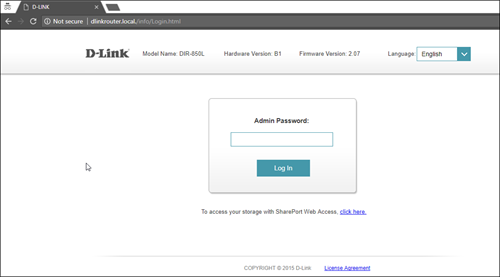
4. Setelah anda berjaya log masuk, halaman persediaan berasaskan web akan muncul. Sila ikuti langkah di bawah untuk konfigurasi.

5. Dari menu atas, klik Tetapan dan kemudian pilih Wayarles.

6. Skrin di bawah akan muncul untuk mengkonfigurasi tetapan wayarles. Memandangkan ini ialah router dwijalur (dual band), anda akan mempunyai 2 nama Wi-Fi (Wi-Fi Name) (SSID) iaitu 2.4GHz dan 5GHz.
Anda boleh menyambung ke mana-mana SSID, sebaik-baiknya dengan isyarat tersedia yang lebih kuat.

7. Anda boleh menukar nama Wi-Fi (Wi-Fi Name) (SSID) dan Kata laluan (password) untuk mengikut pilihan anda, dan kemudian klik "Simpan" untuk perubahan berlaku.
Sila sambung semula ke nama wayarles baharu dengan Kata laluan (password) baharu setelah selesai.
Ya, Tambahan Mesh Wi-Fi tersedia untuk langganan Astro Fibre Bundle dan Astro Fibre.
LANGKAH 1
Pada alat kawalan jauh anda, tekan butang HOME dan menu laman utama akan dipaparkan di bahagian atas skrin anda.
LANGKAH 2
Pergi ke Settings.
LANGKAH 3
Pergi ke Resolusi Video dan tekan “OK”.

LANGKAH 4
Pergi ke pilihan anda dan tekan “OK”.
Disarankan untuk pilih Auto.

LANGKAH 5
Pergi ke Simpan dan tekan "OK" untuk mengesahkan pilihan anda sekiranya anda boleh membaca teks dengan betul.
Sebaliknya, pergi ke Batal untuk kembali ke tetapan sebelumnya.

1. What is Netflix?
Netflix is a streaming entertainment service that offers a wide variety of award-winning TV programmes, films, anime, documentaries and more - on thousands of internet-connected devices. There's always something new to discover, and more TV shows and movies are added every month. The more you watch, the better Netflix gets at recommending TV shows and movies you’ll love.
Astro customers with an internet-connected Ultra Box or Ulti Box canaccess the Netflix app and watch Netflix content via their Astro Box. For more information about Netflix, visit the Netflix website https://about.netflix.com/en
2. Which new pack comes with Netflix?
Any packages with Entertainment Plus, Movies Plus & Sports Plus will include Netflix. The default Netflix offering is Netflix Standard (2 screens and HD viewing) as part of your Entertainment Plus, Movies Plus and Sports Plus subscription. You can upgrade up to Netflix Premium (4 screens and 4K UHD viewing) at a price of RM 10 (inclusive of govt. tax).
Note: For the above subscriptions, you may use the email address used for your existing subscription with Netflix to activate and the future billing for Netflix will be transferred to your Astro bundle charges. For users that are billed for Netflix through Apple before joining the Astro bundle, remember to cancel your Apple billing arrangement after activating the Astro bundle else you may be double charged for your Netflix account.
If you do not have a bundle which includes Netflix, you may also add anew Netflix subscription to your Astro Bill for billing convenience.
3. How do I know if my new pack includes Netflix?
If Netflix is included as part of your Astro pack, you will find it in My Astro app called “Apps” where you will be able to manage all the streaming apps you are entitled to.
Netflix will also be included in your Astro bill under “MonthlyCharges”
If you have added Netflix to your bill (Netflix Add-on), the Netflix subscription charge will appear in your Astro bill under “One-time charges” as Netflix App Subscription or Netflix Premium and will be charged monthly. You should refer to Netflix account Management for any changes to your Netflix subscription or should you wish to change to other billing methods.
4. I signed up for the EntertainmentPlus / Movies Plus / Sports Plus pack that includes Netflix. How do I activate my Netflix account?
You should have received an email or SMS with your activation details, please click on the link provided to be redirected to the Netflix website to activate your account.
Alternatively, you can also activate Netflix on your Ultra/Ulti Box. Please surf to CH 741 on your Ultra/Ulti Box (or click the Netflix button on your Astro remote) and follow the instructions on the screen.
5. Will I be able to access Netflix on my Ultra/Ulti Box?
You will be able to access Netflix on your Ultra and Ulti Box. However, kindly note that if you have an Ulti Box with a Netflix Premium subscription, you will not be able to watch content in 4K UHD and Netflix Spatial Audio.
6. How do I change my Netflix plan or account information?
You can make changes to your Netflix plans that are included in your Bundle through My Astro app.
You can change your non Astro-bundled a-la carte Netflix plan at any time by signing into Netflix.com and visiting the Account page, then selecting Change Plan to view and select available plans.
7. How many devices can I access Netflix at once?
Customers with a Netflix Premium account are allowed to watch on up to 4 supported devices in 4K UHD and Netflix Spatial Audio. In addition, Netflix Premium subscribers are also allowed to download shows to watch offline on 6 devices at a time.
Netflix Standard account customers are allowed to watch shows in Full HD and download them to watch offline on up to 2 supported devices at a time.
On the other hand,Netflix Basic account customers are allowed to watch shows in HD and download shows for offline viewing on only 1 supported device at a time.
8. You can add a new Netflix account to your bill through CH 741 or clicking the Netflix button on the remote control. Please enter the email address you would like to use for Netflix subscription and ensure the Billing partner is Astro.
If you would like to transfer your existing Netflix Account to be charged under Astro bill, please follow the steps below:
- Cancel your existing subscription with Netflix
- Once the remaining duration of your existing subscription has ended, you may proceed to subscribe for Netflix via Astro bill
- To subscribe, go to CH 741 and enter the email address used for your previous subscription with Netflix
- Once successfully completed, all existing settings and watching history on your Netflix account will be brought over
9. I have added a Netflix account to my Astro bill. Do I need to perform any activation?
By adding a Netflix account to your Astro bill, your Netflix account is already activated. No additional steps for activation are required.
10. When I create a new Netflix account to link to my Astro Bill, will I lose all my current watching history in Netflix?
You may retain your watch history and settings of your existing Netflix account by using the same email of your Netflix account during the linking of your Netflix account with Astro.
11. I forgot my Netflix username or password. How do I find my username or reset my password?
If you have forgotten your username or password, you may follow the steps below:
Step 1. Go to netflix.com
Step 2:Click on Sign In
Step 3:Click on “Need Help” to reset password
12. I forgot which Netflix account is associated with my Astro Account. How do I find that out?
You can recover your Netflix login here or at astro.com.my/Netflix
Step 1:Head to astro.com.my/Netflix
Step 2: At the FAQ section look for “How to recover my Netflix login email and password”
Step 3: Login with Astro ID
Step 4:Proceed to Netflix.com for account recovery
13. What will happen to my Netflix account if I cancel my Astro service or change my Astro package?
If your existing Netflix account is linked with your Astro subscription, your Netflix account will resume on the previous method of payment. If you linked a new Netflix account with your Astro subscription, cancelling Astro service will also cancel your Netflix account.
14. What happens to my Netflix account if I move to a new address?
There will be no changes to your Netflix account when you move to a new address.
15. How do I cancel Netflix?
If you are subscribed to Netflix via a bundle, Netflix comes by default as part of your entitlement.
If you are subscribed to Netflix as an a-la carte, the cancellation of Netflix can only be done via Netflix’s Website, etc. This change will reflect in your next bill.
From mid-December 2021 you may also cancel Netflix add-on through Astro Call Center.
16. I would like to change the Netflix account linked to my Astro pack. What should I do?
Please visit http://help.netflix.com to call or start a live chat with Netflix’s customer support agents. You will be assisted to unlink your Netflix account from your Astro subscription. After the process, you may link another Netflix account to your Astro subscription.
17. Will Netflix be automatically added to my Astro subscription?
Astro subscribers will have the freedom to subscribe to Netflix via Astro, or they may also choose to continue subscribing via Netflix directly on their own.
18. Will Astro censor Netflix content?
Absolutely not. Astro wants to give our members the convenience of having all their favourite series, exciting originals, vernacular signatures, live sports and local blockbuster movies all in one place.
19. I have signed up for two (2) or more main Astro subscriptions bundled with Netflix. Will I be entitled for multiple Netflix subscriptions?
Yes. You are entitled to separate Netflix accounts for each main Astro subscription e.g. If you have subscribed to Entertainment Plus, Platinum Pack, etc separately. Therefore, if you have more than one main Astro subscription with Netflix, you may choose to create multiple email addresses to activate each respective Netflix subscription. Please follow the steps provided to you via email/SMS in order to activate your Netflix subscriptions on the website.
20. Why should I subscribe to a Netflix on Astro vs direct subscription via the Netflix app?
- With numerous OTT entrants, consumers are suffering from subscription fatigue. In fact, they are looking for a one stop shop platform where OTT services are integrated in one place.
- Astro offers flexibility and convenience with new packs where customers can get the convenience of accessing a variety of content via Ultra Box as the single remote-control solution.
- In addition, there will be cost savings for Astro customers to purchase both Netflix and Astro together. Even better deals are available if customers also subscribe to broadband for a better-connected experience.
Setelah proses penamatan selesai, pelanggan akan menerima satu bil terakhir yang menyatakan jumlah amaun yang perlu dibayar kepada Astro mengikut pilihan pengebilan mereka.
Bagi pelanggan yang telah memilih e-bil atau bil SMS sebelum ini, mereka akan menerima bil terakhir mengikut pilihan itu.
Bagi pelanggan yang memilih bil bercetak, mereka akan menerima bil terakhir melalui bil bercetak. (Caj Bil Bercetak akan dikenakan).
Ya, pelanggan yang melanggan Astro First / Astro Best / Pay-Per-View pada Februari 2024 dengan tempoh tontonan pada Mac 2024 akan tetap dikenakan Cukai Perkhidmatan sebanyak 8% di dalam bil seterusnya.
Ya, anda boleh menamatkan perkhidmatan. Walau bagaimanapun, yuran pembatalan awal akan dikenakan untuk penamatan/pembatalan dalam tempoh 24 bulan. Sila rujuk butiran pembatalan Astro Fibre.
Multiroom (TV Pintar) ialah langganan kedua yang membolehkan anda menikmati rancangan Astro kegemaran anda dengan serta-merta dalam bilik yang berbeza pada masa yang sama pada TV Pintar anda. Langgan Multiroom (TV Pintar) pada RM29.99 setiap bulan (tidak termasuk apa-apa cukai kerajaan), dan hanya muat turun aplikasi Astro pada skrin TV kedua anda dan sambungkan ke Wi-fi rumah anda untuk penstriman.
Anda perlu mempunyai langganan Astro sebelum boleh melanggan Disney+ Hotstar sebagai perkhidmatan tambahan melalui Astro dan menikmati mana-mana promosi pakej Astro. Untuk menjadi pelanggan Astro, sila klik di sini: astro.com.my untuk menikmati Global and Malaysian Hits dengan tawaran pajek terunggul.
Sila tukar langganan semasa anda kepada pek Astro baharu kami untuk melanggan Multiroom (Smart TV). Untuk mendaftar, WhatsApp TUKAR ke 03-9543 3838 dan ejen akan membantu anda.
Ketahui lebih lanjut mengenai pek baharu kami di https://product.astro.com.my/tv
Akses Disney+ Hotstar anda dengan Astro akan ditamatkan juga.
Untuk pelanggan Pek Platinum dan Multiroom Smart TV, Astro GO+ akan dimasukkan secara automatik ke dalam langganan anda.