


Pemasangan Untuk Seluruh Malaysia
Mendaftar untuk
| Astro Njoi UniFi Maxis |
Soalan Yang Kerap Ditanya (FAQ)
Cari jawapan anda di sini.
Kami menyediakan perkhidmatan untuk mendaftar Astro dan Broadband untuk anda.
Anda boleh mengelakkan memandu dan beratur di kaunter jualan. Kami adalah peniaga yang boleh memproseskan pendaftaran anda dalam talian.
Anda tidak akan dicaj untuk mendaftar di sini. Tidak ada maklumat kad kredit yang diperlukan. Caj adalah sama seperti yang anda mendaftar di kaunter jualan.
Yang pertama, anda boleh mendaftar dalam talian di sini, kami akan menghubungi anda dengan segera semasa waktu perniagaan. WhatsApp / E-mel / Fax salinan fotokopi IC (untuk warganegara Malaysia) / Pasport (untuk orang asing) kepada kami. Apabila kami menerima semua maklumat, kami akan memproses pendaftaran anda segera.
Sebaik sahaja kami menerima pendaftaran anda dengan maklumat lengkap, kami akan memproses permohonan anda dengan segera pada waktu perniagaan. Kontraktor dari pembekal perkhidmatan kemudian akan menghubungi anda untuk pelantikan pemasangan setelah permohonan anda diluluskan.
Nikmati penjimatan yang lebih besar dan pembayaran bil tanpa gangguan dalam satu bil untuk Astro dan Broadband. Anda dapat menikmati Astro dan Broadband dengan harga potongan setiap bulan sepanjang tempoh kontrak 24 bulan.
Astro menawarkan pelbagai pakej TV termasuk Hiburan, Sukan, Filem dan Kanak-kanak. Anda boleh memilih pakej yang sesuai dengan pilihan tontonan anda serta menambah aplikasi penstriman pilihan jika tersedia.
Ya, anda boleh melanggan pakej TV Astro tanpa menggabungkan broadband. Namun, menggabungkan TV Astro dengan Fibre Broadband boleh memberikan penjimatan bulanan yang lebih baik serta kemudahan satu bil sahaja.
Untuk isi rumah kecil dengan penggunaan penstriman dan pelayaran ringan, 100Mbps biasanya mencukupi. Keluarga besar, pemain permainan dalam talian atau pengguna penstriman berat mungkin mendapat manfaat daripada pelan 500Mbps atau 1Gbps untuk prestasi lebih lancar pada pelbagai peranti.
Kebanyakan pelan TV dan Fibre broadband Astro disertakan dengan kontrak 24 bulan. Caj penamatan awal mungkin dikenakan sekiranya pembatalan dibuat sebelum tamat tempoh kontrak.
Ya, anda boleh menaik taraf pakej TV atau kelajuan broadband pada bila-bila masa, tertakluk kepada kelayakan dan liputan kawasan. Tempoh kontrak baharu mungkin dikenakan bergantung kepada naik taraf tersebut.
Bil bulanan anda akan dikeluarkan terus oleh Astro. Anda boleh menerimanya melalui emel atau mengaksesnya melalui akaun Astro anda. Pelanggan pakej gabungan akan menerima satu bil gabungan untuk perkhidmatan TV dan broadband.
Kaedah pembayaran termasuk perbankan dalam talian, debit automatik, kad kredit atau saluran pembayaran lain yang diluluskan oleh Astro. Pasukan kami boleh membantu anda semasa proses pendaftaran.
Jika anda mengalami gangguan perkhidmatan, anda boleh menghubungi khidmat pelanggan Astro untuk bantuan teknikal. Dalam kebanyakan kes, masalah boleh diselesaikan dari jauh atau juruteknik akan dijadualkan jika perlu.
Ya, pemindahan tertakluk kepada ketersediaan perkhidmatan di alamat baharu anda. Caj pemindahan dan pelarasan kontrak mungkin dikenakan bergantung kepada pelan anda.
Tidak, anda tidak memerlukan kad kredit untuk menghantar permohonan. Pengaturan pembayaran akan dibuat terus dengan Astro selepas perkhidmatan anda diluluskan.
Pakej TV Astro terpilih membenarkan tambahan pilihan seperti perkhidmatan penstriman bergantung kepada promosi semasa dan ketersediaan. Caj bulanan tambahan mungkin dikenakan.
Ya, router WiFi biasanya disediakan semasa pemasangan fibre. Model router mungkin berbeza bergantung kepada pelan kelajuan broadband yang dipilih.
Ya, kami akan menyemak liputan perkhidmatan di alamat anda sebelum meneruskan permohonan untuk memastikan broadband tersedia di kawasan anda.
Bagi warganegara Malaysia, sila sediakan salinan MyKad anda. Bagi warga asing, sila sediakan salinan pasport semasa menghantar permohonan broadband.
Selepas permohonan anda diluluskan, penyedia perkhidmatan biasanya akan menghubungi anda dalam tempoh 2 hingga 7 hari bekerja untuk menetapkan janji temu pemasangan broadband.
Kebanyakan pelan Astro Broadband disertakan dengan kontrak 24 bulan bermula dari tarikh pemasangan. Jika anda berpindah, kontrak 24 bulan baharu mungkin dikenakan di alamat baharu.
Ya, anda boleh memindahkan perkhidmatan broadband tertakluk kepada ketersediaan perkhidmatan di alamat baharu. Kontrak anda mungkin diperbaharui untuk 24 bulan lagi bermula dari tarikh pemasangan baharu.
Ya, anda boleh memohon untuk memindahkan peranti broadband di dalam rumah. Caj pemasangan bukan standard mungkin dikenakan dan perlu dibayar terus kepada pemasang selepas penilaian dibuat.
Ya, anda boleh bertukar ke Astro Broadband. Untuk mengelakkan gangguan perkhidmatan, disarankan untuk mengaktifkan perkhidmatan baharu sebelum menamatkan kontrak broadband sedia ada.
Pemasangan standard mungkin percuma semasa tempoh promosi, namun pemasangan bukan standard (contohnya pemindahan peranti atau pendawaian kompleks) mungkin dikenakan caj tambahan yang perlu dibayar terus kepada pemasang.
Akaun anda mungkin tidak aktif.
Untuk menyelesaikan masalah ini, sila buat laporan melalui WhatsApp atau Borang Maklum Balas.
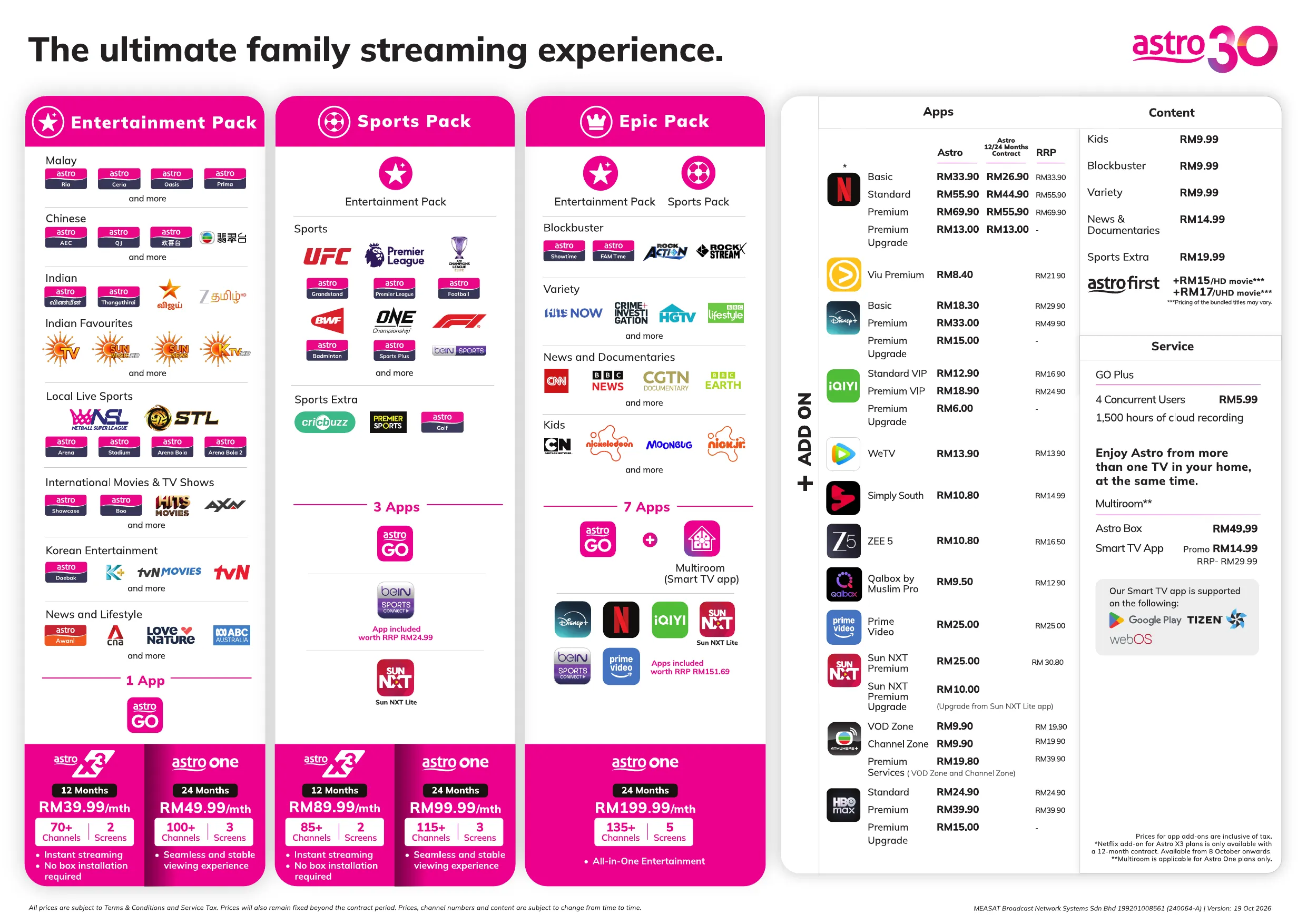
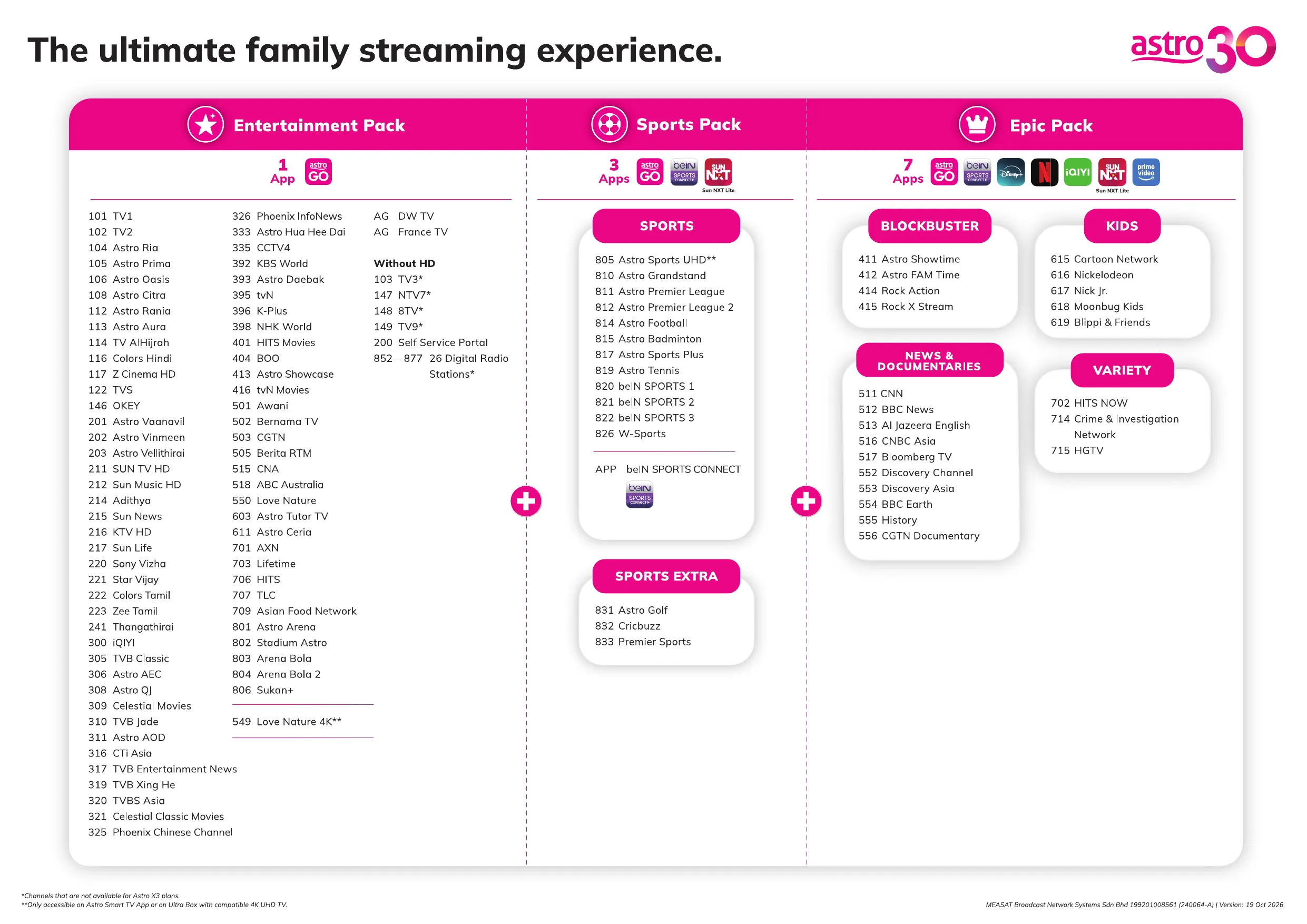
Starting 1 March 2026, customers can look forward to three new movies & entertainment channels — Astro Showtime (CH 411), Rock Action (CH 414) and Rock X Stream (CH 415) — each offering a distinct selection of popular films. Additionally, beginning 1 April 2026, another new channel, Astro FAM Time (CH 412), will be available to customers.
- Astro Showtime (CH 411) - spotlights top titles from Hollywood and beyond
- Rock Action (CH 414) - delivers non‑stop, action‑packed movies
- Rock X Stream (CH 415) - brings together the world’s most talked‑about, critically acclaimed, and big‑budget series
- Astro FAM Time (CH 412) - features family‑friendly favourites and feel‑good entertainment (available from 1st April 2026)
At the same time, Warner Bros. Discovery (WBD) and Astro's partnership model going forward will change how HBO content is accessed on Astro. From 1 March 2026, the HBO Max app will continue to be available to Astro customers as a standalone ala carte subscription, and the following HBO channels will be discontinued on Astro effective 11:59 PM on 28 February 2026:
- HBO HD (CH 411)
- Cinemax HD (CH 412)
- HBO Family (CH 414)
- HBO Hits (CH 415)
We understand how important this service is to many of our customers. Customers on any Movie bundle packages / Movies add-on / Astro One: Epic Pack who wish to continue enjoying HBO’s content can subscribe to the HBO Max app as an ala carte add‑on via Astro from RM24.90/month, with access to HBO Originals, blockbuster movies, and exclusive series. There will be no changes for Astro customers who currently subscribe to HBO Max as an add‑on.
Customers without an Ultra or Ulti Box can still enjoy the HBO Max app on their smart devices (Android/ iOS) or by visiting
https://www.hbomax.com
. To enjoy HBO Max on the Ulti/ Ultra box, customers can upgrade to the Ulti/Ultra box. You can check your eligibility for a free box swap through the following methods:
- Log in to the My Astro app.
- Send a WhatsApp message with "Hi" to 03-9543 3838, select "Upgrade," and then select "Box Upgrade."
If you see the error message "There is No Internet Connection" while using the Astro app on your Smart TV, please follow these troubleshooting steps:
1. Check Your Internet Connection
- Confirm whether your Smart TV is connected to the internet via Wi-Fi or a LAN (Ethernet) cable.
2. Check the LAN Cable Connection (if using Ethernet)
- Ensure the LAN cable is securely connected from the router's LAN port to the TV's LAN port.
- Verify that the LED indicator lights on both the router and TV network port are active.
3. Test the LAN Cable
- Connect the same LAN cable to another device (for example, a laptop or another Smart TV).
- Check whether the device can access the internet to confirm the cable is functioning properly.
4. Reconnect to Wi-Fi (if using Wi-Fi)
- Go to your TV's network settings.
- Select your home Wi-Fi network and choose Forget Network.
- Reconnect to the Wi-Fi network by entering the password again.
5. Check Other Devices
- Verify that other devices in your home (such as smartphones, tablets, or laptops) can connect to the same Wi-Fi network.
- If all devices are unable to connect, the issue may be with your internet service.
6. Restart Your Devices
- Turn off and restart the following devices:
- Router
- Modem (if applicable)
- Smart TV
- Wait a few minutes for the internet connection to stabilize.
- Launch the Astro app again and test the playback.
If you are still having issues, proceed to submit report via WhatsApp or Feedback Form and provide:
- Astro ID use
- Smart TV model
- OS version
- Error reported on device
This will help our support team investigate and assist you further.
Rebat bulanan RM15 (tidak termasuk cukai kerajaan) akan diberikan kepada semua langganan Multiroom (Smart TV) yang aktif sehingga diberitahu kelak. Sekiranya rebat ini ditamatkan pada masa hadapan, kami akan memaklumkan pelanggan terlebih dahulu melalui e-mel atau SMS. Untuk mengemas kini maklumat hubungan anda, sila klik di sini
Kami ingin menasihati anda untuk membuat pembayaran sebelum bil bulan berikutnya dihasilkan supaya tontonan anda tidak akan terganggu. Harap maklum bahawa caj sehingga RM20 (tidak termasuk tax kerajaan) boleh dikenakan jika anda ingin menyambung semula langganan anda, kecuali bagi pelanggan Komersial & Hotel.
Ketahui lebih lanjut tentang bayaran penyambungan di sini.
Sebagai inisiatif untuk menjaga alam sekitar pelanggan digalakkan untuk memilih penyata bil yang dihantar secara percuma melalui e-mel atau SMS. Bermula 1hb Ogos 2022, akan terdapat kenaikkan Caj Bil bercetak daripadaRM7.00 kepada RM10.00 setiap bil/bulan. Caj Bil bercetak akan dikecualikan untuk pelanggan yang memilihe-Pengebilan, yang akan menerima bil mereka melalui platform digital.
Starting from 24 January 2025, Astro One Pack customers can add on Netflix ala-carte (comes with 24 months contract) plan to their subscription. This plan allows customers to choose from three Netflix subscription plans Basic, Standard, and Premium with a 24-month contract. This plan is offered at a discounted rate compared to the regular monthly Netflix add on, providing a cost-effective way to enjoy Netflix content.
Please reach out to the Simply South team by emailing them at [email protected] you have any enquiries or require assistance with the app.
If you would like to contact Astro, you may reach out to our Customer Service Centre by:
- Submitting a feedback form here: www.astro.com.my/contactus/form; or
- Reaching to us via WhatsApp by typing “Hi” at 03-9543 3838 for assistance
Yes, for customers on the Primary, Movies, Movies Plus, Sports, Sports Plus or Premium 1 Pack,
you will still be able to enjoy Viu Premium as an add-on for as low as RM8.40/month (RRP:
RM14.90). Please refer to the table below for the complete pricing:
TV Pack | Price |
|
|
| RM 8.40/month (inclusive of tax) *This add-on price is only applicable if customers choose to add Viu Premium plus another selection under Asian Favourites |
All Other Packs | RM 21.90/month (inclusive of tax) |
Yes, you can watch content on up to 4 different devices simultaneously using the same account. You can have 4 logged-in devices and 4 profiles, allowing for 4 concurrent streams.
All new and existing Astro Pay-TV customers are entitled to Astro special price when they signup for iQIYI as a VIP member via Astro at www.astro.com.my/iqiyi.
Package | Monthly Astro Price |
Standard VIP | RM12.90 (RRP at RM 16.90) |
Premium VIP | RM 18.90 (RRP at RM 24.90) |
Pembayaran yang berjaya melalui JomPAY akan disiarkan dalam masa nyata.
Pengesahan SecureGo adalah wajib untuk semua transaksi melalui My Astro v6.2.0 (berkuat kuasa 12 Jun 2024). Transaksi melalui platform lain atau aplikasi versi terdahulu akan kekal dengan SMS OTP.
Tiada denda akan dikenakan jika anda membatalkan langganan Astro GO+ anda.
Yes, effective 1st March 2025, your Astro subscription packs that are bundled with Netflix will have a price increase:
- Netflix Standard: An increase of RM4.50 (before tax) monthly will be applied.
- Netflix Premium: An increase of RM7.28 (before tax) monthly will be applied.
- Netflix Premium (Astro one Epic): An increase of RM2.78 (before tax) monthly will be applied.
Sila semak SMS yang diterima mengenai status pembayaran yang tidak berjaya dan sekiranya anda memerlukan penjelasan lanjut, hubungi bank pengeluar anda untuk penjelasan atau hubungi kami melalui WhatsApp.
Ya, mana-mana pelanggan aktif Astro dengan bayaran langganan utama minimum RM100 boleh melanggan kepada Multiroom (Astro Box) pada harga RM49.99 sebulan dengan sediaan kotak (harga langganan tertakluk pada Cukai Kerajaan).
There are 4 ways for you to contact us for assistance:
- Submit an in-app feedback form via the iQIYI app by following these simple steps:
- Step 1: Click on your Profile
- Step 2: Click on "Help & Feedback"
- Step 3: Click on "Feedback" at the bottom of the page
- Step 4: Fill in your email address. Please ensure it is accurate as you will be contacted via this email address.
- Step 5: Briefly explain the problem/trouble/feedback
- Step 6: Click "Submit"
- Please contact the iQIYI customer service team via [email protected]. You will receive a response within 3-5 working days.
- Kindly include your iQIYI UID information when you submit your feedback via email by following these simple steps:
- Step 1: Open the iQIYI app
- Step 2: Tap on the "Me" button at the bottom right
- Step 3: Tap on your username at the top left
- Step 4: Scroll down to the "Personal Data" page and copy your "UID" number
- If you are an Astro customer, you may also contact our Customer Service by:
- Submitting a feedback form here: https://support.astro.com.my/feedback-form;
- Reaching to us via WhatsApp by typing "Hi" at 03-95433838 for assistance.
Anda sedang cuba memainkan kandungan yang bukan sebahagian daripada langganan anda. Sekiranya anda tidak dapat memainkan kandungan yang telah dilanggan, sila buat laporan melalui WhatsApp atau
Borang Maklum Balas
.
Penyata bil anda akan merangkumi butiran caj langganan bulanan anda; cth. caj untuk pakej Astro dan perkhidmatan Jalur Lebar yang anda pilih. Ia juga akan menunjukkan tempoh masa yang akan meliputi bil pertama anda dan juga menunjukkan jumlah caj dan tarikh akhir pembayaran.
No, your subscription will be terminated at the end of your Astro billing date. Until then, you will still be able to access your WeTV VIP account.
Ultra Box ialah generasi terkini kotak dayaan UHD 4K Astro dengan ciri rakaman Cloud, antara muka baharu yang direka semula, dan resolusi UHD. Hanya sambungkan Ultra Box baharu ke Internet dan kawal hiburan anda serta terokai lebih daripada 100,000 buah video yang menunggu untuk distrimkan pada bila-bila masa. Dengan kemampuan untuk merakam sebanyak mana rancangan yang anda inginkan secara serentak.
Antara muka baharu pada Astro Ultra Box menawarkan pengalaman paparan yang dipertingkat dengan rupa baharu dan rasa dengan ciri-ciri seperti:
· Skrin Laman Utama Baharu - Semuanya yang anda lihat ialah milik anda
· Terokai VOD - Terokai 100k video, strim pada bila-bila masa, di mana-mana sahaja termasuk dalam 4K UHD
· Carian - Carian lebih pantas dan lebih mudah
· Main dari Mula - Anda terlepas permulaan? Hanya mulakan semula
· Berhenti Di Sini, Teruskan Di Sana - Berhenti pada satu skrin dan teruskan pada peranti lain
· Berbilang Skrin - Strim dengan lancar merentasi apa jua peranti
· Rakaman Cloud - Rakam semua program yang anda inginkan pada masa yang sama
. **Tontonan berterusan - Teruskan menonton rancangan kegemaran anda semasa hujan.
Nota: ** Kecuali 4K UHD, Astro First dan semua saluran radio
Astro GO is free for all Astro customers to enjoy their favourite shows and channels on their smartphones, tablets, and computers – anytime, anywhere in Malaysia. Astro customers with an active Pay-TV subscription can link their accounts to watch corresponding On Demand and TV channels available on Astro GO as part of their subscription.
Don't have an Astro account? Fret not, you may still preview and browse content available on Astro GO via Web, Mobile Phone or your tablet using Astro GO Guest Mode.
Yes, you can download selected content on the iQIYI app for offline viewing at a later time. To find the titles you have downloaded, you may go to Profile > My Downloads.
No, there will not be any fees if you change your current Asian Favourites selection to Viu
Premium. You may also switch between Asian Favourites options once every billing cycle.
You can access your WeTV VIP account on up to 2 devices at a time, including your Ultra/Ulti Box. To ensure a smoother streaming experience, please sign out from any unused devices.
If you receive the "Device Was Not Found" error message, it may be because your device has been automatically removed due to concurrent streaming limits being exceeded.
Please perform the following checks and troubleshooting steps:
- Stop streaming on one of the other devices currently using your Astro account.
- Close the Astro Go app on any unused devices.
- Return to your Smart TV and try streaming again.
If you are unable to remove a device or continue to see the error message, proceed to submit report via WhatsApp or Feedback Form and provide:
- Astro ID use
- Smart TV model
- OS version
- Error reported on device
This will help our support team investigate and assist you further.
Viu is an on-demand video streaming service with over 4,500 hours of movies, TV shows and
music. With Viu, you can stream premium Asian content from Korea, Japan, Thailand, Hong
Kong, China and Taiwan – with English, Malay & Chinese subtitles (for selected titles) and more,
all on your big screen TV via the Ultra/Ulti Box or on-the-go right at your fingertips with the Viu
mobile app
Secara umumnya, peringkat Astro Rewards adalah berdasarkan tempoh anda sebagai pelanggan aktif perkhidmatan TV berbayar Astro:
- Magenta: 0 - 2 tahun
- Silver: >2 - 9 tahun
- Gold: >9 - 15 tahun
- Diamond: >15 tahun ke atas
Ganjaran yang anda bakal terima adalah bergantung pada jenis peringkat yang anda langgani. Untuk pengetahuan anda, ini adalah ganjaran terkumpul dimana, jika anda berada di peringkat Diamond, anda juga layak untuk menikmati semua faedah daripada peringkat Magenta, Silver dan Gold.
Sebagai pelanggan Astro, anda boleh semak peringkat Astro Rewards anda melalui aplikasi My Astro app.
1. Muat turun aplikasi My Astro app
2. Login masuk dengan Astro ID anda
3. Pergi ke Ganjaran
4. Anda boleh semak peringkat anda di sini. Tekan peringkat anda untuk info lebih lanjut
Jika anda ingin batalkan perkhidmatan TV berbayar Astro tetapi berhasrat untuk melanggannya semula pada suatu tarikh, tempoh (tahun) anda bersama kami akan ditetapkan kepada status permulaan asal mengikut tarikh pengaktifan baru dimana peringkat Astro Rewards anda akan ditetapkan semula ke peringkat Magenta.
No. The Sun NXT app subscription is currently only accessible within Malaysia.
Ultra atau Ulti Box dan kad SIM merupakan hak milik Astro seperti yang termaktub dalam Terma dan Syarat Umum Perkhidmatan Astro. Oleh itu, anda bertanggungjawab untuk memulangkan semula Astro Box tersebut selepas penamatan langganan Astro. Seandainya pemulangan tidak dilakukan, caj RM100 (sebelum caj cukai jualan dan perkhidmatan) akan dikenakan ke atas akaun anda.
If you see this message, it means the maximum number of devices currently streaming on your Astro account has been exceeded.
Please perform the following checks and troubleshooting steps:
1. Stop Streaming on Other Devices
- Check if Astro is currently being streamed on other devices linked to your account.
- Close the Astro app or stop playback on any unused devices.
2. Wait a Few Minutes
- If a streaming session was recently ended, it may take a few minutes for the system to update.
3. Try Again
- Return to your device and attempt to stream the content again.
4. Check Your Device Usage
- Go to www.astrogo.com.my or open the Astro GO app.
- Log in using your Astro ID and password.
- Review the list of registered devices.
- Remove a device that you no longer use.
- Return to your new device and try signing in again
If you are unable to remove a device or continue to see the error message, proceed to submit report via WhatsApp or Feedback Form and provide:
- Astro ID use
- Smart TV model
- OS version
- Error reported on device
This will help our support team investigate and assist you further.
Note: Please be aware that only one Smart TV device is allowed per account at any point in time.
The new packs will be available starting 9 December 2024 and you can subscribe via:
- The Astro website: www.astro.com.my
- WhatsApp at 03-9543 3838 and type GET ASTRO
- Astro Customer Service Centres
Streaming app entitlement is dependent on the TV Pack you are subscribed to, with some streaming apps available on Astro as an add-to-bill service. Please visit product.astro.com.my/apps to see if you are entitled to your favourite streaming app once it is launched!
Please perform the following checks and troubleshooting steps:
1. Check if your TV supports the Astro app.
The Astro app is generally available on selected:
- Android TV / Google TV
- Samsung Smart TV (selected models)
- LG Smart TV (selected models)
Kindly check that your Smart TV supports the Astro Smart TV app (kindly refer here).
If your TV uses a different operating system (e.g., older proprietary OS), the Astro app may not be available.
2. Update your TV software.
Go to: Settings → Support → Software Update
Install any available updates, then restart the TV and try again.
3. Search the correct app store
- Samsung: Apps
- LG: LG Content Store
- Android/Google TV: Google Play Store
Search for "Astro" or "Astro GO" (depending on your region and service availability).
4. If your TV's region is set incorrectly, certain apps may not appear.
Look under: Settings → General → Location/Region
Ensure it matches your actual country.
If you are still having issues, proceed to submit report via WhatsApp or Feedback Form and provide:
- Astro ID use
- Smart TV model
- OS version
- Error reported on device
This will help our support team investigate and assist you further.
Kelajuan Internet minimum yang disyorkan ialah 10 Mbps untuk video HD dan 30 Mbps untuk video 4K UHD.
Anda akan dapat menonton hampir serta-merta semasa strim rancangan melalui Astro Box anda. Masa penimbal untuk video dimuatkan akan bergantung pada kelajuan jalur lebar anda.
All new and existing Astro TV customers can subscribe to WeTV VIP for only RM10.50/month by following the steps below:
Step 1: Go to www.astro.com.my/product/apps/wetv and select Get it now
Step 2: Log in with your Astro ID
Step 3: Key in your mobile number and proceed to add WeTV to your bill
Step 4: Once you have validated your mobile number via the OTP code, you will be able to enjoy VIP-exclusive shows on WeTV!
Ya, pelanggan mungkin perlu menyediakan dokumen tambahan seperti slip pembayaran bank atau resit pembayaran. Untuk permintaan bayaran balik disebabkan salah pembayaran, adalah wajib untuk memberikan bukti pembayaran atau penyata bank yang menunjukkan butiran transaksi dan akaun bank pada halaman yang sama. Pelanggan akan dimaklumkan oleh Astro sekiranya terdapat sebarang dokumen yang tidak lengkap selepas pengesahan dibuat.
Yes, your information will still be available in the HBO Max app if you choose to resubscribe directly to HBO Max through
www.hbomax.com
. To keep your preferences and account settings, ensure you use the same email address when you resubscribe.