

Pemasangan Untuk Seluruh Malaysia
Mendaftar untuk
| Astro Njoi UniFi Maxis |
Soalan Yang Kerap Ditanya (FAQ)
Cari jawapan anda di sini.
Kami menyediakan perkhidmatan untuk mendaftar Astro dan Broadband untuk anda.
Anda boleh mengelakkan memandu dan beratur di kaunter jualan. Kami adalah peniaga yang boleh memproseskan pendaftaran anda dalam talian.
Anda tidak akan dicaj untuk mendaftar di sini. Tidak ada maklumat kad kredit yang diperlukan. Caj adalah sama seperti yang anda mendaftar di kaunter jualan.
Yang pertama, anda boleh mendaftar dalam talian di sini, kami akan menghubungi anda dengan segera semasa waktu perniagaan. WhatsApp / E-mel / Fax salinan fotokopi IC (untuk warganegara Malaysia) / Pasport (untuk orang asing) kepada kami. Apabila kami menerima semua maklumat, kami akan memproses pendaftaran anda segera.
Sebaik sahaja kami menerima pendaftaran anda dengan maklumat lengkap, kami akan memproses permohonan anda dengan segera pada waktu perniagaan. Kontraktor dari pembekal perkhidmatan kemudian akan menghubungi anda untuk pelantikan pemasangan setelah permohonan anda diluluskan.
Nikmati penjimatan yang lebih besar dan pembayaran bil tanpa gangguan dalam satu bil untuk Astro dan Broadband. Anda dapat menikmati Astro dan Broadband dengan harga potongan setiap bulan sepanjang tempoh kontrak 24 bulan.
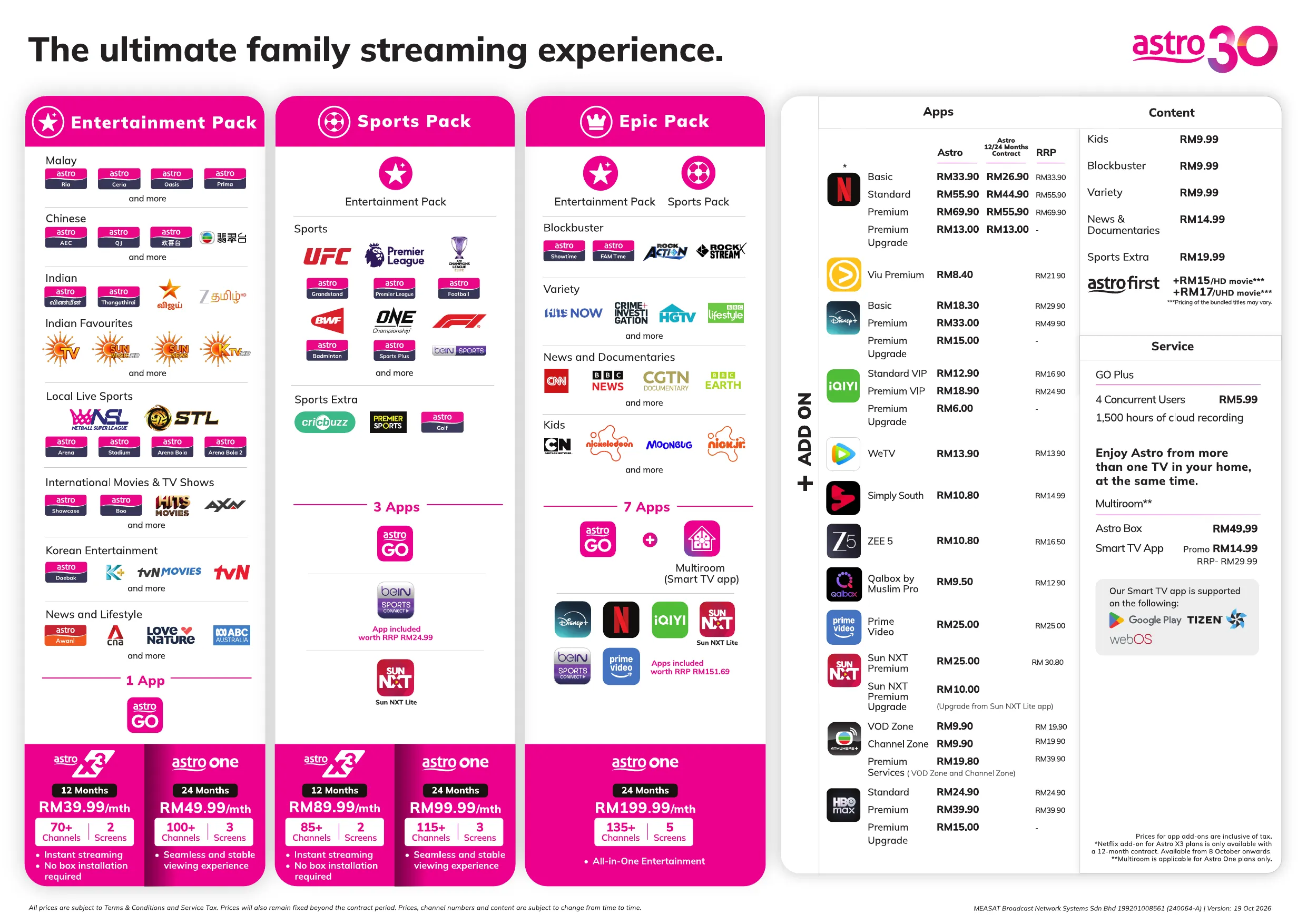
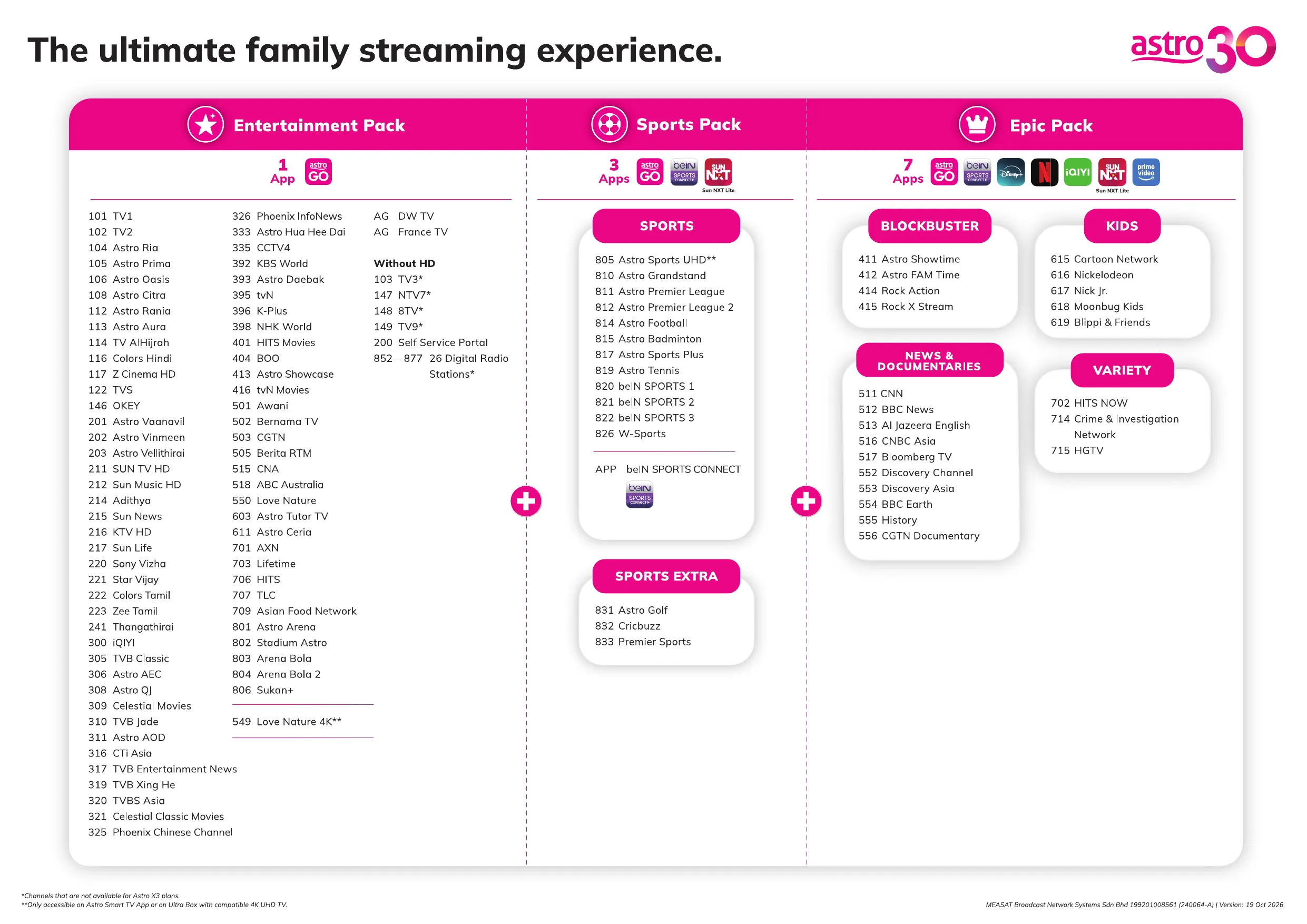
Astro menawarkan pelbagai pakej TV termasuk Hiburan, Sukan, Filem dan Kanak-kanak. Anda boleh memilih pakej yang sesuai dengan pilihan tontonan anda serta menambah aplikasi penstriman pilihan jika tersedia.
Ya, anda boleh melanggan pakej TV Astro tanpa menggabungkan broadband. Namun, menggabungkan TV Astro dengan Fibre Broadband boleh memberikan penjimatan bulanan yang lebih baik serta kemudahan satu bil sahaja.
Untuk isi rumah kecil dengan penggunaan penstriman dan pelayaran ringan, 100Mbps biasanya mencukupi. Keluarga besar, pemain permainan dalam talian atau pengguna penstriman berat mungkin mendapat manfaat daripada pelan 500Mbps atau 1Gbps untuk prestasi lebih lancar pada pelbagai peranti.
Kebanyakan pelan TV dan Fibre broadband Astro disertakan dengan kontrak 24 bulan. Caj penamatan awal mungkin dikenakan sekiranya pembatalan dibuat sebelum tamat tempoh kontrak.
Ya, anda boleh menaik taraf pakej TV atau kelajuan broadband pada bila-bila masa, tertakluk kepada kelayakan dan liputan kawasan. Tempoh kontrak baharu mungkin dikenakan bergantung kepada naik taraf tersebut.
Bil bulanan anda akan dikeluarkan terus oleh Astro. Anda boleh menerimanya melalui emel atau mengaksesnya melalui akaun Astro anda. Pelanggan pakej gabungan akan menerima satu bil gabungan untuk perkhidmatan TV dan broadband.
Kaedah pembayaran termasuk perbankan dalam talian, debit automatik, kad kredit atau saluran pembayaran lain yang diluluskan oleh Astro. Pasukan kami boleh membantu anda semasa proses pendaftaran.
Jika anda mengalami gangguan perkhidmatan, anda boleh menghubungi khidmat pelanggan Astro untuk bantuan teknikal. Dalam kebanyakan kes, masalah boleh diselesaikan dari jauh atau juruteknik akan dijadualkan jika perlu.
Ya, pemindahan tertakluk kepada ketersediaan perkhidmatan di alamat baharu anda. Caj pemindahan dan pelarasan kontrak mungkin dikenakan bergantung kepada pelan anda.
Tidak, anda tidak memerlukan kad kredit untuk menghantar permohonan. Pengaturan pembayaran akan dibuat terus dengan Astro selepas perkhidmatan anda diluluskan.
Pakej TV Astro terpilih membenarkan tambahan pilihan seperti perkhidmatan penstriman bergantung kepada promosi semasa dan ketersediaan. Caj bulanan tambahan mungkin dikenakan.
Ya, router WiFi biasanya disediakan semasa pemasangan fibre. Model router mungkin berbeza bergantung kepada pelan kelajuan broadband yang dipilih.
Ya, kami akan menyemak liputan perkhidmatan di alamat anda sebelum meneruskan permohonan untuk memastikan broadband tersedia di kawasan anda.
Bagi warganegara Malaysia, sila sediakan salinan MyKad anda. Bagi warga asing, sila sediakan salinan pasport semasa menghantar permohonan broadband.
Selepas permohonan anda diluluskan, penyedia perkhidmatan biasanya akan menghubungi anda dalam tempoh 2 hingga 7 hari bekerja untuk menetapkan janji temu pemasangan broadband.
Kebanyakan pelan Astro Broadband disertakan dengan kontrak 24 bulan bermula dari tarikh pemasangan. Jika anda berpindah, kontrak 24 bulan baharu mungkin dikenakan di alamat baharu.
Ya, anda boleh memindahkan perkhidmatan broadband tertakluk kepada ketersediaan perkhidmatan di alamat baharu. Kontrak anda mungkin diperbaharui untuk 24 bulan lagi bermula dari tarikh pemasangan baharu.
Ya, anda boleh memohon untuk memindahkan peranti broadband di dalam rumah. Caj pemasangan bukan standard mungkin dikenakan dan perlu dibayar terus kepada pemasang selepas penilaian dibuat.
Ya, anda boleh bertukar ke Astro Broadband. Untuk mengelakkan gangguan perkhidmatan, disarankan untuk mengaktifkan perkhidmatan baharu sebelum menamatkan kontrak broadband sedia ada.
Pemasangan standard mungkin percuma semasa tempoh promosi, namun pemasangan bukan standard (contohnya pemindahan peranti atau pendawaian kompleks) mungkin dikenakan caj tambahan yang perlu dibayar terus kepada pemasang.
Astro X3 offers a curated selection of entertainment and sports content designed to provide a great streaming experience. The availability of certain channels and programmes is subject to content rights and licensing agreements. We are continuously exploring opportunities to expand and align our content offering, with the aim of bringing more channels and content to Astro X3 in the future.
As for radio channels, Astro X3 is designed primarily for digital-first streaming households, focusing on video entertainment content. As such, radio channels are not included within the Astro X3 experience. Customers can continue to enjoy their favourite radio stations through dedicated radio streaming apps, which can be downloaded directly from their device's app store.
Astro X3 is a new way to become an Astro customer, designed for the big screen. It allows customers to sign up instantly and start streaming Astro directly on their Smart TV—without the need for a set-top box, satellite dish or installation.
Astro GO, on the other hand, is a companion app that comes with every Astro subscription. It extends the experience to smaller screens, enabling customers to watch their content on smartphones, tablets and PCs anytime, anywhere.
Caj pemulangan semula lebihan bayaran adalah tertakluk kepada bank pemprosesan anda. Bagaimanapun, Astro tidak mengenakan sebarang bayaran untuk pemlangan semula lebihan bayaran anda.
The contract period for TV packs will be 24-months upon sign up. In addition to the TV packs, if you would like to also sign-up for Broadband, the contract commitment will be 24 months too.
Astro customers can enjoy a special offer of RM13.90/month (RRP RM13.90/month) when they subscribe to WeTV VIP via Astro.
Anda bebas untuk menguruskan sambungan peranti anda sendiri.
Bayaran box RM100 akan dikenakan kepada bil pelanggan seterusnya jika dia gagal memulangkan Astro box & Kar Pintar/Kad SIM.
Tidak. Disney+ tidak tersedia pada aplikasi Astro Smart TV atau Astro GO.
Anda boleh mengakses Disney+ melalui:
a. Astro Ultra dan Ulti Box dengan memilah aplikasi Disney+ di baris Apps pada halaman Home.
b. Peranti peribadi (cth. telefon pintar, tablet dan Smart TV) dengan memuat turun aplikasi Disney+ atau melayari laman web Disney+.
Sila pastikan maklumat pangilan terkini anda dikemas kini dalam pangkalan data kami semasa anda berhubung dengan ejen kami, ini termasuk nombor telefon bimbit dan alamat rumah anda. Maklumat ini akan digunakan oleh ejen kurier kami untuk menghubungi anda terus bagi proses pengambilan semula.
Anda dibenarkan memulangkan Astro box, Kad pintar/Kad SIM walaupun selepas dicajuntuk bayaran kotak. Setelah berjaya mendapatkan semula kotak Astro & Kad Pintar/Kad SIM daripada pelanggan, Astro akan meneruskan pembayaran balik dalam tempoh 30 hari dari tarikh pengesahan pengembalian barang ke gudang Astro kami.
Proses pemulangan semula lebihan bayaran memerlukan tempoh 5 hari bekerja untuk diproses oleh pihak Astro, dan tambahan 3 - 7 hari bekerja diperlukan tertakluk kepada pemprosesan bank masing-masing.
The Kids Friendly Profile is an enhancement to the Kids User Profile feature with the following major improvements:
- PIN control for the Kids Profile: When switching from a Kids Profile to an adult profile (i.e.: Father or Mother), a PIN entry will be required.
- Limited Kids Profile Content Search: Only Kids age-appropriate content can be searched and displayed within the Kids Profile.
- Kids Profile Based Recordings: Kids Profiles will have their own personalised age-appropriate recordings without any overlap with other user profiles. This feature will be available from 17th August onwards.
These enhancements are available across the Astro GO app, Ultra/Ulti Box, and Multiroom Box/Smart TV app.
Click here to find out more on this new feature and how to use it!
The amount you're charged depends on:
- Your contract period and how long's left of your minimum term from the date your subscriptions end, calculated in months.
- Your current box type - Ultra or Ulti/Other Astro Boxes
- The packages you subscribe to, including App services such as Disney+ and Netflix
You can create up to 5 (five) profiles per account for either HBO Pack with HBO Max Standard or HBO Pack with HBO Max Premium app subscription. Each profile can be customised as kid-friendly by adjusting the settings during the profile creation process. Profiles created for kids will only feature content that is suitable for children under 12 years, irrespective of your membership plan.
Ya. Anda boleh menerokai aplikasi My Astro walaupun anda tidak log masuk. Klik pada "Teruskan sebagai tetamu" untuk menyemak ciri aplikasi sebelum log masuk.
Namun, kami mencadangkan pelanggan Astro untuk log masuk ke aplikasi My Astro dengan Astro ID untuk pengalaman yang terbaik. Inilah cara memautkan Astro ID anda ke akaun Astro anda.
Muat turun My Astro app atau layari laman web My Astro.
Starting 29th April 2025 onwards, the Sun NXT app will be available on the Ultra/Ulti Box for all Astro customers to enjoy on the big screen, web app or/and mobile app.
If you’re facing issues updating your mobile number via My Astro, here’s how you can update your mobile number through your Set Top Box (STB).
- Follow Method A if your box uses a satellite dish (Applicable to all boxes).
- Follow Method B if you are on Ultra or Ulti box that is connected to the internet.
- If your box has both, either method will work.
Method A:
- Switch on your box and navigate to Channel 105 OR Channel 201 OR Channel 308 OR Channel 802.
- Press on the red button on your Astro remote control and a QR code will be displayed on your screen.
- Scan the QR code on a mobile device.
- On the newly opened webpage, please enter your new mobile number.
- To verify your identity, please enter the last 6 digits of the Astro account holder’s MyKad/Passport.
- Please enter the OTP sent to the new mobile number.
- Once the OTP is verified, your mobile number will be updated.
Method B:
- Switch on your box and launch My Astro through the top menu or from the ‘Apps’ section.
- Once you are in My Astro, press the yellow button on your Astro remote control to visit your ‘Account details’.
- Press the down button to view ‘Personal info’.
- Press the left button and focus on the edit icon for mobile number, press on "OK" to change your contact details.
- To verify your identity, please enter the last 6 digits of the Astro account holder’s MyKad/Passport.
- Please enter your new mobile number.
- Please enter the OTP sent to the new mobile number.
- Once the OTP is verified, your mobile number will be updated.
If you’re still unable to update your mobile number, kindly reach out to us via our Feedback Form and a representative from our team will get in touch to assist you soon.
Sebaik sahaja anda menerima pautan eKYC, anda perlu melengkapkan pengesahan dalam masa 3 hari.
Sebagai pelanggan sedia ada, anda akan melihat beberapa perubahan selepas beralih ke aplikasi Disney+ yang baharu kerana beberapa data tontonan peribadi seperti profil, aktiviti tontonan, kandungan yang telah dimuat turun dan tetapan aplikasi tidak akan dipindahkan ke aplikasi baharu.
Oleh itu, anda perlu menetapkan semula profil anda apabila menggunakan aplikasi Disney+ yang baharu buat kali pertama.
Untuk pertanyaan lanjut berkaitan pemindahan dan pengalaman baharu aplikasi Disney+, dan ciri-ciri berkaitan aplikasi, sila layari Pusat Bantuan Disney+.
Anda boleh mendaftar sehingga empat (5) peranti.
Untuk mengalih keluar peranti di Astro GO, klik pada Tetapan > Peranti Berdaftar untuk melihat dan mengalih keluar peranti daripada senarai peranti yang didaftarkan kepada Astro ID anda.
If you would like more information or to provide feedback on Astro Rewards, kindly reach out to us at 03 9543 3838 or visit one of our Astro service centres.
Yes, starting 9 December 2024, the new packs will be the default offering from Astro.
Astro GO+ adalah servis tambahan untuk:
- Membolehkan tayangan serentak di Astro GO sehingga 4 pengguna/peranti.
- Meningkatkan storan rakaman awan daripada 200 jam menjadi 1500 jam.
If you receive the "Device Was Not Found" error message, it may be because your device has been automatically removed due to concurrent streaming limits being exceeded.
Please perform the following checks and troubleshooting steps:
- Stop streaming on one of the other devices currently using your Astro account.
- Close the Astro Go app on any unused devices.
- Return to your Smart TV and try streaming again.
If you are unable to remove a device or continue to see the error message, proceed to submit report via WhatsApp or Feedback Form and provide:
- Astro ID use
- Smart TV model
- OS version
- Error reported on device
This will help our support team investigate and assist you further.
Download the iQIYI app > Select "Profile" > Click on "Log in with Astro ID" > Click on "Do not have an Astro ID? Click here".
No. There will be no changes to your monthly subscription fee as part of the refreshed channel lineup. You will continue to enjoy your current pack at the same price, along with the new channels and content additions.
If you’re an HBO Pack add‑on customer, you’ll continue paying the same RRP amount (depending on your subscription plan – Standard/Premium). If you’re on a combo plan / 50% discounted offer, you’ll keep to the discounted price until the promo expires. After the expiry, you may continue to subscribe to the HBO Max app as an ala carte add‑on via Astro from RM24.90/month.
The TVBAnywhere+ app supports seven languages: Traditional Chinese, Simplified Chinese, English, Vietnamese, Thai, Bahasa Malaysia and Bahasa Indonesia. For major drama titles, subtitles are available in Traditional Chinese, Simplified Chinese, English, Bahasa Malaysia and Bahasa Indonesia. Subtitle availability may vary depending on the title.
Jangan risau, anda hanya perlu sahkan Astro ID anda sekali sahaja. Selepas itu, anda boleh log masuk ke akaun anda seperti biasa.
Untuk Astro Ultra Box atau Ulti Box, akan terdapat caj terperinci "Box Fee" yang dinyatakan di dalam bil Astro anda.
Anda boleh meminta penetapan semula kata laluan dengan mengklik pada 'Lupa Kata Laluan' di halaman log masuk.
You may cancel your iQIYI subscription in the app by following these steps:
Step 1: Go to Home Page
Step 2: Click on "VIP subscription"
Step 3: Click on "Manage VIP subscription" (Gear icon)
Step 4: Click on "Cancel VIP subscription"
Anda boleh menghubungi pihak perkhidmatan pelanggan kami di talian 03-95433838 jika terdapat sebarang masalah atau pertanyaan mengenai penebusan ganjaran anda.
Unfortunately, subtitles and dubbing options are currently not available.
Ya, undang-undang cukai perkhidmatan semasa tidak mengecualikan perkhidmatan yang diberikan kepada pelanggan yang tinggal di Labuan, Langkawi, dan Tioman.
Only Astro customers with the Sports subscription as part of their Astro TV Pack (Bundle or add-on) will be able to enjoy the beIN SPORTS CONNECT app on their Ultra/Ulti Box.
Please perform the following checks and troubleshooting steps:
1. Check if your TV supports the Astro app.
The Astro app is generally available on selected:
- Android TV / Google TV
- Samsung Smart TV (selected models)
- LG Smart TV (selected models)
Kindly check that your Smart TV supports the Astro Smart TV app (kindly refer here).
If your TV uses a different operating system (e.g., older proprietary OS), the Astro app may not be available.
2. Update your TV software.
Go to: Settings → Support → Software Update
Install any available updates, then restart the TV and try again.
3. Search the correct app store.
- Samsung: Apps
- LG: LG Content Store
- Android/Google TV: Google Play Store
Search for "Astro" or "Astro GO" (depending on your region and service availability).
4. If your TV's region is set incorrectly, certain apps may not appear.
Look under: Settings → General → Location/Region
Ensure it matches your actual country.
If you are still having issues, proceed to submit report via WhatsApp or Feedback Form and provide:
- Astro ID use
- Smart TV model
- OS version
- Error reported on device
This will help our support team investigate and assist you further.
Yes, you can watch content on up to 4 different devices simultaneously using the same account. You can have 4 logged-in devices and 4 profiles, allowing for 4 concurrent streams.
Yes, you can. Click on Menu > Language and choose your preferred language. Then, click “SAVE”