

Pemasangan Untuk Seluruh Malaysia
Mendaftar untuk
| Astro Njoi UniFi Maxis |
Soalan Yang Kerap Ditanya (FAQ)
Cari jawapan anda di sini.
Kami menyediakan perkhidmatan untuk mendaftar Astro dan Broadband untuk anda.
Anda boleh mengelakkan memandu dan beratur di kaunter jualan. Kami adalah peniaga yang boleh memproseskan pendaftaran anda dalam talian.
Anda tidak akan dicaj untuk mendaftar di sini. Tidak ada maklumat kad kredit yang diperlukan. Caj adalah sama seperti yang anda mendaftar di kaunter jualan.
Yang pertama, anda boleh mendaftar dalam talian di sini, kami akan menghubungi anda dengan segera semasa waktu perniagaan. WhatsApp / E-mel / Fax salinan fotokopi IC (untuk warganegara Malaysia) / Pasport (untuk orang asing) kepada kami. Apabila kami menerima semua maklumat, kami akan memproses pendaftaran anda segera.
Sebaik sahaja kami menerima pendaftaran anda dengan maklumat lengkap, kami akan memproses permohonan anda dengan segera pada waktu perniagaan. Kontraktor dari pembekal perkhidmatan kemudian akan menghubungi anda untuk pelantikan pemasangan setelah permohonan anda diluluskan.
Nikmati penjimatan yang lebih besar dan pembayaran bil tanpa gangguan dalam satu bil untuk Astro dan Broadband. Anda dapat menikmati Astro dan Broadband dengan harga potongan setiap bulan sepanjang tempoh kontrak 24 bulan.
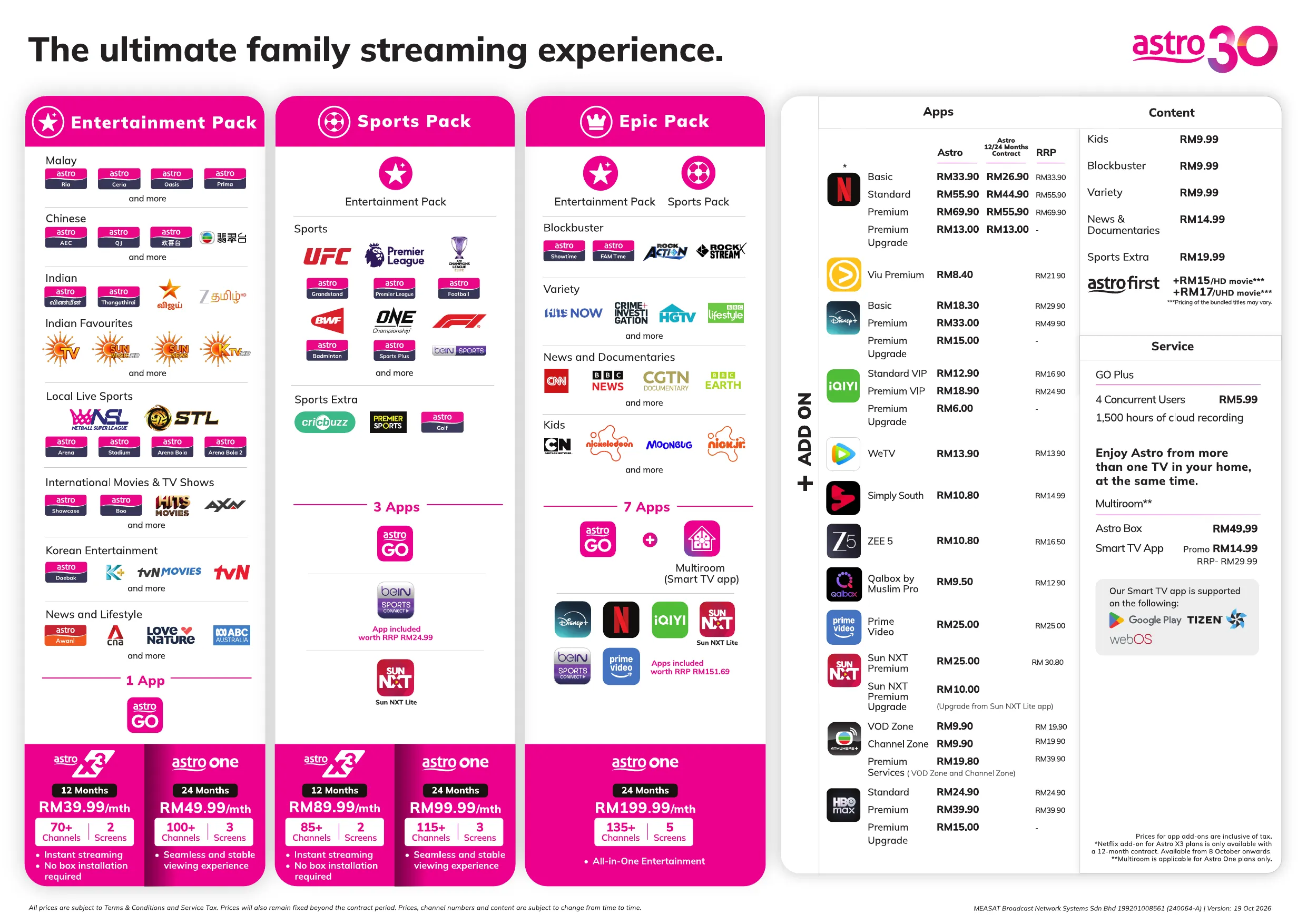
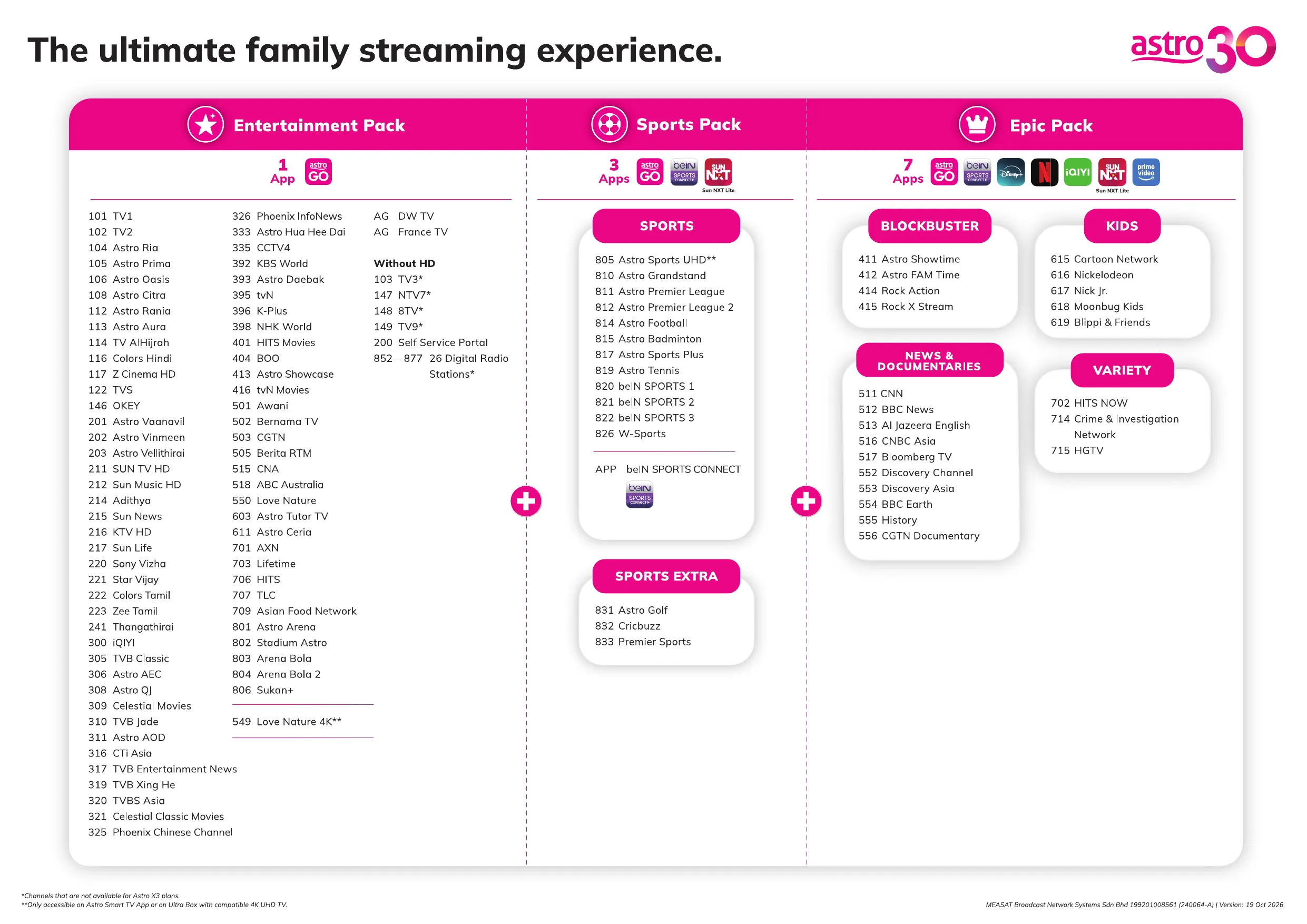
Astro menawarkan pelbagai pakej TV termasuk Hiburan, Sukan, Filem dan Kanak-kanak. Anda boleh memilih pakej yang sesuai dengan pilihan tontonan anda serta menambah aplikasi penstriman pilihan jika tersedia.
Ya, anda boleh melanggan pakej TV Astro tanpa menggabungkan broadband. Namun, menggabungkan TV Astro dengan Fibre Broadband boleh memberikan penjimatan bulanan yang lebih baik serta kemudahan satu bil sahaja.
Untuk isi rumah kecil dengan penggunaan penstriman dan pelayaran ringan, 100Mbps biasanya mencukupi. Keluarga besar, pemain permainan dalam talian atau pengguna penstriman berat mungkin mendapat manfaat daripada pelan 500Mbps atau 1Gbps untuk prestasi lebih lancar pada pelbagai peranti.
Kebanyakan pelan TV dan Fibre broadband Astro disertakan dengan kontrak 24 bulan. Caj penamatan awal mungkin dikenakan sekiranya pembatalan dibuat sebelum tamat tempoh kontrak.
Ya, anda boleh menaik taraf pakej TV atau kelajuan broadband pada bila-bila masa, tertakluk kepada kelayakan dan liputan kawasan. Tempoh kontrak baharu mungkin dikenakan bergantung kepada naik taraf tersebut.
Bil bulanan anda akan dikeluarkan terus oleh Astro. Anda boleh menerimanya melalui emel atau mengaksesnya melalui akaun Astro anda. Pelanggan pakej gabungan akan menerima satu bil gabungan untuk perkhidmatan TV dan broadband.
Kaedah pembayaran termasuk perbankan dalam talian, debit automatik, kad kredit atau saluran pembayaran lain yang diluluskan oleh Astro. Pasukan kami boleh membantu anda semasa proses pendaftaran.
Jika anda mengalami gangguan perkhidmatan, anda boleh menghubungi khidmat pelanggan Astro untuk bantuan teknikal. Dalam kebanyakan kes, masalah boleh diselesaikan dari jauh atau juruteknik akan dijadualkan jika perlu.
Ya, pemindahan tertakluk kepada ketersediaan perkhidmatan di alamat baharu anda. Caj pemindahan dan pelarasan kontrak mungkin dikenakan bergantung kepada pelan anda.
Tidak, anda tidak memerlukan kad kredit untuk menghantar permohonan. Pengaturan pembayaran akan dibuat terus dengan Astro selepas perkhidmatan anda diluluskan.
Pakej TV Astro terpilih membenarkan tambahan pilihan seperti perkhidmatan penstriman bergantung kepada promosi semasa dan ketersediaan. Caj bulanan tambahan mungkin dikenakan.
Ya, router WiFi biasanya disediakan semasa pemasangan fibre. Model router mungkin berbeza bergantung kepada pelan kelajuan broadband yang dipilih.
Ya, kami akan menyemak liputan perkhidmatan di alamat anda sebelum meneruskan permohonan untuk memastikan broadband tersedia di kawasan anda.
Bagi warganegara Malaysia, sila sediakan salinan MyKad anda. Bagi warga asing, sila sediakan salinan pasport semasa menghantar permohonan broadband.
Selepas permohonan anda diluluskan, penyedia perkhidmatan biasanya akan menghubungi anda dalam tempoh 2 hingga 7 hari bekerja untuk menetapkan janji temu pemasangan broadband.
Kebanyakan pelan Astro Broadband disertakan dengan kontrak 24 bulan bermula dari tarikh pemasangan. Jika anda berpindah, kontrak 24 bulan baharu mungkin dikenakan di alamat baharu.
Ya, anda boleh memindahkan perkhidmatan broadband tertakluk kepada ketersediaan perkhidmatan di alamat baharu. Kontrak anda mungkin diperbaharui untuk 24 bulan lagi bermula dari tarikh pemasangan baharu.
Ya, anda boleh memohon untuk memindahkan peranti broadband di dalam rumah. Caj pemasangan bukan standard mungkin dikenakan dan perlu dibayar terus kepada pemasang selepas penilaian dibuat.
Ya, anda boleh bertukar ke Astro Broadband. Untuk mengelakkan gangguan perkhidmatan, disarankan untuk mengaktifkan perkhidmatan baharu sebelum menamatkan kontrak broadband sedia ada.
Pemasangan standard mungkin percuma semasa tempoh promosi, namun pemasangan bukan standard (contohnya pemindahan peranti atau pendawaian kompleks) mungkin dikenakan caj tambahan yang perlu dibayar terus kepada pemasang.
Anda tidak perlu meminta untuk penyambungan semula kerana sistem kami akan mengesan bayaran anda dan memprosesnya serta merta, dengan syarat anda membayar melalui saluran bayaran masa nyata.
Klik di sini untuk senarai penuh saluran bayaran kami.
Customers can enjoy major European football leagues, over 3,000 hours of live tennis and other global sporting events LIVE and on-demand on the app. You may check out the complete list of competitions available on the app here: beIN SPORTS CONNECT | Live Leagues and Competitions | LaLiga, Serie A, Ligue
The iQIYI app offers subtitles in multiple languages for all their content excluding some variety shows. However, no dubbing option is available yet. You will be able to select or switch off your subtitles when you play your video in full screen.
Sila pastikan anda telah melanggani saluran ini.
Jika anda sudah melanggan saluran ini, sila ikut langkah di bawah.
STEP 1
Anda perlu memuat semula isyarat box anda
Rujuk langkah panduan untuk Memuat semula signal box anda.
STEP 2
Jika masalah berterusan selepas 30 minit, sila buat laporan melalui WhatsApp atau Borang Maklum Balas.
You can access your ZEE5 Premium account on up to five (5) devices at a time, including your Ultra/Ulti Box. To ensure a smoother streaming experience, please sign out from any unused devices.
Anda boleh mengisi Borang Maklum Balas dan pilih Jenis Maklum Balas dan Isu seperti butiran di bawah:
Jenis Maklum Balas: Pembayaran/Bil
Isu : Saya da pertanyaan mengenai pemulangan baki
ATAU
Bertanya melalui platform Digital Rasmi Astro iaitu Facebook atau Chat. Ejen kami akan membantu permintaan anda.
Kadar cukai perkhidmatan untuk langganan Astro TV akan dinaikkan daripada 6% kepada 8%. Walau bagaimanapun, cukai perkhidmatan untuk Astro Fibre yang tergolong dalam kategori perkhidmatan telekomunikasi akan kekal pada kadar 6%.
Tidak, pelanggan perlu menghantar notis penamatan melalui Astro Hotline. Rujuk
sini
untuk maklumat lanjut.
Tidak aka nada sebarang perubahan selagi ianya berkaitan dengan perkhidmatan Astro Broadband/Astro Fibre. Ini termasuklah langganan tambahan seperti Mesh WiFi, yang kekal pada 6%.
Yes. To change the language, go to the app’s side menu, then go to Settings and select the preferred interface language.
Dengan memasukkan 10-digit nombor akaun, Astro akan dapat memberikan pilihan layan diri yang lebih baik, kerana ia membenarkan Astro untuk menyesuaikan pilihan automatik berdasarkan keperluan setiap akaun pelanggan.
Bagi pelanggan Astro Fiber baharu dengan penghala RG21, anda akan dibimbing untuk memasang Aplikasi Astro Fiber pada peranti mudah alih anda semasa pemasangan perkhidmatan. Sebagai alternatif, anda boleh merujuk kepada panduan pengguna di sini untuk pemasangan sendiri.
Untuk sebarang peralatan yang tidak dipulangkan, bayaran penalti akan dikenakan seperti di bawah:
- Astro Box – RM100
- Router – RM200 (Untuk Astro Fibre sahaja)
- Mesh – RM200 setiap satu (Untuk Astro Fibre sahaja)
Step 1: At Astro Home, go to the app rail and select "beIN SPORTS CONNECT"
Step 2: Go to the Profile icon at the top of your screen and click "OK"
Step 3: A QR code will be presented on your screen. Use the in-app QR code scanner on your mobile device to scan the QR code
Step 4: Your TV screen will refresh automatically and you will be able to enjoy the beIN SPORTS CONNECT app on your TV!
Pada masa kini, tiada rebat disediakan apabila anda daftar untuk Ultra Plug & Play Box.
If you’re facing issues updating your email address via My Astro, here’s how you can update your email address through your Set Top Box (STB).
Note: This method only works if you are on Ultra or Ulti box that is connected to the internet. If you are on an older box, kindly reach out to us via our Feedback Form.
- Switch on your box and launch My Astro through the top menu or from the ‘Apps’ section.
- Once you are in My Astro, press the yellow button on your Astro remote control to visit your ‘Account details’.
- Press the down button to view ‘Personal info’.
- Press the left button and focus on the edit icon for email address, press on "OK" to change your contact details.
- To verify your identity, please enter the last 6 digits of the Astro account holder’s MyKad/Passport.
- Please enter your new email address.
- Please enter the OTP sent to the new email address.
- Once the OTP is verified, your email address will be updated.
If you’re still unable to update your email address, kindly reach out to us via our Feedback Form and a representative from our team will get in touch to assist you soon.
If you are interested to subscribe to Sun NXT via Astro, please click here or reach out to us via WhatsApp by typing “Hi” at 03-9543 3838.
Pada masa ini, e‑Invoicing tidak diwajibkan untuk semua pelanggan. Namun, ia diwajibkan bagi pelanggan yang melanggan perkhidmatan Astro Fibre atau Broadband. Ini adalah selaras dengan keperluan e‑Invois nasional oleh Lembaga Hasil Dalam Negeri Malaysia (LHDN).
Untuk perkhidmatan Astro yang lain, e‑Invoicing adalah pilihan. Walau bagaimanapun, pelanggan digalakkan untuk menggunakannya kerana ia membantu mempercepatkan proses, memudahkan urus niaga serta memberikan pengalaman pengebilan dan pematuhan cukai yang lebih lancar dari semasa ke semasa.
Yes, you can download selected content on the Viu mobile app for offline viewing at a later time
if you are a Viu Premium member. To view all the shows you have downloaded, please click on
the “download (downwards arrow)” button at the Home Page.
After completing the subscription process in Q4, follow the simple steps below to access WeTV VIP on your Ultra/Ulti Box:
Step 1: Go to your Ultra/Ulti Box Home Page and select "WeTV" under the Apps rail
Step 2: Click "Log in" and scan the QR code on your TV with your mobile device to download/launch the WeTV app
Step 3: On your mobile device, create a new account or log in using your registered mobile number and click "Login Authorization" to pair your device to your TV
Step 4: Once pairing is complete, please press the back button on your remote to start enjoying VIP-exclusive shows!
Important note: Please ensure that the mobile number used to log in to the app is the same one used to purchase your WeTV VIP subscription. Email login is not applicable for Astro Billing WeTV VIP customers.
*We highly encourage our customers to only use their device’s built-in camera to scan the QR code if available. Alternatively, only use QR code scanner apps that are from a trusted 3rd party provider. By using an untrusted QR code scanner app, you assume all responsibility for any damages or losses that may occur.
You will be able to enjoy your Viu Premium membership immediately upon purchase/choosing it
under your Asian Favourites bundle option. For further clarification, feel free to reach out to us
via WhatsApp by typing “Hi” at 03-9543 3838.
Tidak. Penebusan hendaklah dilakukan oleh pemilik akaun sahaja. Walau bagaimanapun, jika pemilik akaun tiada, ahli keluarga terdekat juga boleh melakukan penebusan dengan syarat pemilik akaun bersetuju dan memberikan kebenaran untuk menebus ganjaran menggunakan bukti kelayakan akaunnya.
Yes, you can download WeTV's content on your device for offline viewing if you have subscribed to WeTV VIP. This feature is not available if you are not a VIP member. However, kindly note that some content is subjected to copyright which disables the download function on those selected videos.
Starting 1 March 2026, customers can look forward to three new movies & entertainment channels — Astro Showtime (CH 411), Rock Action (CH 414) and Rock X Stream (CH 415) — each offering a distinct selection of popular films. Additionally, beginning 1 April 2026, another new channel, Astro FAM Time (CH 412), will be available to customers.
- Astro Showtime (CH 411) - spotlights top titles from Hollywood and beyond
- Rock Action (CH 414) - delivers non‑stop, action‑packed movies
- Rock X Stream (CH 415) - brings together the world’s most talked‑about, critically acclaimed, and big‑budget series
- Astro FAM Time (CH 412) - features family‑friendly favourites and feel‑good entertainment (available from 1st April 2026)
At the same time, Warner Bros. Discovery (WBD) and Astro's partnership model going forward will change how HBO content is accessed on Astro. From 1 March 2026, the HBO Max app will continue to be available to Astro customers as a standalone ala carte subscription, and the following HBO channels will be discontinued on Astro effective 11:59 PM on 28 February 2026:
- HBO HD (CH 411)
- Cinemax HD (CH 412)
- HBO Family (CH 414)
- HBO Hits (CH 415)
We understand how important this service is to many of our customers. Customers on any Movie bundle packages / Movies add-on / Astro One: Epic Pack who wish to continue enjoying HBO’s content can subscribe to the HBO Max app as an ala carte add‑on via Astro from RM24.90/month, with access to HBO Originals, blockbuster movies, and exclusive series. There will be no changes for Astro customers who currently subscribe to HBO Max as an add‑on.
Yes. The TVBAnywhere+ app can be downloaded on compatible mobile device via the Apple App Store or Google Play Store. Once installed, customers can log in with their Astro ID to access the app.
Follow the steps below to access the TVBAnywhere+ app on your Ultra/Ulti box:
- Step 1: On the Home menu, go to the app rail and select TVBAnywhere+. A screen with Pair TVBAnywhere+ TV App and a QR code will appear.
- Step 2: Scan the QR code with your mobile device. This action will open the TVBAnywhere+ login page on your phone.
- Step 3: Click on the Astro logo from the partner picker list and login with your Astro ID.
- Step 4: The TVBAnywhere+ app will now launch. Select the ‘Me’ icon to open your profile.
- Step 5: Choose Pair with TV App on the profile page.
- Step 6: A pairing code will appear on your TV. Enter this code on your mobile device and click OK. The TV screen will refresh, and the TVBAnywhere+ homepage will appear.
You can use your existing Prime Video account to access Prime Video on the Ultra/Ulti Box however, if you would like to enjoy the Prime Video for 2 months without additional cost, you may register with a new mobile number/email address. Alternatively, you can activate the 2-month access period using the same mobile number or email address associated with your Prime Video account after your current subscription ends, anytime between 24 April 2025 and 23 June 2025.
While we understand that some customers prefer to buy individual channels, the new packs are designed to offer content at a more affordable price by bundling channels together. As a result, individual channel purchases (ala carte) are not available with the new packs. This approach helps us provide a wider range of content at better value for all customers.
All Customers on any Bundle which includes Movies Pack, those with the Movies Add‑On, customers subscribed to the HBO Pack Add‑On, as well as customers on the Astro One Epic Pack, will automatically be entitled to the new channels.
Complimentary access to the Sun NXT Lite app is only available to Indian Favourites/Maharaja Pack customers. To get an access to Sun NXT Lite, you must be an existing Astro customer with a subscription to Indian Favourites/Maharaja Pack.
You can subscribe to the Astro X3 packs through the following channels:
i. Customer Support: Astro Customer Service, Sales Representatives, or visit Astro Stores for assistance.
ii. WhatsApp: Reach out to our sales agent by sending “Hi” to 03-95433838, select Sign Up, and Connect to Agent.
iii. Astro Official Website: Visit https://product.astro.com.my/tv , choose the Astro X3 packs, and complete the sign-up to start streaming instantly.
Ikuti langkah berikut untuk 'muat semula' atau 'refresh' smartcard anda melalui My Astro:
- Buka/Muat turun My Astro app atau layari laman web My Astro web
- Log masuk dengan Astro ID
- Pergi ke Akaun
- Tekan Langganan atau Pek TV
- Tekan Bilik
- Untuk smartcard Astro yang ingin dimuat semula, tekan butang 'Muat semula'. Ini akan muat semula isyarat kotak Astro anda
📡 Mengalami masalah teknikal?
📱 Muat turun aplikasi My Astro untuk:
- Lakukan penyelesaian masalah sendiri
- Selesai dalam beberapa minit
- Tak perlu hubungi khidmat pelanggan
Tidak, SecureGo hanya boleh dipautkan dengan 1 peranti bagi satu Astro ID.
Baki akan dikreditkan ke dalam akaun anda, dan ia akan dicerminkan di dalam bil anda yang seterusnya. Baki kredit akan digunakan untuk mengimbangi baki bil anda.
If you receive the "Device Was Not Found" error message, it may be because your device has been automatically removed due to concurrent streaming limits being exceeded.
Please perform the following checks and troubleshooting steps:
- Stop streaming on one of the other devices currently using your Astro account.
- Close the Astro Go app on any unused devices.
- Return to your Smart TV and try streaming again.
If you are unable to remove a device or continue to see the error message, proceed to submit report via WhatsApp or Feedback Form and provide:
- Astro ID use
- Smart TV model
- OS version
- Error reported on device
This will help our support team investigate and assist you further.
Buat masa ini, arahan ini hanya terhad kepada perkhidmatan SMS dengan pautan URL antara individu. Walaubagaimanapun, sekatan terhadap SMS yang dihantar oleh perusahaan melalui kod pendek seperti 6XXXX, 3XXxx, 2XXXXdan 1XXXX akan dilaksanakan pada peringkat akan datang. Bagi menyahut seruan inisiatif kerajaan ini, pelanggan Astro tidak lagi akan menerima bil SMS berkuatkuasa pada 1 Ogos 2023. Perubahan ini akan dilaksanakan secara berperingkat.
Sila ubah suai kaedah penghantaran bil pilihan anda menggunakan portal perkhidmatan layan diri kami melalui laman web My Astro atau aplikasi My Astro. Sila klik di sini untuk memuat turun aplikasi pada peranti mudah alih anda atau log masuk ke laman sesawang My Astro.
There are 4 ways for you to contact us for assistance:
- Submit an in-app feedback form via the iQIYI app by following these simple steps:
- Step 1: Click on your Profile
- Step 2: Click on "Help & Feedback"
- Step 3: Click on "Feedback" at the bottom of the page
- Step 4: Fill in your email address. Please ensure it is accurate as you will be contacted via this email address.
- Step 5: Briefly explain the problem/trouble/feedback
- Step 6: Click "Submit"
- Please contact the iQIYI customer service team via [email protected]. You will receive a response within 3-5 working days.
- Kindly include your iQIYI UID information when you submit your feedback via email by following these simple steps:
- Step 1: Open the iQIYI app
- Step 2: Tap on the "Me" button at the bottom right
- Step 3: Tap on your username at the top left
- Step 4: Scroll down to the "Personal Data" page and copy your "UID" number
- If you are an Astro customer, you may also contact our Customer Service by:
- Submitting a feedback form here: https://support.astro.com.my/feedback-form;
- Reaching to us via WhatsApp by typing "Hi" at 03-95433838 for assistance.
Sun NXT Lite app | Sun NXT Premium app |
|
|
Harap maklum bahawa pelanggan yang terlibat akan dimaklumkan tentang perubahan ini 30 hari sebelum pelaksanaan melalui SMS yang dihantar secara berperingkat (Mulai 1 Julai) dan pengumuman berjadual di WhatsApp, aplikasi My Astro dan laman web Astro.