

Pemasangan Untuk Seluruh Malaysia
Mendaftar untuk
| Astro Njoi UniFi Maxis |
Soalan Yang Kerap Ditanya (FAQ)
Cari jawapan anda di sini.
Kami menyediakan perkhidmatan untuk mendaftar Astro dan Broadband untuk anda.
Anda boleh mengelakkan memandu dan beratur di kaunter jualan. Kami adalah peniaga yang boleh memproseskan pendaftaran anda dalam talian.
Anda tidak akan dicaj untuk mendaftar di sini. Tidak ada maklumat kad kredit yang diperlukan. Caj adalah sama seperti yang anda mendaftar di kaunter jualan.
Yang pertama, anda boleh mendaftar dalam talian di sini, kami akan menghubungi anda dengan segera semasa waktu perniagaan. WhatsApp / E-mel / Fax salinan fotokopi IC (untuk warganegara Malaysia) / Pasport (untuk orang asing) kepada kami. Apabila kami menerima semua maklumat, kami akan memproses pendaftaran anda segera.
Sebaik sahaja kami menerima pendaftaran anda dengan maklumat lengkap, kami akan memproses permohonan anda dengan segera pada waktu perniagaan. Kontraktor dari pembekal perkhidmatan kemudian akan menghubungi anda untuk pelantikan pemasangan setelah permohonan anda diluluskan.
Nikmati penjimatan yang lebih besar dan pembayaran bil tanpa gangguan dalam satu bil untuk Astro dan Broadband. Anda dapat menikmati Astro dan Broadband dengan harga potongan setiap bulan sepanjang tempoh kontrak 24 bulan.
Astro menawarkan pelbagai pakej TV termasuk Hiburan, Sukan, Filem dan Kanak-kanak. Anda boleh memilih pakej yang sesuai dengan pilihan tontonan anda serta menambah aplikasi penstriman pilihan jika tersedia.
Ya, anda boleh melanggan pakej TV Astro tanpa menggabungkan broadband. Namun, menggabungkan TV Astro dengan Fibre Broadband boleh memberikan penjimatan bulanan yang lebih baik serta kemudahan satu bil sahaja.
Untuk isi rumah kecil dengan penggunaan penstriman dan pelayaran ringan, 100Mbps biasanya mencukupi. Keluarga besar, pemain permainan dalam talian atau pengguna penstriman berat mungkin mendapat manfaat daripada pelan 500Mbps atau 1Gbps untuk prestasi lebih lancar pada pelbagai peranti.
Kebanyakan pelan TV dan Fibre broadband Astro disertakan dengan kontrak 24 bulan. Caj penamatan awal mungkin dikenakan sekiranya pembatalan dibuat sebelum tamat tempoh kontrak.
Ya, anda boleh menaik taraf pakej TV atau kelajuan broadband pada bila-bila masa, tertakluk kepada kelayakan dan liputan kawasan. Tempoh kontrak baharu mungkin dikenakan bergantung kepada naik taraf tersebut.
Bil bulanan anda akan dikeluarkan terus oleh Astro. Anda boleh menerimanya melalui emel atau mengaksesnya melalui akaun Astro anda. Pelanggan pakej gabungan akan menerima satu bil gabungan untuk perkhidmatan TV dan broadband.
Kaedah pembayaran termasuk perbankan dalam talian, debit automatik, kad kredit atau saluran pembayaran lain yang diluluskan oleh Astro. Pasukan kami boleh membantu anda semasa proses pendaftaran.
Jika anda mengalami gangguan perkhidmatan, anda boleh menghubungi khidmat pelanggan Astro untuk bantuan teknikal. Dalam kebanyakan kes, masalah boleh diselesaikan dari jauh atau juruteknik akan dijadualkan jika perlu.
Ya, pemindahan tertakluk kepada ketersediaan perkhidmatan di alamat baharu anda. Caj pemindahan dan pelarasan kontrak mungkin dikenakan bergantung kepada pelan anda.
Tidak, anda tidak memerlukan kad kredit untuk menghantar permohonan. Pengaturan pembayaran akan dibuat terus dengan Astro selepas perkhidmatan anda diluluskan.
Pakej TV Astro terpilih membenarkan tambahan pilihan seperti perkhidmatan penstriman bergantung kepada promosi semasa dan ketersediaan. Caj bulanan tambahan mungkin dikenakan.
Ya, router WiFi biasanya disediakan semasa pemasangan fibre. Model router mungkin berbeza bergantung kepada pelan kelajuan broadband yang dipilih.
Ya, kami akan menyemak liputan perkhidmatan di alamat anda sebelum meneruskan permohonan untuk memastikan broadband tersedia di kawasan anda.
Bagi warganegara Malaysia, sila sediakan salinan MyKad anda. Bagi warga asing, sila sediakan salinan pasport semasa menghantar permohonan broadband.
Selepas permohonan anda diluluskan, penyedia perkhidmatan biasanya akan menghubungi anda dalam tempoh 2 hingga 7 hari bekerja untuk menetapkan janji temu pemasangan broadband.
Kebanyakan pelan Astro Broadband disertakan dengan kontrak 24 bulan bermula dari tarikh pemasangan. Jika anda berpindah, kontrak 24 bulan baharu mungkin dikenakan di alamat baharu.
Ya, anda boleh memindahkan perkhidmatan broadband tertakluk kepada ketersediaan perkhidmatan di alamat baharu. Kontrak anda mungkin diperbaharui untuk 24 bulan lagi bermula dari tarikh pemasangan baharu.
Ya, anda boleh memohon untuk memindahkan peranti broadband di dalam rumah. Caj pemasangan bukan standard mungkin dikenakan dan perlu dibayar terus kepada pemasang selepas penilaian dibuat.
Ya, anda boleh bertukar ke Astro Broadband. Untuk mengelakkan gangguan perkhidmatan, disarankan untuk mengaktifkan perkhidmatan baharu sebelum menamatkan kontrak broadband sedia ada.
Pemasangan standard mungkin percuma semasa tempoh promosi, namun pemasangan bukan standard (contohnya pemindahan peranti atau pendawaian kompleks) mungkin dikenakan caj tambahan yang perlu dibayar terus kepada pemasang.
Astro ID is the account you use to sign in and manage all your Astro services online. You can use your Astro ID for the following Astro apps and portals:
- My Astro
- Astro GO
- HBO GO
- Disney+
- iQIYI
- TVBAnywhere+
- beIN Sports Connect
- SYOK App
- AWANI App
- Astro Website
- Ideaktiv portals
You can create an Astro ID using your mobile number or email address here. To secure your Astro ID, please proceed to next step and link the ID to your Astro account number (10 digits) or smart card number (12 digits).
If you experience constant loading or buffering while watching content on the Astro Smart TV app, please follow the steps below:
1. Update Your Smart TV Software
- Ensure your Smart TV is running the latest software or firmware version.
- Check for updates in your TV's Settings menu and install any available updates.
2. Restart Your Devices
- Turn off and restart the following devices:
- Router
- Modem (if applicable)
- Smart TV
- Wait a few minutes for all devices to reconnect and stabilize.
- Relaunch the Astro app and test the VOD content again.
3. Clear the Astro App Cache
- Clear the application cache on your Smart TV.
- After clearing the cache, reopen the Astro app and check if the buffering issue has been resolved.
4. Reinstall the Astro App
- Uninstall the Astro app from your Smart TV.
- Download and install the latest version from your TV's app store.
- Launch the app and test any content again.
5. Still Experiencing Buffering Issues?
- Check whether other devices on the same network are heavily using the internet.
- Use a LAN cable for a more stable connection if possible.
If you are still having issues, proceed to submit report via WhatsApp or Feedback Form and provide:
- Astro ID use
- Smart TV model
- OS version
- Type of internet connection (Wi‑Fi or LAN)
- Screenshot/photo of the error message
This will help our support team investigate and assist you further.
All Customers on any Bundle which includes Movies Pack, those with the Movies Add‑On, customers subscribed to the HBO Pack Add‑On, as well as customers on the Astro One Epic Pack, will automatically be entitled to the new channels.
If you see the error message "There is No Internet Connection" while using the Astro app on your Smart TV, please follow these troubleshooting steps:
1. Check Your Internet Connection
- Confirm whether your Smart TV is connected to the internet via Wi-Fi or a LAN (Ethernet) cable.
2. Check the LAN Cable Connection (if using Ethernet)
- Ensure the LAN cable is securely connected from the router's LAN port to the TV's LAN port.
- Verify that the LED indicator lights on both the router and TV network port are active.
3. Test the LAN Cable
- Connect the same LAN cable to another device (for example, a laptop or another Smart TV).
- Check whether the device can access the internet to confirm the cable is functioning properly.
4. Reconnect to Wi-Fi (if using Wi-Fi)
- Go to your TV's network settings.
- Select your home Wi-Fi network and choose Forget Network.
- Reconnect to the Wi-Fi network by entering the password again.
5. Check Other Devices
- Verify that other devices in your home (such as smartphones, tablets, or laptops) can connect to the same Wi-Fi network.
- If all devices are unable to connect, the issue may be with your internet service.
6. Restart Your Devices
- Turn off and restart the following devices:
- Router
- Modem (if applicable)
- Smart TV
- Wait a few minutes for the internet connection to stabilize.
- Launch the Astro app again and test the playback.
If you are still having issues, proceed to submit report via WhatsApp or Feedback Form and provide:
- Astro ID use
- Smart TV model
- OS version
- Error reported on device
This will help our support team investigate and assist you further.
- Jika anda mendaftar untuk PVR (Pelanggan baharu), anda perlu mengekalkan langganan Astro anda selama 24 bulan, atau penalti prorata akan dikenakan.
- Jika anda telah mendaftar untuk PVR (Pelanggan sedia ada), anda perlu mengekalkan langganan Astro anda untuk 24 bulan, atau penalti prorata akan dikenakan.
- Jika anda mengambil dekoder PVR pada tawaran istimewa dengan langganan pakej Super Pack Lite/Super Pack/Super Pack Plus/langganan bulanan & RM169.60 (harga termasuk cukai Kerajaan), anda perlu mengekalkan langganan pakej anda selama minimum 6 bulan, atau yuran penalti rata sebanyak RM106 (harga termasuk cukai Kerajaan) akan dikenakan.
Ya! Anda boleh menghubungi terus ejen kurier kami untuk menjadualkan semula tarikh dan masa pengambilan.
Untuk membuat semakan status termination anda, hubungi kami melalui:
1) Mesej kami di WhatsApp pada nombor 03-9543 3838. Taip Termination Status
2) Hantar Borang Maklum Balas
3) Hubungi kami melalui platform Digital Rasmi Astro iaitu Facebook atau Chat
Ejen kami akan kongsikan informasi yang anda perlukan.
The Astro X3 packs are available to both new and existing Astro customers, making it easier for customers to enjoy a fully digital viewing experience. For existing Astro customers, subscribing to an Astro X3 pack under a 12-month contract will be treated as a new subscription, and a separate account will be created.
To manage this subscription, customers will need to register a new Astro ID using a new email address. This ensures a smooth and seamless self-service experience, with each subscription managed independently.
Download the Sun NXT app > Select "Profile" > Click on "Log in with Astro ID" > Click on "Do not have an Astro ID? Click here".
Step 1: Close the "Astro ID Login" tab in your browser, then close your mobile app browser (Safari, Google Chrome, Mozilla Firefox etc).
Step 2: Close the beIN SPORTS CONNECT app on your mobile device.
Step 3 Reopen the beIN SPORTS CONNECT app and try to log in again
Yes, the iQIYI app is accessible globally. However, the content of the app might differ depending on the country which will be tailored based on local content rights and market preferences.
Starting Thursday, November 14, 10 AM, Netflix will increase the prices for Netflix subscriptions across all plans (Basic, Standard, and Premium) in Malaysia. For Astro subscription packs that are bundled with Netflix, the price change will only take effect on 1 March 2025.
If you subscribe to Netflix through Astro, please note the following changes:
- New Netflix add-on sign-ups: The new prices will take effect immediately.
- Existing Netflix add-on customers who subscribed before November 14, 2024: The price change will take effect for billing cycles starting on or after November 21, 2024.
- Astro subscription packs that are bundled with Netflix: The price change will only take effect on March 1, 2025.
Customers can enjoy major European football leagues, over 3,000 hours of live tennis and other global sporting events LIVE and on-demand on the app. You may check out the complete list of competitions available on the app here: beIN SPORTS CONNECT | Live Leagues and Competitions | LaLiga, Serie A, Ligue
Tidak, anda tidak akan ditukarkan kepada bayaran baharu secara automatik. Untuk membuat pertukaran secara manual, sila hubungi kami di 03-9543 3838.
Terokalah ribuan filem dan siri yang menambat hati. Koleksi kami sentiasa bertambah. Kalau anda mahu menikmati lebih banyak filem di samping langganan sedia ada anda, tekan butang Utama dan pilih On Demand. Gunakan kekunci anak panah untuk skrol ke Store. Pilihlah mana-mana filem untuk disewa selama tempoh hingga 48 jam.
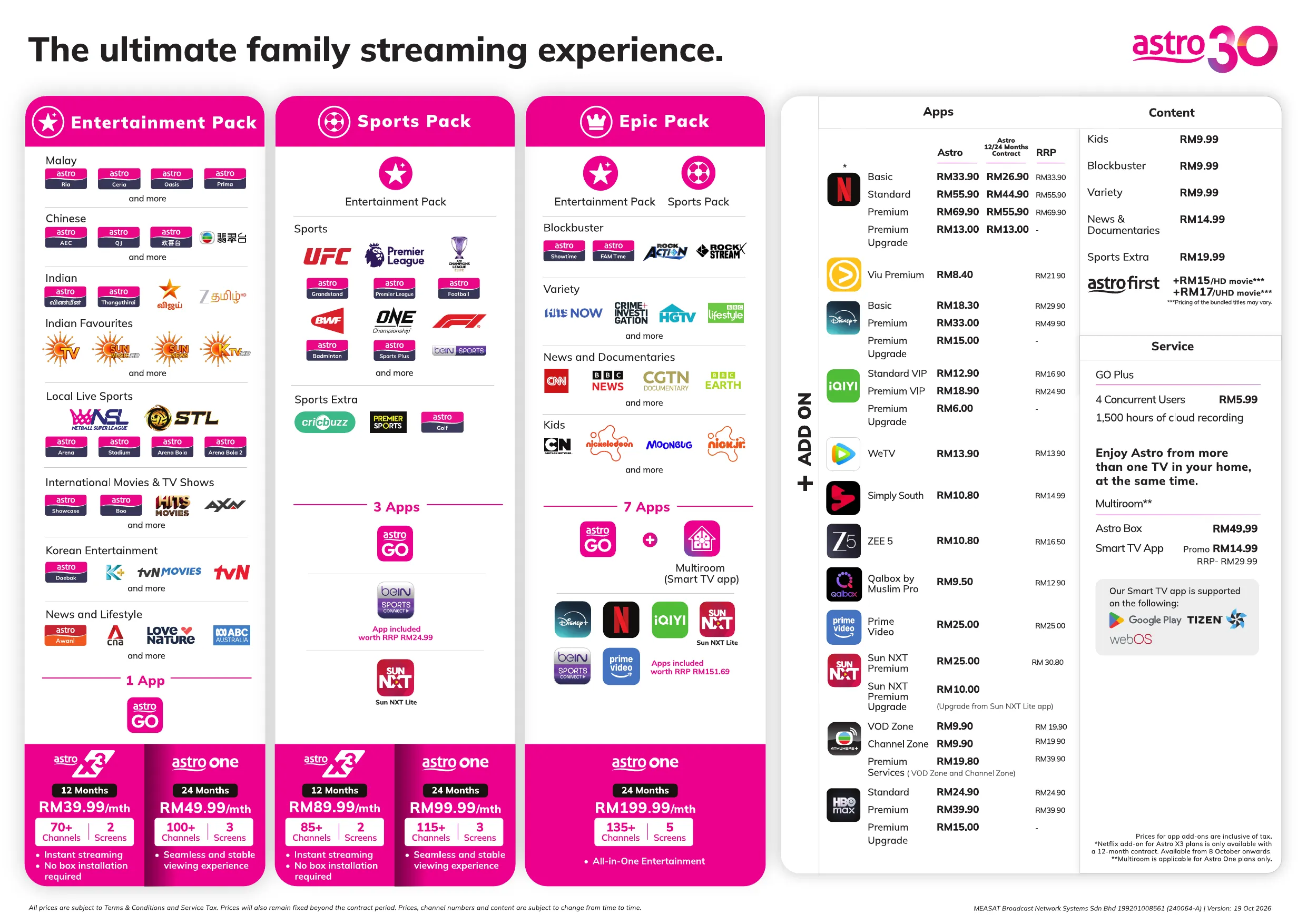
Ya, mana-mana pelanggan aktif Astro dengan bayaran langganan utama minimum RM100 boleh melanggan kepada Multiroom (Astro Box) pada harga RM49.99 sebulan dengan sediaan kotak (harga langganan tertakluk pada Cukai Kerajaan).
A . Via www.astro.com.my/sunnxt
Sun NXT Lite Flow
- Step 1 : Open the Sun NXT app page on your device and click on “Get or activate Sun NXT now” to log in with your Astro ID and user will proceed Add On subscription.
- Step 2: After successful activation, users will be redirected to the Sun NXT web app.
Note: An email with an auto-generated password will be sent to the user’s email.
Sun NXT Premium Flow
- Step 1: Open the Sun NXT app page on your device and click on “Get or activate Sun NXT now” to log in with your Astro ID.
- Step 2: After successfully activating the Add-on subscription, users will be redirected to the Sun NXT web app.
B. Via the My Astro App
- Step 1: Download the My Astro app from the Apple App Store, Google Play Store, or Huawei App Gallery.
- Step 2: Go to Account > Subscription > Add-ons > Apps > Sun NXT Premium > Confirm Order.
- Step 3: Press "Get or Activate Sun NXT Now" and follow the on-screen steps.
- Step 4: Once redirected to the Sun NXT app, create a Sun NXT account as instructed.
C. Via the Ultra/Ulti Box
Sun NXT Lite Flow
- Step 1: Launch the Sun NXT app from the rail of apps at the bottom of the screen. Click on ‘Go to Sun NXT app’ at the bottom.
- Step 2: Input email address for activation.
- Step 3: Validate email using an OTP.
- Step 4: Once account is activated & provisioning is successful, Astro will send an email on the auto-generated password upon successful subscription.
- Step 5: The user will be redirected to the partner’s app, where they will land on the Sun NXT main page and they can proceed to log in with their activated account via Astro.
Sun NXT Premium Flow
- Step 1: Launch the Sun NXT app from the rail of apps at the bottom of the screen.
- Step 2: lick on ‘Go to Sun NXT app’ at the bottom.
- Step 3: Input email address for activation.
- Step 4: Validate email using an OTP.
- Step 5: Once account is activated & provisioning is successful, Astro will send an email on the auto-generated password upon successful subscription.
- Step 6: The user will be redirected to the partner’s app, where they will land on the Sun NXT main page and they can proceed to log in with their activated account via Astro.
Anda boleh melawat dan mengikuti langkah-langkah yang ditunjukkan di
https://biz.astro.com.my/home-resources/astrobiz-selfcare-user-guide
untuk mencipta ID Astro anda.
All Ultra/Ulti Box customers may watch selected WeTV titles for free on their Astro Box.
Simply follow these steps:
Step 1: Go to your Ultra/Ulti Box Home Page and select WeTV under the Apps rail
Step 2: Click play on any non-VIP titles/episodes and start streaming!
Note: No login is required to stream free content on WeTV.
Lawati https://product.astro.com.my/box/ulti atau lihat panduan pengguna kami untuk cara yang cepat dan mudah untuk bermula!
Yes, you can download ZEE5’s content on your device for offline viewing if you have subscribed to ZEE5 Premium. This feature is not available if you are not a Premium member. However, kindly note that some content is subjected to copyright which disables the download function on those selected videos.
Setelah proses penamatan selesai, pelanggan akan menerima satu bil terakhir yang menyatakan jumlah amaun yang perlu dibayar kepada Astro mengikut pilihan pengebilan mereka.
Bagi pelanggan yang telah memilih e-bil atau bil SMS sebelum ini, mereka akan menerima bil terakhir mengikut pilihan itu.
Bagi pelanggan yang memilih bil bercetak, mereka akan menerima bil terakhir melalui bil bercetak. (Caj Bil Bercetak akan dikenakan).
If you see this message, it means the maximum number of devices currently streaming on your Astro account has been exceeded.
Please perform the following checks and troubleshooting steps:
1. Stop Streaming on Other Devices
- Check if Astro is currently being streamed on other devices linked to your account.
- Close the Astro app or stop playback on any unused devices.
2. Wait a Few Minutes
- If a streaming session was recently ended, it may take a few minutes for the system to update.
3. Try Again
- Return to your device and attempt to stream the content again.
4. Check Your Device Usage
- Go to www.astrogo.com.my or open the Astro GO app.
- Log in using your Astro ID and password.
- Review the list of registered devices.
- Remove a device that you no longer use.
- Return to your new device and try signing in again
If you are unable to remove a device or continue to see the error message, proceed to submit report via WhatsApp or Feedback Form and provide:
- Astro ID use
- Smart TV model
- OS version
- Error reported on device
This will help our support team investigate and assist you further.
Note: Please be aware that only one Smart TV device is allowed per account at any point in time.
Astro Quick Pay ialah kaedah mudah untuk menyemak Ringkasan Bil anda, Status Akaun dan membayar bil Astro mengikut keselesaan anda dengan pembayaran segera, terus dari rumah.
Namun, anda hanya boleh bayar bil terkini melalui Astro Quick Pay.
Untuk melihat sejarah pembayaran penuh, muat turun penyata, dan urus semuanya dalam satu tempat, muat turun aplikasi My Astro app.
Ya, anda boleh mendaftar untuk auto-debit selepas akaun anda telah diaktifkan melalui aplikasi My Astro atau laman web My Astro dengan mengikut langkah yang tertera di sini.
Untuk maklumat lanjut, anda boleh layari
https://www.hasil.gov.my/en/e-invoice/
ATAU hubungi talian help desk LHDN di 03‑8682 8000
ATAU hantar emel kepada
[email protected]
.
Anda memerlukan nombor akaun 10 digit anda dan alamat e-mel anda.
No, it is not necessary to change to one of the new packs. Customers can continue to enjoy the entertainment experience with their existing packs.
Walaupun anda boleh memadankan Mesh kedua dengan Mesh pertama, para pelanggan dinasihatkan untuk mengikuti langkah-langkah sama dalam tetapan Rangkaian Mesh dengan memadankan unit Mesh bersama router WiFi.
Sila naik taraf perisian Ultra/Ulti Box untuk menikmati Netflix di Ultra/Ulti Box anda. Untuk naik taraf, sila klik pada ikon aplikasi Netflix di halaman utama atau pergi ke CH741 untuk menaik taraf perisian. Klik Pasang (install) bila mesej naik taraf perisian dipaparkan. Ini akan mengambil masa kira-kira 20 minit dan selepas itu anda boleh mula menonton Netflix di Ultra/Ulti Box.
SecureGo hanya boleh dipautkan kepada satu (1) peranti untuk setiap nombor Astro ID untuk tujuan keselamatan. Ini membantu mengelakkan penipuan berkaitan penjejasan nombor ID anda atau penggunaan peranti lain untuk mendaftarkan SecureGo dengan ID anda.
Each account can only have one Astro X3 pack subscription at a time, whether it is the Astro X3: Entertainment 12 Pack or the Astro X3: Sports 12 Pack. Multiple subscriptions under the same account are not supported. If you wish to subscribe to another plan, you can do so by creating a separate account using a different email address. Each subscription will be managed independently.
Untuk membolehkan pelanggan membuat keputusan bagi sambungan Wifi berdasarkan keutamaan mereka atas nasihat Jurupasang di tapak.
Pengguna boleh menyambungkan peranti mereka secara manual kepada jalur Wifi yang berbeza berdasarkan penggunaan dan keutamaan mereka.
Yes, effective 1st March 2025, your Astro subscription packs that are bundled with Netflix will have a price increase:
- Netflix Standard: An increase of RM4.50 (before tax) monthly will be applied.
- Netflix Premium: An increase of RM7.28 (before tax) monthly will be applied.
- Netflix Premium (Astro one Epic): An increase of RM2.78 (before tax) monthly will be applied.
Semua Astro box dan Kad Pintar/Kad SIM adalah hak milik Astro dan mengikut Terma & Syarat semasa kami, pelanggan dikehendaki memulangkannya selepas perkhidmatan Astro ditamatkan.
Penjadualan semula mesti dilakukan sekurang-kurangnya 1 jam sebelum masa temujanji asal.
You can access your Prime Video Account on up to three (3) devices at a time (including your Ultra/Ulti Box), have up to 6 different profiles. However, you are only able to stream 2 devices concurrently for a single show/movie. To ensure a smoother streaming experience, please sign out from any unused devices.
Description | Benefit |
Profiles | Up to 6 profiles including Kids profile |
Concurrent streams | Up to 3 devices |
Simultaneous streams of same content | Up to 2 devices |
Ya, anda hanya memerlukan kelulusan sekali sahaja dan tidak memerlukan anda memohon setiap bulan.
Jika anda mempunyai kabel Astro, alat kawalan jauh atau Astro Box lama di rumah, anda dikehendaki memulangkannya hanya di pusat pengumpulan berdaftar untuk pengendalian dan pengurusan e-sisa yang betul dengan cara yang mesra alam. Klik di sini untuk mencari pusat pengumpulan berdaftar berhampiran anda.
Untuk pertanyaan berkaitan kitar semula, sila klik di sini.
Ya, anda boleh memohon untuk mendapatkan bil-bil e-Invois anda terdahulu jika anda mendapatkan keizinan sebelum tarikh akhir dalam tempoh yang dibenarkan: 5 hari setelah tamatnya tempoh e-Invois.
Senario A (Hanya untuk bulan Aug ’24):
Tarikh Bil: 07 Aug 2024
Bil Bermula/ Berakhir: 07 Aug – 6 Sept 2024
Tempoh Pemohonan e-Invois: 07 Aug – 11 Sept 2024 (dalam waktu 5 hari setelah tempoh berakhirnya bil)
Keputusan pemohonan: Anda akan menerima e-Invois untuk tarikh bil 07 Aug 2024
Senario B (Untuk bulan Sept ’24 dan seterusnya):
Tarikh Bil: 01 Sept 2024
Bil Bermula/ Berakhir: 01 Sept – 30 Sept 2024
Tempoh Pemohonan e-Invois: 01 Sept – 5 Oct 2024 (dalam waktu 5 hari setelah tempoh berakhirnya bil)
Keputusan pemohonan: Anda akan menerima e-Invois dari bulan terdahulu bertarikh 01 Sept 2024
Senario C (Untuk bulan Sep ’24 dan seterusnya):
Tarikh Bil: 01 Sept 2024
Bil Bermula/ Berakhir: 01 Sept – 30 Sept 2024
Tempoh Pemohonan e-Invois: 6 Oct 2024 seterusnya (lebih 5 hari setelah tempoh berakhirnya bil)
Keputusan pemohonan: Anda akan menerima e-Invois untuk kitaran bil seterusnya