
Pemasangan Untuk Seluruh Malaysia
Mendaftar untuk
| Astro Njoi UniFi Maxis |
Soalan Yang Kerap Ditanya (FAQ)
Cari jawapan anda di sini.
Kami menyediakan perkhidmatan untuk mendaftar Astro dan Broadband untuk anda.
Anda boleh mengelakkan memandu dan beratur di kaunter jualan. Kami adalah peniaga yang boleh memproseskan pendaftaran anda dalam talian.
Anda tidak akan dicaj untuk mendaftar di sini. Tidak ada maklumat kad kredit yang diperlukan. Caj adalah sama seperti yang anda mendaftar di kaunter jualan.
Yang pertama, anda boleh mendaftar dalam talian di sini, kami akan menghubungi anda dengan segera semasa waktu perniagaan. WhatsApp / E-mel / Fax salinan fotokopi IC (untuk warganegara Malaysia) / Pasport (untuk orang asing) kepada kami. Apabila kami menerima semua maklumat, kami akan memproses pendaftaran anda segera.
Sebaik sahaja kami menerima pendaftaran anda dengan maklumat lengkap, kami akan memproses permohonan anda dengan segera pada waktu perniagaan. Kontraktor dari pembekal perkhidmatan kemudian akan menghubungi anda untuk pelantikan pemasangan setelah permohonan anda diluluskan.
Nikmati penjimatan yang lebih besar dan pembayaran bil tanpa gangguan dalam satu bil untuk Astro dan Broadband. Anda dapat menikmati Astro dan Broadband dengan harga potongan setiap bulan sepanjang tempoh kontrak 24 bulan.
Astro menawarkan pelbagai pakej TV termasuk Hiburan, Sukan, Filem dan Kanak-kanak. Anda boleh memilih pakej yang sesuai dengan pilihan tontonan anda serta menambah aplikasi penstriman pilihan jika tersedia.
Ya, anda boleh melanggan pakej TV Astro tanpa menggabungkan broadband. Namun, menggabungkan TV Astro dengan Fibre Broadband boleh memberikan penjimatan bulanan yang lebih baik serta kemudahan satu bil sahaja.
Untuk isi rumah kecil dengan penggunaan penstriman dan pelayaran ringan, 100Mbps biasanya mencukupi. Keluarga besar, pemain permainan dalam talian atau pengguna penstriman berat mungkin mendapat manfaat daripada pelan 500Mbps atau 1Gbps untuk prestasi lebih lancar pada pelbagai peranti.
Kebanyakan pelan TV dan Fibre broadband Astro disertakan dengan kontrak 24 bulan. Caj penamatan awal mungkin dikenakan sekiranya pembatalan dibuat sebelum tamat tempoh kontrak.
Ya, anda boleh menaik taraf pakej TV atau kelajuan broadband pada bila-bila masa, tertakluk kepada kelayakan dan liputan kawasan. Tempoh kontrak baharu mungkin dikenakan bergantung kepada naik taraf tersebut.
Bil bulanan anda akan dikeluarkan terus oleh Astro. Anda boleh menerimanya melalui emel atau mengaksesnya melalui akaun Astro anda. Pelanggan pakej gabungan akan menerima satu bil gabungan untuk perkhidmatan TV dan broadband.
Kaedah pembayaran termasuk perbankan dalam talian, debit automatik, kad kredit atau saluran pembayaran lain yang diluluskan oleh Astro. Pasukan kami boleh membantu anda semasa proses pendaftaran.
Jika anda mengalami gangguan perkhidmatan, anda boleh menghubungi khidmat pelanggan Astro untuk bantuan teknikal. Dalam kebanyakan kes, masalah boleh diselesaikan dari jauh atau juruteknik akan dijadualkan jika perlu.
Ya, pemindahan tertakluk kepada ketersediaan perkhidmatan di alamat baharu anda. Caj pemindahan dan pelarasan kontrak mungkin dikenakan bergantung kepada pelan anda.
Tidak, anda tidak memerlukan kad kredit untuk menghantar permohonan. Pengaturan pembayaran akan dibuat terus dengan Astro selepas perkhidmatan anda diluluskan.
Pakej TV Astro terpilih membenarkan tambahan pilihan seperti perkhidmatan penstriman bergantung kepada promosi semasa dan ketersediaan. Caj bulanan tambahan mungkin dikenakan.
Ya, router WiFi biasanya disediakan semasa pemasangan fibre. Model router mungkin berbeza bergantung kepada pelan kelajuan broadband yang dipilih.
Ya, kami akan menyemak liputan perkhidmatan di alamat anda sebelum meneruskan permohonan untuk memastikan broadband tersedia di kawasan anda.
Bagi warganegara Malaysia, sila sediakan salinan MyKad anda. Bagi warga asing, sila sediakan salinan pasport semasa menghantar permohonan broadband.
Selepas permohonan anda diluluskan, penyedia perkhidmatan biasanya akan menghubungi anda dalam tempoh 2 hingga 7 hari bekerja untuk menetapkan janji temu pemasangan broadband.
Kebanyakan pelan Astro Broadband disertakan dengan kontrak 24 bulan bermula dari tarikh pemasangan. Jika anda berpindah, kontrak 24 bulan baharu mungkin dikenakan di alamat baharu.
Ya, anda boleh memindahkan perkhidmatan broadband tertakluk kepada ketersediaan perkhidmatan di alamat baharu. Kontrak anda mungkin diperbaharui untuk 24 bulan lagi bermula dari tarikh pemasangan baharu.
Ya, anda boleh memohon untuk memindahkan peranti broadband di dalam rumah. Caj pemasangan bukan standard mungkin dikenakan dan perlu dibayar terus kepada pemasang selepas penilaian dibuat.
Ya, anda boleh bertukar ke Astro Broadband. Untuk mengelakkan gangguan perkhidmatan, disarankan untuk mengaktifkan perkhidmatan baharu sebelum menamatkan kontrak broadband sedia ada.
Pemasangan standard mungkin percuma semasa tempoh promosi, namun pemasangan bukan standard (contohnya pemindahan peranti atau pendawaian kompleks) mungkin dikenakan caj tambahan yang perlu dibayar terus kepada pemasang.
Sebarang pembelian melalui aplikasi Astro Smart TV seperti Pay-Per-View dan Astro First tertakluk kepada cukai kerajaan sebanyak 8%.
Untuk pelanggan Pek Platinum dan Multiroom Smart TV, Astro GO+ akan dimasukkan secara automatik ke dalam langganan anda.
Anda boleh melihat butiran langganan anda atau saluran dan pakej langganan semasa melakui
aplikasi My Astro
atau
laman sesawang My Astro
. Hanya log in ke akaun under dan click pada butang
Langganan
.
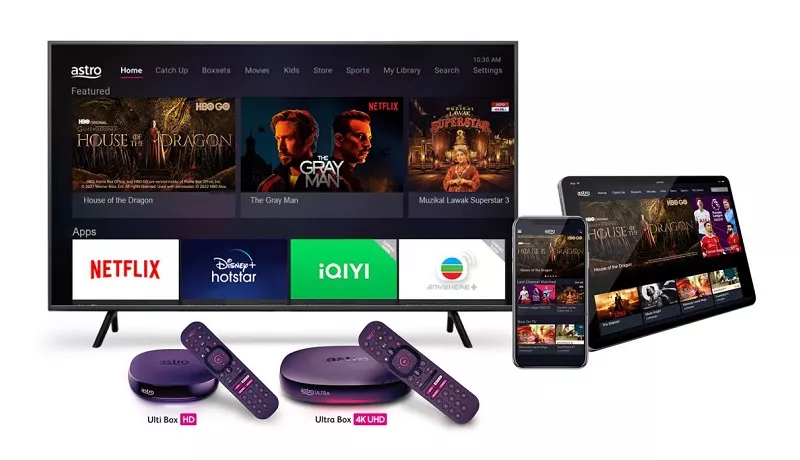
The main features and changes in this update are the revamped look and feel of Astro's user interface on the Astro Ultra/Ulti Boxes and Astro GO, which include redesigns to the Astro interface that consists of title rows at the Home Page to feature popular franchises, new live programmes posters and changes to the menu bar for easier navigation; auto-start Interactive Mode on Astro GO; as well as a Picture-in-Picture mode that shrinks your video player so you can keep watching your favourite shows while using other apps.
The details of each feature are:
- New Astro user interface
- Picture-in-picture mode
- Auto-start Interactive Mode on Astro GO
For more info, please read our dedicated FAQ on this here.
Ya, Astro terikat kepada akta PDPA. Semua maklumat yang diterima akan digunakan selaras dengan Notis Privasi kami.
Tidak, Cukai Perkhidmatan adalah cukai yang perlu dibayar sepenuhnya kepada Kerajaan. Astro hanya bertindak sebagai ejen kutipan untuk Kerajaan.
Bermula
12 Disember 2023
, pengguna perlu log masuk menggunakan
alamat e-mel berdaftar
,
nombor mudah alih
, atau
akaun media sosial
(Facebook, Google atau Apple) untuk mengakses mana-mana platform digital Astro, termasuk
My Astro
,
Astro GO
, dan
laman web rasmi Astro
.
Astro customers can enjoy a special offer of RM13.90/month (RRP RM13.90/month) when they subscribe to WeTV VIP via Astro.
TVBAnywhere+ is the global streaming app from Television Broadcasts Limited (TVB) and is available as an add on for all Astro customers. It offers a vast library of over 40,000 hours of Chinese entertainment, including the latest drama series, variety shows, evergreen classics, and unlimited TVB originals. Customers can enjoy these shows anytime, anywhere.
Key features include:
- Up to two concurrent streams per account
- Watch on the big screen via Astro’s Ultra/Ulti Box, Android TVs, and selected Samsung and LG Smart TVs.
- Subtitles and dubbing in multiple languages: major dramas are available in Traditional Chinese, Simplified Chinese, English, Bahasa Malaysia and Bahasa Indonesia.
Ikuti langkah berikut untuk 'muat semula' atau 'refresh' smartcard anda melalui My Astro:
- Buka/Muat turun My Astro app atau layari laman web My Astro web
- Log masuk dengan Astro ID
- Pergi ke Akaun
- Tekan Langganan atau Pek TV
- Tekan Bilik
- Untuk smartcard Astro yang ingin dimuat semula, tekan butang 'Muat semula'. Ini akan muat semula isyarat kotak Astro anda
📡 Mengalami masalah teknikal?
📱 Muat turun aplikasi My Astro untuk:
- Lakukan penyelesaian masalah sendiri
- Selesai dalam beberapa minit
- Tak perlu hubungi khidmat pelanggan
The iQIYI App is an on-demand video streaming service provided by iQIYI that was first launched in June 2019 in more than 191 countries providing the best Asian dramas to viewers across the world. iQIYI allows subscribers to watch all their favourite Asian entertainment including dramas, variety shows, movies and anime, with subtitles in multiple languages and equipped with Dolby Atmos for the most immersive experience at their fingertips.
There will be no changes to your HBO Max app subscription or your contracted pricing until your current 12‑month contract ends. However, due to Warner Bros. Discovery (WBD) and Astro's partnership model going forward, the HBO HD (CH 411), Cinemax HD (CH 412), HBO Family (CH 414) and HBO Hits (CH 415) channels will cease on Astro at 11:59 PM on 28 February 2026.
After your contract expires, you will no longer be eligible for the same discounted rate or Disney+ combo offer. If you wish to continue watching HBO content, you may subscribe to the HBO Max app as a standalone à‑la‑carte add‑on via Astro from RM24.90 per month.
If you are interested to subscribe to Sun NXT via Astro, please click here or reach out to us via WhatsApp by typing “Hi” at 03-9543 3838.
Notifikasi yang anda terima akan bergantung kepada kaedah pembayaran yang anda pilih:
(i) Portal My Astro: e-resit akan menunjukkan pengesahan pembayaran.
(ii) IVR: Status pembayaran akandimaklumkan melalui IVR dan notifikasi SMS akan dihantar untuk transaksi yang berjaya.
(iii) SMS: Status pembayaran akan dimaklumkan melalui SMS.
(iv) Panggilan: Status pembayaran akan dimaklumkan melalui SMS.
(v) Pusat Khidmat Pelanggan Astro: Resit fizikal akan menunjukkan pengesahan pembayaran.
Ya, tontonan melalui aplikasi Astro Smart TV akan menggunakan satu (1) daripada had tontonan serentak Astro GO anda.
Ya, Multiroom (Smart TV) akan menggunakan satu (1) daripada peruntukan tontonan serentak Astro GO anda.
Pelanggan Multiroom (Smart TV) boleh menikmati akses sehingga 4 peranti serentak (menonton sehingga 4 skrin pada masa yang sama), yang terdiri daripada 1 Smart TV dan 3 peranti mudah alih, komputer riba atau tablet. Ini kerana Astro GO+ disertakan secara percuma bersama langganan Multiroom (Smart TV).
Yes, your information will still be available in the HBO Max app if you choose to resubscribe directly to HBO Max through
www.hbomax.com
. To keep your preferences and account settings, ensure you use the same email address when you resubscribe.
Step 1: At Astro Home, go to the app rail and select "beIN SPORTS CONNECT"
Step 2: Go to the Profile icon at the top of your screen and click "OK"
Step 3: A QR code will be presented on your screen. Use the in-app QR code scanner on your mobile device to scan the QR code
Step 4: Your TV screen will refresh automatically and you will be able to enjoy the beIN SPORTS CONNECT app on your TV!
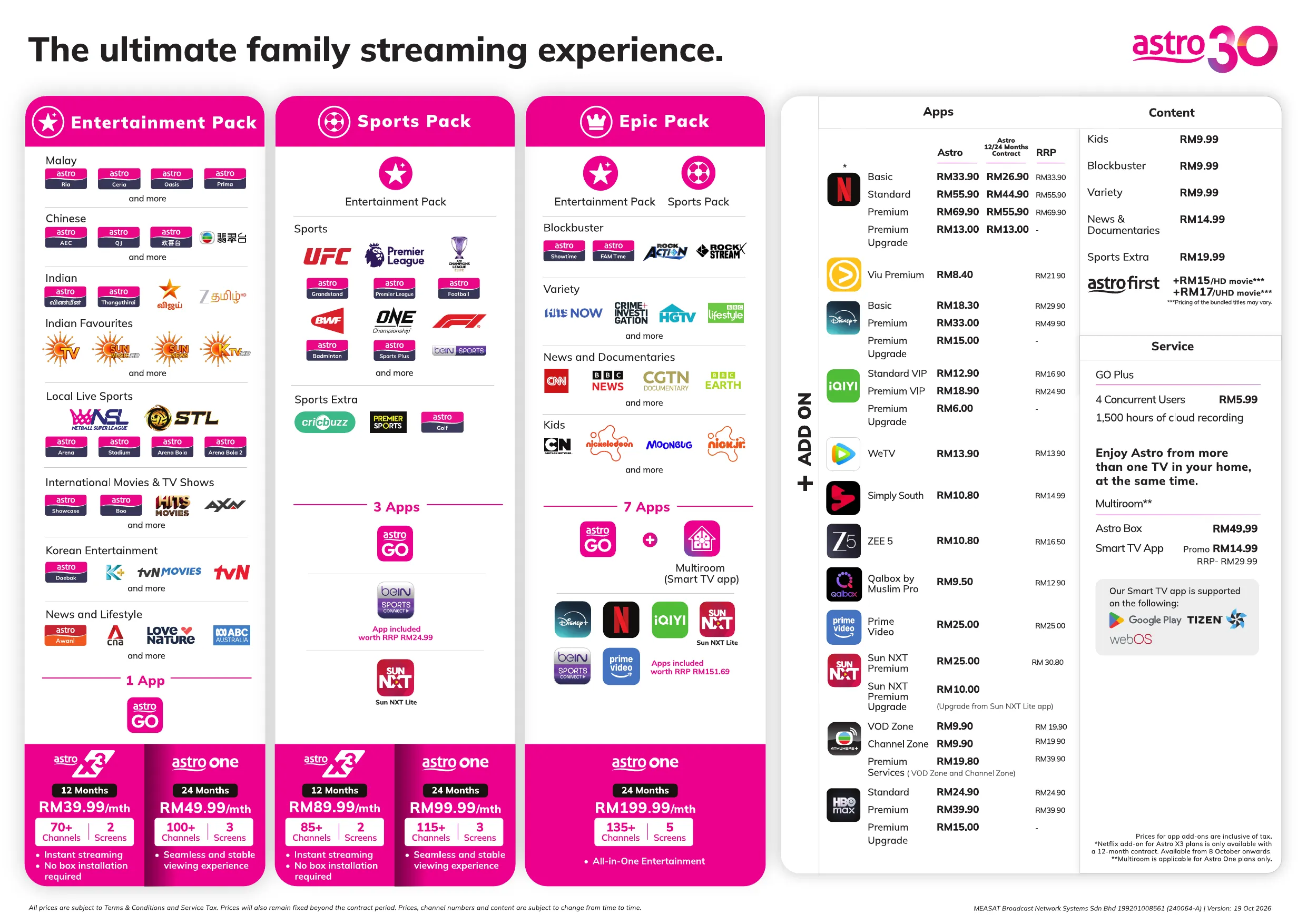
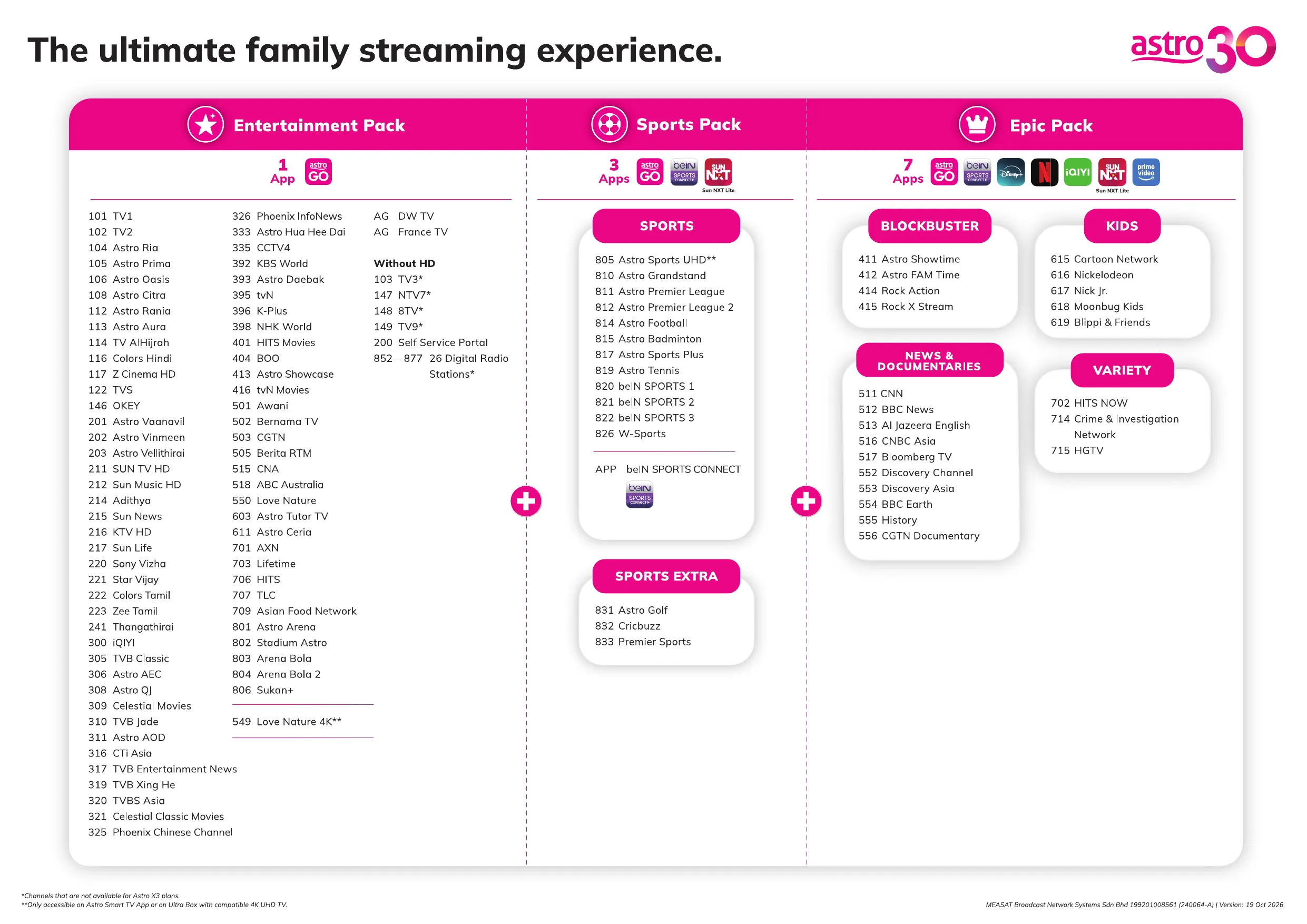
Astro X3 packs offer a new way to enjoy Astro — without the need for a set-top box or satellite dish, giving you a simpler and more flexible way to watch your favourite content. With no box required, you can start streaming your favourite entertainment shows and live sports instantly via the Astro app on selected Smart TVs and personal devices such as smartphones, tablets, and laptops — anytime, anywhere. And with just a 12-month contract, these plans offer greater flexibility while delivering the same breadth of content you enjoy with Astro.
You can choose from two flexible 12-month options, depending on your viewing preferences:
- Astro X3: Entertainment 12 Pack – for a wide range of entertainment content
- Astro X3: Sports 12 Pack – for live sports and comprehensive coverage
*No-contract options will be available from December 2026.
You will be able to enjoy all the content on ZEE5 immediately upon successful purchase from the Astro website. You may enjoy your Premium privileges from the ZEE5 app on your Ultra Box, Ulti Box, mobile devices (Android & iOS), Apple TV, Android TV, as well as on Web (www.Zee5.com).Please ensure that the email address used to log in to the app is the same one used to purchase your ZEE5 premium subscription.
If your Astro account is suspended or disconnected, your Sun NXT app access will be immediately affected, and you will no longer be able to use the service. To restore your Sun NXT app access, please ensure your Astro account is active.
Ya, anda boleh memohon untuk mendapatkan bil-bil e-Invois anda terdahulu jika anda mendapatkan keizinan sebelum tarikh akhir dalam tempoh yang dibenarkan: 5 hari setelah tamatnya tempoh e-Invois.
Senario A (Hanya untuk bulan Aug ’24):
Tarikh Bil: 07 Aug 2024
Bil Bermula/ Berakhir: 07 Aug – 6 Sept 2024
Tempoh Pemohonan e-Invois: 07 Aug – 11 Sept 2024 (dalam waktu 5 hari setelah tempoh berakhirnya bil)
Keputusan pemohonan: Anda akan menerima e-Invois untuk tarikh bil 07 Aug 2024
Senario B (Untuk bulan Sept ’24 dan seterusnya):
Tarikh Bil: 01 Sept 2024
Bil Bermula/ Berakhir: 01 Sept – 30 Sept 2024
Tempoh Pemohonan e-Invois: 01 Sept – 5 Oct 2024 (dalam waktu 5 hari setelah tempoh berakhirnya bil)
Keputusan pemohonan: Anda akan menerima e-Invois dari bulan terdahulu bertarikh 01 Sept 2024
Senario C (Untuk bulan Sep ’24 dan seterusnya):
Tarikh Bil: 01 Sept 2024
Bil Bermula/ Berakhir: 01 Sept – 30 Sept 2024
Tempoh Pemohonan e-Invois: 6 Oct 2024 seterusnya (lebih 5 hari setelah tempoh berakhirnya bil)
Keputusan pemohonan: Anda akan menerima e-Invois untuk kitaran bil seterusnya
Sila pastikan anda telah melanggani saluran ini.
Jika anda sudah melanggan saluran ini, sila ikut langkah di bawah.
STEP 1
Anda perlu memuat semula isyarat box anda
Rujuk langkah panduan untuk Memuat semula signal box anda.
STEP 2
Jika masalah berterusan selepas 30 minit, sila buat laporan melalui WhatsApp atau Borang Maklum Balas.
Yes, you may change the interface language of the app. To access the language settings, please click "Profile" > "Settings" > "Language" and select your preferred language
After completing the subscription process, you will be able to access the iQIYI App on the Ultra/Ulti Box by following the steps below:
On your Ultra/Ulti Box
Step 1: At the Home menu, go to the App Rail and select "iQIYI"
Step 2: Click "OK" on your Astro remote
Step 3: While on the iQIYI App Home Page, navigate to "VIP account" located at the top left pane and click "Login". A page with a QR Code will be presented on your TV screen
Step 4: Scan the QR code using your mobile device and you will be directed to the iQIYI mobile app
Step 5: Follow the steps under "On Mobile App" below to pair your iQIYI account with your Ultra/Ulti Box
On the iQIYI Mobile App
Step 1: Download the iQIYI App on your mobile device
Step 2: At the login page, select "Continue with Astro"
Step 3: Log in with your Astro ID
Step 4: Click on the "Me" icon located at the bottom of the screen, and you will be presented with your iQIYI profile page
Step 5: Click on the in-app QR code scanner located at the top right corner of the screen
Step 6: Scan the QR Code displayed on your TV screen with the in-app QR code scanner. Refer to Step 3 under "On your Ultra/Ulti Box" above
Step 7: The screen on your TV will reload automatically and the iQIYI App home screen will be displayed. Now, you can enjoy the iQIYI App on your Ultra/Ulti Box!
You can enjoy Prime Video benefits on Prime Video website and/or mobile app for 2 months once you have activated your Prime Video access anytime between 24 April 2025 – 23 June 2025.
Astro X3 allow up to 2 concurrent streams at the same time, shared across your registered devices. If you’d like to enjoy more simultaneous viewing, you can add GO+ to increase to up to 4 concurrent streams for RM5.99 per month (exclusive of SST). While streaming is flexible across devices, only one Smart TV can be used at a time. The remaining streams can be used on mobile or other supported devices via Astro GO.
If you don't currently have an Ultra or Ulti Box, you can upgrade by calling or sending a "Hi" message via WhatsApp to 03-9543 3838. Select your preferred language, then type “2” to upgrade and select “Box upgrade” option. Once your Ultra/Ulti Box is successfully activated, you'll able to access Prime Video app on Astro Box. Activate the app to enjoy the 2 months access. To activate click
https://product.astro.com.my/apps/primevideo
Anda akan dikenakan Cukai Perkhidmatan 8% ke atas perkhidmatan langganan Astro Pay TV yang diberikan pada atau selepas 1hb Mac 2024. Manakala untuk Astro Fibre termasuk Mesh WiFi akan kekal pada Cukai Perkhidmatan 6%.
Pembayaran masa nyata ditunaikan hampir serta-merta. Namun, penyelenggaraan sistem secara harian dilakukan antara 12 tengah malam sehingga 3 pagi, dan sebarang pembayaran semasa tempoh ini ditangguhkan sehingga penyelenggaraan sistem selesai.
Tidak. Langganan Disney+ melalui Astro hanya tersedia untuk pelanggan Astro yang mempunyai langganan aktif. Jika anda menjadi pelanggan Astro, anda perlu mendaftar Astro terlebih dahulu sebelum boleh melanggan Disney+ melalui Astro atau menikmati Disney+ sebagai sebahagian daripada pakej Astro terpilih.
Untuk mengetahui lebih lanjut tentang pakej Astro dan tawaran terkini, klik di sini.
Netflix changes their prices and plans from time to time to reflect the improvements that they make to the service. They continue to invest heavily in great new shows and films, to deliver great value for money.
Netflix ialah perkhidmatan penstriman hiburan yang menawarkan pelbagai program TV yang memenangi anugerah, filem, anime, dokumentari dan banyak lagi - pada beribu-ribu peranti bersambung Internet. Sentiasa terdapat sesuatu yang baharu untuk diterokai dan banyak rancangan TV serta filem yang ditambah setiap bulan. Semakin banyak anda tonton, semakin baik Netflix dapat mencadangkan rancangan TV dan filem yang anda akan sukai.
Pelanggan Astro dengan Ultra Box atau Ulti Box bersambung Internet boleh mencapai aplikasi Netflix dan menonton rancangan Netflix melalui Astro Box mereka. Untuk maklumat lanjut tentang Netflix, lawati laman web Netflix.
Ya, anda boleh naik taraf kelajuan Internet anda. Tapi, turun taraf kelajuan tidak dibenarkan.
Sila pastikan anda telah memasukkan alamat e-mel atau nombor telefon bimbit yang didaftarkan pada akaun Disney+ anda.
Jika anda masih tidak menerima OTP, sila hubungi Pusat Khidmat Pelanggan Astro melalui WhatsApp di +603 9543 3838 untuk bantuan lanjut.
4K content is currently not supported on the Ultra/Ulti Box. However, you can still enjoy Prime Video in 4K on compatible smart devices.
Anda boleh melaporkan insiden melalui WhatsApp di 03-95433838 dengan menaip PNP dan ejen kami yang berdedikasi akan mengendalikan urusan anda. Sila sediakan nombor pengesanan Airway Bill anda untuk pengesahan.
Jika kotak penggantian/kad SIM Astro dianggap perlu, Plug & Play Box yang baharu dan kad SIM Astro yang baharu akan dihantar melalui kurier ke alamat perkhidmatan anda.
Untuk pasang sendiri, dalam bil pertama setelah mengaktifkan Plug & Play Box anda, yuran pengaktifan akan disertakan sebagai item baris berasingan dalam bil anda bersama dengan yuran langganan.
Jika anda memilih untuk memasang Plug & Play Box melalui pihak pemasang, anda boleh membayar yuran pemasangan dan yuran pengaktifan terus kepada pemasang semasa pemasangan. Ini akan ditunjukkan dalam bil terperinci anda yang seterusnya sebagai yuran penyediaan.
Yes, you can download ZEE5’s content on your device for offline viewing if you have subscribed to ZEE5 Premium. This feature is not available if you are not a Premium member. However, kindly note that some content is subjected to copyright which disables the download function on those selected videos.
A . Via www.astro.com.my/sunnxt
Sun NXT Lite Flow
- Step 1 : Open the Sun NXT app page on your device and click on “Get or activate Sun NXT now” to log in with your Astro ID and user will proceed Add On subscription.
- Step 2: After successful activation, users will be redirected to the Sun NXT web app.
Note: An email with an auto-generated password will be sent to the user’s email.
Sun NXT Premium Flow
- Step 1: Open the Sun NXT app page on your device and click on “Get or activate Sun NXT now” to log in with your Astro ID.
- Step 2: After successfully activating the Add-on subscription, users will be redirected to the Sun NXT web app.
B. Via the My Astro App
- Step 1: Download the My Astro app from the Apple App Store, Google Play Store, or Huawei App Gallery.
- Step 2: Go to Account > Subscription > Add-ons > Apps > Sun NXT Premium > Confirm Order.
- Step 3: Press "Get or Activate Sun NXT Now" and follow the on-screen steps.
- Step 4: Once redirected to the Sun NXT app, create a Sun NXT account as instructed.
C. Via the Ultra/Ulti Box
Sun NXT Lite Flow
- Step 1: Launch the Sun NXT app from the rail of apps at the bottom of the screen. Click on ‘Go to Sun NXT app’ at the bottom.
- Step 2: Input email address for activation.
- Step 3: Validate email using an OTP.
- Step 4: Once account is activated & provisioning is successful, Astro will send an email on the auto-generated password upon successful subscription.
- Step 5: The user will be redirected to the partner’s app, where they will land on the Sun NXT main page and they can proceed to log in with their activated account via Astro.
Sun NXT Premium Flow
- Step 1: Launch the Sun NXT app from the rail of apps at the bottom of the screen.
- Step 2: lick on ‘Go to Sun NXT app’ at the bottom.
- Step 3: Input email address for activation.
- Step 4: Validate email using an OTP.
- Step 5: Once account is activated & provisioning is successful, Astro will send an email on the auto-generated password upon successful subscription.
- Step 6: The user will be redirected to the partner’s app, where they will land on the Sun NXT main page and they can proceed to log in with their activated account via Astro.
Sebarang pakej dengan Entertainment Plus akan merangkumi Netflix. Tawaran Netflix secara amnya adalah Netflix Standard (2 skrin dan paparan HD) sebagai sebahagian daripada langganan Entertainment Plus anda. Anda boleh menaik taraf sehingga Netflix Premium (4 skrin dan paparan UHD 4K) pada harga sebanyak RM 10 (termasuk cukai kerajaan).
Nota: Untuk langganan di atas, anda boleh menggunakan alamat e-mel yang digunakan untuk langganan anda yang sedia ada dengan Netflix untuk diaktifkan dan pengebilan akan datang bagi Netflix akan dipindahkan ke caj gabungan Astro anda. Bagi pengguna yang dikenakan bil untuk Netflix melalui Apple sebelum menyertai gabungan Astro, adalah diingatkan untuk membatalkan pengaturan pengebilan Apple anda selepas mengaktifkan gabungan Astro lain kerana anda mungkin dikenakan caj dua kali ganda untuk akaun Netflix anda. Jika anda tidak mempunyai gabungan yang merangkumi Netflix, anda juga boleh menambah langganan Netflix baharu ke Bil Astro anda untuk kemudahan pengebilan.
Jika anda tidak mempunyai pakej yang merangkumi Netflix, anda juga boleh menambah langganan Netflix baharu ke Bil Astro anda untuk kemudahan pengebilan.
You can cancel your WeTV VIP subscription via WeTV’s official website or mobile app.
Kindly note that we will not be able to offer a refund if you do decide to leave the WeTV app before your subscription period ends.
Tidak. Kualiti video anda bergantung pada kelajuan dan kestabilan sambungan internet anda.
Kelajuan internet rumah yang disyorkan untuk pengalaman tontonan yang lancar ialah 30Mbps.
Yes. The highest video quality available on the TVBAnywhere+ app is 1080p.
Follow the steps below to access the TVBAnywhere+ app on your Ultra/Ulti box:
- Step 1: On the Home menu, go to the app rail and select TVBAnywhere+. A screen with Pair TVBAnywhere+ TV App and a QR code will appear.
- Step 2: Scan the QR code with your mobile device. This action will open the TVBAnywhere+ login page on your phone.
- Step 3: Click on the Astro logo from the partner picker list and login with your Astro ID.
- Step 4: The TVBAnywhere+ app will now launch. Select the ‘Me’ icon to open your profile.
- Step 5: Choose Pair with TV App on the profile page.
- Step 6: A pairing code will appear on your TV. Enter this code on your mobile device and click OK. The TV screen will refresh, and the TVBAnywhere+ homepage will appear.