Perkhidmatan TV satelit percuma dari Astro. Nikmati hiburan, berita, pembelajaran, maklumat dan banyak lagi.

Gambar untuk ilustrasi sahaja.
Nikmati percuma ke 15+ saluran TV & 10+ saluran radio.
* Tertakluk kepada terma dan syarat Astro.


Langkah-1 |
Langkah-2 |
Langkah-3 |
Pilih pakej & mendaftar dalam talian. |
Duduk kembali & tunggu pemasangan. |
Nikmati Astro / Broadband baru anda! |
Perkhidmatan TV satelit percuma dari Astro. Nikmati hiburan, berita, pembelajaran, maklumat dan banyak lagi.
Gambar untuk ilustrasi sahaja.
Dekoder baru sahaja tanpa piring satelit & kabel. Anda mesti ada piring satelit Astro/Njoi dan kabel terpasang dan berfungsi baik.
Termasuk pemasangan.
Dekoder baru lengkap dengan piring satelit & kabel.
Termasuk pemasangan.
Mendaftar untuk
| Njoi Astro UniFi Maxis |
Cari jawapan anda di sini.
Kami menyediakan perkhidmatan untuk mendaftar Astro dan Broadband untuk anda.
Anda boleh mengelakkan memandu dan beratur di kaunter jualan. Kami adalah peniaga yang boleh memproseskan pendaftaran anda dalam talian.
Anda tidak akan dicaj untuk mendaftar di sini. Tidak ada maklumat kad kredit yang diperlukan. Caj adalah sama seperti yang anda mendaftar di kaunter jualan.
Yang pertama, anda boleh mendaftar dalam talian di sini, kami akan menghubungi anda dengan segera semasa waktu perniagaan. WhatsApp / E-mel / Fax salinan fotokopi IC (untuk warganegara Malaysia) / Pasport (untuk orang asing) kepada kami. Apabila kami menerima semua maklumat, kami akan memproses pendaftaran anda segera.
Sebaik sahaja kami menerima pendaftaran anda dengan maklumat lengkap, kami akan memproses permohonan anda dengan segera pada waktu perniagaan. Kontraktor dari pembekal perkhidmatan kemudian akan menghubungi anda untuk pelantikan pemasangan setelah permohonan anda diluluskan.
Nikmati penjimatan yang lebih besar dan pembayaran bil tanpa gangguan dalam satu bil untuk Astro dan Broadband. Anda dapat menikmati Astro dan Broadband dengan harga potongan setiap bulan sepanjang tempoh kontrak 24 bulan.
Astro menawarkan pelbagai pakej TV termasuk Hiburan, Sukan, Filem dan Kanak-kanak. Anda boleh memilih pakej yang sesuai dengan pilihan tontonan anda serta menambah aplikasi penstriman pilihan jika tersedia.
Ya, anda boleh melanggan pakej TV Astro tanpa menggabungkan broadband. Namun, menggabungkan TV Astro dengan Fibre Broadband boleh memberikan penjimatan bulanan yang lebih baik serta kemudahan satu bil sahaja.
Untuk isi rumah kecil dengan penggunaan penstriman dan pelayaran ringan, 100Mbps biasanya mencukupi. Keluarga besar, pemain permainan dalam talian atau pengguna penstriman berat mungkin mendapat manfaat daripada pelan 500Mbps atau 1Gbps untuk prestasi lebih lancar pada pelbagai peranti.
Kebanyakan pelan TV dan Fibre broadband Astro disertakan dengan kontrak 24 bulan. Caj penamatan awal mungkin dikenakan sekiranya pembatalan dibuat sebelum tamat tempoh kontrak.
Ya, anda boleh menaik taraf pakej TV atau kelajuan broadband pada bila-bila masa, tertakluk kepada kelayakan dan liputan kawasan. Tempoh kontrak baharu mungkin dikenakan bergantung kepada naik taraf tersebut.
Bil bulanan anda akan dikeluarkan terus oleh Astro. Anda boleh menerimanya melalui emel atau mengaksesnya melalui akaun Astro anda. Pelanggan pakej gabungan akan menerima satu bil gabungan untuk perkhidmatan TV dan broadband.
Kaedah pembayaran termasuk perbankan dalam talian, debit automatik, kad kredit atau saluran pembayaran lain yang diluluskan oleh Astro. Pasukan kami boleh membantu anda semasa proses pendaftaran.
Jika anda mengalami gangguan perkhidmatan, anda boleh menghubungi khidmat pelanggan Astro untuk bantuan teknikal. Dalam kebanyakan kes, masalah boleh diselesaikan dari jauh atau juruteknik akan dijadualkan jika perlu.
Ya, pemindahan tertakluk kepada ketersediaan perkhidmatan di alamat baharu anda. Caj pemindahan dan pelarasan kontrak mungkin dikenakan bergantung kepada pelan anda.
Tidak, anda tidak memerlukan kad kredit untuk menghantar permohonan. Pengaturan pembayaran akan dibuat terus dengan Astro selepas perkhidmatan anda diluluskan.
Pakej TV Astro terpilih membenarkan tambahan pilihan seperti perkhidmatan penstriman bergantung kepada promosi semasa dan ketersediaan. Caj bulanan tambahan mungkin dikenakan.
Ya, router WiFi biasanya disediakan semasa pemasangan fibre. Model router mungkin berbeza bergantung kepada pelan kelajuan broadband yang dipilih.
Ya, kami akan menyemak liputan perkhidmatan di alamat anda sebelum meneruskan permohonan untuk memastikan broadband tersedia di kawasan anda.
Bagi warganegara Malaysia, sila sediakan salinan MyKad anda. Bagi warga asing, sila sediakan salinan pasport semasa menghantar permohonan broadband.
Selepas permohonan anda diluluskan, penyedia perkhidmatan biasanya akan menghubungi anda dalam tempoh 2 hingga 7 hari bekerja untuk menetapkan janji temu pemasangan broadband.
Kebanyakan pelan Astro Broadband disertakan dengan kontrak 24 bulan bermula dari tarikh pemasangan. Jika anda berpindah, kontrak 24 bulan baharu mungkin dikenakan di alamat baharu.
Ya, anda boleh memindahkan perkhidmatan broadband tertakluk kepada ketersediaan perkhidmatan di alamat baharu. Kontrak anda mungkin diperbaharui untuk 24 bulan lagi bermula dari tarikh pemasangan baharu.
Ya, anda boleh memohon untuk memindahkan peranti broadband di dalam rumah. Caj pemasangan bukan standard mungkin dikenakan dan perlu dibayar terus kepada pemasang selepas penilaian dibuat.
Ya, anda boleh bertukar ke Astro Broadband. Untuk mengelakkan gangguan perkhidmatan, disarankan untuk mengaktifkan perkhidmatan baharu sebelum menamatkan kontrak broadband sedia ada.
Pemasangan standard mungkin percuma semasa tempoh promosi, namun pemasangan bukan standard (contohnya pemindahan peranti atau pendawaian kompleks) mungkin dikenakan caj tambahan yang perlu dibayar terus kepada pemasang.
LANGKAH 1
Pada alat kawalan jauh anda, tekan butang HOME dan menu utama akan dipaparkan di bahagian atas skrin anda.

LANGKAH 2
Pergi ke Settings.

LANGKAH 3
Navigasi ke Network Settings dan tekan "OK".

LANGKAH 4
Pilih Sambungan Wi-Fi Baharu dan tekan "OK".

LANGKAH 5
Sila tunggu sementara dekoder mengimbas rangkaian Wi-Fi yang tersedia.

LANGKAH 6
Pilih rangkaian Wi-Fi anda dan tekan "OK".

LANGKAH 7
Sila masukkan kata laluan untuk menyambung ke rangkaian anda.

LANGKAH 8
Pergi ke Selesai dan tekan "OK" selepas memasukkan kata laluan.

LANGKAH 9
Sila tunggu sementara dekoder bersambung ke rangkaian.

LANGKAH 10
Sambungan anda berjaya apabila skrin ini terpapar.

Tidak, Ulti Box tidak menyokong rancangan UHD 4K. Sekiranya anda mahu menonton rancangan UHD 4K Astro, sila daftar untuk Ultra Box di Astro Ultra Box and Ulti Box | Astro.
LANGKAH 1
Pada alat kawalan jauh anda, tekan butang HOME dan menu laman utama akan dipaparkan di bahagian atas skrin anda.
LANGKAH 2
Pergi ke Settings.
LANGKAH 3
Pergi ke Resolusi Video dan tekan “OK”.

LANGKAH 4
Pergi ke pilihan anda dan tekan “OK”.
Disarankan untuk pilih Auto.

LANGKAH 5
Pergi ke Simpan dan tekan "OK" untuk mengesahkan pilihan anda sekiranya anda boleh membaca teks dengan betul.
Sebaliknya, pergi ke Batal untuk kembali ke tetapan sebelumnya.

Anda boleh meminta penetapan semula kata laluan dengan mengklik pada 'Lupa Kata Laluan' di halaman log masuk.
Untuk pengguna Astro Fibre sedia ada bersama router WiFi 6 Huawei K562e, anda perlu naik taraf kepada router RG21 terbaru untuk mendapat akses kepada aplikasi Astro Fibre dengan bayaran sekali sahaja sebanyak RM300. Untuk pertanyaan lanjut, hubungi Pusat Perhubungan Pelanggan kami di 03 - 9543 1543 dan ejen Astro kami akan terus membantu.
Mesej ralat ini menunjukkan bahawa anda telah mencapai had maksima untuk penstriman video serentak merentas peranti bagi satu (1) akaun. Untuk menghilangkan mesej ini, sila hentikan penstriman pada salah satu peranti anda.
• Jika anda telah membeli pek Astro atau membuat sebarang perubahan pada pek anda pada atau selepas 9 November, anda boleh menstrim pada dua (2) skrin secara serentak.
• Jika anda tidak membuat sebarang perubahan, anda boleh menstrim pada empat (4) skrin secara serentak.
Sekiranya anda masih menghadapi masalah, sila buat laporan melalui WhatsApp atau Borang Maklum Balas.
Pemulangan semula lebihan bayaran hanya boleh dipohon oleh pemilik akaun Astro yang berdaftar.
Walau bagaimanapun, sekiranya anda ingin meminta pemulangan semula lebihan bayaran bagi pihak pemilik akaun, anda boleh mengemukakan dokumen-dokumen sokongan (contoh: surat kebenaran, sijil kematian, salinan kad pengenalan pihak ketiga).
LANGKAH 1
Pada alat kawalan jauh anda, tekan butang HOME dan menu laman utama akan dipaparkan di bahagian atas skrin anda.
LANGKAH 2
Pergi ke Settings.
LANGKAH 3
Pilih Saluran yang anda mahu tambah sebagai kegemaran dan tekan "OK".
LANGkAH 4
Pilih "Add to Favourite" dan tekan "OK"
LANGKAH 5
Anda telah berjaya menambah saluran ke senarai kegemaran bila skrin ini muncul.
LANGKAH 6
Saluran yang anda pilih akan bertanda hati selepas ditambah sebagai kegemaran
Astro menawarkan 3 perkhidmatan selepas jualan berbeza yang disediakan kepada pelanggan:
(1) Ekspres (RM75)
(2) Hari Sama (RM70)
(3) Biasa (RM65)
***Harga adalah termasuk 6% Cukai Perkhidmatan.

Untuk Astro Fibre, anda boleh memilih daripada pilihan kelajuan Jalur Lebar dari 100Mbps hingga 800Mbps dengan harga serendah RM129/bulan dan menerima penghala WiFi 6 percuma & Aplikasi Astro Fiber. Selain itu, anda juga akan menikmati peningkatan kelajuan percuma selama 24 bulan. Kontrak 24 bulan baharu akan bermula selepas pemasangan berjaya dan butiran penuh tawaran ini adalah seperti berikut:
| Harga Astro Fibre Sebulan (RRP) | ||
| 100Mbps | 500Mbps | 800Mbps |
| RM129 (naik taraf kelajuan kepada 500Mbps selama 24 bulan) | RM189 (naik taraf kelajuan kepada 800Mbps selama 24 bulan) | RM249 |
Kelajuan Internet rumah yang disyorkan untuk tontonan yang lancar ialah 10Mbps.
Anda akan dapat mengakses Netflix pada Ultra atau Ulti Box anda. Tapi harap maklum bahawa sekiranya anda mempunyai Ulti Box dengan langganan Netflix Premium, anda tidak akan dapat menonton rancangan dalam 4K UHD.
Multiroom (Astro Box) memerlukan kotak Astro untuk disediakan dan boleh dicapai melalui suapan satelit tetap atau penstriman pada Wi-fi rumah. Sementara itu, Multiroom (TV Pintar) hanya memerlukan TV Pintar dan tiada pemasangan diperlukan. Pelanggan boleh muat turun aplikasi Astro pada TV Pintar dan sambungkan ke Wi-fi rumah untuk penstriman.
What is the BBC Player app?
BBC Player is an authenticated multi-genre SVOD (Subscription Video on Demand) service that allows viewers to watch the very best British programmes anytime and anywhere.
BBC brands available on the app include:
Who can access the BBC Player app?
Starting 20 December 2022, Astro customers on eligible packs will receive access to the BBC Player app to enjoy world class documentaries, premium British dramas, aspirational lifestyle programmes, engaging preschool programmes and more on the big screen via the Ultra Box, Ulti or stream via the mobile app or website for no additional charge.
What content is available on BBC Player?
Access to content within the BBC Player app is based on the pack that Astro customers have subscribed to:

How much does it cost to subscribe to BBC Player via Astro?
BBC Player is bundled to the selected pack listed above (Q3) for both existing and new eligible customers.
Subscribe to our TV Packs for better savings now by visiting www.astro.com.my or WhatsApp "Get BBC" at 03-9543 3838.
How do I access the BBC Player app on the Ultra Box or Ulti Box?
Eligible customers may follow the simple steps below to access the BBC Player app on their Ultra Box or Ulti Box:

How do I access the BBC Player mobile app?
Download the BBC Player app from the iOS App Store or Google Play Store.
After you have successfully downloaded the app to your mobile device, simply click "Astro" as your service provider and log in with your Astro ID. Once complete, you will get instant access to all your favourite BBC content right at your fingertips!
How can I access BBC Player via website?
Please visit www.bbcplayer.com on your browser, log in with your Astro ID and start streaming.
When can I start enjoying my BBC Player subscription?
Starting 20 December 2022, Astro customers on eligible packs will receive complimentary access to the BBC Player app to enjoy world class documentaries, premium British dramas, aspirational lifestyle programmes, engaging preschool programmes and more on the big screen via the Ultra Box, Ulti Box, or stream via the mobile app or website. Thank you for your support.
How many devices can I use to access the BBC Player app at one time?
Customers can access a maximum of 5 devices concurrently on the BBC Player app, including the Astro Ultra Box or Ulti Box.
Can I download content from the BBC Player app for offline viewing?
Yes, selected downloaded programmes will be available for viewing offline for up to 30 days. Just click on a programme you would like to watch offline to check if it is downloadable. Kindly note that this download feature is only available on the BBC Player app. If you are accessing the BBC Player website, you can only stream content online.
What is the storage requirement for content downloading?
The storage requirement is dependent on the type of videos users download as the space needed may vary.
Are there any subtitles available for content on the BBC Player app?
English closed captions are available for all BBC Player programmes, while Chinese and Bahasa Malaysia subtitles are available for selected programmes only.
What audio options are available for content on the BBC Player app?
Currently, only English audio is available for all BBC Player content.
Can I access content on the BBC Player app outside of Malaysia?
Unfortunately, you will not be able to stream or watch programmes online when you are outside of Malaysia. However, you will still be able to watch available downloaded programmes offline on the BBC Player mobile app.
Astro Login
How do I register for an Astro ID?
Download the BBC Player app > Select "Profile" > Click on "Log in with Astro ID" > Click on "Do not have an Astro ID? Click here".
Can I update my email address/mobile number for my Astro ID?
Yes, please visit Astro's Self Service Portal via myastro.astro.com.my to update your email address or mobile number.
I have forgotten my password; what should I do now?
Step 1: Click "Log in" and click "Forgot my password"
Step 2: Enter your email address and click "Submit"
Step 3: An email will be sent to your registered email address with further instructions on how to reset your password
How do I unlock a locked user account?
You may contact Astro's Customer Service by:
Will my personal information be protected?
Yes, Astro is bound by the PDPA act. All information received will be used in accordance with our Privacy Notice.
Other App Enquiries
I am unable to log in to BBC Player with my Astro ID via Google; what should I do now?
Please follow the simple steps below if you are facing issues logging in to BBC Player:
Who may I contact if I encounter any problems with the BBC Player app?
There are 4 ways for you to contact us for assistance:
Issues related to BBC Player in-app or content:
Jika anda mempunyai kabel Astro yang tidak digunakan, alat kawalan jauh atau kotak lama yang terbiar di rumah, anda dikehendaki membuang semua peranti tersebut di Pusat Pengumpulan E-Waste yang berdaftar yang boleh dirujuk di sini.
Untuk semua soalan berkaitan kitarsemula, sila klik di sini.
Ya, pelanggan IPTV sedia ada layak untuk bertukar ke Astro Fibre. Tapi, perkhidmatan IPTV anda akan ditukarkan kepada perkhidmatan Plug & Play dan Astro PVR / B.yond Box sedia ada anda akan dinaik taraf kepada Ultra/Ulti Box. Tiada caj tambahan untuk naik taraf Astro Ultra/Ulti. Sila ambil perhatian bahawa anda akan dikontrak semula selama 24 bulan selepas pemasangan.
Hanya aplikasi penstriman Zee5 mempunyi perubahan harga selepas kenaikan Cukai Perkhidmatan. Bagi aplikasi pengstriman lain seperti Netflix, Disney+ Hotstar, Viu, iQiyi, WeTV dan Qalbox tiada sebarang perubahan harga.
Astro Saluran 200 ialah portal layan diri yang membantu anda menaik taraf pakej anda dan pembelian tambahan dengan segera.
Astro Rewards terbuka kepada semua pelanggan *Aktif Astro PayTV dan ahli keluarga terdekat mereka
* "Pelanggan Aktif Astro" merujuk pelanggan Perkhidmatan Astro dan akaun mereka yang terkini dan aktif tanpa bayaran tertunggak dan tidak melanggar perjanjian langganan Astro atau memberikan apa-apa arahan untuk tamatkan dan/atau gantungkan langganan Perkhidmatan Astro pada tarikh pemakluman pemenang. Pemenang mesti terus aktif sebagai pelanggan Astro sehingga tarikh mengambil hadiah.
Jika ada sebarang perubahan dalam rancangan kami, kami akan memaklumkan para pelanggan tentang apa-apa perkembangan terkini.
What is beIN SPORTS CONNECT?
beIN SPORTS CONNECT is the ultimate live streaming sports service that provides you with access to global sporting events both LIVE and on-demand such as major European football leagues and over 3,000 hours of live tennis via Astro's Ultra Box, Ulti Box, mobile app or web.
How do I access the beIN SPORTS CONNECT app on the Ultra/Ulti Box?
On the beIN SPORTS CONNECT mobile app:
Step 1: Open the "beIN SPORTS CONNECT" app and go to your Profile
Step 2: Select "Sign in with Astro" and log in with your Astro ID
Step 3: Go to "Settings" and select the TV Login option
Step 4: A QR code scanner will appear.
Follow the steps below to pair the mobile app with your TV screenOn the Astro Ultra/Ulti Box:
Step 1: At Astro Home, go to the app rail and select "beIN SPORTS CONNECT"
Step 2: Go to the Profile icon at the top of your screen and click "OK"
Step 3: A QR code will be presented on your screen. Use the in-app QR code scanner on your mobile device to scan the QR code
Step 4: Your TV screen will refresh automatically and you will be able to enjoy the beIN SPORTS CONNECT app on your TV!
Who is entitled to access the beIN SPORTS CONNECT app on the Ultra/Ulti Box?
Only Astro customers with the Sports subscription as part of their Astro TV Pack (Bundle or add-on) will be able to enjoy the beIN SPORTS CONNECT app on their Ultra/Ulti Box. For further enquiries, please WhatsApp "Get beIN" to our Customer Contact Center at 03-9543 3838.
What are the content available in the beIN SPORTS CONNECT app?
Customers can enjoy major European football leagues, over 3,000 hours of live tennis and other global sporting events LIVE and on-demand on the app. You may check out the complete list of competitions available on the app here: beIN SPORTS CONNECT | Live Leagues and Competitions | LaLiga, Serie A, Ligue
Can I stream on more than one device at the same time?
No, you can only stream the beIN SPORTS CONNECT app on one device at a time.
How many devices can I use to watch beIN SPORTS CONNECT?
You can have up to five (5) devices registered to your account at any given time. However, you can only stream from one (1) device at a time.
Can I download content for offline viewing?
Unfortunately, downloading of content is not a feature that is currently available.
Are subtitles or dubbing available for the content on beIN SPORTS CONNECT?
Unfortunately, subtitles and dubbing options are currently not available.
How can I subscribe to beIN SPORTS CONNECT via Astro?
The beIN SPORTS CONNECT app is not available as an add-to-bill option. Please visit www.product.astro.com.my/tv to sign up to one of our TV Packs with the Sports subscription.
Can I access the beIN SPORTS CONNECT app outside of Malaysia?
No, you will not be able to watch beIN SPORTS CONNECT content outside of Malaysia as the app is geo-blocked for each country.
How do I register for an Astro ID?
Download the beIN SPORTS CONNECT app > Select "Login with Astro"> Click "Do not have an Astro ID? Click here".
Can I update my email address/mobile number for my Astro ID?
Yes, please visit Astro's Self Service Portal via myastro.astro.com.my to update your email address or mobile number.
I have forgotten my password; what should I do?
Step 1: Click "Log in" and click "Forgot my password"
Step 2: Enter your email address and click "Submit"
Step 3: An email will be sent to your registered email address with further instructions on how to reset your password
How do I unlock a locked user account?
You may contact Astro's Customer Service by:
The beIN SPORTS CONNECT app won't load after I pressed "cancel" when logging in; what do I do now?
Step 1: Close the "Astro ID Login" tab in your browser, then close your mobile app browser (Safari, Google Chrome, Mozilla Firefox etc).
Step 2: Close the beIN SPORTS CONNECT app on your mobile device.
Step 3 Reopen the beIN SPORTS CONNECT app and try to log in again.
Will my personal information be protected?
Yes, Astro is bounded by the PDPA act. All information received will be used in accordance with our Privacy Notice.
Jika anda ingin menaik taraf pek anda untuk memasukkan Disney+ Hotstar Premium, sila hubungi Pusat Hubungan Pelanggan Astro di 03 9543 3838. Sebagai alternatif, sila WhatsApp Astro di 03 9543 3838 dan taip DH Help untuk bantuan lanjut.
Tidak, aplikasi Astro Fibre ini hanya untuk pelanggan Astro Fibre yang menggunakan router RG21 terbaru sahaja.
Pek baharu dan akses Netflix di Ultra Box tersedia untuk pelanggan Astro IPTV. Bagaimanapun, pelanggan Astro IPTV di Ulti Box akan dapat menikmati akses kepada Netflix pada peringkat kemudian.
Untuk pelanggan yang ingin melanggan Multiroom dengan pemasangan kotak,
(i) pelanggan pada pakej lama (contoh Family Pack, Starter Pack, Value Pack, Super Pack atau Super Pack Plus) perlu melanggan ke pakej baharu kami terlebih dahulu dengan menghantar "Switch" ke 03-9543 3838 melalui WhatsApp;
(ii) pelanggan pada pakej Astro yang baharu boleh melanggan dengan melawati product.astro.com.my/multiroom atau WhatsApp "Hai" ke 03-9543 3838.
Yes. Astro customers will soon be able to enjoy seamless access to Netflix on their connected Ultra and Ulti Boxes. Look out for more details then! Register your interest via https://astro.com.my/Netflix
Cukai Perkhidmatan ini dikenakan ke atas pelanggan perkhidmatan penyiaran Pay TV oleh Kerajaan. Oleh itu, Cukai Perkhidmatan akan diserahkan kepada pelanggan.
Untuk membatalkan langganan Multiroom (Smart TV) anda, sila hubungi kami di 03-9543 3838.
Perkhidmatan Astro Multiroom mencerminkan semua rancangan daripada langganan utama anda, kecuali Minat Khas dan saluran Pay-Per-View seperti filem Astro First/Best.
Bagi pelanggan dengan kotak Multiroom, gabungan Plug & Play dengan Astro Broadband tidak akan mempunyai capaian ke NHK dan Saluran Radio. Bagi gabungan Plug & Play tanpa Astro Broadband tidak akan mempunyai capaian ke NHK World, Saluran Radio dan Sky News.
Perkhidmatan akan disambung semula selepas anda membuat bayaran dalam tempoh 45 hari. Yuran langganan bulanan akan diproratakan dengan sewajarnya dan bayaran penyambungan sehingga RM20 (tidak termasuk SST) boleh dikenakan semasa perkhidmatan disambung semula.
Sekiranya pembayaran dibuat dalam tempoh 45 hari dari tarikh kitaran bil anda, perkhidmatan Astro Fibre akan disambung semula dalam masa 3 jam selepas pembayaran diterima. Bil anda untuk bulan berikutnya akan diproratakan dengan sewajarnya.
Ketahui lebih lanjut tentang bayaran penyambungan di sini.
Ya, anda boleh mengehadkan program berdasarkan penilaian umur dengan pergi ke "Tetapan" > "Kawalan & Profil Ibu Bapa" pada apl Astro Box dan Astro GO anda. Sebagai alternatif, anda juga boleh membuat Profil Kanak-kanak yang menyediakan keselamatan dengan 4 digit PIN untuk keluar dan kebolehaksesan kepada saluran mesra kanak-kanak dan kandungan Atas Permintaan sahaja.
Pembayaran melalui cek akan mengambil masa selama 3-5 hari bekerja untuk ditunaikan. Jika anda ingin tempoh pembayaran yang lebih cepat, kami sarankan agar anda membayar secara dalam talian melalui Astro Quick Pay.
Surcaj dikenakan oleh rakan kongsi kutipan pembayaran pihak ketiga untuk perkhidmatan yang diberikan. Harap maklum bahawa pelanggan mungkin dikenakan surcaj bagi setiap transaksi apabila pembayaran bil dibuat melalui kaedah berikut:-
Pembayaran bil di stesen minyak terpilih, kedai serbaneka, kedai runcit/mudah alih, kiosk, dan e-dompet mungkin dikenakan surcaj sehingga RM0.50 setiap transaksi oleh agensi kutipan yang dilantik RMS (dahulunya dikenali sebagai Razer/MOL ), ATX, MobilityOne, dan e-Pay.
· Untuk mengetahui lebih lanjut tentang cara membuat pembayaran bil anda, klik di sini.
What is the "iQIYI Video - Dramas & Movies" App?
The iQIYI App is an on-demand video streaming service provided by iQIYI that was first launched in June 2019 in more than 191 countries providing the best Asian dramas to viewers across the world. iQIYI allows subscribers to watch all their favourite Asian entertainment including dramas, variety shows, movies and anime, with subtitles in multiple languages and equipped with Dolby Atmos for the most immersive experience at their fingertips.
Where can I access the iQIYI App?
Starting 20 December 2022, Astro customers will be able to enjoy the iQIYI app as an add-to-bill service for an exclusive price via Astro and enjoy the app on their Ultra/Ulti Box, mobile app and website.
How do I access the iQIYI App on the Ultra/Ulti Box?
After completing the subscription process, you will be able to access the iQIYI App on the Ultra/Ulti Box by following the steps below:
On your Ultra/Ulti Box
Step 1: At the Home menu, go to the App Rail and select "iQIYI"
Step 2: Click "OK" on your Astro remote
Step 3: While on the iQIYI App Home Page, navigate to "VIP account" located at the top left pane and click "Login". A page with a QR Code will be presented on your TV screen
Step 4: Scan the QR code using your mobile device and you will be directed to the iQIYI mobile app
Step 5: Follow the steps under "On Mobile App" below to pair your iQIYI account with your Ultra/Ulti Box
On the iQIYI Mobile App
Step 1: Download the iQIYI App on your mobile device
Step 2: At the login page, select "Continue with Astro"
Step 3: Log in with your Astro ID
Step 4: Click on the "Me" icon located at the bottom of the screen, and you will be presented with your iQIYI profile page
Step 5: Click on the in-app QR code scanner located at the top right corner of the screen
Step 6: Scan the QR Code displayed on your TV screen with the in-app QR code scanner. Refer to Step 3 under "On your Ultra/Ulti Box" above
Step 7: The screen on your TV will reload automatically and the iQIYI App home screen will be displayed. Now, you can enjoy the iQIYI App on your Ultra/Ulti Box!
Can I access the "iQIYI Video - Dramas & Movies' App outside of Malaysia?
Yes, the iQIYI app is accessible globally. However, the content of the app might differ depending on the country which will be tailored based on local content rights and market preferences.
Can I download the content on the iQIYI App for offline viewing?
Yes, you can download selected content on the iQIYI app for offline viewing at a later time. To find the titles you have downloaded, you may go to Profile > My Downloads.
What is the storage requirement for content downloading?
The storage requirement is dependent on the type of videos users are downloading as the space needed varies between titles.
Are there any subtitles or dubbing available for the content on the iQIYI app?
The iQIYI app offers subtitles in multiple languages for all their content excluding some variety shows. However, no dubbing option is available yet. You will be able to select or switch off your subtitles when you play your video in full screen.
Can I change the interface language of the iQIYI app?
Yes, you may change the interface language of the app. To access the language settings, please click "Profile" > "Settings" > "Language" and select your preferred language.
If you have any further questions regarding the app, please go to "Profile" > "Help and Feedback". Thank you for your support.
iQIYI VIP Subscriptions
What is a VIP subscription?
As a VIP (Standard VIP or Premium VIP), you will be entitled to enjoy the benefits of the VIP subscription, including:
Access to exclusive content only on iQIYI
Early access to selected content episodes
Where available, access to high definition (up to 1080P viewing quality) and surroundsound (Dolby Audio) versions of the Content
The ability to skip advertisements
Up to 2 concurrent viewing
Additionally, as a Premium VIP, besides the benefits mentioned above, you will also be entitled to the following benefits:
Advance previewing of selected content episodes labelled as "locked"
Where available, access to high definition (up to 4K viewing quality)
Up to 4 concurrent viewing of VIP content, compared to only 2 concurrent viewing enjoyed by Standard VIP members
If you have more questions about these VIP privileges, please let us know by following these steps: "Profiles" > "Feedback". More privileges are in development for VIPs. Please stay tuned and join IQIYI as a VIP to enjoy these benefits.
How can I become an iQIYI VIP?
You may join iQIYI as a VIP by following these simple steps:
Step 1: Head over to www.astro.com.my/iqiyi
Step 2: Select your desired package (Standard VIP or Premium VIP)
Step 3: Click "Get it now"
Step 4: Log in using your Astro ID
Step 5: Click "Get it now" again
Step 6: Please read the prompted message, then click "Proceed"
Step 7: You will see a confirmation message upon successful purchase
How much does it cost to join iQIYI as a VIP?
All new and existing Astro Pay-TV customers are entitled to Astro special price when they signup for iQIYI as a VIP member via Astro at www.astro.com.my/iqiyi.

How do I make payment for my iQIYI VIP subscription?
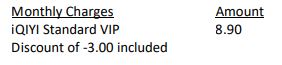
The monthly subscription fee for your iQIYI VIP subscription will be reflected in your Astro bill accordingly. For example, your Astro billing cycle is on the 20th of every month and you just signed up for the iQIYI Standard VIP subscription via Astro on 15October. Your iQIYI monthly charge will be reflected on your upcoming bill on 20th of October, and on the subsequent months' bills, as follows:
When can I start enjoying my VIP subscription?
You will be able to enjoy all the content on the iQIYI app immediately upon successful purchasefrom the Astro website. You may enjoy your VIP privileges from the iQIYI app on your Ultra Box, Ulti Box, mobile devices (Android & iOS), Apple TV, Android TV, as well as on Web (www.iq.com).Please ensure that the account used to log in to the app is the same one used to purchase your iQIYI VIP subscription.
I am an existing iQIYI VIP; will I get to enjoy Astro special price?
If you are an existing iQIYI VIP, you may cancel your existing VIP subscription with iQIYI and signup again via astro.com.my/iqiyi to enjoy the special price by adding your subscription to your Astro bill.
Where can I view my iQIYI entitlement expiry date/next payment details?
You can view your iQIYI entitlement & payment details in the app by follow these steps:
Step 1: Go to the Home Page
Step 2: Click on "VIP subscription"
Step 3: Click on "Manage VIP subscription" (Gear icon)
After following these steps, you will be able to view your entitlement expiry date, next payment date & payment method.
How do I cancel my iQIYI VIP subscription?
You may cancel your iQIYI subscription in the app by following these steps:
Step 1: Go to Home Page
Step 2: Click on "VIP subscription"
Step 3: Click on "Manage VIP subscription" (Gear icon)
Step 4: Click on "Cancel VIP subscription"
Will there be any penalty fees if I cancel my iQIYI VIP subscription?
There will be no penalty fee if you choose to cancel your iQIYI VIP subscription. Your cancellation will take effect upon your current entitlement expiry date. Kindly note that if you cancel your subscription within 24 hours before your entitlement expiry date as reflected in the iQIYI app (not according to Astro billing cycle), your subscription may be auto renewed.
App Issues
Who may I contact if I encounter any problems with the iQIYI app?
There are 4 ways for you to contact us for assistance:
Astro Login
How do I register for an Astro ID?
Download the iQIYI app > Select "Profile" > Click on "Log in with Astro ID" > Click on "Do not have an Astro ID? Click here".
Can I update my email address/mobile number for my Astro ID?
Yes, please visit Astro's Self Service Portal via myastro.astro.com.my to update your email address or mobile number.
I have forgotten my password; what should I do now?
Step 1: Click "Log in" and click "Forgot my password"
Step 2: Enter your email address and click "Submit"
Step 3: An email will be sent to your registered email address with further instructions on how to reset your password
How do I unlock a locked user account?
You may contact Astro's Customer Service by:
Will my personal information be protected?
Yes, Astro is bounded by the PDPA act. All information received will be used in accordance with our Privacy Notice
Pautan eKYC hanya sah selama 3 hari untuk melengkapkan proses pengesahan eKYC. Anda dikehendaki untuk membuat permohonan akaun Astro yang baharu.
Untuk langganan Astro Fibre, sekiranya anda memilih untuk menghentikan/menamatkan perkhidmatan Astro Fibre sebelum kontrak tamat (24 bulan), anda akan dikenakan yuran pembatalan awal sebanyak RM100 x Baki bulan tempoh kontrak untuk perkhidmatan Jalur Lebar anda.
Semua peranti Astro Fibre yang diberikan (modem Fibre, router WiFi dan Mesh WiFi) perlu dikembalikan selepas servis ditamatkan. Pihak Astro akan menjadualkan pengambilan semula peranti selepas perkhidmatan Jalur Lebar anda telah ditamatkan.
Jika peranti rosak, hilang atau tidak dapat diambil semula, bayaran penalti akan dikenakan (tidak termasuk Cukai Perkhidmatan).
Mulai 9 November 2021, anda perlu melanggan pakej-pakej baharu sekiranya ingin membuat tambahan Multiroom pada langganan anda. Caj langganan minimum RM100 diperlukan bagi pakej baharu langganan utama anda.
Hal ini untuk memastikan para pelanggan kami mendapat perhatian dan perkhidmatan terbaik bagi pakej-pakej baharu kami. Terima kasih kerana memahami.
Proses 'Electronic Know-Your-Customer (eKYC) ialah proses pengecamana dan pengesahan pelanggan individu secara dalam talian menggunakan cara elektronik. Ini membolehkan seseorang untuk menjadi pelanggan Astro pada bila-bila masa dan di mana-mana sahaja, tanpa masalah dan membantu mengukuhkan akaun Astro anda dengan melindunginya daripada penggunaan yang tidak sah.
Ya. Sebagai pelanggan Sports Pack, anda akan mendapat akses ke Liga Malaysia serta pelbagai pemain tempatan dan acara sukan antarabangsa sebagai sebahagian daripada langganan anda.
The expiry date is when your current Disney+ Hotstar entitlement ends, except if your Astro subscription is out of contract, in which case this expiry date may not apply to you. For details on your subscription expiry date, please call our Customer Contact Centre or WhatsApp us "DH Help
LANGKAH 1
Tekan butang "HOME" pada alat kawalan jauh anda.

LANGKAH 2
Pergi ke Pilihan Sistem dan tekan "OK".
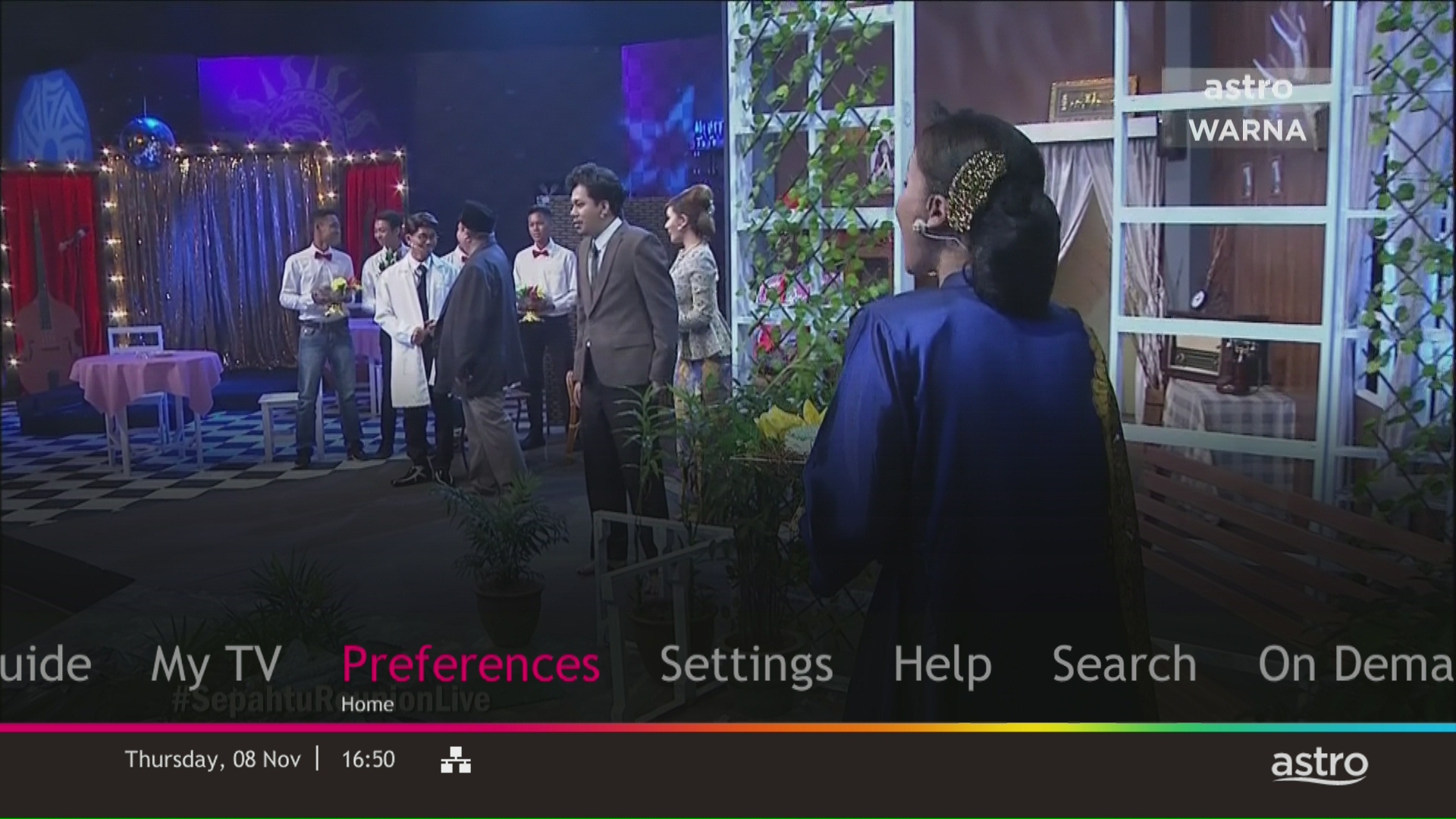
LANGKAH 3
Pergi ke Standby Automatik dan tekan "OK".

LANGKAH 4
Pergi ke pilihan anda dan tekan "OK".

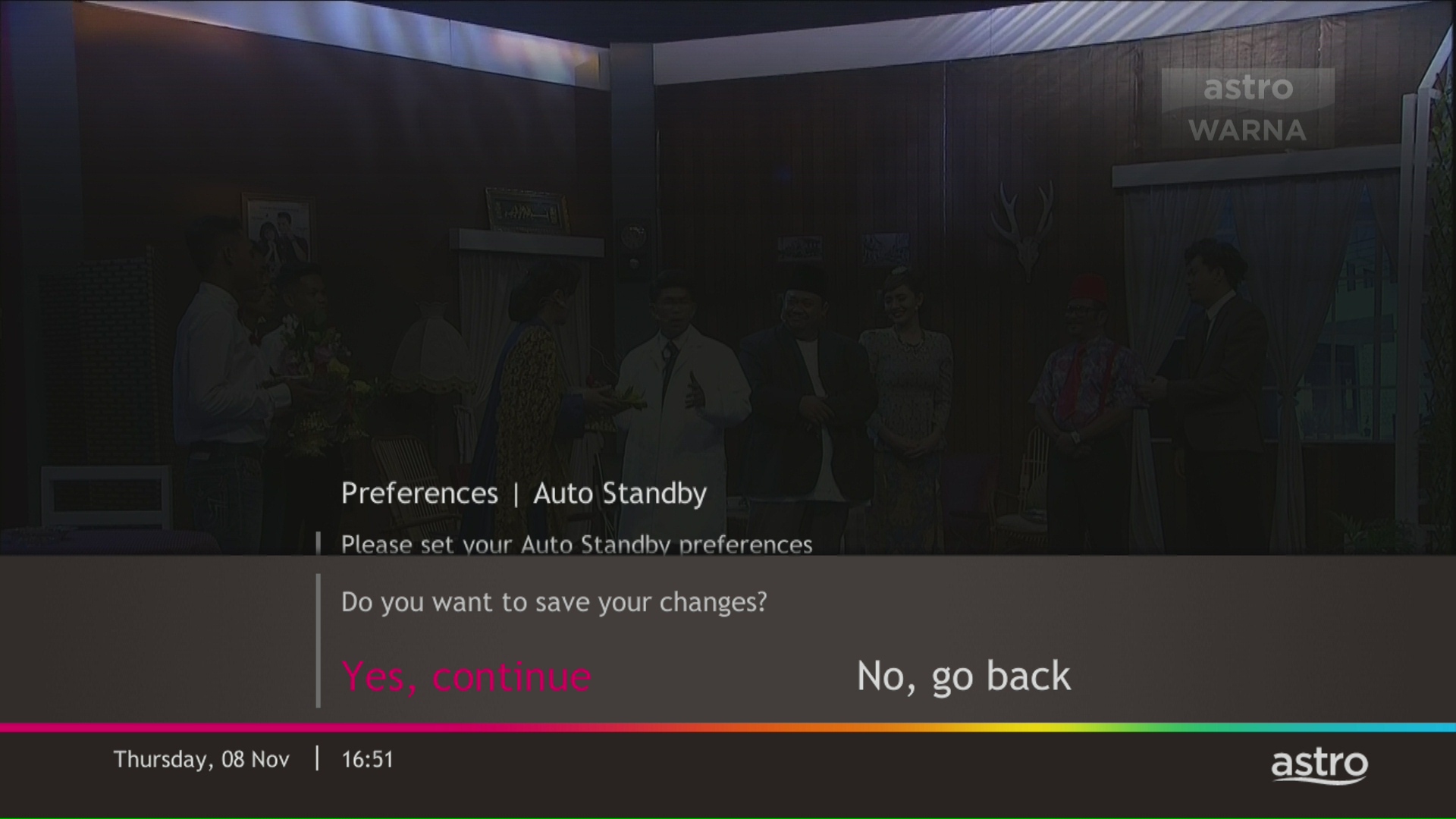
LANGKAH 5
Pilih Ya, teruskan dan kemudian tekan "OK" untuk mengesahkan perubahan.
Jika tidak, pilih Tidak, pergi semula untuk batalkan.
Ya, pelanggan Astro sedia ada boleh melanggan semua tawaran Astro & Broadband. Kontrak 24 bulan akan diperbaharui bila mendaftar jalur lebar.
Ya, pelanggan Astro sedia ada boleh melanggan semua tawaran Astro Fibre. Anda juga mempunyai pilihan untuk melanggan Astro Fibre sahaja (kendiri), yang datang tanpa sebarang pakej TV.
Kontrak 24 bulan akan diperbaharui apabila mendaftar untuk pek baharu.
Ya, anda akan menikmati Ulti Box apabila melanggan Primary/Entertainment/ Movie Pack ATAU Ultra Box apabila melanggan Sports/Sports+/Movies+/Premium 1/Premium 2/Premium 3/Platinum Pack.
Anda akan mendapat pemasangan PERCUMA untuk kedua-dua Ultra/Ulti Box selepas mendaftar dengan Astro & Broadband.
Ketik pada tab 'Akaun' pada bar navigasi dan skrol ke bahagian 'Bil'. Ketik pada 'Penyata Bil' untuk melihat sebarang penyata bil sehingga enam (6) bulan.

Pemasangan Jalur Lebar bukan standard meliputi senario apabila kabel dipasang pada dinding/siling atau kabel tambahan dan penggerudian diperlukan untuk melengkapkan pemasangan Astro & Broadband anda. Yuran tambahan akan dikenakan bergantung pada keperluan seperti berikut:

Anda akan mendapat semula akses ke saluran anda di Astro serta-merta sebaik sahaja peralatan telah dipasang di rumah baharu anda, dengan syarat akaun anda aktif. Pelanggan masih boleh teruskan menonton melalui Astro Go.
Astro continuously reviews its content proposition to offer the best choices and a variety of compelling content for our customers for the best viewing experience. As such, we will cease the sale of PPV passes on CH200 from 8 October onwards.
Customers can continue to enjoy their favourite content by subscribing to the relevant packs and stay tuned for more exciting offers to be announced soon.
There will be no installation fee for both Astro Box and Ultra Box. The Multiroom (second decoder) must be installed at the same registered address as your primary subscription.
Baki akan dikreditkan ke dalam akaun anda, dan ia akan dicerminkan di dalam bil anda yang seterusnya. Baki kredit akan digunakan untuk mengimbangi baki bil anda.