

Nationwide Installation
Applying for
| Maxis UniFi Astro Njoi |
Frequently Asked Questions
Find your answers here.
We provide one stop service to apply Astro and Broadband for you.
You can avoid driving and queuing at the sales counter. We are the dealer that can help you to handle your application from the beginning to the end.
We do not charge you when you apply from us. There is no credit card information required to apply here. Charges are the same as you apply from the sales counter.
First, you can apply online, we will get back to you immediately during business hour. WhatsApp/Email/Fax us your Photocopy of IC (for malaysian) / Passport (for foreigners). When we receive all the information, we will proceed with your application immediately.
Once we receive your application with complete information, we will process your application immediately during business hour. The contractor from the service provider will then contact you for installation appointment once your application is approved.
Enjoy greater savings and hassle-free bill payment in one single bill for both Astro and Broadband. You get to enjoy Astro and Broadband at discounted price every month over the contract period of 24 months.
Astro offers multiple TV packs including Entertainment, Sports, Movies and Kids options. You can choose a pack that matches your viewing preferences and add optional streaming apps where available.
Yes, you may subscribe to Astro TV packs without bundling broadband. However, bundling Astro TV with Fibre Broadband may provide better monthly savings and convenience with a single bill.
For small households with light streaming and browsing, 100Mbps is usually sufficient. Larger families, gamers or heavy streamers may benefit from 500Mbps or 1Gbps plans for smoother performance across multiple devices.
Most Astro TV and Fibre broadband plans come with a 24-month contract. Early termination charges may apply if cancellation is made before the contract ends.
Yes, you may upgrade your TV pack or broadband speed at any time, subject to eligibility and coverage. A new contract period may apply depending on the upgrade.
Your monthly bill will be issued directly by Astro. You may receive it via email or access it through your Astro account. Bundled customers will receive a single combined bill for TV and broadband services.
Payment methods may include online banking, auto debit, credit card or other approved payment channels provided by Astro. Our team can guide you during the registration process.
If you experience any service interruption, you may contact Astro customer support for technical assistance. In many cases, issues can be resolved remotely or a technician will be arranged if necessary.
Yes, relocation is subject to service availability at your new address. Relocation charges and contract adjustments may apply depending on your plan.
No, you do not need a credit card to submit your application. Payment setup will be arranged directly with Astro after your service is approved.
Selected Astro TV packs allow optional add-ons such as streaming services depending on current promotions and availability. Additional monthly charges may apply.
Yes, a WiFi router is typically provided during fibre installation. The router model may vary depending on the selected broadband speed plan.
Yes, we will check the service coverage at your address before proceeding with your application to ensure broadband is available at your location.
For Malaysians, please provide a copy of your MyKad. For foreigners, provide a copy of your passport when submitting your broadband application.
After your application is approved, the service provider typically contacts you within 2 to 7 working days to arrange the broadband installation appointment.
Most Astro Broadband plans come with a 24-month contract starting from your installation date. If you relocate, a new 24-month contract may apply at your new address.
Yes, you can relocate your broadband service, subject to service availability at the new address. Your contract may reset for another 24 months from the new installation date.
Yes, you may request to relocate broadband devices within your home. Non-standard installation charges may apply and are payable to the installer directly after assessment.
Yes, you can switch to Astro Broadband. To avoid service interruption, it is recommended to activate the new service before terminating your current broadband contract.
Standard installations may be free during promotions, but non-standard installations (e.g., device relocation or complex wiring) may incur extra charges payable directly to the installer.
Zee5 is the only app that has a change in price upon the SST increase. Prices of Netflix, Disney+ Hotstar, Viu, iQIYI, WeTV and Qalbox will not be affected.
You can recover your Netflix login here or at astro.com.my/Netflix
Step 1: Head to astro.com.my/Netflix
Step 2: At the FAQ section look for "How to recover my Netflix login email and password
You will be contacted by an Astro representative within two working days to advise you on the next course of action.
Customers with a Movies subscription via Movies, Premium 1, Premium 3 and Platinum packs will be able to access Disney+ Hotstar on the Ultra box.
Alternatively, customers can add on the 3-month Disney+ Hotstar pass for RM54.90. Subscribe to Disney+ Hotstar via astro.com.my/Disney.
For more support and options for your subscription, please WhatsApp us at 03 9543 3838 and type DH Help. Alternatively, you may visit astro.com.my/Disney for more information.
STEP 1
Identify your remote control:

a) Remote control with Astro logo at the bottom of the remote, proceed to STEP 2.
b) Remote control with Astro logo at the top of the remote, proceed to STEP 4
STEP 2 (Astro Logo at the bottom of the Remote)
On your remote, press the “set tv” button and set tv instructions will be displayed on top of your screen:

STEP 3
Follow the steps appear on the TV screen to sync your Astro remote and complete the setup.

STEP 4 (Astro Logo atthe top of the Remote)
Press and hold “tv input” key on bottom left of the remote for 3 seconds until the LED blinks twice.

STEP 5
Enter the 2-digit TV Code of your TV Brand and the LED will blink twice:

STEP 6
Try out the TV controls (TV Standby or adjust Volume) to check if they are working correctly.

STEP 7
Press ok and wait for the LED to blink twice to save the settings.
If you need further help with the Astro Fibre app, you may call our Customer Contact Centre at 03 - 9543 1543 and an Astro agent will be available to assist you immediately.
Please ensure that you have subscribed to the mentioned channel.
If you're subscribed to this channel, follow below steps.
STEP 1
You need to refresh the signal on your box.
Refer to Refresh signal of your box guide.
STEP 2
If issue persist after 30 minutes, proceed to submit report via WhatsApp or Feedback Form.
Yes, a third party is allowed to make the advance payment on your behalf. In the case of refund, the amount will be returned to the owner of the third-party account (source of payment).
Yes, the Multiroom (Smart TV) will utilise one (1) of your Astro GO concurrency.
Customers subscribing to Multiroom (Smart TV) can enjoy access up to 4 concurrency (watch 4 screens at the same time) which is shared across one Smart TV device and 3 mobile/laptop/tablet device(s) as Astro GO+ is complimentary with a Multiroom (Smart TV) subscription.
Settlement of total outstanding balance is to be made prior to any of the request.
You may reach out to Astro's customer service at 03-95433838 if you think there's an error regarding your redemption or rewards.
Astro Fibre WiFi router is a dual-band edge Residential Gateway which supports two frequency bands 2.4GHz and 5GHz.
If you would like more information or to provide feedback, kindly log in to our support page via support.astro.com.my. For more questions regarding Astro Pack, you may reach out to us via call at 03-7481 1000 (Monday to Friday, 9AM – 6PM exclude public holidays).
Photograph or scan your payment receipt, and send it to one of our contact platforms found here.
Astro ID is the account you use to sign in and manage all your Astro services online. You can use your Astro ID for the following Astro apps and portals:
- My Astro
- Astro GO
- HBO GO
- Disney+ Hotstar
- iQIYI
- TVBAnywhere+
- beIN Sports Connect
- SYOK App
- AWANI App
- Astro Website
- Ideaktiv portals
You can create an Astro ID using your mobile number or email address here. To secure your Astro ID, please proceed to next step and link the ID to your Astro account number (10 digits) or smart card number (12 digits).
Discover thousands of movies and series you'll love, and we are continuously expanding. If you would like to enjoy more movies on top of your current subscription, press the Home button and select On Demand. Use the arrow keys to scroll to Store. Pick and choose to rent any movie for up to 48hours.
Please see the table below for the offers available for residential customers.

Notes:
· Installation fee includes Government tax.
· Monthly subscription fee does not include Government tax.
· The Ulti Box offers in the table above include a contract Period of 24 months with a pro-rated early termination fee of RM600 (excluding Government tax).
· The installation fees listed in the table above applies for a standard installation of the Ulti Box in your home. Additional charges may apply for non-standard installation.
· * Existing customers with monthly pack >RM100 are recommended to select Ultra Box @ FREE Installation fee with 24 months contract.
· ** New customers with monthly pack >RM100 are recommended to select Ultra box @ RM99 installation fee with 24 months contract.
· You may visit https://product.astro.com.my/box to find out more details about Astro Ultra Box.
· Ulti Box installation is free for Astro & Broadband customers for Starter Pack and above. A separate list of TNC’s will be applicable for this offer.
You would have to create a new Astro ID with your email address or mobile number and link your Astro subscription. Please follow the steps in the link here
You can be assured that your data are safe with us. Astro implemented sufficient security measures to protect customer data and fully comply to Personal Data Protection Act
STEP 1
On your remote, press the HOME button and the home menu will be displayed on top of your screen.

STEP 2
Navigate to Settings.

STEP 3
Navigate to S/PDIF Audio and press "OK".

STEP 4
Navigate to your preferred selection and press “OK”.

The Multi-user Profile feature allows customers to create individual profiles within their Astro Box and Astro GO with the following personalisations:
- Personalised Recommendations
- Continue Watching
- Watch List
- Last Viewed Channel
- Favourite & Blocked Channels
The MUP feature is a great way to allow individual users to tailor personal Astro experiences whilst using a shared device (e.g.: Astro Box) in the household, providing them with better personalised recommendations and encouraging better content discovery.
Click here to find out more on this new feature and how to use it!
Netflix is a streaming entertainment service that offers a wide variety of award-winning TV programmes, films, anime, documentaries and more - on thousands of internet-connected devices. There's always something new to discover, and more TV shows and movies are added every month. The more you watch, the better Netflix gets at recommending TV shows and movies you'll love.
Astro customers with an internet-connected Ultra Box or Ulti Box can access the Netflix app and watch Netflix content via their Astro Box. For more information about Netflix, visit the Netflix website.
Yes, if a device is faulty due to customer's negligence, it is subject to a penalty fee for each device:
- WiFi router: RM200
- Fibre modem: RM500
- Mesh WiFi: RM200/unit
Starting 21 June 2022, all new digital sign-ups for TV packs on astro.com.my will now include access to the Astro GO app within an hour upon checkout of your first month subscription fees (excluding tax). Install the app on your smartphones, tablets or computers and you can start streaming even before your Astro box arrives!
Kindly ensure that your mobile number is the same as the registered phone number of the Astro account holder as the OTP will only be sent to the registered number. For further assistance, please call or WhatsApp us at 03-9543 3838. Alternatively, you may submit a request via our online Feedback Form here: astro.com.my/contactus/form.aspx.
Please ensure that your Astro subscription comes with access to Disney+ Hotstar. You may visit astro.com.my/disney to learn more about the Packs that come with Disney+ Hotstar or to check if your Disney+ Hotstar access is activated.
Upon confirmation that your subscription comes with access to Disney+ Hotstar, if you still see an error screen on your TV with your Ultra or Ulti Box when logging in to Disney+ Hotstar, please call our Customer Contact Centre at 03 9543 3838 and an Astro agent will be available to assist you immediately.
Although it is possible to pair the second mesh node unit with the first mesh, customers are advised to follow similar steps in setting up the Mesh Network by pairing the mesh unit with the WiFi router instead.
The promotion period of Astro Fibre’s Speed Upgrade Campaign is from 24 November 2023 until 31 May 2024.
For information about the Disney+ Hotstar app functions and specifications, please visit help.hotstar.com or email disneyplus.my@hotstar.com.
Ultra Box with Contract:
Astro customers are entitled to a two (2) years manufacturer warranty and Installation warranty. During this period, after-sales service is free of charge. However, when your warranty period is over, all after-sales service is subject to a minimal service charge starting from RM65 inclusive of 8% Service Tax.
Other Decoders/Ultra Box Without contract:
Astro customers are entitled to a one (1) year manufacturer warranty and (6) months Installation warranty. During this period, after-sales service is free of charge. However, when your Installation warranty period is over, all after-sales service is subject to a minimal service charge starting fromRM65 inclusive of 8% service tax.

1. Please standby computer/laptop to access to the internet and connection must be via LAN (cable) [Connect the LAN (cable) to the yellow port in Maxis Router and direct to computer/laptop].
2. You may open any web browser such as Google Chrome, Internet Explorer, Mozilla Firefox and etc.
3. On the address bar, please go to http://192.168.1.254 and below page will appear.

If below box appear, please enter required details as below:

USERNAME: Administrator
PASSWORD: (ACCESS KEY AT THE RGW STICKER)
(These are the defaults, if you have done previous configuration on your router the password may be different)
4. Once enter into the page ‘’TECHNICOLOR TG784N V3’’, you may follow below step for the wireless information.
i. Click "Configure”

ii. Once clicked configure button, below screen will appear.
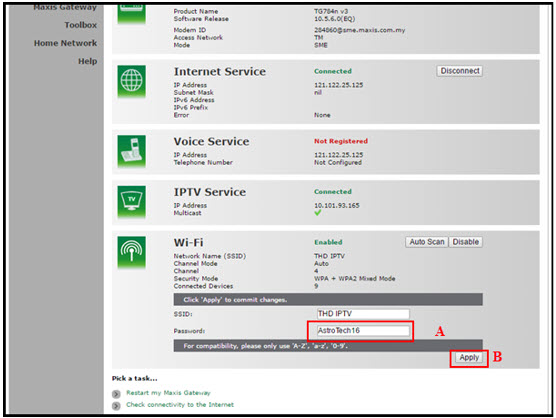
A. This is your current password. Please delete and enter the new password.
B. Once completed the selection; click the "Apply" button. Router will auto reboot and connection re-establish after few minutes.
Please re-connect your wireless using the new password.
Kindly note that not all Astro & Broadband Devices are required to be returned. After service termination of your Astro & Broadband service, we will call you via your registered mobile number within 3 days to schedule a pickup appointment with our Astro agent if your device needs to be returned.
If you were not contacted within 3 working days to return your devices, you are required to discard your old Astro & Broadband devices only at registered collection centres for proper handling and management of e-waste in an environmentally sound manner. Click here to find a registered collection centre near you.
Frequently Asked Questions
1) I missed the pickup appointment; what do I do now?
You can reschedule the pick-up appointment by calling our agent directly.
2) Can I reschedule my pickup date?
Yes! You can call our agent back directly to reschedule the pickup date and time.
3) Do I have to pack my device(s) before handing it over to the Astro agent?
Our Astro agent will dismantle the devices for you. However, if your devices are already dismantled, please pack them in their original box/packaging if possible. If this option is not available to you, just hand the device(s) over to the Astro agent without any packaging. You will not be charged any fees if the original packaging has been damaged/lost.
4) Do I have to print anything or fill in any forms before handing my device(s) over to the Astro agent?
No, you do not have to prepare any documents before handing your device(s) over to the Astro agent! All you have to do is get your device(s)ready before the Astro agent arrives to ensure a smooth handover process.
5) I have the Astro & Broadband router and modem to return, however, the cable(s) that come with them are damaged/lost; will there be any penalty fees?
No, please return your old Astro & Broadband modem and its power supply unit (PSU). There will be no penalty fees if the cable is damaged or lost.
Recycle via Registered Collection Centres
For all recycling-related questions, please click here.
STEP 1
Switch off the power of your box and make sure that the adapter’s power light is off.
STEP 2
Unplug the HDMI cable from your TV and plug it back in securely to other available HDMI port.
STEP 3
Switch on the power for your box and make sure that the adapter’s power light is on.
Please wait for 5 minutes.
STEP 4
Turn on your box. Do select the correct TV input.
You should no longer be experiencing this problem. 
STEP 1
On your remote, press the HOME button and the home menu will be displayed on top of your screen.

STEP 2
Navigate to Guide.

STEP 3
Select the channel you would like to add to favourite list and press "OK".

STEP 4
Select "Add to Favourites" and press "OK".

STEP 5
You are successfully added the channel to favourite list when this screen appears.

STEP 6
Your selected channel will have a heart tagging after added as favourite.
It will take around 10 to 15 minutes before you are able to view your purchase.
No, there are no penalty fees for the Mesh WiFi devices should you wish to terminate Astro Fibre within/after 24 months.
Unfortunately, this means that you are using a TV model that does not support 4K UHD resolution (Sony BRAVIA 4K GB, Sony BRAVIA 4K UR or Sony BRAVIA VH). Not to worry, we are working with the Sony team to ensure you will be able to enjoy these 4K UHD channels soon. We will keep you posted once these channels are available to you!
1. Unifi netis brand
The following shows an Interface based on Unifi router

- Launch Web Browser and enter the default's gateway's IP address (192.168.1.1) in the address bar.

- Enter Username and Password.
- Username = tmadmin
- Password = Adm@xxxx (xxxx refers to last four digits of MAC address)

- Choose WLAN -> wlan0 (2.4GHz) Basic Setting. Note down on SSID.

- Choose WLAN -> wlan1 (5GHz). Compare SSID with previous SSID.

- If SSID for wlan0 (2.4GHz) and wlan1 (5GHz) are the same. Change wlan1 (5GHz) SSID by adding number 5(i.e. ifuni_5G) to differentiate from 2.4 GHz. Click Apply Changes.
Note: Connection to Wi-Fi may be temporarily loss while the changes is updated.
Disney+ Hotstar is available on Chromecast (Gen 2 onwards, firmware 1.43 & above) and with the latest version of the Disney+ Hotstar app on iPhone, iPad and Android mobile.
Follow these instructions to cast your film/series:
- Make sure your mobile device and your Chromecast are on the same WiFi network
- Log into your Disney+ Hotstar app
- Select a film/series that you want to cast
- Press "Play'
- Once the film/series has started, tap on the casting icon
- Select the screen you wish to cast to
- The film/series should then be cast onto your screen
Your existing offers with us will not be affected and will continue until the agreed upon date.
Please upgrade the Ultra/Ulti Box software to enjoy Netflix on your Ultra/Ulti Box. To do this, please click on the Netflix app icon on the homepage or go to CH741 to prompt the software upgrade. Kindly click Install when the software upgrade prompt appears. This will take approximately 20 minutes and you would be able to launch Netflix on the Ultra/Ulti Box after that.
Service will resume within 3 hours after payment is made.
Currently, you may only add a maximum of five family members to the Astro Fibre App. However, kindly note that we are working on allowing users to add more family members in the future.
Astro's Plug & Play Box is our latest box where users can enjoy the latest Astro box simply by connecting it to the TV and internet. There is no longer a need to schedule or pay for an installation. By connecting your Plug & Play Box to home broadband, you will be able to-do the following:
- Watch your channels over the Internet. No more rain fade!
- Never miss your favorite shows again as you can stream LIVE events from the beginning, or simply pause and resume the program as you wish.
- Access a library of over 110,000 videos on demand. Catch-up or binge-watch full episodes whenever you like.
- Access your recordings anytime on TV or the Astro GO app via Cloud Recording.
Other features include pause on TV and continue watching on the Astro GO app, enhanced search capabilities and more.
Want to return your Ultra or Ulti Plug & Play Box? It's simple and free!
Here's what you can do with your unused Ultra/Ulti Plug & Play Box:
1. Return your device to us via Arranged Pick-up:
Step 1: Please call Astro's Contact Centre at 03-9543 3838 to schedule an arranged pick-up by one of our courier partners.
Step 2: Just sit back and relax! A courier agent will come to your doorstep to retrieve the devices.
Yes, you may terminate the service. However, an early cancellation fee will be applied for terminations/cancellations within 24 months. Please refer to the Astro Fibre's cancellation details.
No, Astro GO is a free app for Astro customers. The content available on Astro GO will depend on the subscription pack that you are subscribed to.
If you do not have an Astro subscription, please click here to find out packages available.
For customers whose sign-up speed is 50Mbps, 100Mbps or 500Mbps, you will get to enjoy your upgraded speed of 100Mbps/500Mbps/800Mbps for 24 months.
All existing or new Astro customers who meet the following criteria may upgrade to the Ultra Box:
- Have an internet connection at home (recommended>10Mbps speed)
- Maintain a minimum subscription with a HD + Recording service
If you live in a high-rise building, please call us at 03- 7481 8000 to check if your building can support the Ultra Box. If your high-rise building allows for the set-up of individual dishes you will be able to upgrade to the Ultra Box, subject to the criteria above.
If you would like to access our 4K UHD content via the Astro UHD channel 805 and UHD content on VOD, Astro Best and Astro First. We also recommend:
- 4K UHD supported TV that is HDCP2.2 compliant
- Internet connection of at least 30Mbps
Note: If you do not have an internet connection at home, you may take up the Ultra Box bundled with Astro™'s broadband package with rebates of up to RM30/month. For more details and to sign up for Astro & Broadband, please click here.
Please ensure that you are using the correct ID for eKYC submission.
For Malaysians :
1. Please ensure you are using MyKad or MyTentera.
2. Capture the front and back of your ID.
3. Ensure that there is no glare when capturing the photo.
4. Ensure that are capturing it in a bright room to have the highest picture quality.
5. Please do not cover your ID when capturing it, as it may impact the OCR Optical Character Recognition accuracy.
For Malaysian Permanent Resident and Other Nationality :
1. Please use Passport only.
2. Please capture your whole passport, which has your personal information on it and your signature.
3. Ensure that there is no glare when capturing the photo.
4. Please do not cover your ID with your when capturing it, as it may impact the OCR Optical Character Recognition accuracy.
