

Nationwide Installation
Applying for
| Maxis UniFi Astro Njoi |
Frequently Asked Questions
Find your answers here.
We provide one stop service to apply Astro and Broadband for you.
You can avoid driving and queuing at the sales counter. We are the dealer that can help you to handle your application from the beginning to the end.
We do not charge you when you apply from us. There is no credit card information required to apply here. Charges are the same as you apply from the sales counter.
First, you can apply online, we will get back to you immediately during business hour. WhatsApp/Email/Fax us your Photocopy of IC (for malaysian) / Passport (for foreigners). When we receive all the information, we will proceed with your application immediately.
Once we receive your application with complete information, we will process your application immediately during business hour. The contractor from the service provider will then contact you for installation appointment once your application is approved.
Enjoy greater savings and hassle-free bill payment in one single bill for both Astro and Broadband. You get to enjoy Astro and Broadband at discounted price every month over the contract period of 24 months.
Astro offers multiple TV packs including Entertainment, Sports, Movies and Kids options. You can choose a pack that matches your viewing preferences and add optional streaming apps where available.
Yes, you may subscribe to Astro TV packs without bundling broadband. However, bundling Astro TV with Fibre Broadband may provide better monthly savings and convenience with a single bill.
For small households with light streaming and browsing, 100Mbps is usually sufficient. Larger families, gamers or heavy streamers may benefit from 500Mbps or 1Gbps plans for smoother performance across multiple devices.
Most Astro TV and Fibre broadband plans come with a 24-month contract. Early termination charges may apply if cancellation is made before the contract ends.
Yes, you may upgrade your TV pack or broadband speed at any time, subject to eligibility and coverage. A new contract period may apply depending on the upgrade.
Your monthly bill will be issued directly by Astro. You may receive it via email or access it through your Astro account. Bundled customers will receive a single combined bill for TV and broadband services.
Payment methods may include online banking, auto debit, credit card or other approved payment channels provided by Astro. Our team can guide you during the registration process.
If you experience any service interruption, you may contact Astro customer support for technical assistance. In many cases, issues can be resolved remotely or a technician will be arranged if necessary.
Yes, relocation is subject to service availability at your new address. Relocation charges and contract adjustments may apply depending on your plan.
No, you do not need a credit card to submit your application. Payment setup will be arranged directly with Astro after your service is approved.
Selected Astro TV packs allow optional add-ons such as streaming services depending on current promotions and availability. Additional monthly charges may apply.
Yes, a WiFi router is typically provided during fibre installation. The router model may vary depending on the selected broadband speed plan.
Yes, we will check the service coverage at your address before proceeding with your application to ensure broadband is available at your location.
For Malaysians, please provide a copy of your MyKad. For foreigners, provide a copy of your passport when submitting your broadband application.
After your application is approved, the service provider typically contacts you within 2 to 7 working days to arrange the broadband installation appointment.
Most Astro Broadband plans come with a 24-month contract starting from your installation date. If you relocate, a new 24-month contract may apply at your new address.
Yes, you can relocate your broadband service, subject to service availability at the new address. Your contract may reset for another 24 months from the new installation date.
Yes, you may request to relocate broadband devices within your home. Non-standard installation charges may apply and are payable to the installer directly after assessment.
Yes, you can switch to Astro Broadband. To avoid service interruption, it is recommended to activate the new service before terminating your current broadband contract.
Standard installations may be free during promotions, but non-standard installations (e.g., device relocation or complex wiring) may incur extra charges payable directly to the installer.
Astro GO is a free streaming companion app for all Astro customers to enjoy their favourite shows and channels on their smartphones, tablets, and computers - anytime, anywhere in Malaysia. Astro customers with an active Pay-TV subscription can link their accounts to watch corresponding on demand and TV channels available on Astro GO as part of their subscription.
After service termination of your Astro Fibre service, we will call you via your registered mobile number (up to 3 times over 3 days) to schedule an arranged pick-up by one of our Astro agents. Our agent will then come to your doorstep, dismantle the devices for you and retrieve them.
Note: Upon termination of your service, customers are required to return their old Astro Fibre devices to Astro. Failure to do so will incur a fee of RM200 (WiFi Router), RM500 (Fibre Modem) and RM200 (Mesh WiFi Unit - if applicable) for each unit. All prices stated are exclusive of Govt. tax.
No, the Ulti Box does not support 4K UHD content. If you would like to watch Astro's 4K UHD content, please sign up for an Ultra box at Astro Ultra Box and Ulti Box | Astro.
STEP 1
On your remote, press the Home button and the Home Page will be displayed on your screen.
STEP 2
Navigate to Profile.
STEP 3
The Profile Selection Screen will be displayed.
STEP 4
Navigate to Edit Profile.
STEP 5
Choose a profile to edit.
STEP 6
Navigate to Delete Profile.
STEP 7
Click Confirm to delete your profile.
STEP 8
The deleted profile will be removed from the Profile Selection Screen.
If you are subscribed to Netflix via a bundle, Netflix comes by default as part of your entitlement.
If you are subscribed to Netflix as an a-la carte, the cancellation of Netflix can only be done via Netflix's Website, etc). This change will reflect in your next bill. From mid-December 2021 you may also cancel Netflix add-on through Astro Call Center.
Not to worry, you will only need to verify your Astro ID once. After that, you may log in to your account as usual.
Please contact your issuing bank for further information. Astro does not directly handle standing instructions. Please utilise our auto-debit facility if you would like hassle-free payments.
For any access related queries on Disney+ Hotstar, please call or WhatsApp "DH Help
STEP 1
While watching linear channel, press “OK” to launch player banner.

STEP 2
Press “OK” again to Pause. You will see an Icon on the left of TV screen.

STEP 3
Press “OK” again to resume the program.

STEP 4
Navigate to Back To Live TV and press "OK" to go back to the live view.

If you would like for more information, kindly visit our Multiroom page via Astro website https://www.astro.com.my/multiroom
To view the terms and conditions, click here.
Go to the "Content' tab and click the search icon on the screen. Type in a show title. The titles are categorized according to the following:
- On Demand
- Channels
- On TV

Yes, customer may choose to have different billing method for each different account.
Physical bill charging will only apply to the account that has opted for paper bills.
STEP 1
Check on the adapter's power light.
If the adapter's power light is ON, please refer to Blank Screen troubleshooting steps here.
Otherwise, if the adapter's power light is OFF, switch off the power for your box.

STEP 2
Ensure power cable is connected tightly.
Plug in power cable to different power socket and switch on the plug.
You should no longer be experiencing this problem.
If issue remains, proceed to STEP 3.

STEP 3
Try a different power socket to connect the equipment.
Turn on the power socket and check the adapter's power light.

If there is no light on your power adaptor's, please submit the issue on our Feedback Form and attach a picture of your smart card number for assistance.
Please indicate in the form if any lightning strike/thunderstorm/power trip occurred.
Refund fee is subject to your processing bank. However, Astro did not impose refund processing fee.
Most Astro customers are eligible to use the app, web, Ultra and Ulti boxes. You will only need to login with your Astro ID. Do note that your Astro ID must be linked to your Astro account to use the service. Click "Create now!' on the login page and you will be guided to create an Astro ID if you do not have one.
Tap on the "Account' tab on the navigation bar and scroll to "Billing' section. Tap on "Bill Statement' to view any bill statement up to six (6) months.

Yes, you can sign up for auto-debit after your account has been activated via My Astro.
Alternatively, you may also call our Customer Contact Centre at 03-9543 3838 for assistance or to enquire about any current Auto Debit promotions.
You will need to bring along all devices to your new place as no new devices will be issued.
Relocation will be subjected to new 24 months recontract and standard relocation fee applies for both Maxis and Allo respectively.
STEP 1
On your remote, press the HOME button and the home menu will be displayed on top of your screen.

STEP 2
Navigate to Settings.

STEP 3
Navigate to Remote Control Settings and press "OK".

STEP 4
Follow the steps appear on the screen to sync your Astro remote.

You may access it by pressing "200' on your Astro remote control whilst watching TV.
Please contact Astro Customer Call Center via 03-95433838
There are no switching fees apply when existing Astro customer move to new packs.
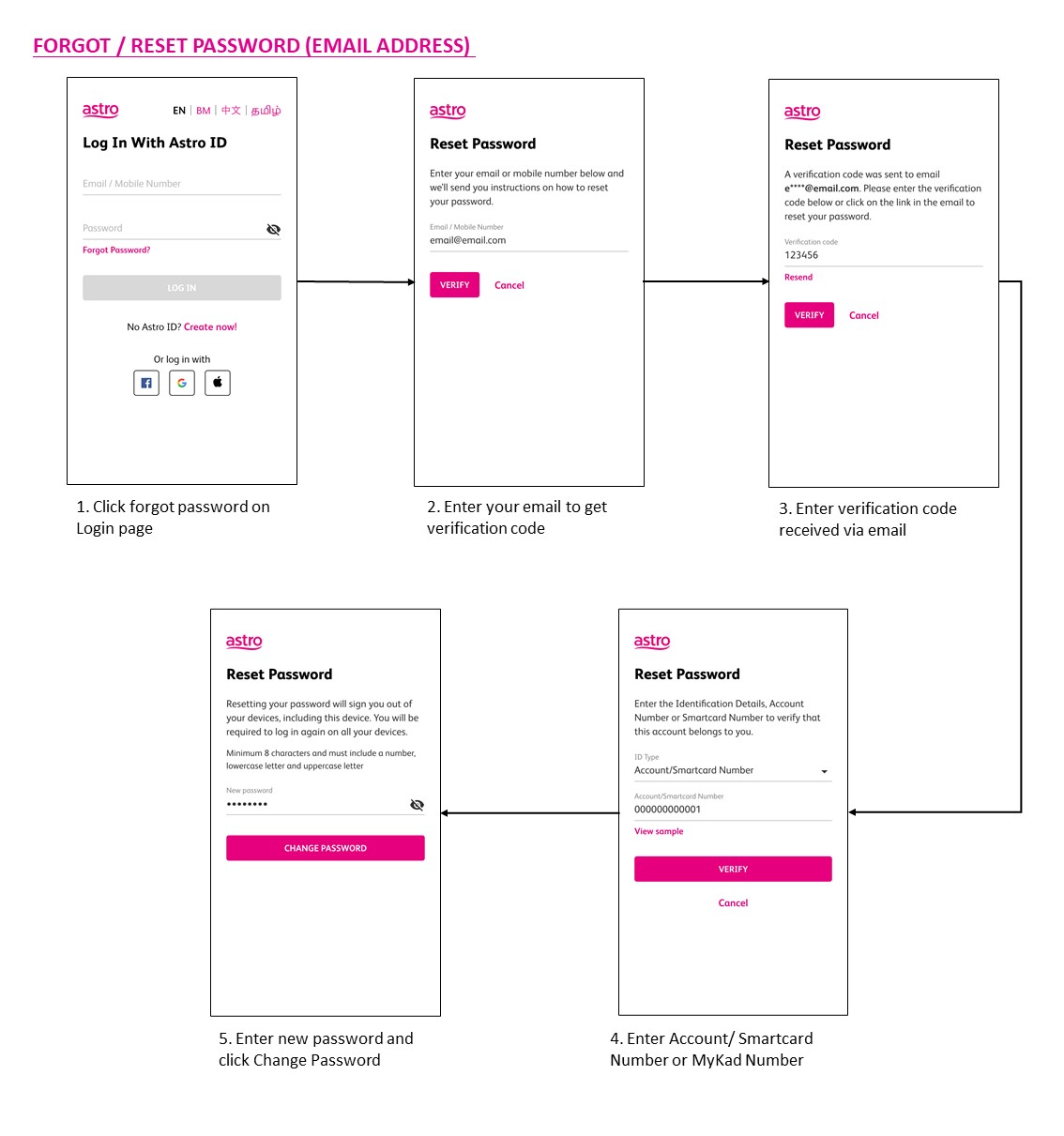
You may use the 'forgot password' recovery feature on the login page. Just enter the email address/ mobile number you signed up with and we will send you a recovery email.

You require at least two devices to form a Mesh WiFi network which are Astro Fibre WiFi router and a Mesh WiFi unit.
The Mesh unit will link to the WiFi router to form the Mesh WiFi network. You may connect up to 5 Mesh WiFi units for optimal WiFi coverage in your home.
Please note that only one Disney+ Hotstar access is bundled to each TV Pack subscription which allows two concurrent streams on Disney+ Hotstar.
No, this change in due date will not impact your monthly bill subscription.
Please refer below for the installation and activation fees for Astro customers on the new pack.

Please refer to these FAQs for more information.

You may proceed with below troubleshooting and it shouldn't take you any longer than 15 minutes.
- Please standby computer/ laptop to access to the internet and connection must be via LAN (cable) [Connect the LAN (cable) to the yellow port at ZTE Router and direct to computer/ laptop].
- You may open any web browser such as Google Chrome, Internet Explorer, Mozilla Firefox and etc.
- On the address bar, please go to http://192.168.0.1 and below page will appear.

4. Type the Username and Password as below. Then click Login. (These are the defaults, if you have done previous configuration on your router the password may be different)
Username: admin
Password: admin (or time123)

5. The router's web-based setup page should now appear. Please follow below steps for the configuration.

i. On the setup page, click the Network tab then click on the WLAN then choose Basic sub-tab.

ii. Please ensure Wireless RF Mode is Enabled.

iii. Click the drop-down arrow for Channel, then select your desired channel.
Choose between 1 until 11 (Suggested 1,6,11).

iv. Click Submit. Router will auto reboot and connection re-establish after few minutes.
Customers on the Multiroom (Smart TV) app can stream these two channels (CH549 Love Nature & CH805 Astro SuperSport) if their TV model supports 4K UHD resolution.
Kindly note that these Sony TV models do not support 4K UHD resolution:
• Sony BRAVIA 4K GB
• Sony BRAVIA 4K UR
• Sony BRAVIA VH
*CH805 Astro SuperSport is only available to customers on the Sports, Sports Plus, Premium 1, Premium 2, Premium 4, Platinum Lite and Platinum Packs.
STEP 1
Switch off the power for your box and make sure that the adapter's power light is off.

STEP 2
Locate the SIM card at the left side and gently pull it out.

STEP 3
Wipe the SIM card's gold chip clean using a dry soft cloth.

STEP 4
Make sure the gold chip is facing down and reinsert it all the way in.

STEP 5
Switch on the power for your box and make sure that the adapter's power light is on.
Please wait for 5 minutes.

STEP 6
Turn on your box. You should no longer be experiencing this problem.

If issue persist, please submit the issue on our Feedback Form with the error details and provide sim card number for assistance.
Yes, your charges during the deferment days will be pro-rated and reflected in your next bill. Please note that due to the recent requested change in your Astro account, the expiry date for your Disney+ Hotstar (3-months pass) subscription has been deferred to xxx (date) to consolidate the final monthly subscription pricing.
Starting 9 June 2023, Viu Premium will be added as an option as part of our Asian Favourites along side Chinese, Indian and Indonesian Favourites. Astro customers on the Entertainment, EntertainmentPlus, Premium 2, Premium 3 and Platinum Packs will be able to choose Viu Premium as their Asian Favourites selection and stream the app for FREE. While customers on other TV Packs may purchase Viu Premium as an add-on to their subscription for as low as RM8.40/month (RRP: RM17.90). After successfully adding Viu Premium to your subscription, all Ultra and Ulti Box customers can access the app on their Astro Box, www.viu.com and the Viu mobile app to enjoy all the best KDramas, popular local hits, popular Thai and Indonesian shows and so much more! For further information and updates on Viu,
please visit: www.astro.com.my/Viu .
Tune to channel 200 - select on "My Account".Your Total amount due will be stated under the "Bill Summary" section.

**Please note that this feature requires your box to be connected to your home Wi-Fi. Alternatively you can perform the SMS steps displayed on the screen to check your bill amount.
Your purchase will be reflected on your next monthly Astro bill. For example, if you rented a movie for RM 15.00 for 2 days and your next bill statement is in 2 weeks. RM 15.00 will be reflected in your Astro subscription bill in two weeks' time.
You can request for a password reset by clicking on "Forgot My Password' at the login page.
Astro subscribers will have the freedom to subscribe to Netflix via Astro, or they may also choose to continue subscribing via Netflix directly on their own.
If you have more than one card registered for OTP payments, you will be asked to select the specific card to be used for that specific transaction.
All Astro customers and non-customers who have an Astro ID will no longer be able to log in to our digital platforms using their usernames. Users will experience this change if they currently do not use an email address or mobile number to login, for example: johndoe2023.
Please rest assured that streamingapps labelled with "coming soon"
will be available on Astro in the near future.Please visit product.astro.com.my/appsfor more information on the streaming apps available on Astro or follow oursocial media to get notified on latest launches.
Facebook: @Astro
Instagram: @astromalaysia
Twitter: @astroonline
Kindly take note that streaming appslabelled with “coming soon” will be made available on Astro once they areready. Astro reserves the right to delay or cancel streaming app launches, ifnecessary.
Yes, you are entitled to a free Ultra/Ulti box with free standard installation upon signing up Astro Fibre with a new 24-month contract.
Astro is an official distributor of Disney+ Hotstar, the dedicated streaming home of global, and Malaysian Hits. Astro customers can now subscribe to Disney+ Hotstar through our Movies, Premium 1, Premium 3 or Platinum Pack and enjoy award-winning entertainment with Disney+ Hotstar alongside Astro's much-loved local content for even better value and savings. Now, customers can enjoy Disney+ Hotstar on their Ultra or Ulti Box, mobile app or web! In addition, customers who have multiple primary Astro accounts will be entitled to multiple entitlements to Disney+ Hotstar.

By default, the band steering featured is disabled. Follow these steps to enable it.
Note: Band Steering is called Dual-band Combination in the router web interface.
- Please connect your computer or laptop to your Astro Fibre router using LAN cable. Your LAN cable must be connected from the yellow port of Astro Fibre router (Any available port).
- Once connected, open any web browser such as Google Chrome, Internet Explorer, Mozilla Firefox and etc.
- On the address bar, type http://192.168.100.254 and below page will appear.

Login using your username and password if you have changed the router login setting. Otherwise, your default router login is as per below.
Username: user
Password: user
4. Once you have successfully logged in, the router's web-based setup page will appear.

5. At the top of the page, click Wi-Fi to configure the WiFi parameters.

6. Click on Dual-band Combination button to enable the Band Steering.

7. A pop-up message will appear showing "The device network may be disconnected when dual-band combination is enabled". Click "OK" to proceed.

8. Set the Wi-Fi name and Wi-Fi password based on customer's preferences. Then click "Apply" for the changes to take place.
Please reconnect to the new Wi-Fi name with the new password once completed.

No, you will not be charged 8% Service Tax for paper billing option.
From 1st July 2023 onwards, Astro will ONLY accept cheques deposited at Public Bank Berhad.
To simplify your monthly payments, here are some recommended alternatives you can look into.
- Auto-Debit
- Online Banking
- JomPAY
- Astro Quick Pay
To find out more on how you can make your payments via these channels, kindly visit here.
Should you choose to continue with cheque payment, do ensure that you follow these steps below.
Step 1: Fill in the cheque
Step 2: Ensure that your 10-digit Astro account number is accurately written at the back of the cheque
Step 3: Go to your nearest Public Bank
Step 4: Locate the Cheque Deposit Machine
Step 5: Select “Bill Payment” on the screen
Step 6: Select “Astro”
Step 7: Drop your cheque in
Step 8: Collect your receipt
Please check SMS received on the unsuccessful payment status and should you require further clarification contact your issuing bank for clarification or contact us via WhatsApp.
Unfortunately, only Astro Fibre customers who subscribe from 24 November 2023 to 31 May 2024 are eligible for this free speed upgrade. However, you may still get the speed boost by calling in to our Customer Contact Centre at 03-9543 3838 and re-contracting with us. Kindly note that your account will restart with a new 24-month contract.
If you choose to self-install the Plug& Play Box, then no installation fee will be charged. However, there will be an activation fee (please refer to the table below)

If you choose to have an installer to install the Plug & Play Box, then an installation fee will also apply.
Yes, your advance payment will be fully refunded if you cancel your subscription before the Astro box installation. Please call Astro's Contact Centre at 03-9543 3838 for a refund. The refund process will take approximately 14 days for processing with your issuing bank. However, if you decide to cancel your subscription after the Astro box installation (during your contract period), the prorated early termination fee will apply.
The Ultra Box is Astro's latest generation of 4K UHD enabled box with Cloud recording feature, redesigned new interface, and UHD resolution. Just connect the all-new Ultra Box to the internet and take control of your entertainment and explore over 110,000 videos that are waiting to be streamed, anytime. With the ability to record as many shows as you want simultaneously.
The new interface on Astro Ultra Box offers an enhanced viewing experience with a brand-new look and feel with features such as:
· New Home Screen - Everything you see is yours
· Discover VOD - Discover 110k videos, stream anytime, anywhere including in 4K UHD
· Search - Search faster and easier
· Play from Start - You missed the start? Just restart
· Stop Here, Continue There - Stop on one screen and continue on another device
· Multi-Screen - Stream seamlessly across any device
· Cloud Recording - Record all the programmes you want at the same time
. **Continuous viewing - Enable to continue watching your favorite shows during raining
Note: ** Except 4K UHD, Astro First and all radio channels
