

Nationwide Installation
Applying for
| Maxis UniFi Astro Njoi |
Frequently Asked Questions
Find your answers here.
We provide one stop service to apply Astro and Broadband for you.
You can avoid driving and queuing at the sales counter. We are the dealer that can help you to handle your application from the beginning to the end.
We do not charge you when you apply from us. There is no credit card information required to apply here. Charges are the same as you apply from the sales counter.
First, you can apply online, we will get back to you immediately during business hour. WhatsApp/Email/Fax us your Photocopy of IC (for malaysian) / Passport (for foreigners). When we receive all the information, we will proceed with your application immediately.
Once we receive your application with complete information, we will process your application immediately during business hour. The contractor from the service provider will then contact you for installation appointment once your application is approved.
Enjoy greater savings and hassle-free bill payment in one single bill for both Astro and Broadband. You get to enjoy Astro and Broadband at discounted price every month over the contract period of 24 months.
Astro offers multiple TV packs including Entertainment, Sports, Movies and Kids options. You can choose a pack that matches your viewing preferences and add optional streaming apps where available.
Yes, you may subscribe to Astro TV packs without bundling broadband. However, bundling Astro TV with Fibre Broadband may provide better monthly savings and convenience with a single bill.
For small households with light streaming and browsing, 100Mbps is usually sufficient. Larger families, gamers or heavy streamers may benefit from 500Mbps or 1Gbps plans for smoother performance across multiple devices.
Most Astro TV and Fibre broadband plans come with a 24-month contract. Early termination charges may apply if cancellation is made before the contract ends.
Yes, you may upgrade your TV pack or broadband speed at any time, subject to eligibility and coverage. A new contract period may apply depending on the upgrade.
Your monthly bill will be issued directly by Astro. You may receive it via email or access it through your Astro account. Bundled customers will receive a single combined bill for TV and broadband services.
Payment methods may include online banking, auto debit, credit card or other approved payment channels provided by Astro. Our team can guide you during the registration process.
If you experience any service interruption, you may contact Astro customer support for technical assistance. In many cases, issues can be resolved remotely or a technician will be arranged if necessary.
Yes, relocation is subject to service availability at your new address. Relocation charges and contract adjustments may apply depending on your plan.
No, you do not need a credit card to submit your application. Payment setup will be arranged directly with Astro after your service is approved.
Selected Astro TV packs allow optional add-ons such as streaming services depending on current promotions and availability. Additional monthly charges may apply.
Yes, a WiFi router is typically provided during fibre installation. The router model may vary depending on the selected broadband speed plan.
Yes, we will check the service coverage at your address before proceeding with your application to ensure broadband is available at your location.
For Malaysians, please provide a copy of your MyKad. For foreigners, provide a copy of your passport when submitting your broadband application.
After your application is approved, the service provider typically contacts you within 2 to 7 working days to arrange the broadband installation appointment.
Most Astro Broadband plans come with a 24-month contract starting from your installation date. If you relocate, a new 24-month contract may apply at your new address.
Yes, you can relocate your broadband service, subject to service availability at the new address. Your contract may reset for another 24 months from the new installation date.
Yes, you may request to relocate broadband devices within your home. Non-standard installation charges may apply and are payable to the installer directly after assessment.
Yes, you can switch to Astro Broadband. To avoid service interruption, it is recommended to activate the new service before terminating your current broadband contract.
Standard installations may be free during promotions, but non-standard installations (e.g., device relocation or complex wiring) may incur extra charges payable directly to the installer.
You can track your ticket status by contacting us via WhatsApp or call us at 03-9543 3838.
Please check if you are streaming on a supported device. Astro GO is only applicable within the supported platforms; mobile devices (phones and tablets) and web browsers.
If you are still having issues, proceed to submit report via WhatsApp or Feedback Form.
Please ensure that your mobile number is up to date in our database to ensure that payment reminders are sent to the right person.
You can do so via:
1. Astro Self-Service Portal
2. Call our Customer Call Centre (CCC)
**Only account holder can update the mobile number
Starting 12 December 2023, Multiroom Smart TV app customers can enjoy two 4K Ultra HD (4K UHD) channels, namely CH549 Love Nature and CH805 Astro SuperSport. “Love Nature” is available to all customers regardless of their subscribed TV Pack. It celebrates the complexity of life on earth, presenting nature stories in stunning detail and colours.
Additionally, “Astro SuperSport” is only available to customers on the Sports, Sports Plus, Premium 1, Premium 2, Premium 4, Platinum Lite and Platinum Packs. This channel showcases a variety of sporting events, selected to appeal to the Malaysian viewing audience.
Absolutely not. Astro wants to give our members the convenience of having all their favourite series, exciting originals, vernacular signatures, live sports and local blockbuster movies all in one place.
What is the BBC Player app?
BBC Player is an authenticated multi-genre SVOD (Subscription Video on Demand) service that allows viewers to watch the very best British programmes anytime and anywhere.
BBC brands available on the app include:
- BBC Earth inspires audiences by sharing the incredible wonders of our universe. BBC Earth showcases the work of the world's foremost factual filmmakers as it seeks to take audiences on a thrilling journey of discovery across natural history and science. From the smallest creature under the microscope to the limitless expanses of space, BBC Earth brings viewers face to face with heart pounding action, mind-blowing ideas and the wonders of being human.
- BBC First is the home of premium, original British dramas. Showcasing world-renowned, award-winning talent in front of and behind the camera, it delivers audiences the first chance to see stories that challenge, immerse and entertain, all with a unique British perspective.
- BBC Brit offers premium factual entertainment that is intelligent but irreverent. Male-skewing but with broader appeal, it blends expertise with entertainment and fact with fun. This brand is the exclusive home of Top Gear and covers a rich variety of subjects: cars, science, adventure, business, life-changing moments, extreme characters, quirky eccentrics and comedy. BBC Brit is available exclusively on BBC Player.
- BBC Lifestyle is the unique entertainment destination brimming with vibrant, fresh and exciting programmes which set trends and guide you into transforming your world; from revamping your home to invigorating your culinary skills and helping you become happier and get the best out of life.
- CBeebies is a pre-school channel for children aged six years and under. CBeebies provides a range of pre-school programming designed to encourage learning through play in a consistently safe environment. Acclaimed children's titles such as Bluey, Hey Duggee, Go Jetters, JoJo & Gran Gran, Thomas & Friends and Teletubbies encourage children to learn about and enjoy the world around them.
Who can access the BBC Player app?
Starting 20 December 2022, Astro customers on eligible packs will receive access to the BBC Player app to enjoy world class documentaries, premium British dramas, aspirational lifestyle programmes, engaging preschool programmes and more on the big screen via the Ultra Box, Ulti or stream via the mobile app or website for no additional charge.
What content is available on BBC Player?
Access to content within the BBC Player app is based on the pack that Astro customers have subscribed to:

How much does it cost to subscribe to BBC Player via Astro?
BBC Player is bundled to the selected pack listed above (Q3) for both existing and new eligible customers.
Subscribe to our TV Packs for better savings now by visiting www.astro.com.my or WhatsApp "Get BBC" at 03-9543 3838.
How do I access the BBC Player app on the Ultra Box or Ulti Box?
Eligible customers may follow the simple steps below to access the BBC Player app on their Ultra Box or Ulti Box:

How do I access the BBC Player mobile app?
Download the BBC Player app from the iOS App Store or Google Play Store.
After you have successfully downloaded the app to your mobile device, simply click "Astro" as your service provider and log in with your Astro ID. Once complete, you will get instant access to all your favourite BBC content right at your fingertips!
How can I access BBC Player via website?
Please visit www.bbcplayer.com on your browser, log in with your Astro ID and start streaming.
When can I start enjoying my BBC Player subscription?
Starting 20 December 2022, Astro customers on eligible packs will receive complimentary access to the BBC Player app to enjoy world class documentaries, premium British dramas, aspirational lifestyle programmes, engaging preschool programmes and more on the big screen via the Ultra Box, Ulti Box, or stream via the mobile app or website. Thank you for your support.
How many devices can I use to access the BBC Player app at one time?
Customers can access a maximum of 5 devices concurrently on the BBC Player app, including the Astro Ultra Box or Ulti Box.
Can I download content from the BBC Player app for offline viewing?
Yes, selected downloaded programmes will be available for viewing offline for up to 30 days. Just click on a programme you would like to watch offline to check if it is downloadable. Kindly note that this download feature is only available on the BBC Player app. If you are accessing the BBC Player website, you can only stream content online.
What is the storage requirement for content downloading?
The storage requirement is dependent on the type of videos users download as the space needed may vary.
Are there any subtitles available for content on the BBC Player app?
English closed captions are available for all BBC Player programmes, while Chinese and Bahasa Malaysia subtitles are available for selected programmes only.
What audio options are available for content on the BBC Player app?
Currently, only English audio is available for all BBC Player content.
Can I access content on the BBC Player app outside of Malaysia?
Unfortunately, you will not be able to stream or watch programmes online when you are outside of Malaysia. However, you will still be able to watch available downloaded programmes offline on the BBC Player mobile app.
Astro Login
How do I register for an Astro ID?
Download the BBC Player app > Select "Profile" > Click on "Log in with Astro ID" > Click on "Do not have an Astro ID? Click here".
Can I update my email address/mobile number for my Astro ID?
Yes, please visit Astro's Self Service Portal via myastro.astro.com.my to update your email address or mobile number.
I have forgotten my password; what should I do now?
Step 1: Click "Log in" and click "Forgot my password"
Step 2: Enter your email address and click "Submit"
Step 3: An email will be sent to your registered email address with further instructions on how to reset your password
How do I unlock a locked user account?
You may contact Astro's Customer Service by:
- Submitting a feedback form here: https://support.astro.com.my/feedback-form or
- Send a message on WhatsApp by typing "Hi" at 03-95433838.
Will my personal information be protected?
Yes, Astro is bound by the PDPA act. All information received will be used in accordance with our Privacy Notice.
Other App Enquiries
I am unable to log in to BBC Player with my Astro ID via Google; what should I do now?
Please follow the simple steps below if you are facing issues logging in to BBC Player:
- Go to id.astro.com.my and log in via your Google account
- Under "Profile", create a new password for your Astro ID
- Return to BBC Player and sign in via Astro using your Gmail account and the new password
Who may I contact if I encounter any problems with the BBC Player app?
There are 4 ways for you to contact us for assistance:
Issues related to BBC Player in-app or content:
- Submit an in-app feedback form to BBC Player, or
- Reach out to BBC Player via email at bbcplayerops@bbc.com Issues related to Astro entitlement/packages:
- Submit this feedback form here: https://support.astro.com.my/feedback-form, or
- Send a message on WhatsApp by typing "Hi" at 03-95433838
The Kids Friendly Profile is an enhancement to the Kids User Profile feature with the following major improvements:
- Kid-Friendly Channels, On Demand content & TV Guide: Only Kid-friendly channels and On-Demand content can be viewed in the Kids Profile. Other channels and content are not viewable. The same applies to the Kids TV Guide.
- PIN control for the Kids Profile: When switching from a Kids Profile to an adult profile (i.e.: Father or Mother), a PIN entry will be required.
- Limited Kids Profile Content Search: Only Kids age-appropriate content can be searched and displayed within the Kids Profile.
- Kids Profile Based Recordings: Kids Profiles will have their own personalised age-appropriate recordings without any overlap with other user profiles. This feature will be available from 17th August onwards.
These enhancements are available across the Astro GO app, Ultra/Ulti Box, and Multiroom Box/Smart TV app.
Click here to find out more on this new feature and how to use it!
Tap on the "Account' screen on the navigation bar to view your outstanding balance. Click on "Pay Now' to pay your bill. If your payment is successful, you will receive a record and your payment history will be updated.


STEP 1
While watching linear channel, press “OK” to launch player banner.

STEP 2
Press “OK” again to Pause. You will see an Icon on the left of TV screen.

STEP 3
Press “OK” again to resume the program.

STEP 4
Navigate to Back To Live TV and press "OK" to go back to the live view.

· Bill
· Log into your Astro Self-Service (location)
Refund process required 5 working days by Astro and additional 3 - 7 working days required subject to the respective processing banks.
Some of our payment partners require payees to scan the barcode on the statement to make payment. Always bring your Astro bill statement when making payment over the counter.
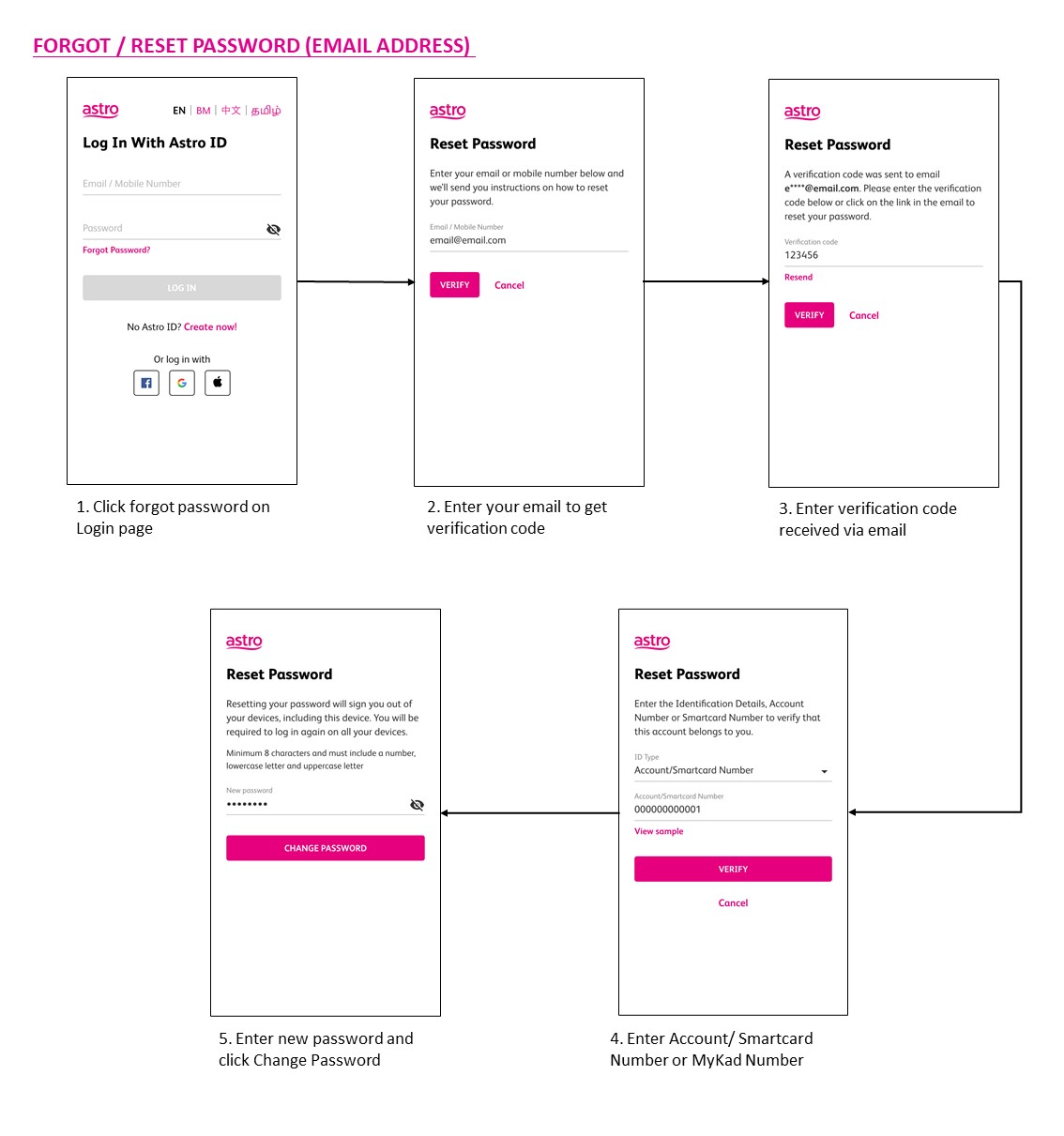
You may use the 'forgot password' recovery feature on the login page. Just enter the email address/ mobile number you signed up with and we will send you a recovery email.

You can proceed with below troubleshooting if the weather is good. Ortherwise, you may try again later.
STEP 1
On your remote, press the “HOME” button and the home menu will be displayed at the bottom of your screen.
STEP 2
Navigate to SETTINGS and press “OK”.
STEP 3
Navigate to STB DIAGNOSTICS and press “OK”.
STEP 4
Refer to the signal strength % shown on the top left of your screen.
If it is 65% or higher, please go to WhatsApp to receive further help.
If it is below 65%, please go to STEP 5.
STEP 5
Switch off the power for your box and make sure that the adapter’s power light is off.
STEP 6
Unscrew the satellite cable from the box and pull it out.
STEP 7
Plug the satellite cable back into the box and screw it back securely.
STEP 8
Switch on the power for your box and make sure that the adapter’s power light is on.
Please wait for 5 minutes.
STEP 9
Turn on your box. You should no longer be experiencing this issue.
If issue persist, please attach a picture of your General tab of the STB Diagnostics for assistance.
Centralized Dish
If issue persist under a centralised satellite dish, please refer to your respective Building Management before contacting our agents.
Astro offers 3 different after-sales service that is made available to the customers:
(1) Express (RM75)
(2) Same Day (RM70)
(3) Regular (RM65)
***Price is inclusive of 6% Service Tax.

No, the Service Tax is a tax payable entirely to the Government. Astro acts as a collection agent for the Government.
At this point in time, 4K UHD content from Disney+ Hotstar is not available on the Ultra or Ulti Box. We are working to enable this on the Ultra Box in a future update.
If you are subscribed to Netflix via a bundle, Netflix comes by default as part of your entitlement.
If you are subscribed to Netflix as an a-la carte, the cancellation of Netflix can only be done via Netflix's Website, etc). This change will reflect in your next bill. From mid-December 2021 you may also cancel Netflix add-on through Astro Call Center.
For Platinum Pack and Multiroom Smart TV customers, Astro GO+ will be automatically added to your subscription.
Your account may be under suspension. To resolve this issue, proceed to submit report via WhatsApp or Feedback Form.
Please contact your issuing bank for further information. Astro does not directly handle standing instructions. Please utilise our auto-debit facility if you would like hassle-free payments.
STEP 1
Check the Audio settings on your box and set to Auto.
Refer guide to change Set HDMI Audio.
STEP 2
If issue persist, check if there is any 3rd party device (sound system/hdmi splitter) connected between box and TV.
STEP 3
If using 3rd party devices, bypass/remove 3rd party device and make sure HDMI cable connected directly from box to TV.
STEP 4
If issue persist, connect to Live Agent via WhatsApp for help.
No, this change in due date will not impact your monthly bill subscription.
STEP 1
Switch OFF the power of your Ultra / Ulti box and make sure that the adapter's power light is off.

STEP 2
Switch ON the power of your Ultra / Ulti box and make sure that the adapter's power light is on.

STEP 3
On your remote control, press the standby button repeatedly until the Startup Options appear on TV.

STEP 4
Press "1".

STEP 5
Press "1".

STEP 6
The Software Update progress screen will appears.
The update will take 10 - 15 minutes to complete.
Please be patience.

Although it is possible to pair the second mesh node unit with the first mesh, customers are advised to follow similar steps in setting up the Mesh Network by pairing the mesh unit with the WiFi router instead.
You would need your 10-digit account number and your email address.
Netflix is available to IPTV customers on the Ultra Box and Ulti Box. Non-Ultra Box customers will not be able to access Netflix on CH741. Please upgrade to the Ultra Box/Ulti Box to access Netflix on the Ultra Box.
Only the account holder is allowed to manage the auto-debit facility. However, a third-party card holder has the right to withdraw their registered card from the linked-account with proper validation.
Refund fee is subject to your processing bank. However, Astro did not impose refund processing fee.
Please check your internet speed and connection status via internet connection test. If your internet is working fine and the issue persists, proceed to submit report via WhatsApp or Feedback Form.


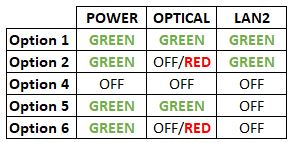


Option 1
- Please turn off all devices (Modem and Router). By restarting your modem, you can isolate the possibility of overloaded processes in the modem, which would impact its performance.
- Ensure the fiber cable from your wall socket and modem is securely connected.
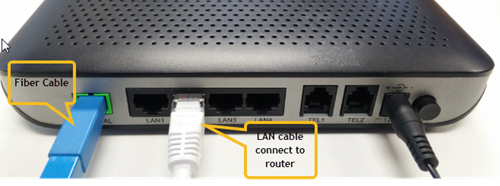

Notes: You might be connected to LAN 1 if backbone is Maxis
Router connection

3. Please make sure the LAN cable is connected properly from router (Port 1-4 - Yellow port) to PC/Laptop.
4. If the issue persists, submit your feedback form and attach your modem light indicator picture/video for further assistance.
Option 2/ Option 3/ Option 5/ Option 6
1. Please turn off all devices (Modem and Router). By restarting your modem, you can isolate the possibility of overloaded processes in the modem, which would impact its performance.
2. Ensure the fiber cable from your wall socket and modem is securely connected.

3. Ensure both cables on the Modem (LAN Port 2) and Router (WAN Port - Red port) are properly connected.

Notes: You might be connected to LAN 1 if backbone is Maxis
Router connection

3. Please make sure the LAN cable is connected properly from router (Port 1-4 - Yellow port) to PC/Laptop.
4. Please make sure both cables on Router (Any Yellow port) and Astro Decoder (Network Port behind decoder) are properly inserted.


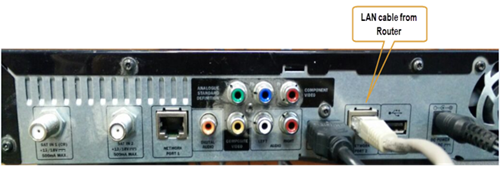

5. Switch on modem and router and please wait for 2 minutes to stabilise the devices after reboot.
6. If the issue persists, submit your feedback form and attach your modem light indicator picture/ video for further assistance.
Option 4
1. Ensure Modem/Router are connected tightly to the power socket.

2. Try to use another power socket / power source to eliminate faulty power sockets/power sources which could cause the issue.
3. If the issue persists, submit your feedback form for further assistance.
STEP 1
On your remote, press the HOME button and the home menu will be displayed on top of your screen.

STEP 2
Navigate to Settings.

STEP 3
Navigate to Audio and press "OK".

STEP 4
Navigate to your preferred selection and press “OK”.

Astro continuously reviews its content proposition to offer the best choices and a variety of compelling content for our customers for the best viewing experience. As such, we will cease the sale of PPV passes on CH200 from 8 October onwards.
Customers can continue to enjoy their favourite content by subscribing to the relevant packs and stay tuned for more exciting offers to be announced soon.
Not all shows/channels will be available on the Plug & Play Box as this depends on contractual rights with specific guidelines on the entitlement of these shows/channels and what you have as a part of your subscription.
- Customers subscribing to Plug & Play Box with or without Astro Broadband will not have access to 1 (one) Channel - NHK World
Please be assured that we are continuously working hard to make more content available on the Plug & Play Box.
If you prefer to have all these channels, we recommend that you choose the Satellite dish option for the Ultra or Ulti Box.
Unavailable channels are as below:

Astro Fibre WiFi router is a dual-band edge Residential Gateway which supports two frequency bands 2.4GHz and 5GHz.
No there will not be any penalty.
For the Multiroom subscription on a box setup, if your subscription is within the 24-month contractual period. Then a pro-rated penalty of RM600 will be applied for any Astro box except for Ultra Box, which the penalty will be RM1,000.
After service termination of your Astro Fibre service, we will call you via your registered mobile number (up to 3 times over 3 days) to schedule an arranged pick-up by one of our Astro agents. Our agent will then come to your doorstep, dismantle the devices for you and retrieve them.
Note: Upon termination of your service, customers are required to return their old Astro Fibre devices to Astro. Failure to do so will incur a fee of RM200 (WiFi Router), RM500 (Fibre Modem) and RM200 (Mesh WiFi Unit - if applicable) for each unit. All prices stated are exclusive of Govt. tax.
Rescheduling must be done at least 1 hour prior to the original appointment time.
The new packs and access to Netflix on the Ultra Box and Ulti Box is available for Astro IPTV customers.
Auto-debit payment will be debited from your account 5-7 working days after your billing cycle date.
If your auto-debit payment is unsuccessful, you will receive an SMS alert.
We are thrilled to announce that as part of your subscription, you are able to enjoy exclusive coverage of live matches in HD on Astro channels, On Demand and Astro GO! This means that you'll have access to all the latest games, highlights, and analysis, right at your fingertips.
With this new addition, you'll be able to follow your favourite teams and players closer than ever before, keeping you up-to-date with all the action on and off the field. Whether you're a die-hard fan or a casual spectator, this new content is sure to provide you with endless hours of entertainment.
To ensure that we continue offering the best choice in sports content, our Sports Pack will now be priced at RM104.99/month (for 12 months contract) or RM99.99/month (for 24 months contract) and Premium Pack 1 will now be priced at RM139.99/month (for 12 months contract) or RM129.99/month (for 24 months contract) starting 9 February 2023, and this applies to all new customers.
Note that there will no changes for existing Sports Pack & Premium 1 customers in 24 or 12 month contract being renewed before 1st June 2023.
We appreciate your continued support and can't wait for you to experience this exciting new addition to your Sports Pack subscription.
Please refer to the table below for the full revised pricing for the following packs:

We hope you continue to enjoy your Astro experience with us.
If you sign up Astro & Broadband with standard Ultra & Ulti box (DBB), all channels are available.
However, there are channels that will not be available with Ultra/Ulti Plug & Play Box which are NHK World (398).
Astro introduces Liga Malaysia for all Astro customers to watch the Malaysian Football League’s Liga Malaysia competitions LIVE, comprising Perlawanan Sumbangsih (Piala Sultan Haji Ahmad Shah), Liga Super, Piala FA and Piala Malaysia live in HD on Astro Arena (CH801), Arena Bola channels (CH803 and CH804) and stream on Astro GO until further notice.
You may register for auto-debit via: -
1.My Astro website.

2.MyAstro App.

3.Any of our AstroExperience Store.
Your current additional RM20 rebate will be removed. However, you will still get to enjoy the standard bundle rebate accordingly.
No, you need to have an Astro ID to enjoy the features.
Multiroom discount rates will be removed upon splitting the account.
Please submit your issue here or you can WhatsApp us at 03-9543 3838.
Yes, your charges during the deferment days will be pro-rated and reflected in your next bill. Please note that due to the recent requested change in your Astro account, the expiry date for your Disney+ Hotstar (3-months pass) subscription has been deferred to xxx (date) to consolidate the final monthly subscription pricing.
Currently, there are no rebates provided when you sign-up for the Ultra/Ulti Plug & Play Box.
