

Nationwide Installation
Applying for
| Maxis UniFi Astro Njoi |
Frequently Asked Questions
Find your answers here.
We provide one stop service to apply Astro and Broadband for you.
You can avoid driving and queuing at the sales counter. We are the dealer that can help you to handle your application from the beginning to the end.
We do not charge you when you apply from us. There is no credit card information required to apply here. Charges are the same as you apply from the sales counter.
First, you can apply online, we will get back to you immediately during business hour. WhatsApp/Email/Fax us your Photocopy of IC (for malaysian) / Passport (for foreigners). When we receive all the information, we will proceed with your application immediately.
Once we receive your application with complete information, we will process your application immediately during business hour. The contractor from the service provider will then contact you for installation appointment once your application is approved.
Enjoy greater savings and hassle-free bill payment in one single bill for both Astro and Broadband. You get to enjoy Astro and Broadband at discounted price every month over the contract period of 24 months.
Astro offers multiple TV packs including Entertainment, Sports, Movies and Kids options. You can choose a pack that matches your viewing preferences and add optional streaming apps where available.
Yes, you may subscribe to Astro TV packs without bundling broadband. However, bundling Astro TV with Fibre Broadband may provide better monthly savings and convenience with a single bill.
For small households with light streaming and browsing, 100Mbps is usually sufficient. Larger families, gamers or heavy streamers may benefit from 500Mbps or 1Gbps plans for smoother performance across multiple devices.
Most Astro TV and Fibre broadband plans come with a 24-month contract. Early termination charges may apply if cancellation is made before the contract ends.
Yes, you may upgrade your TV pack or broadband speed at any time, subject to eligibility and coverage. A new contract period may apply depending on the upgrade.
Your monthly bill will be issued directly by Astro. You may receive it via email or access it through your Astro account. Bundled customers will receive a single combined bill for TV and broadband services.
Payment methods may include online banking, auto debit, credit card or other approved payment channels provided by Astro. Our team can guide you during the registration process.
If you experience any service interruption, you may contact Astro customer support for technical assistance. In many cases, issues can be resolved remotely or a technician will be arranged if necessary.
Yes, relocation is subject to service availability at your new address. Relocation charges and contract adjustments may apply depending on your plan.
No, you do not need a credit card to submit your application. Payment setup will be arranged directly with Astro after your service is approved.
Selected Astro TV packs allow optional add-ons such as streaming services depending on current promotions and availability. Additional monthly charges may apply.
Yes, a WiFi router is typically provided during fibre installation. The router model may vary depending on the selected broadband speed plan.
Yes, we will check the service coverage at your address before proceeding with your application to ensure broadband is available at your location.
For Malaysians, please provide a copy of your MyKad. For foreigners, provide a copy of your passport when submitting your broadband application.
After your application is approved, the service provider typically contacts you within 2 to 7 working days to arrange the broadband installation appointment.
Most Astro Broadband plans come with a 24-month contract starting from your installation date. If you relocate, a new 24-month contract may apply at your new address.
Yes, you can relocate your broadband service, subject to service availability at the new address. Your contract may reset for another 24 months from the new installation date.
Yes, you may request to relocate broadband devices within your home. Non-standard installation charges may apply and are payable to the installer directly after assessment.
Yes, you can switch to Astro Broadband. To avoid service interruption, it is recommended to activate the new service before terminating your current broadband contract.
Standard installations may be free during promotions, but non-standard installations (e.g., device relocation or complex wiring) may incur extra charges payable directly to the installer.
The Download function offers an alternative to streaming so that you can watch TV shows and movies offline anywhere.
You can start downloading a movie/TV show by clicking on the "Download” button. Kindly note that you can only download one title at the time. Other titles will be in queue and will start downloading automatically as soon as the first download is complete.

Once you have downloaded a title, the progress icon will show “Complete” and you may find your downloaded content by checking “My Library” > “Downloads”.

*To save on data usage, we recommend downloading via Wi-Fi.
Downloaded content retention periods vary according to the type of content.
- Each movie – minimum 2 Days
- Each TV series episode - minimum 7 Days
The number of days left for you to view your content in offline mode is shown for each piece of downloaded content for your reference. Expired content will be automatically deleted from the app, freeing up your device storage.
Thank you for your interest in returning your Astro Box & Smart card/SIM card. By returning these items, you are playing your part in preserving our environment as we will refurbish the box and return it to circulation or recycle it.
All Astro box and smartcard/SIM cards are also property of Astro and as per our current T&Cs, customers are required to return them upon termination of Astro services.
Astro Fibre is Astro’s own internet service that enables you to enjoy Astro content while staying connected with high-speed fibre broadband. Customers can enjoy substantial savings by choosing your desired broadband speed to accompany your Astro TV packages. Customers can choose from two types of Astro Fibre offering:
- Astro Fibre Bundle offers the best value proposition of 50Mbps to 800Mbps high-speed broadband bundled with Astro TV content packages including access to leading streaming services, creating a one-stop entertainment solution for its customers.
- Astro Fibre is a standalone high-speed broadband service of 100Mbps to 800Mbps offering a powerful WiFi system leveraging the latest WiFi 6 router and a flexible mesh proposition.
Yes, existing Astro customers can subscribe to all Astro & Broadband offerings. 24 months contract will be renewed upon signing up for broadband.
Yes, you can upgrade your internet speed. However, speed downgrade is not allowed.

1. Via Television
a) Ultra Box
• Press the “Home” button and scroll to “Settings” > “Wi-Fi/Ethernet” > “New Wi-Fi Connection”
• Allow the Ultra Box to scan the Wi-Fi networks available and subsequently choose your home Wi-Fi network > Enter your Wi-Fi password
• Once you are connected, your Home screen will now show “tabs” where you can now enjoy Video On Demand

o “Catch-up” missed episodes from ongoing programmes
o Binge-watch full seasons from “Boxsets”
o Choose the your favourites from “Movies”, “Kids” and more
2. Mobile/Portable devices
(a) Just head to the Google Play Store, Huawei App Gallery or Apple App Store here, search for “Astro GO” and download Astro GO on iOS and Android devices. Login to watch on demand and other ASTRO channels based on your subscription.
Currently, this change affects SMS bills only. Other SMSs such as (but not limited to) bill reminders, payment notifications, promotional SMSs or technical appointment reminders will still be sent to you if applicable.
Astro Rewards is your free loyalty programme - a way for us to say thank you for being with us.
We're always adding new and exciting gifts, deals, and experiences for you - all ready and waiting in the My Astro app for you, right at your fingertips. Here's the best part, the longer you're with us, the better your rewards!
STEP 1
Choose your language preferences for both Menu Language and Info Language. Then, press "OK".

STEP 2
Select you box operating mode and press "OK".

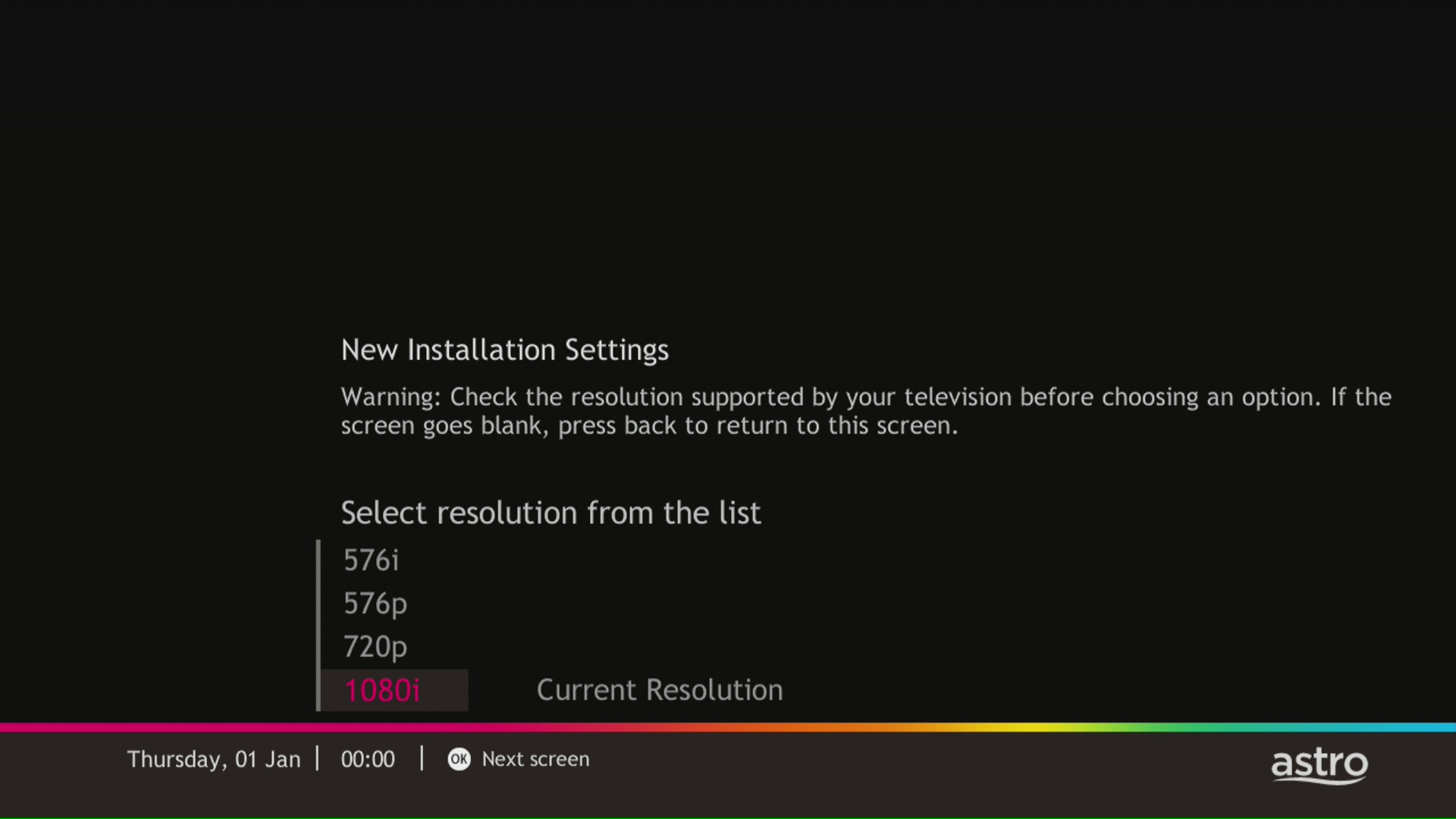
STEP 3
Select the resolution supports by your TV and press "OK".
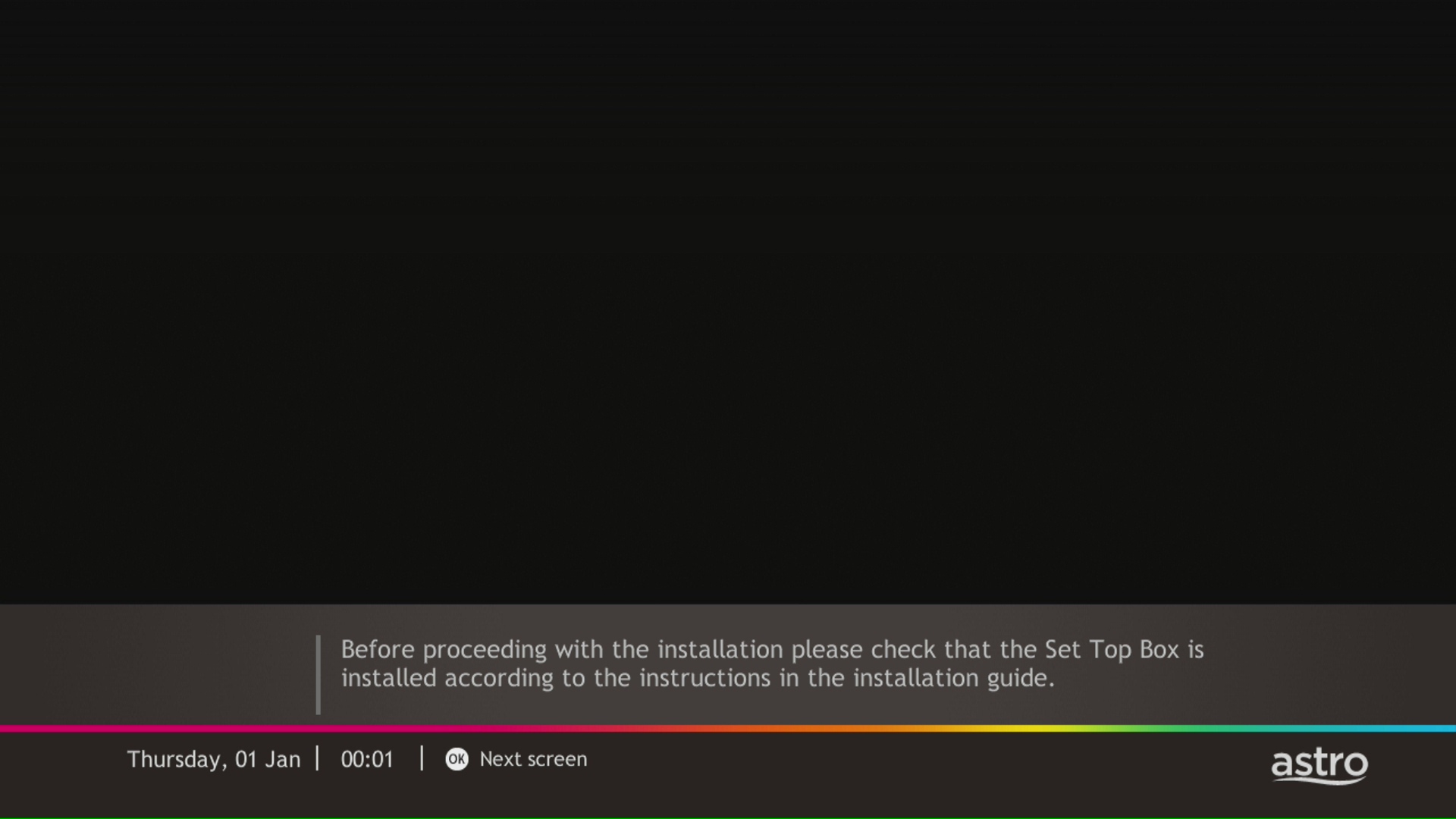
STEP 4
Press "OK" to proceed to the next screen.
STEP 5
Please select the LNB type and press "OK".

STEP 6
Select this as the Entry Point and press "OK" to confirm your selection.

STEP 7
Signal reading results for Tuner 1 and Tuner 2 screen will be displayed. Then, press "OK" to proceed to next screen.

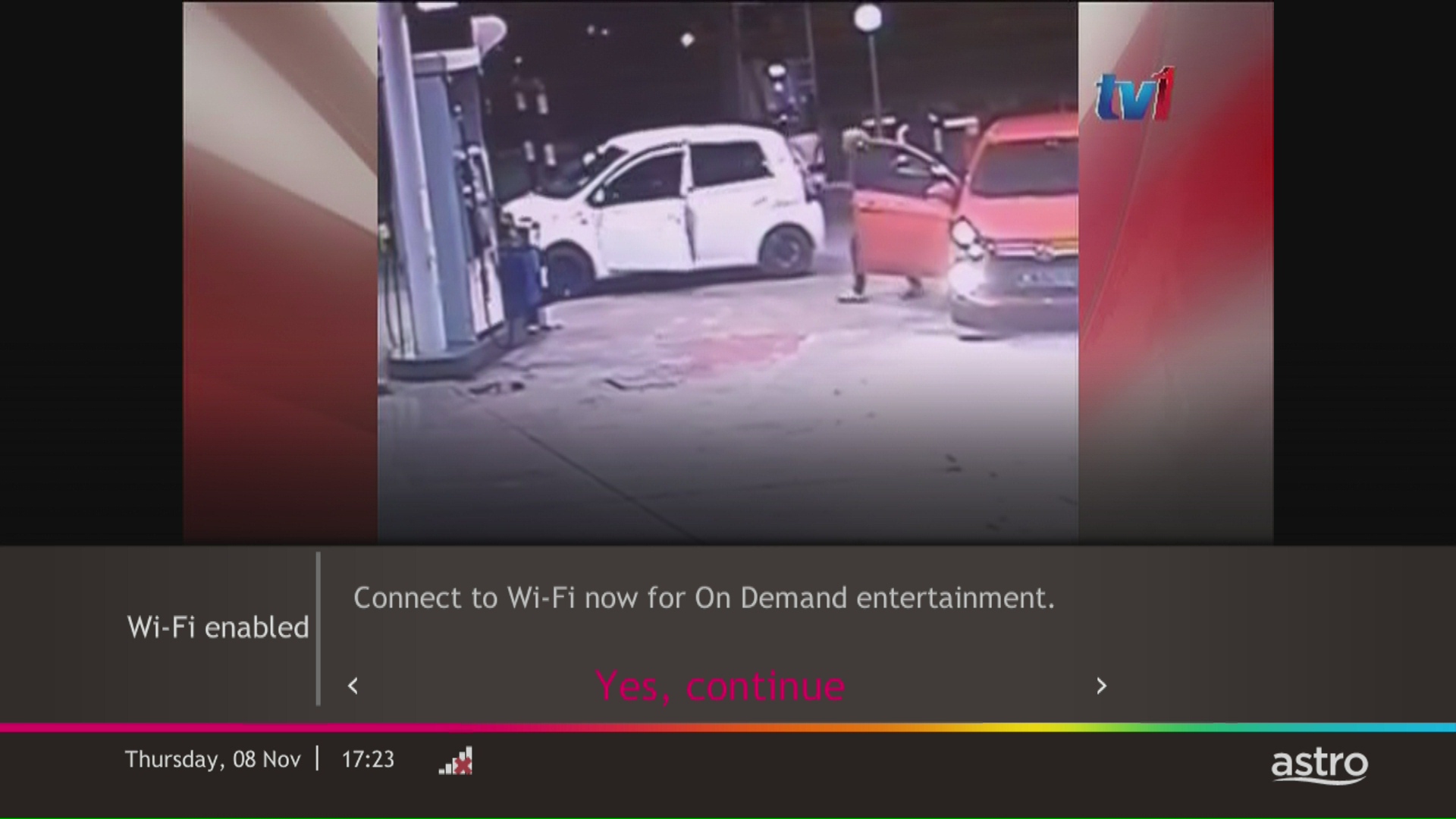
STEP 8
Select Yes, continue and press "OK" to connect to Wi-Fi network.
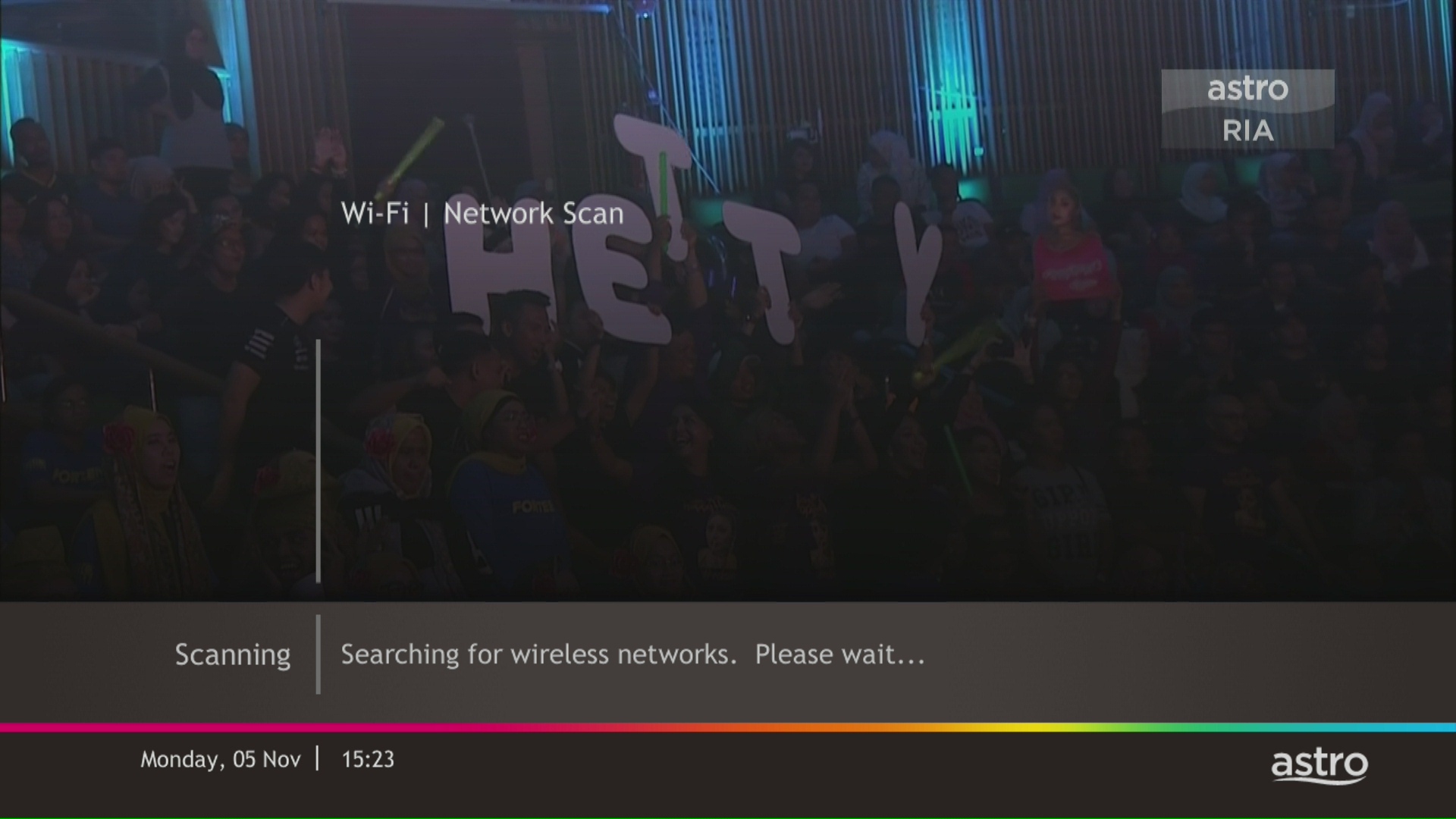
STEP 9
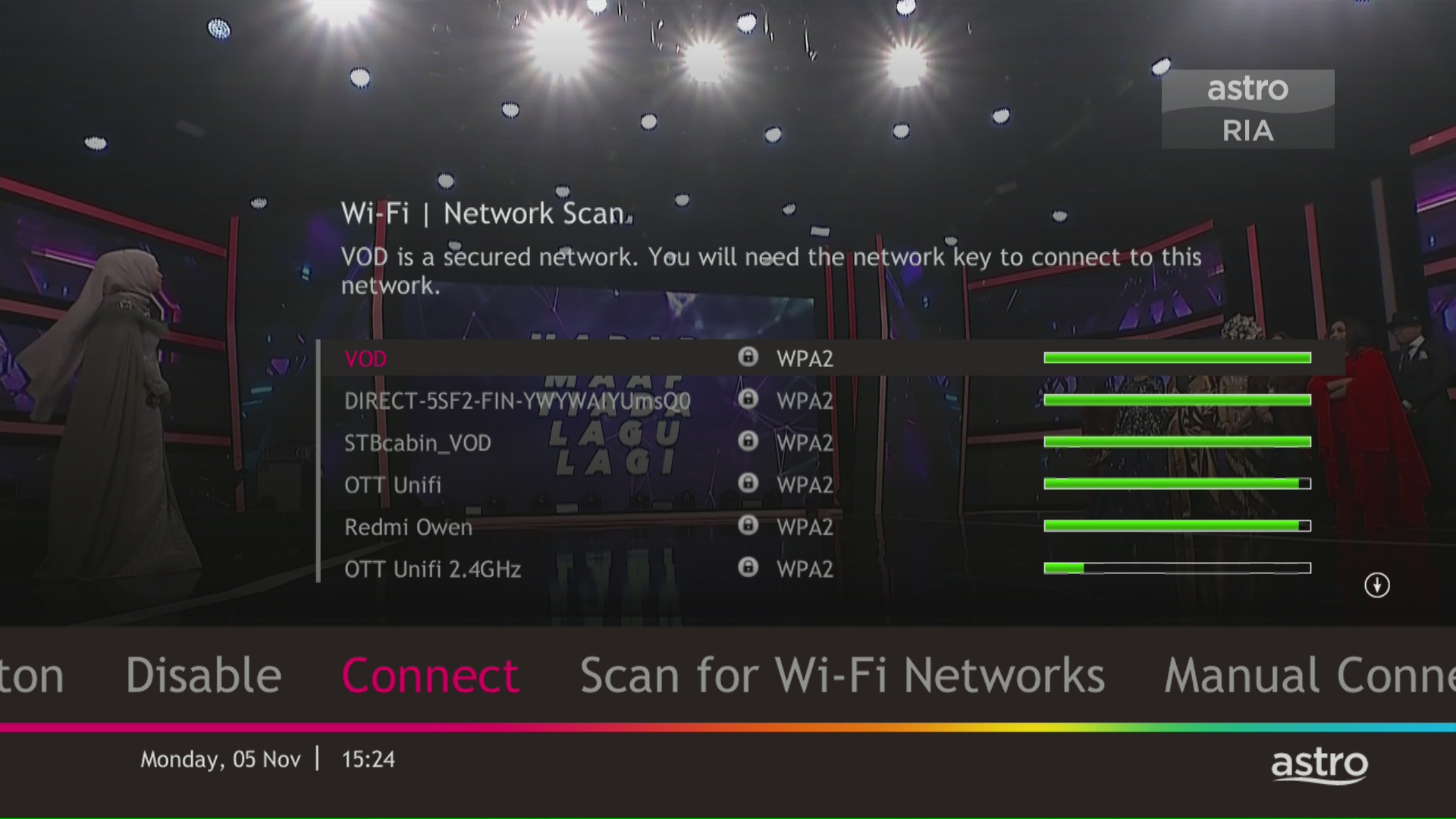
Please wait while the box scanning for the available Wi-Fi network.
STEP 10
Select your Wi-Fi network and navigate to "Connect".
STEP 11
Please enter the password to connect to your network and press "OK".

STEP 12
You are successfully connected when this screen appears.

From 8 October 2021 onwards, Astro will be ceasing the daily passes (e.g. 3, 5, 7 & 30 days passes). Please subscribe to the relevant packs to continue enjoying your favourite content. Stay tuned for more exciting offers. Thank you.
STEP 1
On your remote, press the HOME button and the home menu will be displayed on top of your screen.

STEP 2
Navigate to Settings.

STEP 3
Navigate to Network Settings and press "OK".

STEP 4
Navigate to Network Diagnostics and press "OK".

STEP 5
Network Diagnostics screen will be displayed accordingly.

Yes, existing Astro & Broadband customers within contract or out of contract can subscribe to Astro Fibre Bundle. The 24-month contract will be renewed.
However, your contract with Maxis/Allo needs to be terminated before signing up to this offer. An early cancellation fee applies if you are still within contract.
*Subject to Terms &Conditions of your contract
STEP 1
Press "HOME" button on your remote control.

STEP 2
Navigate to Settings and press "OK".

STEP 3
Navigate to STB Diagnostics and press "OK".

STEP 4
Take a look at the Smart Card Status.

We noticed that you've recently requested for a change in your Astro account.
As this change will affect your overall monthly subscription, the expiry date for your Disney+ Hotstar (3-months Pass) subscription has been deferred to xxx (date) to consolidate the final monthly subscription pricing.
You will only be able to watch Astro GO and/or Multiroom Smart TV on up to 2 devices at the same time as opposed to 4 devices with Astro GO+.
Your cloud recording storage will also decrease from 1500 hours down to 200 hours. Your stored recordings/downloaded shows that exceed 200 hours will also be removed.
Yes, however we do advise keeping your subscription while your TV is being fixed to avoid having to download the app again.
You require at least two devices to form a Mesh WiFi network which are Astro Fibre WiFi router and a Mesh WiFi unit.
The Mesh unit will link to the WiFi router to form the Mesh WiFi network. You may connect up to 5 Mesh WiFi units for optimal WiFi coverage in your home.
Yes, the monthly subscription fee will be prorated into your Astro bill.
STEP 1
Press "HOME" button on your remote control.

STEP 2
Navigate to Settings and press "OK".
STEP 3
Navigate to STB Diagnostics and press "OK".
STEP 4
Navigate to IP Diagnostics and press "OK".

STEP 5
IP Diagnostics information will be displayed.

The speeds shown under “My Network Map†are the WiFi speeds of your connected devices based on factors such as signal strength, distance of devices from your router, obstructing objects etc. This function allows users to know the signal strengths achievable from every room in their house or any distance from their router, giving users accurate indication If additional mesh is needed or if the placement of their router requires adjustment.
However, the speeds shown under “My Devices†are the recent WiFi consumption of your connected devices, which allows you to monitor every user’s internet consumption in your household.
You may utilise your credit balance to offset future billing on your Astro account, or contact us here for further enquiries.
STEP 1
On your remote, press the HOME button and the home menu will be displayed on top of your screen.
STEP 2
Navigate to Settings.
STEP 3
Navigate to Remote Control Settings and press "OK".

STEP 4
Follow the steps appear on the screen to sync your Astro remote.

Your existing contracts and corresponding rewards including but not limited to discounts/rebates will be removed with no penalty applied and replaced with the new contracts associated with the new packs. Exception applies to Disney+ Hotstar (3-Month Pack) and Multiroom campaigns in which remaining contract durations will be brought over if the subscription is continued or penalty will be applied upon discontinuation of said subscriptions.
Band Steering is a functionality that our WiFi router (Huawei K562E) has that intelligently connects devices to its WiFi to the best frequency bands available based on usage, speed and coverage by using only one same SSID for both 2.4GHz and 5GHz band.
The RM15 monthly rebate (before Govt. Tax) will be applicable to all on-going Multiroom Smart TV subscriptions until further notice. However, in the event of rebate expiry, Astro will notify impacted customers in advance via email or SMS. To update your contact details, please reach out via a feedback form here.
Unfortunately, you will no longer be able to access Disney+ Hotstar via Astro if you cancel your Astro subscription with Disney+ Hotstar entitlement.
This Disney+ Hotstar software update will be rolled out progressively to all Ulti Box customers starting 23 August 2022. Please be assured that you will be able to access the Disney+ Hotstar app on your Ulti Box soon.
If you need further assistance, please call our Customer Contact Centre or WhatsApp "DH Help
To check your contract, please visit My Astro.
Astro ID is the account you use to sign in and manage all your Astro services online. You can use your Astro ID for the following Astro apps and portals:
- My Astro
- Astro GO
- HBO GO
- Disney+ Hotstar
- iQIYI
- TVBAnywhere+
- beIN Sports Connect
- SYOK App
- AWANI App
- Astro Website
- Ideaktiv portals
You can create an Astro ID using your mobile number or email address here. To secure your Astro ID, please proceed to next step and link the ID to your Astro account number (10 digits) or smart card number (12 digits).
-The Mesh unit can only be used indoors. It can be mounted onto a wall or be placed horizontally on a desktop. Do not install it in other mode, such as on the ceiling.
-Keep a clearance of at least 10 cm around the device to ensure proper ventilation.
-Keep the device away from electrical appliances that generate strong magnetic or electric fields, such as microwave ovens.
Settlement of total outstanding balance is to be made prior to any of the request.
Please ensure you:
a. Have your original identification card “MyKad” (Front & Back) with you (Malaysian).
b. Have your original Passport & Visa with you (Non-Malaysian).
c. Are in a brightly lit environment
To request for a move, you may choose to:
1. Self-serve by logging in to My Astro app and follow the steps below:
Step 1: From Account tab, choose Installation address under Subscription.
Step 2: Click "Relocate”.
Step 3: Verify your identity via OTP.
Step 3: Fill in the OTP that you receive and proceed by clicking "Verify"
Step 4: Confirm the Address, a support ticket will be created.
2. Submit your feedback via below link: https://support.astro.com.my/feedback-form
Step1: Choose Feedback Type
- Type: Technical issues
- Issue: I want to enquire about installation/ relocation
Step2: Fill in the form and click “Submit” support ticket.
We are working with the Sony team to ensure you will be able to enjoy these 4K UHD channels soon. We will keep you posted once these channels are available to you!
Astro wants to give our members the convenience of having all their favourite series, exciting originals, vernacular signatures, live sports and local blockbuster movies in one place. Astro customers will be able to enjoy greater convenience by having Netflix bundled with their Astro subscription, consolidating the subscriptions, and providing easy access for payment in a single bill, at the best value.
No, there are no penalty fees for the Mesh WiFi devices should you wish to terminate Astro Fibre within/after 24 months.
Astro sends regular payment reminders to customers via SMS until their current charges have been paid. However, we encourage customers to pay their bill as soon as possible to avoid disconnection of Astro service. Please reach out to us here if you require more information about payment reminders or to change your contact details.
Please check SMS received on the unsuccessful payment status and should you require further clarification contact your issuing bank for clarification or contact us via WhatsApp.
The notification you receive will depend on the payment method you choose:
(i) My Astro Portal: e-receipt will indicate payment confirmation.
(ii) IVR: Payment status will be notified over the IVR and an SMS notification will be sent for successful transactions.
(iii) SMS: Payment status will be notified via SMS.
(iv) Call: Payment status will be notified via SMS.
(v) Customer Service Centre: Physical receipt will indicate payment confirmation.
You may click here to Login and proceed to secure your Astro ID by linking it to your Astro account. If you do not have an Astro ID, please follow the steps in below to create one. You may also choose to log in or create Astro ID with your social accounts (eg. Facebook, Google and Apple).


No, Astro GO is a free app for Astro customers. The content available on Astro GO will depend on the subscription pack that you are subscribed to.
If you do not have an Astro subscription, please click here to find out packages available.
Any packages with Entertainment Plus, Movies Plus & Sports Plus will include Netflix. The default Netflix offering is Netflix Standard (2 screens and HD viewing) as part of your Entertainment Plus, Movies Plus and Sports Plus subscription. You can upgrade up to Netflix Premium (4 screens and 4K UHD viewing) at a price of RM 10 (inclusive of govt. tax).
Note: For the above subscriptions, you may use the email address used for your existing subscription with Netflix to activate and the future billing for Netflix will be transferred to your Astro bundle charges. For users that are billed for Netflix through Apple before joining the Astro bundle, remember to cancel your Apple billing arrangement after activating the Astro bundle else you may be double charged for your Netflix account.
If you do not have a bundle which includes Netflix, you may also add a new Netflix subscription to your Astro Bill for billing convenience.
Refund can only be made by the registered Astro account holders.
However, if you would like to request refunds on behalf of the account holder, you may do so by providing the supporting documents (e.g.: authorization letter, death certificate, 3rd party NRIC copy).
For customers who wish to have their physical tax invoices reprinted, there will be a flat fee of RM10.00 levied as part of the process which has been implemented since year 2015.
STEP 1
Switch off the power for your box and make sure that the adapter's power light is off.

STEP 2
Locate the SIM card at the left side and gently pull it out.

STEP 3
Wipe the SIM card's gold chip clean using a dry soft cloth.

STEP 4
Make sure the gold chip is facing down and reinsert it all the way in.

STEP 5
Switch on the power for your box and make sure that the adapter's power light is on.
Please wait for 5 minutes.

STEP 6
Turn on your box. You should no longer be experiencing this problem.

If issue persist, please submit the issue on our Feedback Form with the error details and provide sim card number for assistance.
No, please use a Malaysian mobile number registered with a local network service to register and activate access for Disney+ Hotstar with your Astro subscription.
No, the Mesh WiFi add-on with Astro Fibre is only available as a subscription service and will not be tied to any device contract.
Upon completion of the termination process, customer will receive one last closing bill stating the total amount due to Astro according to their billing option.
For customers who had opted to switch their billing option to e-bill or SMS bill, they will receive their final bill accordingly.
For customers who opted for paper bill, they will receive the final bill via paper bill. (The Paper Bill Charge will be applied).
There are two ways for you to switch your preferred bill delivery method:
A. Customers can manage their account via the My Astro Portal by following these easy steps:
- Visit www.astro.com.my
- Select “My Account”, then select “Manage Account”
- Log in to My Astro Web using your Astro ID
- Select “Account”
- Under “Billing”, click on “Bill Delivery Method”
- Choose your preferred bill delivery method, then click “Proceed”
B. Customers can also manage their account via Astro’s mobile application, the My Astro app by following these easy steps:
- Open the “My Astro” app on your smartphone. If you do not have it installed, you may download it here (Google Play Store) or here (IOS App Store)
- Log in with your Astro ID
- Select “Account” in the navigation bar
- Select “Bill Delivery Method”
- Choose your preferred bill delivery method, then click "Proceed
STEP 1
On your remote, press the HOME button and the home menu will be displayed on top of your screen.

STEP 2
Navigate to Settings.

STEP 3
Navigate to Audio and press "OK".

STEP 4
Navigate to your preferred selection and press “OK”.

