

Nationwide Installation
Applying for
| Maxis UniFi Astro Njoi |
Frequently Asked Questions
Find your answers here.
We provide one stop service to apply Astro and Broadband for you.
You can avoid driving and queuing at the sales counter. We are the dealer that can help you to handle your application from the beginning to the end.
We do not charge you when you apply from us. There is no credit card information required to apply here. Charges are the same as you apply from the sales counter.
First, you can apply online, we will get back to you immediately during business hour. WhatsApp/Email/Fax us your Photocopy of IC (for malaysian) / Passport (for foreigners). When we receive all the information, we will proceed with your application immediately.
Once we receive your application with complete information, we will process your application immediately during business hour. The contractor from the service provider will then contact you for installation appointment once your application is approved.
Enjoy greater savings and hassle-free bill payment in one single bill for both Astro and Broadband. You get to enjoy Astro and Broadband at discounted price every month over the contract period of 24 months.
Astro offers multiple TV packs including Entertainment, Sports, Movies and Kids options. You can choose a pack that matches your viewing preferences and add optional streaming apps where available.
Yes, you may subscribe to Astro TV packs without bundling broadband. However, bundling Astro TV with Fibre Broadband may provide better monthly savings and convenience with a single bill.
For small households with light streaming and browsing, 100Mbps is usually sufficient. Larger families, gamers or heavy streamers may benefit from 500Mbps or 1Gbps plans for smoother performance across multiple devices.
Most Astro TV and Fibre broadband plans come with a 24-month contract. Early termination charges may apply if cancellation is made before the contract ends.
Yes, you may upgrade your TV pack or broadband speed at any time, subject to eligibility and coverage. A new contract period may apply depending on the upgrade.
Your monthly bill will be issued directly by Astro. You may receive it via email or access it through your Astro account. Bundled customers will receive a single combined bill for TV and broadband services.
Payment methods may include online banking, auto debit, credit card or other approved payment channels provided by Astro. Our team can guide you during the registration process.
If you experience any service interruption, you may contact Astro customer support for technical assistance. In many cases, issues can be resolved remotely or a technician will be arranged if necessary.
Yes, relocation is subject to service availability at your new address. Relocation charges and contract adjustments may apply depending on your plan.
No, you do not need a credit card to submit your application. Payment setup will be arranged directly with Astro after your service is approved.
Selected Astro TV packs allow optional add-ons such as streaming services depending on current promotions and availability. Additional monthly charges may apply.
Yes, a WiFi router is typically provided during fibre installation. The router model may vary depending on the selected broadband speed plan.
Yes, we will check the service coverage at your address before proceeding with your application to ensure broadband is available at your location.
For Malaysians, please provide a copy of your MyKad. For foreigners, provide a copy of your passport when submitting your broadband application.
After your application is approved, the service provider typically contacts you within 2 to 7 working days to arrange the broadband installation appointment.
Most Astro Broadband plans come with a 24-month contract starting from your installation date. If you relocate, a new 24-month contract may apply at your new address.
Yes, you can relocate your broadband service, subject to service availability at the new address. Your contract may reset for another 24 months from the new installation date.
Yes, you may request to relocate broadband devices within your home. Non-standard installation charges may apply and are payable to the installer directly after assessment.
Yes, you can switch to Astro Broadband. To avoid service interruption, it is recommended to activate the new service before terminating your current broadband contract.
Standard installations may be free during promotions, but non-standard installations (e.g., device relocation or complex wiring) may incur extra charges payable directly to the installer.
Yes, customers may need to provide additional documents such as bank-in slips or payment receipts. Any incomplete document, customer will be notified by Astro after validation is made.
Yes, penalty fee of RM200/Mesh WiFi will be imposed if customer fails to return the device(s). The courier company would make two attempts to retrieve the Mesh WiFi unit within a period of 30 days, failing which the penalty would be imposed.
Mesh WiFi devices are available as an add-on subscription from RM10/month across all Astro Fibre speeds. You may subscribe to a maximum of 5 units of Mesh WiFi per Astro Fibre subscription.
You can contact Astro's Contact Centre (03 - 9543 1543) to subscribe to the Mesh WiFi.
Astro offers 3 different after-sales service that is made available to the customers:
(1) Express (RM75)
(2) Same Day (RM70)
(3) Regular (RM65)
***Price is inclusive of 6% Service Tax.

STEP 1
On your remote, press the HOME button and the home menu will be displayed on top of your screen.

STEP 2
Navigate to Settings.

STEP 3
Navigate to Parental Control and press "OK".

STEP 4
Please enter your PIN (Default PIN is 0000).

STEP 5
Navigate to your preferred category to block and press "OK".

You can track your ticket status by contacting us via WhatsApp or call us at 03-9543 3838.
You can be assured that your data are safe with us. Astro implemented sufficient security measures to protect customer data and fully comply to Personal Data Protection Act
Photograph or scan your payment receipt, and send it to one of our contact platforms found here.
You may call Astro's Contact Centre at 03-9543 3838 or wait for an Astro representative to be in contact with you within 2 working days to assist you with your order.
Real-time payments are posted almost instantaneously. However, daily system maintenance occurs between 12AM to 3AM - any payment made during this period will be delayed until system maintenance is complete.
We try to make as many movies and TV shows available for download. However, for some titles, while we may have the rights to offer them via streaming, we may not be able to offer them for download.
Please be informed that your service will be suspended if there is no payment after 31 days from your bill cycle date. After 62 days of non-payment, your service will be terminated, and an early cancellation fee will be applied if you are still within the 24-month contract.
We wish to advise you to make your payment before the following month's bill is generated in order to avoid interruption in your viewing experience. Please note that to reconnect your subscription, there will be a charge of up to RM20 (excl. gov tax) upon reconnection, except for Commercial & Hotel customers.
Find out more about the reconnection fee here.
For customers with the Ultra or Ulti Box, you will be charged a fee of RM100 (not inclusive of Govt. tax) upon confirmation of lost Astro Box and Smart Card/SIM Card.
For lost Smart Card/SIM card only, you may be charged RM50 to obtain a replacement.
Please ensure that you have subscribed to the mentioned channel.
If you're subscribed to this channel, follow below steps.
STEP 1
You need to refresh the signal on your box.
Refer to Refresh signal of your box guide.
STEP 2
If issue persist after 30 minutes, proceed to submit report via WhatsApp or Feedback Form.
STEP 1
Try to change channels on your Astro remote. Check the LED light.
If the LED is blinking 3 times or if it is not blinking, replace the batteries and proceed to STEP 2.
Otherwise, if the LED is blinking 1 time, your remote is working fine, let's proceed to STEP 3.
STEP 2
Check if you can change channels using your Astro remote control. You should no longer be experiencing this problem if is a battery issue.
If issue remain after batteries replacement, proceed to STEP 3.
STEP 3
You need to refresh the box setting manually from the box front panel.
Refer to Refresh Box setting (Clear NVRAM) - Ultra / Ulti Box.
If issue persist, please submit the issue on our Feedback Form.
STEP 1
On your remote, press the HOME button and the home menu will be displayed on top of your screen.
STEP 2
Navigate to Settings.
STEP 3
Navigate to Network Settings and press "OK".

STEP 4
Navigate to Network Diagnostics and press "OK".

STEP 5
Network Diagnostics screen will be displayed accordingly.

i.Initiate the app on your new Smart TV device, key in the unique code on the TV to your mobile
ii.You will see the list of devices on your mobile and choose the old device to be removed
iii.Your new Smart TV device will be added
STEP 1
On your remote, press the HOME button and the home menu will be displayed on top of your screen.

STEP 2
Navigate to Settings.

STEP 3
Navigate to TV Settings and press “OK”.

STEP 4
Navigate to your preferred selection and press “OK”.

STEP 5
Navigate to Save and press "OK" to confirm your selection.

Mesh WiFi technology greatly improves the WiFi network coverage within your home and virtually eliminates all WiFi “dead spots”. However, like all technologies there are limitations that you should be aware of.
The pairing of Mesh unit to the WiFi router is automatically handled between the WiFi router and the Mesh unit after it calculates its current position in relation to the WiFi router and surrounding Mesh unit (if available) already connected to the WiFi router.
If you are self-installing the mesh at your house, it is advisable for you to always pair the Mesh unit(s) with the WiFi router only regardless of how many Mesh unit available at your house.
Please note that if you have a Mesh connected to another Mesh, the expected performance of the WiFi speed will not perform as optimally as when compared to a Mesh connected directly to the WiFi router. Adding more points (also referred as Number of hops) in between your device to the WiFi router which will cause a reduction in bandwidth and add latency.
Of course! Please ensure your account is active when requesting for a move.
Yes, you can upgrade your internet speed. However, speed downgrade is not allowed.
Yes, any active Astro subscriber with a minimum primary subscription fee of RM100 can subscribe to a Multiroom (Astro Box) at a price of RM49.99 monthly with the box setup (subscription price is subject to Govt Tax).
No, you will not be charged 8% Service Tax for reconnection performed before 1st March 2024. Only reconnections executed on or after 1st March 2024 are subject to the 8% Service Tax.
Zee5 is the only app that has a change in price upon the SST increase. Prices of Netflix, Disney+ Hotstar, Viu, iQIYI, WeTV and Qalbox will not be affected.
If you sign up Astro & Broadband with standard Ultra & Ulti box (DBB), all channels are available.
However, there are channels that will not be available with Ultra/Ulti Plug & Play Box which are NHK World (398).
Astro invests billions of ringgits in content annually to keep Malaysians entertained and informed. Hence, we work alongside industry players, content partners and regulators in protecting intellectual property so that Astro can continue to produce and aggregate compelling content for our viewers.
We continue to educate and raise awareness among the public and businesses about the economic and social losses caused by content piracy. You can play your part in combating piracy by reporting potential copyright infringement of Astro content to the Domestic Trade and Consumer Affairs Ministry (KPDNHEP) on the following channels:
- 1-800-886-800 (hotline)
- 03-8882 6088 (Enforcement Command Centre)
- +6019-279 4317 (WhatsApp)
Astro ID is the account you use to sign in and manage all your Astro services online. You can use your Astro ID for the following Astro apps and portals:
- My Astro
- Astro GO
- HBO GO
- Disney+ Hotstar
- iQIYI
- TVBAnywhere+
- beIN Sports Connect
- SYOK App
- AWANI App
- Astro Website
- Ideaktiv portals
You can create an Astro ID using your mobile number or email address here. To secure your Astro ID, please proceed to next step and link the ID to your Astro account number (10 digits) or smart card number (12 digits).
Yes, customers will be charged 8% Service Tax for packages purchased after 29th February due to the implementation of the 8% Service Tax starting 1st March 2024.
STEP 1
On your remote, press the HOME button.

STEP 2
Navigate to Update Satellite Frequency and press “OK”.

STEP 3
Choose Test Satellite Frequency and press “OK”.

STEP 4
Select Yes, continue and press "OK" to start the test.
Otherwise, select No, go back to cancel.

STEP 5
Satellite Frequency Test progress screen will be displayed.

STEP 6
The test result will be displayed once completed.
Press "OK" to go back to channel.
No, please use a Malaysian mobile number registered with a local network service to register and activate access for Disney+ Hotstar with your Astro subscription.
Yes, please WhatsApp "DH Help
Yes. You are entitled to separate Netflix accounts for each main Astro subscription e.g. If you have subscribed to Entertainment Plus, Platinum Pack, etc separately. Therefore, if you have more than one main Astro subscription with Netflix, you may choose to create multiple email addresses to activate each respective Netflix subscription. Please follow the steps provided to you via email/SMS in order to activate your Netflix subscriptions on the website.
For Platinum Pack and Multiroom Smart TV customers, Astro GO+ will be automatically added to your subscription.
Mac OS X
1. Click the Go tab in the top menu bar and select Utilities from the drop-down menu.
2. Type "network utility" in the search bar in the top right-hand corner of the Utilities window and then hit the "Enter" key on your keyboard.

3. Click the Network Utility icon to open the Network Utility window.
4. For Ping Test, select the Ping tab and then type the address you'd like to ping in the text box. Click Ping and wait for the ping results.

5. For Traceroute Test, select the Traceroute tab and then type the address you like to traceroute in the text box. Click Trace and wait for the traceroute results.

Windows 10
1. Click the Search icon (magnifying glass) in the bottom left-hand corner and type "cmd" into the search bar.

2. Select the Command Prompt app - it will be at the top of the list of search results as the best match.

3. A black box with a flashing cursor will open; this is the Command Prompt.
For Ping Test, type "ping" and then hit the Space bar on your keyboard. Type in the address you like to ping and then hit the Enter key on your keyboard. Wait for the ping results.

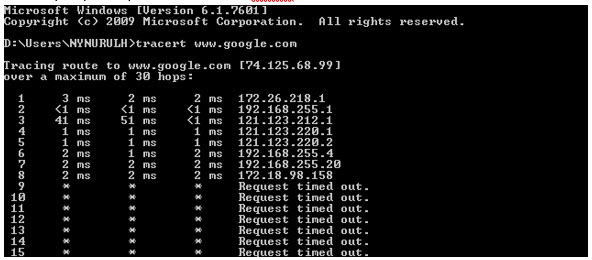
For Traceroute Test, type "tracert" and then hit the Space bar on your keyboard. Type in the address you like to trace and then hit the Enter key on your keyboard. Wait for the tracert results.

Windows 7 & Vista
1. Open the Start menu by clicking the Windows icon at the bottom left-hand corner of the screen.
2. Type "cmd" in the search bar at the bottom of the menu.
3. Click cmd found in the search results for Programs.

4. A black box with a flashing cursor will open; this is the Command Prompt.
For Ping Test, type "ping" and then hit the Space bar on your keyboard. Type in the address you like to ping and then hit the Enter key on your keyboard. Wait for the ping results.

For Traceroute Test, type "tracert" and then hit the Space bar on your keyboard. Type in the address you like to trace and then hit the Enter key on your keyboard. Wait for the traceroute results.

Windows 8
1. Move the mouse to the right-hand corner of the screen to make the vertical menu bar (charm bar) appear. Click Search.
2. Type "cmd" in the search bar and hit the Enter key on your keyboard.

3. Click cmd that found in the search results for Programs.
4. A black box with a flashing cursor will open; this is the Command Prompt.
For Ping Test, type "ping" and then hit the Space bar on your keyboard. Type in the address you like to ping and then hit the Enter key on your keyboard. Wait for the ping results.

For Traceroute Test, type "tracert" and then hit the Space bar on your keyboard. Type in the address you'd like to trace and then hit the Enter key on your keyboard. Wait for the traceroute results.
Windows XP
1. Click the Start button in the bottom left-hand corner of the screen.
2. Click the Run option in the right-hand column.

3. Type "cmd" in the text box and then hit the Enter key on your keyboard.
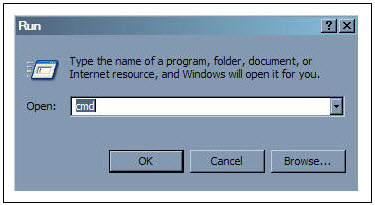
4. A black box with a flashing cursor will open; this is the Command Prompt.
For Ping Test, type "ping" and then hit the Space bar on your keyboard. Type in the address you'd like to ping and then hit the Enter key on your keyboard. Wait for the ping results.

For Traceroute Test, type "tracert" and then hit the Space bar on your keyboard. Type in the address you'd like to trace and then hit the Enter key on your keyboard. Wait for the tracert results.
Please refer to these FAQs for more information.
The different light colours on your Astro Ultra Box or Ulti Box informs you on the phase the box is going through.
1. Ultra Box magenta light / Ulti Box purple light - Your box is turned "On".
Press the Home button to launch Video On Demand and stream anytime or press channel number on your remote.

2. Ultra Box / Ulti Box orange light - Your box is on "Standby" mode.
Your box is ready to be turned "On" or leave it in this mode to receive new software updates.

3. Ultra Box / Ulti Box blinking orange light - Your box is booting up.
Please wait a few minutes for the box to start.
4. Ultra Box / Ulti box blinking blue light - Your box is downloading a software update.
Please wait a few minutes for the download to complete.

STEP 1
On your remote, press the HOME button and the home menu will be displayed on top of your screen.

STEP 2
Navigate to SETTINGS and press "OK".

STEP 3
Navigate to STB Diagnostics and press "OK".

STEP 4
Navigate to Network Diagnostics and press "OK" .

STEP 5
Please ensure the Tunes service multicast status is Multicast Up.
If the status is Multicast is Not Available, please reboot the decoder and router before verifying this status.
If issue persists, please submit the issue on our Feedback Form with error details and attach a picture of your Network Diagnostics.
Multiroom discount rates will be removed upon splitting the account.
We apologise for the inconvenience caused. If you have not receive the upgraded speed within 48 hours after the service activation, please call Astro’s Contact Centre at 03-9543 1543 and an Astro agent will be available to assist you immediately.
Yes, you can go to "Account' and scroll to "Subscription' and select TV pack. You may reach out to us via WhatsApp at 03-9543 3838 for more details.
No, there is no penalty or switching fee if you decide to cancel your Multiroom (Smart TV) subscription.
The "coming soon" label on some streamingapps on your TV and the "Apps" page of Astro's website allows our customers tostay on top of new launches as they happen! Stay tuned for these upcomingstreaming apps so you can access even more content that you love from acrossthe world.
Yes, you may still watch CH550 Love Nature and CH811 Astro SuperSport which offers the same content/programmes, but in HD resolution. Kindly note that CH811 Astro SuperSport is only available for customers on the Sports, Sports Plus, Premium 1, Premium 2, Premium 4, Platinum Lite and Platinum Packs.
To cancel your Multiroom (Smart TV) subscription, please call us at 03-9543 3838.
You will receive an email within 45 minutes of payment made to let you know whether your advance payment is successful or not. If your payment has failed, you may call Astro's Contact Centre at 03-9543 3838 or wait for an Astro representative to be in contact with you within 2 working days to assist you with your order.
Please upgrade the Ultra/Ulti Box software to enjoy Netflix on your Ultra/Ulti Box. To do this, please click on the Netflix app icon on the homepage or go to CH741 to prompt the software upgrade. Kindly click Install when the software upgrade prompt appears. This will take approximately 20 minutes and you would be able to launch Netflix on the Ultra/Ulti Box after that.
Astro is continuously improving our user interface and introducing new features to our platforms to ensure that your Astro experience is more seamless, efficient and user-friendly.
For details on our latest interface, Picture-in-Picture mode and auto-start interactive mode on Astro GO, please click here.
In addition, we have also recently introduced a new look to the Title Information Page, the ability to disable the Profile Selection Screen and adjustable auto-standby timing. For more information, please click here.
Please update your auto-debit payment details via My Astro Portal.
Your existing offers with us will not be affected and will continue until the agreed upon date.
