
A free satellite TV service from Astro. Watch lifetime entertainment, news, learning & information and more.

Pictures for illustration only.
Enjoy free access to 15+ TV channels & 10+ radio channels.
* Subject to Astro terms & conditions.


Step-1 |
Step-2 |
Step-3 |
Choose a plan & sign-up online. |
Sit back & wait for installation. |
Enjoy your new Astro / Broadband! |
A free satellite TV service from Astro. Watch lifetime entertainment, news, learning & information and more.
Pictures for illustration only.
New decoder only without satellite dish & cabling. You must have Astro/Njoi satellite dish and cable installed and working properly.
Including installation.
New decoder complete with satellite dish & cabling.
Including installation.
Applying for
| Njoi Astro UniFi Maxis |
Find your answers here.
We provide one stop service to apply Astro and Broadband for you.
You can avoid driving and queuing at the sales counter. We are the dealer that can help you to handle your application from the beginning to the end.
We do not charge you when you apply from us. There is no credit card information required to apply here. Charges are the same as you apply from the sales counter.
First, you can apply online, we will get back to you immediately during business hour. WhatsApp/Email/Fax us your Photocopy of IC (for malaysian) / Passport (for foreigners). When we receive all the information, we will proceed with your application immediately.
Once we receive your application with complete information, we will process your application immediately during business hour. The contractor from the service provider will then contact you for installation appointment once your application is approved.
Enjoy greater savings and hassle-free bill payment in one single bill for both Astro and Broadband. You get to enjoy Astro and Broadband at discounted price every month over the contract period of 24 months.
Astro offers multiple TV packs including Entertainment, Sports, Movies and Kids options. You can choose a pack that matches your viewing preferences and add optional streaming apps where available.
Yes, you may subscribe to Astro TV packs without bundling broadband. However, bundling Astro TV with Fibre Broadband may provide better monthly savings and convenience with a single bill.
For small households with light streaming and browsing, 100Mbps is usually sufficient. Larger families, gamers or heavy streamers may benefit from 500Mbps or 1Gbps plans for smoother performance across multiple devices.
Most Astro TV and Fibre broadband plans come with a 24-month contract. Early termination charges may apply if cancellation is made before the contract ends.
Yes, you may upgrade your TV pack or broadband speed at any time, subject to eligibility and coverage. A new contract period may apply depending on the upgrade.
Your monthly bill will be issued directly by Astro. You may receive it via email or access it through your Astro account. Bundled customers will receive a single combined bill for TV and broadband services.
Payment methods may include online banking, auto debit, credit card or other approved payment channels provided by Astro. Our team can guide you during the registration process.
If you experience any service interruption, you may contact Astro customer support for technical assistance. In many cases, issues can be resolved remotely or a technician will be arranged if necessary.
Yes, relocation is subject to service availability at your new address. Relocation charges and contract adjustments may apply depending on your plan.
No, you do not need a credit card to submit your application. Payment setup will be arranged directly with Astro after your service is approved.
Selected Astro TV packs allow optional add-ons such as streaming services depending on current promotions and availability. Additional monthly charges may apply.
Yes, a WiFi router is typically provided during fibre installation. The router model may vary depending on the selected broadband speed plan.
Yes, we will check the service coverage at your address before proceeding with your application to ensure broadband is available at your location.
For Malaysians, please provide a copy of your MyKad. For foreigners, provide a copy of your passport when submitting your broadband application.
After your application is approved, the service provider typically contacts you within 2 to 7 working days to arrange the broadband installation appointment.
Most Astro Broadband plans come with a 24-month contract starting from your installation date. If you relocate, a new 24-month contract may apply at your new address.
Yes, you can relocate your broadband service, subject to service availability at the new address. Your contract may reset for another 24 months from the new installation date.
Yes, you may request to relocate broadband devices within your home. Non-standard installation charges may apply and are payable to the installer directly after assessment.
Yes, you can switch to Astro Broadband. To avoid service interruption, it is recommended to activate the new service before terminating your current broadband contract.
Standard installations may be free during promotions, but non-standard installations (e.g., device relocation or complex wiring) may incur extra charges payable directly to the installer.
By default, all Astro Fibre customers will receive a Private IPv4 or IPv6 address. However, customers who would like to subscribe to a fixed IP service can do so by contacting our Customer Service Centre at 03-9543 3838 for Astro Fibre’s Fixed IP service for only RM5/month.
Starting 9 June 2023, Viu Premium will be added as an option as part of our Asian Favourites along side Chinese, Indian and Indonesian Favourites. Astro customers on the Entertainment, EntertainmentPlus, Premium 2, Premium 3 and Platinum Packs will be able to choose Viu Premium as their Asian Favourites selection and stream the app for FREE. While customers on other TV Packs may purchase Viu Premium as an add-on to their subscription for as low as RM8.40/month (RRP: RM17.90). After successfully adding Viu Premium to your subscription, all Ultra and Ulti Box customers can access the app on their Astro Box, www.viu.com and the Viu mobile app to enjoy all the best KDramas, popular local hits, popular Thai and Indonesian shows and so much more! For further information and updates on Viu,
please visit: www.astro.com.my/Viu .
Check out our user guide for a quick and easy way to get started!
Download our user guide in English
Download our user guide in Malay
Download our user guide in Chinese
Do you need more information? Watch our Astro Ultra How to videos here.
Yes, Mesh WiFi add-on is available for both Astro Fibre Bundle and Astro Fibre subscription.
The Ultra/Ulti Plug & Play Box comes with a one-year box hardware warranty.
For self-installation, there is a warranty seal at the bottom of the Ultra/Ulti Plug & Play Box, which must not be removed or tampered with as this would void the one-year Ultra/Ulti box hardware warranty.
The new packs and access to Netflix on the Ultra Box and Ulti Box is available for Astro IPTV customers.

1. Via Television
a) Ultra Box
• Press the “Home” button and scroll to “Settings” > “Wi-Fi/Ethernet” > “New Wi-Fi Connection”
• Allow the Ultra Box to scan the Wi-Fi networks available and subsequently choose your home Wi-Fi network > Enter your Wi-Fi password
• Once you are connected, your Home screen will now show “tabs” where you can now enjoy Video On Demand

o “Catch-up” missed episodes from ongoing programmes
o Binge-watch full seasons from “Boxsets”
o Choose the your favourites from “Movies”, “Kids” and more
2. Mobile/Portable devices
(a) Just head to the Google Play Store, Huawei App Gallery or Apple App Store here, search for “Astro GO” and download Astro GO on iOS and Android devices. Login to watch on demand and other ASTRO channels based on your subscription.
STEP 1
On your remote, press the HOME button and the home menu will be displayed on top of your screen.

STEP 2
Navigate to Settings.

STEP 3
Navigate to Standby Mode and press "OK".

STEP 4
Navigate to your preferred selection and press "OK".

STEP 5
Navigate to Save and press "OK" to confirm your selection.

Astro Rewards is open to all *Active Astro PayTV customers and their immediate family members
* "Active Astro customer" refers to subscriber of the Astro Service and whose account is current and active with no outstanding payments due and owing to Astro and who has not breached the Astro subscription agreement nor given any instructions to terminate and /or suspend his/her subscription to the Astro Service as at the date of winner notification. Winners must remain active Astro customers until the date of collection of prizes.
Unfortunately, only Astro Fibre customers who subscribe from 24 November 2023 to 31 May 2024 are eligible for this free speed upgrade. However, you may still get the speed boost by calling in to our Customer Contact Centre at 03-9543 3838 and re-contracting with us. Kindly note that your account will restart with a new 24-month contract.
The main changes are the revamped look and feel of the user interface on the Smart TV App, which include redesigns to the Astro interface that consists of title rows at the Home Page to feature popular franchises, new live programmes posters and changes to the menu bar for easier navigation.
For more info, please read our dedicated FAQ on this here.
In addition, we have also recently introduced a new look to the Title Information Page and the ability to disable the Profile Selection Screen. For more information, please click here.
A deposit of RM500 is payable for new subscribers (non-Malaysians). The fee will be refunded when service is terminated.
No deposit is required for all existing Astro customers and new subscribers (Malaysians).
You will need to bring along all devices to your new place as no new devices will be issued.
Relocation will be subjected to new 24 months recontract and standard relocation fee applies for both Maxis and Allo respectively.
Intermittent internet connection using LAN cable
Looks like there is something wrong with your service connection.
Please run a Ping Test, Traceroute Test and attach the picture or screenshot of both test results in the Feedback Form below, in order for us to provide further assistances.
Please ensure to attach the required screenshot(s) in ONE file (i.e. Microsoft Word document, PDF, Image file) before submitting the form.
Intermittent internet connection using Wi-Fi
1. Router Positioning
Most people underestimate the importance of picking a good spot for a Wi-Fi router. Even a small shift in positioning could end up being the difference between day and night.
i) High vs. Low
Put the router as high up as possible to extend the broadcasting range of the radio waves. This also helps clear the router of possible interferences.
ii) Concrete & Metals
Make sure your router isn't blocked by any other objects, especially devices that are electronic. Also, avoid placing your router in your basement as this area is usually enclosed by a lot of concrete, which can be almost impossible for Wi-Fi signals to penetrate.
iii) Distance to Router
The further away from your router you get, the weaker the Wi-Fi signal. Therefore, the best option is to place your router as close to your devices as possible, but this is only practical if you have one main area where you tend to use your devices.
Otherwise, you should place your router near the center of your home. After all, Wi-Fi broadcasts in 360 degrees, so it doesn't make sense to put it at one end of the house.
2. Wireless Interference & Noise
You've probably never noticed but there are wireless signals all around you wherever you go and they're passing through you all the time. From where? Electronic devices, Wi-Fi routers, satellites, cell towers, and more.
Although Wi-Fi is supposed to be on a different frequency than most of these devices, the amount of radio noise can still cause interference. Some common causes of interference include:
i) Microwaves
ii) Bluetooth Devices
iii) Cordless Phone
3. Surrounding Wi-Fi signals
A truth of the modern world is that every household has their own Wi-Fi network, which can cause issues with channel overlap. This can be somewhat problematic in a townhouse, but is especially problematic in housing complexes and apartments where there can be many routers within close proximity.
Which is why it's important that you pick a good channel in your router settings. Modern routers can choose channels for you automatically, but sometimes it's better to investigate and find the best channel yourself.
4. Usage
More likely, however, is that the people on your network such as friends, roommates, or family members are participating in bandwidth-heavy activities like gaming and streaming Ultrabox/ Netflix.
Fortunately, if this is the case, you can prioritize your own network traffic by enabling Quality of Service in your router settings.
If the problem persists, please run a Ping Test, Traceroute Test and attach the picture or screenshot of both test results in the Feedback Form below, in order for us to provide further assistances.
Please make sure to attach the required screenshot(s) in ONE file (i.e. Microsoft Word document, PDF, Image file) before submitting the form.
Quick Info
A Ping Test shows how long it takes for packets to reach host.
A Traceroute Test traces the route of packets to destination host from our server.


You may proceed with below troubleshooting and it shouldn't take you any longer than 15 minutes.
1. Please standby computer/laptop to access to the internet and connection must be via LAN (cable) [Connect the LAN (cable) to the blue port at Cisco Router and direct to computer/laptop].
2. You may open any web browser such as Google Chrome, Internet Explorer, Mozilla Firefox and etc.
3. On the address bar, please go to http://192.168.1.1 and below page will appear.

4. Type the Username and Password as below. Then click OK. (These are the defaults, if you have done previous configuration on your router the password may be different).
Username: admin
Password: admin (or time123)

5. The router's web-based setup page should now appear. Please follow below steps for the configuration.

i. On the setup page, click the Wireless tab then click on the Basic Wireless Settings sub-tab.
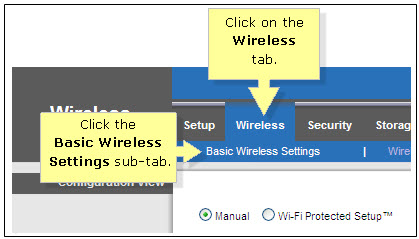
ii. On the Configuration View section, click the Manual radio button. Choosing the Manual setup will allow you to adjust your wireless channel according to your preference.

iii. Leave the Channel Width set to 20MHz Only.

iv. Click the drop-down arrow for Channel, then select your desired channel.
Choose between 1 until 11 (Suggested 1,6,11).
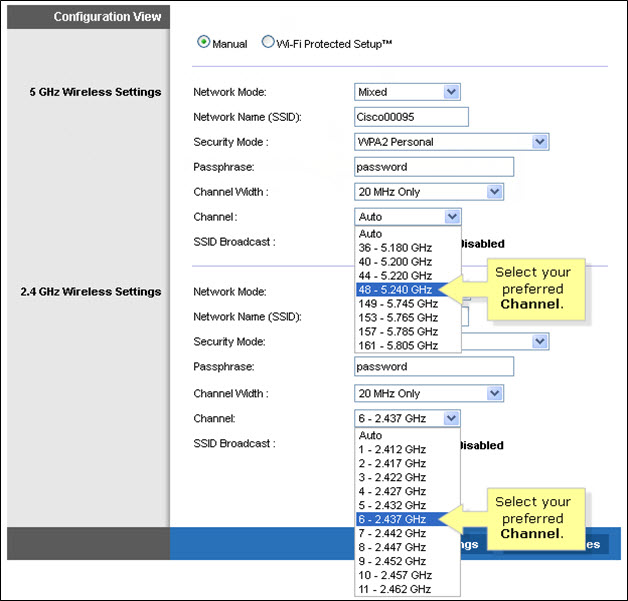
v. Click Save Settings to apply your changes. Router will auto reboot and connection re-establish after few minutes.
Please be sure to take your decoder, satellite dish, smartcard, remote control and all other fixtures after dismantling is done by the technician.
You will receive two SMS notifications with tracking numbers separately from the courier service, one for the Plug & Play Box and one for the Astro SIM card. Please expect these SMS notifications to be sent to you within 2-3 working days upon successful order submission (online or via retailer).
We try to make as many movies and TV shows available for download. However, for some titles, while we may have the rights to offer them via streaming, we may not be able to offer them for download.
Yes, existing Astro customers can subscribe to all Astro Fibre offerings. You also have the option to subscribe to Astro Fibre as a standalone, which comes without any TV packages.
The 24-month contract will be renewed upon signing up for the new packs.
Astro introduces the new Ulti Box with a redesigned new interface, Cloud recording feature, enhanced search capabilities and more. Just connect the all new Ulti Box to the Internet and take control of your entertainment and stream up to 110,000 videos on demand, anytime.
The features of the new Ulti Box include:
· New Home Screen - Everything you see is yours
· Discover Video on Demand (VOD) - Discover 110,000 videos, stream anytime, anywhere
· Search - Search for your favorite show or video faster and easier
· Play from Start - Missed the start of the show? Just restart.
· Stop Here, Continue There -Stop on one screen and continue on another device
· Multi-Screen - Stream seamlessly across any device
· Cloud Recording - Record all the programmers you want at the same time
. **Continuous viewing - Enable to continue watching your favorite shows during raining.
We recommend an Internet speed of 10Mbps and above for optimal access to cloud recording, streaming on demand videos and search functions.
Note: ** Except 4K UHD, Astro First and all radio channels
No, please use a Malaysian mobile number registered with a local network service to register and activate access for Disney+ Hotstar with your Astro subscription.
Netflix is a streaming entertainment service that offers a wide variety of award-winning TV programmes, films, anime, documentaries and more - on thousands of internet-connected devices. There's always something new to discover, and more TV shows and movies are added every month. The more you watch, the better Netflix gets at recommending TV shows and movies you'll love.
Astro customers with an internet-connected Ultra Box or Ulti Box can access the Netflix app and watch Netflix content via their Astro Box. For more information about Netflix, visit the Netflix website.
1. Ensure power cable is connected tightly.
2. Try to use another power socket / power source to eliminate faulty power sockets/ power sources which could cause the issue.

3. If the issue persists, submit your feedback form for further assistance.
1. Ensure power cable is connected tightly.
2. Try to use another power socket / power source to eliminate faulty power sockets/power sources which could cause the issue.
3. If the issue persists, submit your feedback form for further assistance.
Visit https://product.astro.com.my/box or check out our user guide for a quick and easy way to get started!
Your existing offers with us will not be affected and will continue until the agreed upon date.
Service Tax is charged based on the date the service is rendered. For services rendered on or after 1st March 2024, the Service Tax rate would be at 8% whilst for services enjoyed before 1st March 2024, the Service Tax rate would be 6%.
Once your Plug & Play Box has been activated, a courier service will reach out to you within TWO (2) weeks for a time for them to pick up the old Astro box and SIM card/Smartcard.
Please call our Customer Contact Centre or WhatsApp "DH Help" at 03 9543 3838 to cancel your Disney+ Hotstar 3-months add-on pass with Astro.
The entire eKYC verification process may be completed within 5 minutes.
You may report the incident on WhatsApp at 03-9543 3838 by typing PNP and our access our user guide or request for further help from our dedicated agents. Please have your Airway Bill tracking numbers ready for validation.If a replacement box/Astro SIM card is deemed necessary, a new Box and a new Astro SIM card will be couriered to your service address.
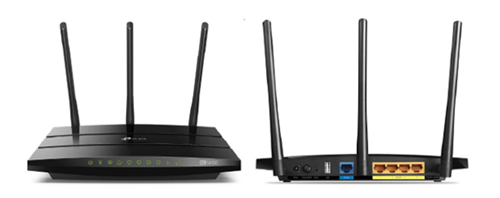
You may proceed with the following troubleshooting steps and it shouldn’t take you much longer than 15 minutes.
1. Please standby a computer/laptop to access to the internet and connection must be via LAN cable (connect the LAN cable to the Black port at D-Link Router and direct to the computer/laptop).
2. You may open any web browser such as Google Chrome, Internet Explorer, Mozilla Firefox and etc.
3. On the address bar, please go to tplinkwifi.net and to access to below login page. Type the Username and Password, then click "Login".

The default login of the router is available on the sticker at the back of the router. If you have done a configuration on your router previously, the password may be different)
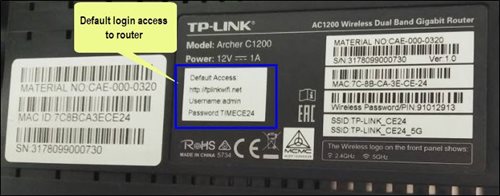
For example, below is the login details of the above router:
Username: admin
Password: TIMECE24
4. Once you have successfully login, the router's web-based setup page will appear. Please follow below steps for the configuration.
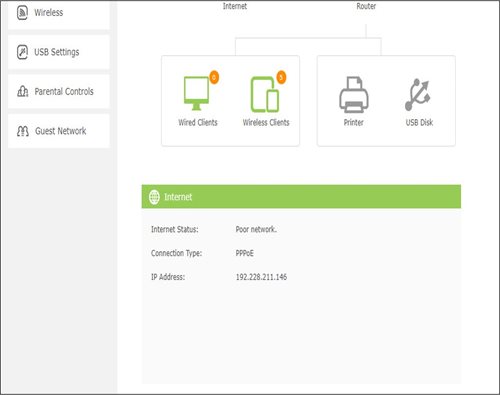
5. From the top menu, choose Basic and then click Wireless tab on the left menu to access to below screen.

6. Since this is a dual band router, you will have 2 Wireless Network Names (SSID) i.e. 2.4GHz and 5GHz. You may connect to any of the SSID, preferably with a stronger signal available.
7. You may change the Wireless Network Name (SSID) and the Password to follow your preferences, then click "Save" for the changes to take place.
Please reconnect to the new wireless name with the new password once completed.
Broadband Deal bundle are recommended packages offered to customers with higher rebate as compared to Broadband Non-Deal bundle.
STEP 1
Press "HOME" button on your remote control.

STEP 2
Navigate to My TV and press "OK".

STEP 3
Navigate to Bookings and press "OK".

STEP 4
Your list of your booking programs will be displayed.

The charge for your Disney+ Hotstar subscription is reflected in your Astro subscription, and not on the Disney+ Hotstar app/website. For details on your subscription, please call our Customer Contact Centre or WhatsApp us "DH Help
While this technology has its benefits, different devices at home have different reaction and response to changes in signal strength and quality, and it's almost impossible to predict if they will make good band choices due to the interaction between the devices and the Wifi router. Some smart home devices also recommend that band steering is not used due to various reasons such as needing a constant consistent connection, ability to only connect to a particular band, registration of the respective MAC address, etc..
Example:
As single SSID is used, the device may remain on a weak 5GHz network instead of switching over to stronger 2.4GHz network.
There will be no penalty imposed upon the removal of Astro GO+ from your subscription.
We are thrilled to announce that as part of your subscription, you are able to enjoy exclusive coverage of live matches in HD on Astro channels, On Demand and Astro GO! This means that you'll have access to all the latest games, highlights, and analysis, right at your fingertips.
With this new addition, you'll be able to follow your favourite teams and players closer than ever before, keeping you up-to-date with all the action on and off the field. Whether you're a die-hard fan or a casual spectator, this new content is sure to provide you with endless hours of entertainment.
To ensure that we continue offering the best choice in sports content, our Sports Pack will now be priced at RM104.99/month (for 12 months contract) or RM99.99/month (for 24 months contract) and Premium Pack 1 will now be priced at RM139.99/month (for 12 months contract) or RM129.99/month (for 24 months contract) starting 9 February 2023, and this applies to all new customers.
Note that there will no changes for existing Sports Pack & Premium 1 customers in 24 or 12 month contract being renewed before 1st June 2023.
We appreciate your continued support and can't wait for you to experience this exciting new addition to your Sports Pack subscription.
Please refer to the table below for the full revised pricing for the following packs:

We hope you continue to enjoy your Astro experience with us.
Astro Channel 200 is a self-service portal that helps you upgrade your packages and purchase add-ons instantly.
Refund can be made when there be a termination of account, over payments and in cases where payment was wrongly made to another Astro account.
If you add on the Mesh WiFi during your initial order of Astro Fibre, there is no additional installation fee. If you order the Mesh WiFi as an add-on at a later time, you will have to pay RM49 per installer visit. However, if you choose to have the Mesh WiFi delivered via courier in order to self-install your Mesh WiFi, there will be no installation or delivery fee charged.
Of course! Please ensure your account is active when requesting for a move.
The Download/Upload for each of the speed is as follow:
50Mbps/20Mbps
100Mbps/50Mbps
500Mbps/100Mbps
800Mbps/200Mbps
*Actual download/upload speeds is dependent on external factors, including but not limited to the distance between your devices and the WiFi router, network capacity and the number of connected users, the quality of your internal wiring, any obstructions of WiFi signals, the signal strength of wireless connection from your devices and if you are using a wireless connection.
STEP 1
Check the internet connectivity by run the Test Connection.
Refer Run Test Connection.
STEP 2
Verify the average speedtest based on the Test Connection result.
a. Above 10Mbps - Proceed to STEP 5
b. Less then 10 Mbps - Proceed to STEP 3
Notes: Minimum 10 Mbps internet speed from box requires in order to get a stable connection.
STEP 3
Check the connection to the box either using Ethernet (LAN cable) or Wi-Fi.
a. If using Ethernet (LAN cable) - Connect to Live Agent for help.
b. If using Wi-Fi - Proceed to STEP 4
STEP 4
Check location of the decoder and router.
a. If nearby (within 1.5m) - Try connect to box from router using LAN cable.
b. If far (more than 1.5m) / No LAN cable - Proceed STEP 5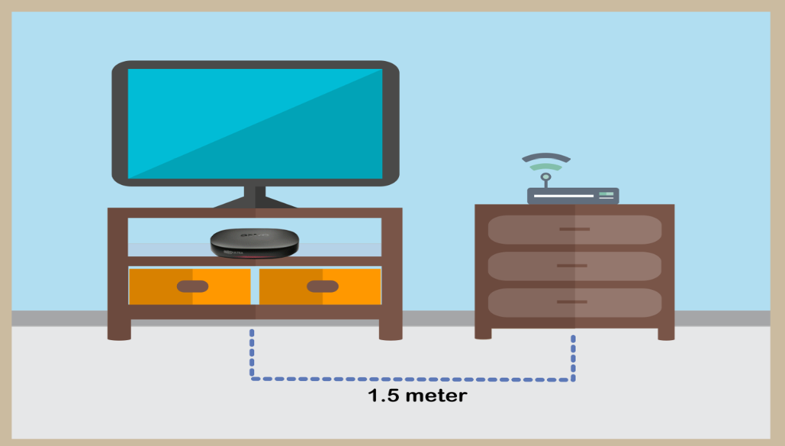
STEP 5
Reboot router, modem and decoder.
If issue persist, please try again after 30mins to 1 hour. Connect to live agent if persist after 30 mins to 1 hour.
A security question will be asked when making payments with credit cards over the phone. All other payment channels will not require any form of verification.
You can be assured that your data are safe with us. Astro implemented sufficient security measures to protect customer data and fully comply to Personal Data Protection Act
STEP 1
Switch off the power of your box and make sure that the adapter’s power light is off.
STEP 2
Unplug the HDMI cable from your TV and plug it back in securely to other available HDMI port.
STEP 3
Switch on the power for your box and make sure that the adapter’s power light is on.
Please wait for 5 minutes.
STEP 4
Turn on your box. Do select the correct TV input.
You should no longer be experiencing this problem.

Starting 9 November 2021, you will need to subscribe to the new packages to add on Multiroom to your subscription. Your new package will require a minimum primary subscription fee of RM100.
This is to ensure our customers receive the best possible attention and service via our new packages. We thank you for your understanding.
Yes, as part of our Astro Fibre Movies & Sports Campaign, new Astro Fibre customers can enjoy 50Mbps + the Movies/Movies+/Sports/Sports+ Pack TV bundle for a special price from only RM164.99/month when they sign up within the campaign period, with more than RM800 savings in total.
This Disney+ Hotstar software update will be rolled out progressively to all Ulti Box customers starting 23 August 2022. Please be assured that you will be able to access the Disney+ Hotstar app on your Ulti Box soon.
If you need further assistance, please call our Customer Contact Centre or WhatsApp "DH Help

