
A free satellite TV service from Astro. Watch lifetime entertainment, news, learning & information and more.

Pictures for illustration only.
Enjoy free access to 15+ TV channels & 10+ radio channels.
* Subject to Astro terms & conditions.


Step-1 |
Step-2 |
Step-3 |
Choose a plan & sign-up online. |
Sit back & wait for installation. |
Enjoy your new Astro / Broadband! |
A free satellite TV service from Astro. Watch lifetime entertainment, news, learning & information and more.
Pictures for illustration only.
New decoder only without satellite dish & cabling. You must have Astro/Njoi satellite dish and cable installed and working properly.
Including installation.
New decoder complete with satellite dish & cabling.
Including installation.
Applying for
| Njoi Astro UniFi Maxis |
Find your answers here.
We provide one stop service to apply Astro and Broadband for you.
You can avoid driving and queuing at the sales counter. We are the dealer that can help you to handle your application from the beginning to the end.
We do not charge you when you apply from us. There is no credit card information required to apply here. Charges are the same as you apply from the sales counter.
First, you can apply online, we will get back to you immediately during business hour. WhatsApp/Email/Fax us your Photocopy of IC (for malaysian) / Passport (for foreigners). When we receive all the information, we will proceed with your application immediately.
Once we receive your application with complete information, we will process your application immediately during business hour. The contractor from the service provider will then contact you for installation appointment once your application is approved.
Enjoy greater savings and hassle-free bill payment in one single bill for both Astro and Broadband. You get to enjoy Astro and Broadband at discounted price every month over the contract period of 24 months.
Astro offers multiple TV packs including Entertainment, Sports, Movies and Kids options. You can choose a pack that matches your viewing preferences and add optional streaming apps where available.
Yes, you may subscribe to Astro TV packs without bundling broadband. However, bundling Astro TV with Fibre Broadband may provide better monthly savings and convenience with a single bill.
For small households with light streaming and browsing, 100Mbps is usually sufficient. Larger families, gamers or heavy streamers may benefit from 500Mbps or 1Gbps plans for smoother performance across multiple devices.
Most Astro TV and Fibre broadband plans come with a 24-month contract. Early termination charges may apply if cancellation is made before the contract ends.
Yes, you may upgrade your TV pack or broadband speed at any time, subject to eligibility and coverage. A new contract period may apply depending on the upgrade.
Your monthly bill will be issued directly by Astro. You may receive it via email or access it through your Astro account. Bundled customers will receive a single combined bill for TV and broadband services.
Payment methods may include online banking, auto debit, credit card or other approved payment channels provided by Astro. Our team can guide you during the registration process.
If you experience any service interruption, you may contact Astro customer support for technical assistance. In many cases, issues can be resolved remotely or a technician will be arranged if necessary.
Yes, relocation is subject to service availability at your new address. Relocation charges and contract adjustments may apply depending on your plan.
No, you do not need a credit card to submit your application. Payment setup will be arranged directly with Astro after your service is approved.
Selected Astro TV packs allow optional add-ons such as streaming services depending on current promotions and availability. Additional monthly charges may apply.
Yes, a WiFi router is typically provided during fibre installation. The router model may vary depending on the selected broadband speed plan.
Yes, we will check the service coverage at your address before proceeding with your application to ensure broadband is available at your location.
For Malaysians, please provide a copy of your MyKad. For foreigners, provide a copy of your passport when submitting your broadband application.
After your application is approved, the service provider typically contacts you within 2 to 7 working days to arrange the broadband installation appointment.
Most Astro Broadband plans come with a 24-month contract starting from your installation date. If you relocate, a new 24-month contract may apply at your new address.
Yes, you can relocate your broadband service, subject to service availability at the new address. Your contract may reset for another 24 months from the new installation date.
Yes, you may request to relocate broadband devices within your home. Non-standard installation charges may apply and are payable to the installer directly after assessment.
Yes, you can switch to Astro Broadband. To avoid service interruption, it is recommended to activate the new service before terminating your current broadband contract.
Standard installations may be free during promotions, but non-standard installations (e.g., device relocation or complex wiring) may incur extra charges payable directly to the installer.
No, the PVR service fee is included in all Starter Pack, Value Pack, Super Pack Lite, Super Pack and Super Pack Plus subscriptions only.
No. Astro GO is a FREE entitlement exclusively for customers with an Astro subscription. If you do not have an Astro subscription account, please visit astro.com.my to find out more.
Step 1:
Type ASTRO EBILL <Your 10-Digit Smart Card Number> <Your Email Address>
Example: ASTRO EBILL 0156123412 abcdabcd@gmail.com
Step 2:
Send SMS to 66688
Note: This request must be sent from account holder’s mobile/primary number
*Standard telco charges and Terms & Conditions apply
Please check SMS received on the unsuccessful payment status and should you require further clarification contact your issuing bank for clarification or contact us via WhatsApp.
electronic Know-Your-Customer (eKYC) is an online process of identifying and verifying individual customers using electronic means. This enables a person to be an Astro customer anytime and anywhere, hassle-free and helps to secure your Astro account by protecting it from unauthorised usage.
STEP 1
On your remote, press the HOME button.

STEP 2
Navigate to Update Satellite Frequency and press “OK”.

STEP 3
Choose Test Satellite Frequency and press “OK”.

STEP 4
Select Yes, continue and press "OK" to start the test.
Otherwise, select No, go back to cancel.

STEP 5
Satellite Frequency Test progress screen will be displayed.

STEP 6
The test result will be displayed once completed.
Press "OK" to go back to channel.
For My Astro App Users
Go to the "Account' tab and scroll to "Personal Info' section. Click "Name & contact info' to view and update your personal contact information.

For Ultra and/or Ulti Users


STEP 1
On your remote, press the HOME button and the home menu will be displayed on top of your screen.

STEP 2
Navigate to Settings.

STEP 3
Navigate to HDMI Audio and press "OK".

STEP 4
Navigate to your preferred selection and press “OK”.

Your purchased PPV daily pass will still be accessible to you for the purchased duration ie. 3, 5, 7 or 30 days respectively. However, you will no longer be able to purchase PPV daily passes from 8 Oct onward.
If you choose to downgrade your packs or terminate Astro services before the end of your contract term, you will have to pay a cancellation fee. This cancellation fee is calculated based on your subscribed package, contract period and box type. If you cancel your service(s)/change your packages upon completion of your contract term, you won't have to pay any cancellation fee.
Yes, you will be able to access Disney+ Hotstar even if you remain on your existing Movies/Starter Plus/Value Plus Packs.
1. Ultra Box magenta light / Ulti Box purple light - Your box is turned "On".
Press the Home button to launch Video On Demand and stream anytime or press channel number on your remote.

2. Ultra Box / Ulti Box orange light - Your box is on "Standby" mode.
Your box is ready to be turned "On" or leave it in this mode to receive new software updates.

3. Ultra Box / Ulti Box blinking orange light - Your box is booting up.
Please wait a few minutes for the box to start.
4. Ultra Box / Ulti box blinking blue light - Your box is downloading a software update.
Please wait a few minutes for the download to complete.

Starting 12 December 2023, users have to use their registered email address, mobile number or a social account (Facebook, Google or Apple) to log into any of Astro's digital platforms, including My Astro, Astro GO and Astro's official website. Usernames as an Astro ID is no longer available. This change was made to ensure details linked to your Astro account are always updated and to improve the overall user experience on our platforms.
Yes, Astro is bounded by the PDPA act. All information received will be used in accordance with our Privacy Notice.
Yes, a charge of up to RM20.00 may be imposed upon reconnection.
For customers with Entertainment Plus, Movies Plus, Sports Plus, Premium 2, Premium 3, and Platinum Pack
For Non-Entertainment Plus, Premium 2, Premium 3, and Platinum Pack Pack customers (New Netflix customers)
Note: The Netflix plan will be defaulted to Premium, you may select ‘Change Plan’ to choose the ‘Standard’ plan.
For Non-Entertainment Plus Pack, Premium 2, Premium 3, and Platinum Pack customers (Existing Netflix customers)
For any access related queries on Disney+ Hotstar, please call or WhatsApp "DH Help
No. If you are a non-Astro subscriber, you will still be able to create an Astro ID, but access and use of Astro's digital services will be limited. If you are an Astro subscriber, please link your Astro ID to your Astro account number to enjoy exclusive access to all of Astro's digital services.
Refund fee is subject to your processing bank. However, Astro did not impose refund processing fee.
Step 1: Visit Astro website at https://www.astro.com.my/
Step 2: Click "Login'
Step 3: After login, click the profile icon and select 'Manage Profile'. You may change your account password here.
STEP 1
On your remote, press the HOME button and the home menu will be displayed on top of your screen.
STEP 2
Navigate to Settings.
STEP 3
Navigate to Menu Language and press "OK".

STEP 4
Navigate to your preferred language selection and press “OK”.

Yes. You are entitled to separate Netflix accounts for each main Astro subscription e.g. If you have subscribed to Entertainment Plus, Platinum Pack, etc separately. Therefore, if you have more than one main Astro subscription with Netflix, you may choose to create multiple email addresses to activate each respective Netflix subscription. Please follow the steps provided to you via email/SMS in order to activate your Netflix subscriptions on the website.
STEP 1
Press "HOME" button on your remote control.

STEP 2
Navigate to My TV and press "OK".

STEP 3
Navigate to Bookings and press "OK".

STEP 4
Your list of your booking programs will be displayed.

Please fill up the forms below for processing your request:
Transfer of Equiment Ownership Form
We would need you to run few tests in order for us to understand your issue and to assist you in fixing the problem.
This will not take longer than 15 minutes.


We need you to run the Speed Test using both WiFi connection and LAN cable.

4. Once you've gathered all the results, attach in Feedback Form for further assistance.
Quick Info
Astro ID and / or account deletion is permanent. Upon deletion, it will be unlinked from your TV subscription account and you will be logged out from all the associated Astro apps and / or services connected including the partner apps that you have logged in using the same Astro ID. If you have any queries regarding Astro ID or would like to request for Astro ID account deletion, click on submit your request here, fill in the required details and our Astro representative will get back to you within 3 business days for security verification purposes.
1. Ensure Modem/Router are connected tightly to the power socket.

2. Try to use another power socket / power source to eliminate faulty power sockets/power sources which could cause the issue.

3. If issue persists, submit your Feedback Form for further assistance.
Starting 9 June 2023, Viu Premium will be added as an option as part of our Asian Favourites along side Chinese, Indian and Indonesian Favourites. Astro customers on the Entertainment, EntertainmentPlus, Premium 2, Premium 3 and Platinum Packs will be able to choose Viu Premium as their Asian Favourites selection and stream the app for FREE. While customers on other TV Packs may purchase Viu Premium as an add-on to their subscription for as low as RM8.40/month (RRP: RM17.90). After successfully adding Viu Premium to your subscription, all Ultra and Ulti Box customers can access the app on their Astro Box, www.viu.com and the Viu mobile app to enjoy all the best KDramas, popular local hits, popular Thai and Indonesian shows and so much more! For further information and updates on Viu,
please visit: www.astro.com.my/Viu .
If you have forgotten your username or password, you may follow the steps below:
Step 1. Go to netflix.com
Step 2: Click on Sign In
Step 3: Click on "Need Help
- Credit or Debit Cards
- Visa
- Mastercard
- Maybank2U - Pay using your Maybank2U account
- FPX - Pay using any local bank account via FPX
- E-Wallet - Touch "n Go
STEP 1
Check the internet connectivity by run the Test Connection.
Refer Run Test Connection.
STEP 2
Verify the average speedtest based on the Test Connection result.
a. Above 10Mbps - Proceed to STEP 5
b. Less then 10 Mbps - Proceed to STEP 3
Notes: Minimum 10 Mbps internet speed from box requires in order to get a stable connection.
STEP 3
Check the connection to the box either using Ethernet (LAN cable) or Wi-Fi.
a. If using Ethernet (LAN cable) - Connect to Live Agent for help.
b. If using Wi-Fi - Proceed to STEP 4
STEP 4
Check location of the decoder and router.
a. If nearby (within 1.5m) - Try connect to box from router using LAN cable.
b. If far (more than 1.5m) / No LAN cable - Proceed STEP 5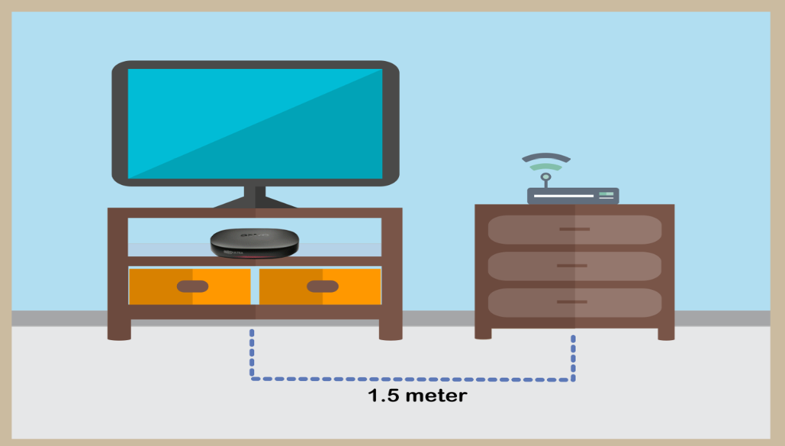
STEP 5
Reboot router, modem and decoder.
If issue persist, please try again after 30mins to 1 hour. Connect to live agent if persist after 30 mins to 1 hour.
-The Mesh unit can only be used indoors. It can be mounted onto a wall or be placed horizontally on a desktop. Do not install it in other mode, such as on the ceiling.
-Keep a clearance of at least 10 cm around the device to ensure proper ventilation.
-Keep the device away from electrical appliances that generate strong magnetic or electric fields, such as microwave ovens.
No, you can remain in your current pack, however starting 9 November 2021, you would need to subscribe to the new packages to make any changes to your subscription. We strongly encourage customers to switch to the new packs to enjoy the best content experience from Astro.
Astro Rewards is your free loyalty programme - a way for us to say thank you for being with us.
We're always adding new and exciting gifts, deals, and experiences for you - all ready and waiting in the My Astro app for you, right at your fingertips. Here's the best part, the longer you're with us, the better your rewards!
Your documents will be handled in compliance with standards set by PDPA (Personal Data Protection Act 2010) and will not be used for other means without your specific consent.
Currently Astro GO is only available in Malaysia. You will not be able to access it if you are overseas.
Yes, however we do advise keeping your subscription while your TV is being fixed to avoid having to download the app again.
Please rest assured that streamingapps labelled with "coming soon"
will be available on Astro in the near future.Please visit product.astro.com.my/appsfor more information on the streaming apps available on Astro or follow oursocial media to get notified on latest launches.
Facebook: @Astro
Instagram: @astromalaysia
Twitter: @astroonline
Kindly take note that streaming appslabelled with “coming soon” will be made available on Astro once they areready. Astro reserves the right to delay or cancel streaming app launches, ifnecessary.
We would recommend the following browsers for a smooth verification process:
• Google Chrome
• Microsoft Edge
• Mozilla Firefox
• Safari
The Malaysia Communication and Multimedia Commission (MCMC)has issued a directive to all telecommunication companies (telcos) to block the sending and receiving of SMS with URL links. The move is aimed at preventing users from becoming victims of online scams. This exercise is applicable for all person-to-person SMS with URL links sent to or received from local and international mobile numbers, which has already taken effect as of 2 May 2023.
Yes, you will enjoy an Ulti box when subscribing to Primary/Entertainment/ Movie Pack OR an Ultra box when subscribing to Sports/Sports+/Movies+/Premium 1/Premium 2/Premium 3/Platinum Pack.
You will get FREE installation for both Ultra/Ulti box upon signing up with Astro & Broadband.
STEP 1
Press "HOME" button on your remote control.

STEP 2
Navigate to Settings and press "OK".

STEP 3
Navigate to Installation Settings and press "OK".

STEP 4
Enter your PIN to access this setting. (Default PIN is 0000).

STEP 5
Navigate to Restore Factory Settings and press "OK".

STEP 6
Navigate to Yes, continue and press "OK" to confirm your selection.
Otherwise, navigate to No, go back to maintain the settings.

STEP 7
Please reboot your box.

STEP 8
New Installation Settings screen will appear.
Click here to follow New Installation Settings guide.

Service will be resumed after you make payment within 45 days. The monthly subscription fee to be prorated accordingly and a reconnection fee of up to RM20 (exclusive of SST) will be applied upon service resumption.
If payment is made within 45 days from your bill cycle date, Astro & Broadband services will be resumed within 3 hours of payment received. Your following month's bill will be prorated accordingly.
Find out more about the reconnection fee here.
Please switch your current subscriptions to our new Astro packs to subscribe to Multiroom (Smart TV). To sign up, WhatsApp "SWITCH" to 03-9543 3838 and an agent will assist you.
Find out more of our new packs at https://product.astro.com.my/tv
You may report the incident on WhatsApp at 03-9543 3838 by typing PNP and our access our user guide or request for further help from our dedicated agents. Please have your Airway Bill tracking numbers ready for validation.If a replacement box/Astro SIM card is deemed necessary, a new Box and a new Astro SIM card will be couriered to your service address.
STEP 1
Switch OFF the power of your Ultra / Ulti box and make sure that the adapter's power light is off.

STEP 2
Switch ON the power of your Ultra / Ulti box and make sure that the adapter's power light is on.

STEP 3
Put the box on standby mode.

STEP 4
Press and hold the Home button on the box.

STEP 5
Wait until "boot" appear on the front panel and released.

STEP 6
When “boot” appears, press “Standby”, “Left “, “Up” continuously until Auto Update appear on box screen and Software Update progress on TV.


STEP 1
Switch OFF the power of your box and make sure that the adapter's power light is off.
STEP 2
Switch ON the power of your box and make sure that the adapter's power light is on.
STEP 3
Press Standby, Ch+, Standby keys on the box simultaneously when the "boot" message appears on the box front panel.
The Software Update progress screen will appears.
The update will take 10 - 15 minutes to complete. Please be patience.


STEP 1
Switch OFF the power of your box and make sure that the adapter's power light is off.
STEP 2
Switch ON the power of your box and make sure that the adapter's power light is on.
STEP 3
Press the standby button repeatedly after switch on the power.

STEP 4
Press "OK".

STEP 5
The Software Update progress screen will appears.
The update will take 10 - 15 minutes to complete.
Please be patience.

The amount you're charged depends on:
My Astro is an easy-to-use, free mobile phone app and responsive web portal that helps Astro customers to manage their Astro accounts. My Astro allows customers to manage their accounts, pay bills, and get any support they need. In addition, customers can find and purchase the latest shows to be viewed on their Astro Box or on Astro GO. Customers can also receive news about Astro's latest products and content offerings.
No, the quality of your video depends on the speed and reliability of your internet.
Astro is an official distributor of Disney+ Hotstar, the dedicated streaming home for global, and Malaysian hits. Astro customers can now subscribe to Disney+ Hotstar through the new, bigger and more diverse Packs, i.e.: Movies, Premium 1, Premium 3 or Platinum Pack. The streaming service brings together blockbuster movies from Hollywood to Hallyu and award-winning content from Disney, Marvel, Star Wars, Pixar, National Geographic, FX, 20th Centuary Studios and more including exclusive premieres from leading Malaysian studios. Take your family entertainment to the next level with Disney+ Originals like I am Groot, Prey, Baymax, Obi-Wan Kenobi, She-Hulk, IN THE SOOP: Friendcation and more - with the convenience of one monthly bill for all your entertainment needs.
Movies Pack, Premium 1, Premium 3 and Platinum customers as well as customers on the Starter Plus Pack, Value Plus Pack, and Disney+ Hotstar (3-months Pass) can enjoy Disney+ Hotstar on Astro.
Customers can subscribe to Disney+ Hotstar via astro.com.my/Disney, as well as via authorised retailers and dealers.

