
A free satellite TV service from Astro. Watch lifetime entertainment, news, learning & information and more.

Pictures for illustration only.
Enjoy free access to 15+ TV channels & 10+ radio channels.
* Subject to Astro terms & conditions.


Step-1 |
Step-2 |
Step-3 |
Choose a plan & sign-up online. |
Sit back & wait for installation. |
Enjoy your new Astro / Broadband! |
A free satellite TV service from Astro. Watch lifetime entertainment, news, learning & information and more.
Pictures for illustration only.
New decoder only without satellite dish & cabling. You must have Astro/Njoi satellite dish and cable installed and working properly.
Including installation.
New decoder complete with satellite dish & cabling.
Including installation.
Applying for
| Njoi Astro UniFi Maxis |
Find your answers here.
We provide one stop service to apply Astro and Broadband for you.
You can avoid driving and queuing at the sales counter. We are the dealer that can help you to handle your application from the beginning to the end.
We do not charge you when you apply from us. There is no credit card information required to apply here. Charges are the same as you apply from the sales counter.
First, you can apply online, we will get back to you immediately during business hour. WhatsApp/Email/Fax us your Photocopy of IC (for malaysian) / Passport (for foreigners). When we receive all the information, we will proceed with your application immediately.
Once we receive your application with complete information, we will process your application immediately during business hour. The contractor from the service provider will then contact you for installation appointment once your application is approved.
Enjoy greater savings and hassle-free bill payment in one single bill for both Astro and Broadband. You get to enjoy Astro and Broadband at discounted price every month over the contract period of 24 months.
Astro offers multiple TV packs including Entertainment, Sports, Movies and Kids options. You can choose a pack that matches your viewing preferences and add optional streaming apps where available.
Yes, you may subscribe to Astro TV packs without bundling broadband. However, bundling Astro TV with Fibre Broadband may provide better monthly savings and convenience with a single bill.
For small households with light streaming and browsing, 100Mbps is usually sufficient. Larger families, gamers or heavy streamers may benefit from 500Mbps or 1Gbps plans for smoother performance across multiple devices.
Most Astro TV and Fibre broadband plans come with a 24-month contract. Early termination charges may apply if cancellation is made before the contract ends.
Yes, you may upgrade your TV pack or broadband speed at any time, subject to eligibility and coverage. A new contract period may apply depending on the upgrade.
Your monthly bill will be issued directly by Astro. You may receive it via email or access it through your Astro account. Bundled customers will receive a single combined bill for TV and broadband services.
Payment methods may include online banking, auto debit, credit card or other approved payment channels provided by Astro. Our team can guide you during the registration process.
If you experience any service interruption, you may contact Astro customer support for technical assistance. In many cases, issues can be resolved remotely or a technician will be arranged if necessary.
Yes, relocation is subject to service availability at your new address. Relocation charges and contract adjustments may apply depending on your plan.
No, you do not need a credit card to submit your application. Payment setup will be arranged directly with Astro after your service is approved.
Selected Astro TV packs allow optional add-ons such as streaming services depending on current promotions and availability. Additional monthly charges may apply.
Yes, a WiFi router is typically provided during fibre installation. The router model may vary depending on the selected broadband speed plan.
Yes, we will check the service coverage at your address before proceeding with your application to ensure broadband is available at your location.
For Malaysians, please provide a copy of your MyKad. For foreigners, provide a copy of your passport when submitting your broadband application.
After your application is approved, the service provider typically contacts you within 2 to 7 working days to arrange the broadband installation appointment.
Most Astro Broadband plans come with a 24-month contract starting from your installation date. If you relocate, a new 24-month contract may apply at your new address.
Yes, you can relocate your broadband service, subject to service availability at the new address. Your contract may reset for another 24 months from the new installation date.
Yes, you may request to relocate broadband devices within your home. Non-standard installation charges may apply and are payable to the installer directly after assessment.
Yes, you can switch to Astro Broadband. To avoid service interruption, it is recommended to activate the new service before terminating your current broadband contract.
Standard installations may be free during promotions, but non-standard installations (e.g., device relocation or complex wiring) may incur extra charges payable directly to the installer.
Yes, your charges during the deferment days will be pro-rated and reflected in your next bill. Please note that due to the recent requested change in your Astro account, the expiry date for your Disney+ Hotstar (3-months pass) subscription has been deferred to xxx (date) to consolidate the final monthly subscription pricing.
STEP 1
In the Kids Profile, press the Home button on your remote and the home menu will be displayed.
STEP 2
Navigate to Profile.
STEP 3
The Profile Selection Screen will be displayed.
STEP 4
Choose an Adult Profile.
STEP 5
Switching from a Kids to an Adult Profile will require you to enter a 4-digit PIN.
Please enter your PIN to proceed. If you have not set up your PIN, the default code is 0000.
STEP 6
After entering the PIN, you will be able to enter the Adult Profile.
Non-standard Broadband installation covers the scenario where additional cables and drilling is required to complete your Astro & Broadband installation or by installing the cable in the walls/ceilings. There are additional fees applied for the additional requirements as follows:

No, you are still able to access HBO Go on your current Movies pack.
Starting 28 April 2022, Astro customers can access Disney+ Hotstar via Ultra Box, mobile app and website. We are working towards making Disney+ Hotstar available via the Ulti Box. Stay tuned for updates.
â€
Your bill statement will include details of your monthly subscription charges; e.g. charges for your chosen Astro packages and Broadband service. It will also show the time period of which your first bill will cover, as well as indicate how much the total charges are and when the payment due date is.
Starting 1 April 2024, Astro’s Chinese content offering on our Primary & Family Pack is now bigger than ever with the addition of up to 10 channels featuring the latest Chinese primetime dramas, variety and current affairs programmes as well as great selection of movies and musical shows. These are the channels available in the Primary & Family Pack at no additional cost:


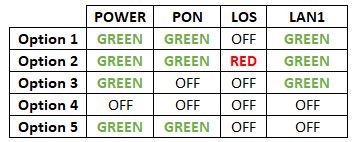

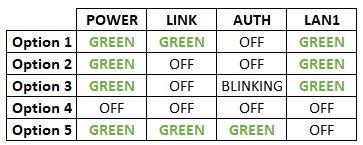
Option 1
Modem connection

Router connection


3. Please make sure the LAN cable is connected properly from router (Port 1-4 - LAN port) to PC/ Laptop.
4. If you have change the password in Selfcare Time portal recently, please change the router configuration follows the new password made in Selfcare, but if you didn't make any changes, please go to Step 5.
5. If the issue persists, submit your feedback form and attach your modem light indicator picture/video for further assistance.
Option 2/ Option 3
Modem Connection

Router Connection


5. Make Sure both cables on Modem (LAN Port 4/ LAN Port 3 for second decoder) and Astro Decoder (Network Port) are properly inserted.


6. Switch on modem and router and please wait for 2 minutes to stabilise the devices after reboot.
5. If the issue persists, submit your feedback form and attach your modem light indicator picture/video for further assistance.
Option 4
1. Ensure Modem/Router are connected tightly to the power socket.

2. Try to use another power socket / power source to eliminate faulty power sockets/power sources which could cause the issue.
3. If the issue persists, submit your feedback form for further assistance.
Option 5
1. Please ensure LAN cable is directly connected to modem port LAN 1.

2. Please use different LAN port if LAN 1 port is still off / not working.
3. If the issue persists, submit your feedback form for further assistance.
Starting 9 November 2021, you will need to subscribe to the new packages to add on Multiroom to your subscription. Your new package will require a minimum primary subscription fee of RM100.
This is to ensure our customers receive the best possible attention and service via our new packages. We thank you for your understanding.
No, your rewards cannot be transferred to another person or exchanged for cash.
Liga Malaysia is available for all customers with a HD enabled box including Zapper, DMT5, Ulti Box and Ultra Box.
Yes, as part of our Astro Fibre Movies & Sports Campaign, new Astro Fibre customers can enjoy 50Mbps + the Movies/Movies+/Sports/Sports+ Pack TV bundle for a special price from only RM164.99/month when they sign up within the campaign period, with more than RM800 savings in total.
Customers on the Multiroom (Smart TV) app can stream these two channels (CH549 Love Nature & CH805 Astro SuperSport) if their TV model supports 4K UHD resolution.
Kindly note that these Sony TV models do not support 4K UHD resolution:
• Sony BRAVIA 4K GB
• Sony BRAVIA 4K UR
• Sony BRAVIA VH
*CH805 Astro SuperSport is only available to customers on the Sports, Sports Plus, Premium 1, Premium 2, Premium 4, Platinum Lite and Platinum Packs.
Create your Astro ID anytime by following these simple steps:
Yes, you may terminate the service, however an early cancellation fee will be applied for termination/cancellation within 24 months. Please refer to the Astro Fibre's cancellation details.
You will only be able to watch Astro GO and/or Multiroom Smart TV on up to 2 devices at the same time as opposed to 4 devices with Astro GO+.
Your cloud recording storage will also decrease from 1500 hours down to 200 hours. Your stored recordings/downloaded shows that exceed 200 hours will also be removed.
Astro does not provide installment plan facilities. You are advised to pay your charges before the due date, as per your monthly bill statement.
Only new and existing Astro Fibre customers with the latest RG21 router can use the Astro Fibre app.

Please first ensure Disney+ Hotstar access is included and has been activated as part of your Astro subscription. Once you have completed your activation process, you can enjoy Disney+ Hotstar on the Ultra box with these simple steps:
You may visit any of Astro's digital platform that you would like to log into. Then, create a new Astro ID using your existing email address or mobile number. After creating your new Astro ID, please use it to log into our digital platforms moving forward.
Not all shows/channels will be available on Astro GO as this depends on contractual rights with specific guidelines on the entitlement of these shows/channels and what you have as a part of your subscription.
Below are channels that are not available on Astro GO:
Please be assured that Astro is continuously working on getting more content available on Astro GO.
The Download/Upload for each of the speed is as follow:
50Mbps/20Mbps
100Mbps/50Mbps
500Mbps/100Mbps
800Mbps/200Mbps
*Actual download/upload speeds is dependent on external factors, including but not limited to the distance between your devices and the WiFi router, network capacity and the number of connected users, the quality of your internal wiring, any obstructions of WiFi signals, the signal strength of wireless connection from your devices and if you are using a wireless connection.
The Multi-user Profile feature allows customers to create individual profiles within their Astro Box and Astro GO with the following personalisations:
The MUP feature is a great way to allow individual users to tailor personal Astro experiences whilst using a shared device (e.g.: Astro Box) in the household, providing them with better personalised recommendations and encouraging better content discovery.
Click here to find out more on this new feature and how to use it!
No, the Astro Fibre App is available for Astro Fibre customers with the RG21 router only.
For Astro Fibre subscription, should you choose to discontinue/terminate the Astro Fibre service before the expiry of the contract (24 months), you will be subjected to an early cancellation fee of RM100 x Remaining months of the contract period for your Broadband services.
All Astro Fibre devices provisioned (Fibre modem, WiFi router and Mesh) will need to be returned upon termination. Our team will schedule the collection of equipment after your Broadband services have been terminated.
If equipment is damaged, lost or cannot be retrieved, penalty fees will be applied (excluding Service Tax) accordingly.
You would need your 10-digit account number and your email address.
electronic Know-Your-Customer (eKYC) is an online process of identifying and verifying individual customers using electronic means. This enables a person to be an Astro customer anytime and anywhere, hassle-free and helps to secure your Astro account by protecting it from unauthorised usage.
A deposit of RM500 is payable for new subscribers (non-Malaysians). The fee will be refunded when service is terminated.
No deposit is required for all existing Astro customers and new subscribers (Malaysians).
Upon successful subscription, you will be able to view your chosen HD channels within 3 hours by keying in the channel numbers into your remote control. Please note that subscription through Channel 200 will take effect within 24 hours.
Your Astro GO email will be delivered to you within an hour upon checkout. Please click the link provided to set up your password and download the Astro GO app on your device by clicking here (Google Play Store) or here (iOS App Store). If you want to stream it directly via your computer or laptop, Astro GO is also available at astrogo.astro.com.my. Log in with your Astro ID and start streaming!
The Personal Video Recorder (PVR) is Astro's High Definition (HD)decoder which comes with a recording function and can be connected to Wi-Fi to access videos on demand. The PVR comes with the following features:
HIGH DEFINITION (HD):High Definition offers greater detail than Standard Definition including vibrant colour and multi-dimensional audio.
CONTROL LIVE TV: Record, Pause, Play & Rewind your favourite TV programmes at any moment. The PVR comes with storage capacity of 500GB (200 hours of HD recording)
ON DEMAND: Experience the new way of watching Astro. Gain access to a library of up to 50,000 On Demand titles that you can pick and watch instantly.
Astro customers are entitled to a two (2) years manufacturer warranty and Installation warranty. During this period, after-sales service is free of charge. However, when your warranty period is over, all after-sales service is subject to a minimal service charge starting from RM65 inclusive of 8% Service Tax.
Other Decoders/Ultra Box Without contract:
Astro customers are entitled to a one (1) year manufacturer warranty and (6) months Installation warranty. During this period, after-sales service is free of charge. However, when your Installation warranty period is over, all after-sales service is subject to a minimal service charge starting fromRM65 inclusive of 8% service tax.
For customers with the Ultra or Ulti Box, you are required to return only the Astro box along with the Smart/SIM Card. There is no requirement to return the remote control, power cables or satellite dish/outdoor unit (ODU).
For customers on other Boxes, you are required to discard them (and their accompanying devices such as the Smart/SIM Card) only at registered collection centers for proper handling and management of e-waste in an environmentally sound manner. Click here to find a registered collection center near you.


Option 1
Modem connection

Router connection


3. Please make sure the LAN cable is connected properly from router (Port 1-4 - LAN port) to PC/Laptop.
4. If you have change the password in Selfcare Time portal recently, please change the router configuration follows the new password made in Selfcare, but if you didn't make any changes, please go to Step 5.
5. If the issue persists, submit your feedback form and attach your modem light indicator picture/video for further assistance.
Option 2 / Option 3
1. Please turn off all devices (Modem and Router). By restarting your modem, you can isolate the possibility of overloaded processes in the modem, which would impact its performance.
2. Gently remove fiber optic cable and blow / wipe the tip of the fibre cable. This is to clean up the cable in order to avoid any interferences.
3. Re-insert the fiber cable to the optical port behind the modem.
4. Ensure both cables on Modem (LAN Port 1) and Router (Internet Port) are properly connected.
Modem Connection
Router Connection
5. Make Sure both cables on Modem (LAN Port 4 /LAN Port 3 for second decoder) and Astro Decoder (Network Port) are properly inserted.

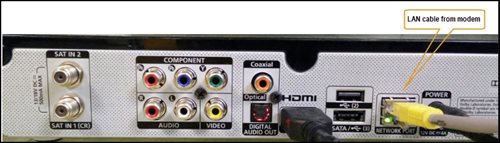
6. Switch on modem and router and please wait for 2 minutes to stabilise the devices after reboot.
5. If the issue persists, submit your feedback form and attach your modem light indicator picture/video for further assistance.
Option 4
1. Ensure Modem/Router are connected tightly to the power socket.

2. Try to use another power socket / power source to eliminate faulty power sockets/ power sources which could cause the issue.
3. If the issue persists, submit your feedback form for further assistance.
Option 5
1. Please ensure LAN cable is directly connected to modem port LAN 1.
2. Please use different LAN port if LAN 1 port is still off / not working.
3. If the issue persists, submit your feedback form for further assistance.
Astro wants to give our members the convenience of having all their favourite series, exciting originals, vernacular signatures, live sports and local blockbuster movies in one place. Astro customers will be able to enjoy greater convenience by having Netflix bundled with their Astro subscription, consolidating the subscriptions, and providing easy access for payment in a single bill, at the best value.
While this technology has its benefits, different devices at home have different reaction and response to changes in signal strength and quality, and it's almost impossible to predict if they will make good band choices due to the interaction between the devices and the Wifi router. Some smart home devices also recommend that band steering is not used due to various reasons such as needing a constant consistent connection, ability to only connect to a particular band, registration of the respective MAC address, etc..
Example:
As single SSID is used, the device may remain on a weak 5GHz network instead of switching over to stronger 2.4GHz network.
Each Astro customer can subscribe to a maximum of one (1) Multiroom (Smart TV) subscription. If you need additional Multiroom access, you may subscribe to Multiroom (Astro Box). All subscription has to be used within the same location as per the main subscription.

1. Please connect your computer or laptop to your Astro Fibre router using LAN cable. Your LAN cable must be connected from the yellow port of Astro Fibre router (Any available port).
2. Once connected, open any web browser such as Google Chrome, Internet Explorer, Mozilla Firefox and etc.
3. On the address bar, type http://192.168.100.254 and below page will appear.

Login using your username and password if you have changed the router login setting. Otherwise, your default router login is as per below.
Username: user
Password: user
4. Once you have successfully logged in, the router's web-based setup page will appear.

5. At the top of the page, click More to configure the WiFi parameters.

6. From the left menu, select WLAN and choose Wi-FI Advanced Network to access the screen below.

7. To change the channel on 2.4 GHz and 5 GHz, click the drop-down arrow for Channel, then select your desired channel.

8. Then, click "Apply" for the changes to take place.

STEP 1
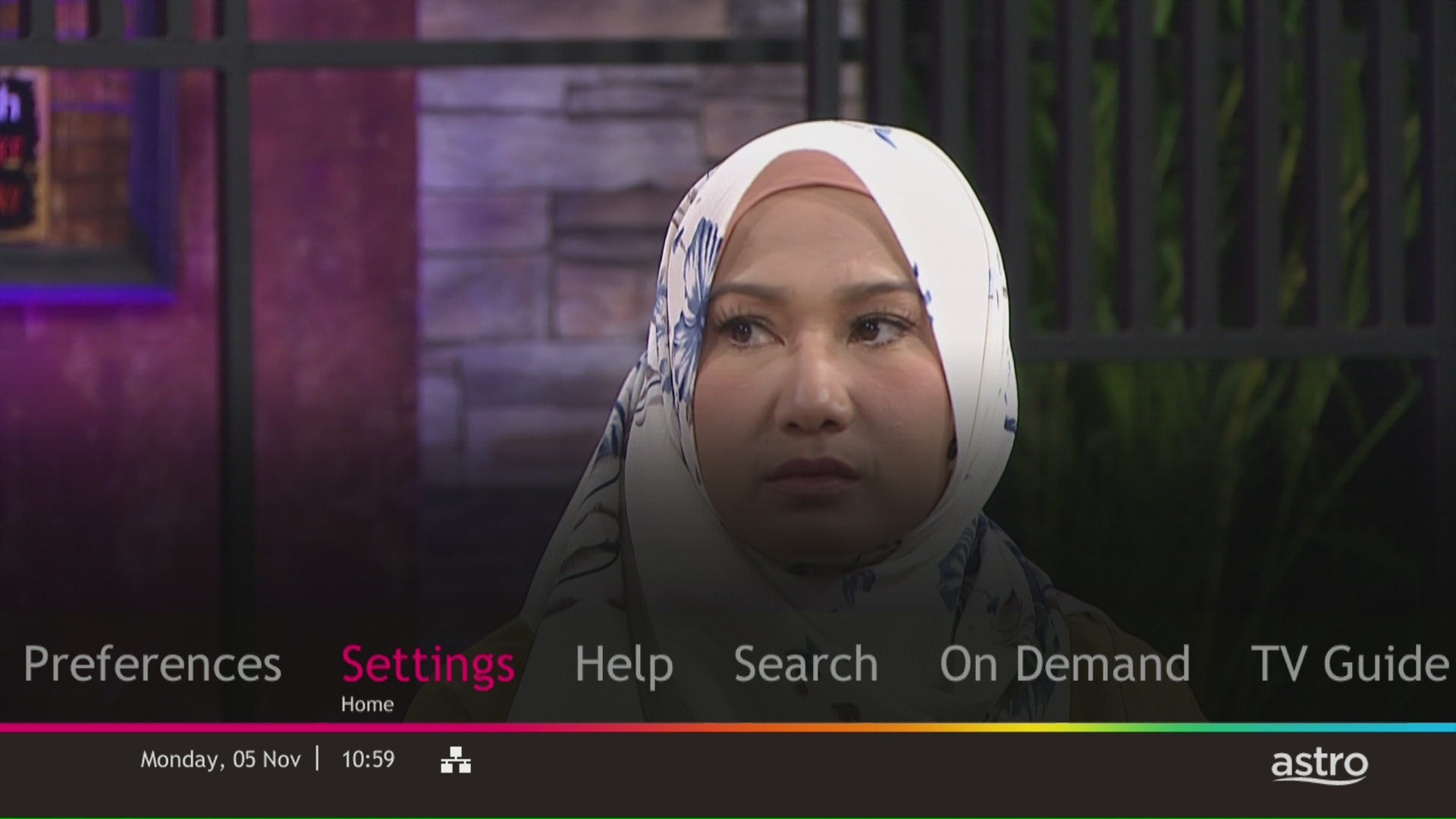
Press "HOME" button on your remote control.

STEP 2
Navigate to Settings and press "OK".
STEP 3
Navigate to Display and press "OK".
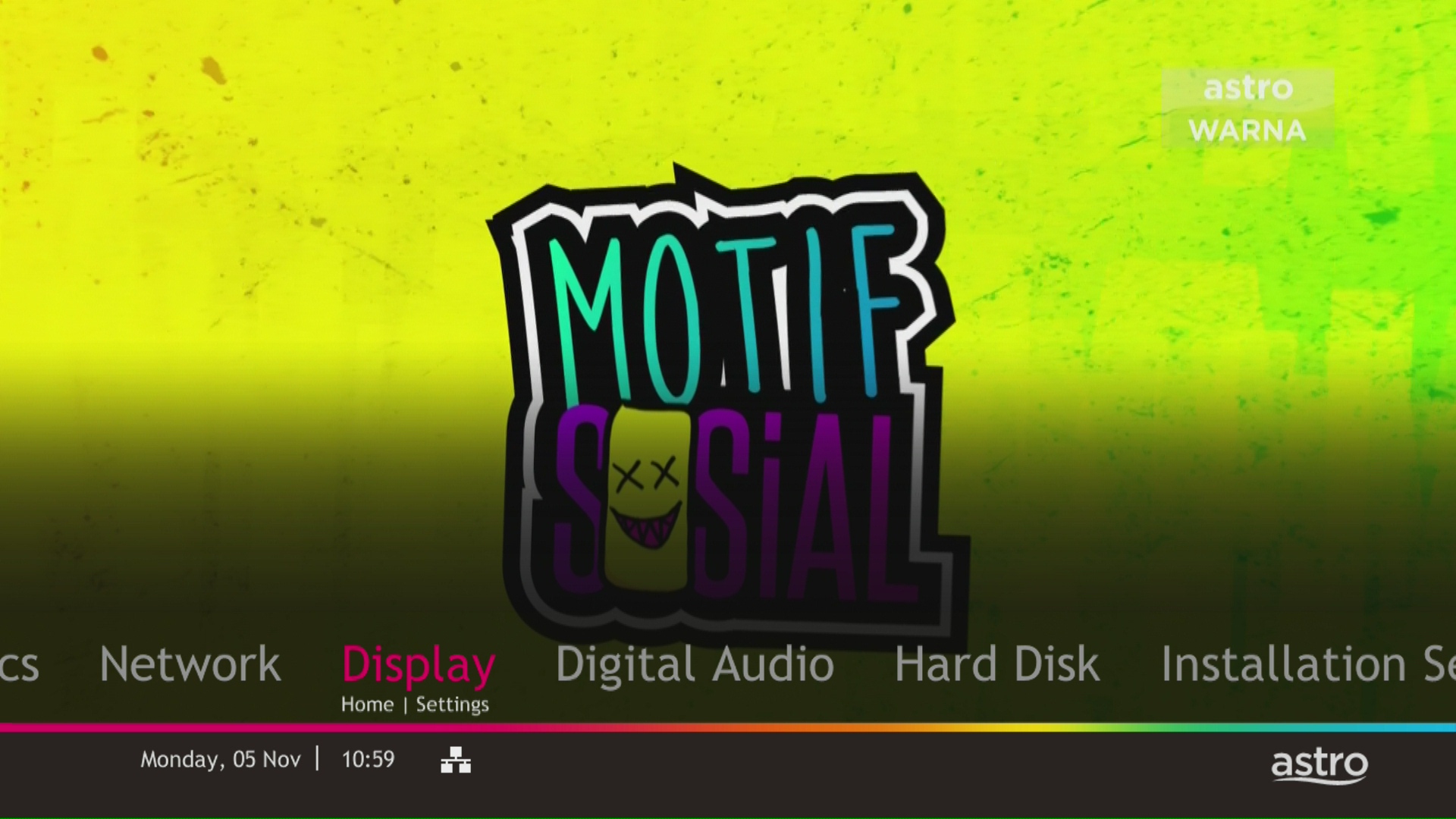
STEP 4
Navigate to TV Settings and press "OK".

STEP 5
Navigate to Conversion for 4:3 Input Video, select your preferred selection and press “OK”.

STEP 6
Select Yes, continue and press "OK" to confirm on the changes.
Otherwise, select No, go back to cancel.

Advance payment can be made via credit/debit card or online banking.
Yes, an existing IPTV customer is eligible to switch to Astro Fibre. However, your IPTV services will be switched to a Plug & Play service, and your existing Astro PVR / B.yond Box will be upgraded to the Ultra/Ulti box. There is no additional charge for the Astro Ultra/Ulti upgrade. Please note that you will be re-contracted for 24 months upon installation.
You may report the incident on WhatsApp at 03-9543 3838 by typing PNP and our access our user guide or request for further help from our dedicated agents. Please have your Airway Bill tracking numbers ready for validation. If a replacement box/Astro SIM card is deemed necessary, a new Box and a new Astro SIM card will be couriered to your service address.
Yes, customers whose accounts are suspended but resumed within 24 months from their offer period start date will still be able to enjoy the internet speed upgrade upon service resumption. However, the speed upgrade offer period will not be extended despite the suspension period.
Unfortunately, customers whose accounts are suspended but resumed after 24 months from their offer period start date will not be able to receive the free speed upgrade.
Currently Astro GO is only available in Malaysia. You will not be able to access it if you are overseas.
STEP 1
Choose your language preferences for both Menu Language and Info Language. Then, press "OK".

STEP 2
Select you box operating mode and press "OK".

STEP 3
Select the resolution supports by your TV and press "OK".
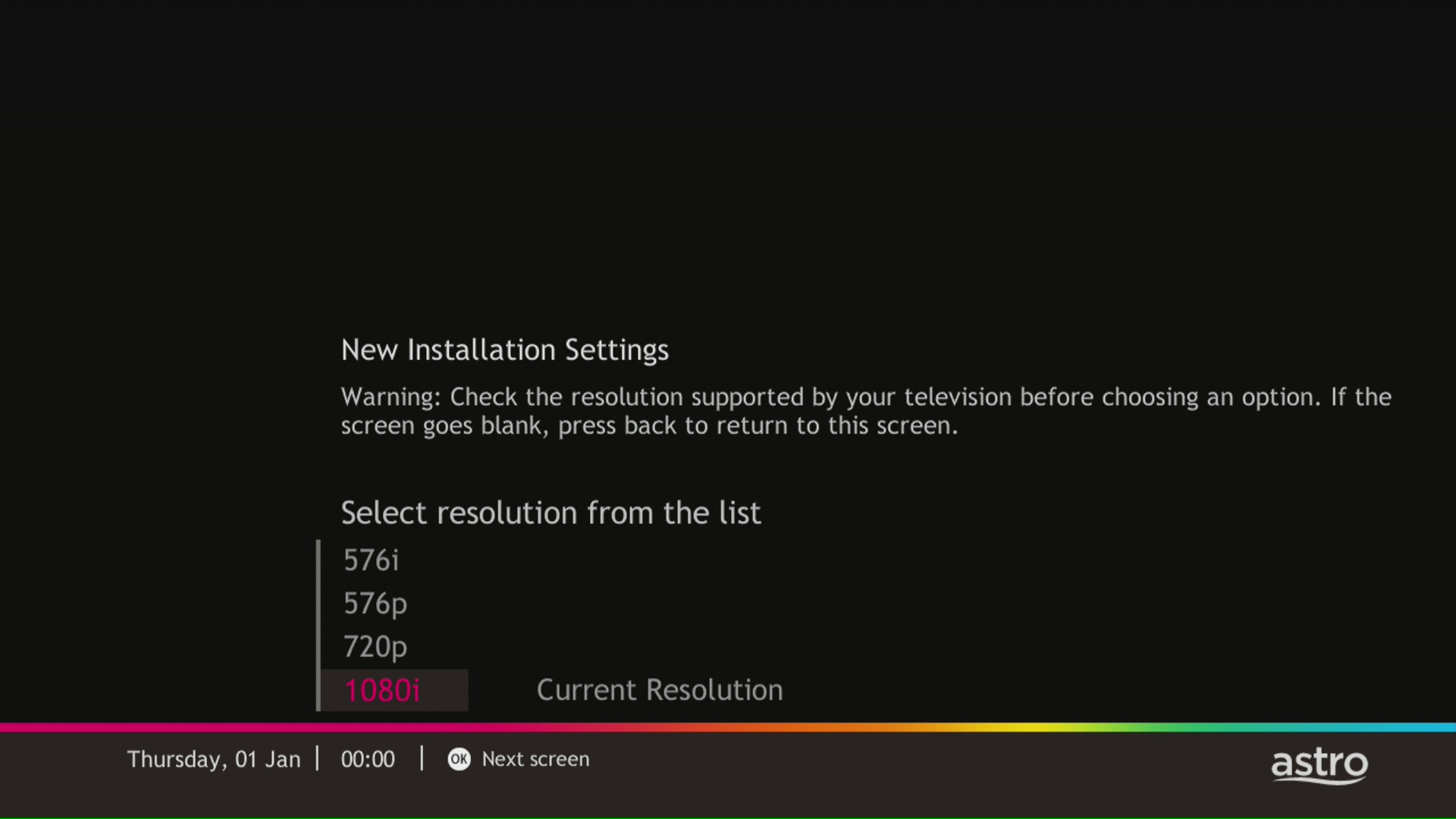
STEP 4
Press "OK" to proceed to the next screen.
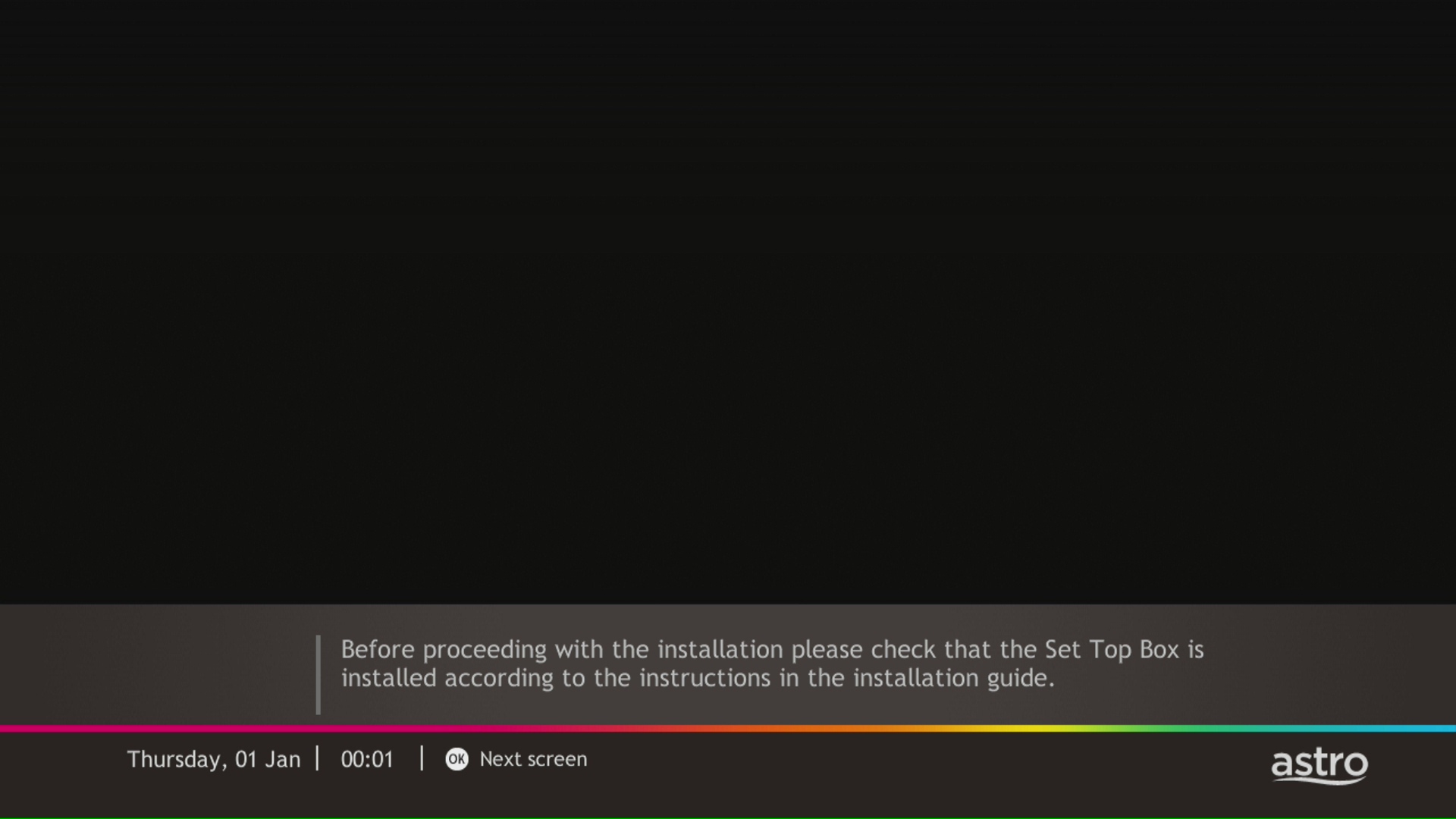
STEP 5
Please select the LNB type and press "OK".

STEP 6
Select this as the Entry Point and press "OK" to confirm your selection.

STEP 7
Signal reading results for Tuner 1 and Tuner 2 screen will be displayed. Then, press "OK" to proceed to next screen.

STEP 8
Select Yes, continue and press "OK" to connect to Wi-Fi network.
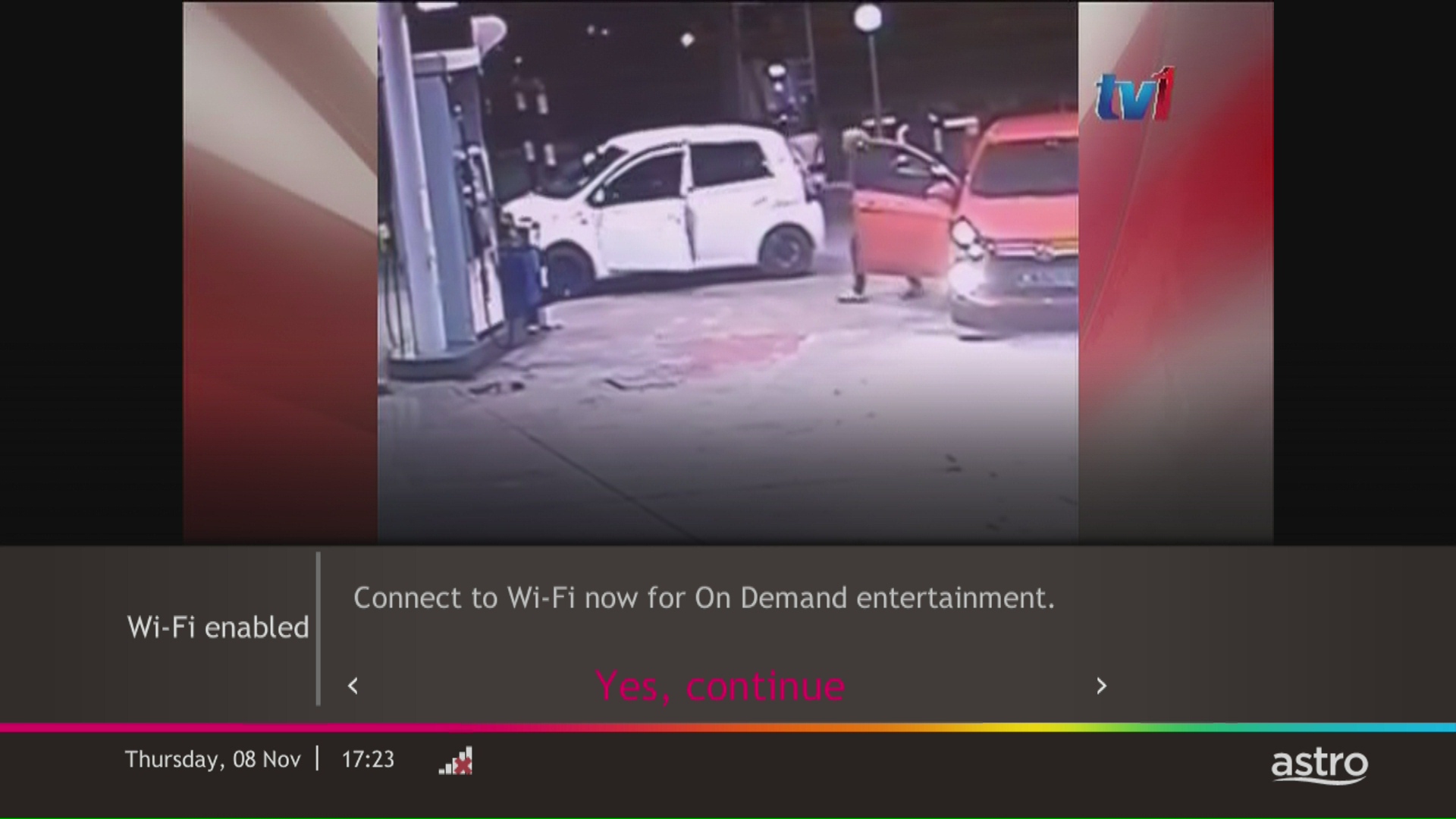
STEP 9
Please wait while the box scanning for the available Wi-Fi network.
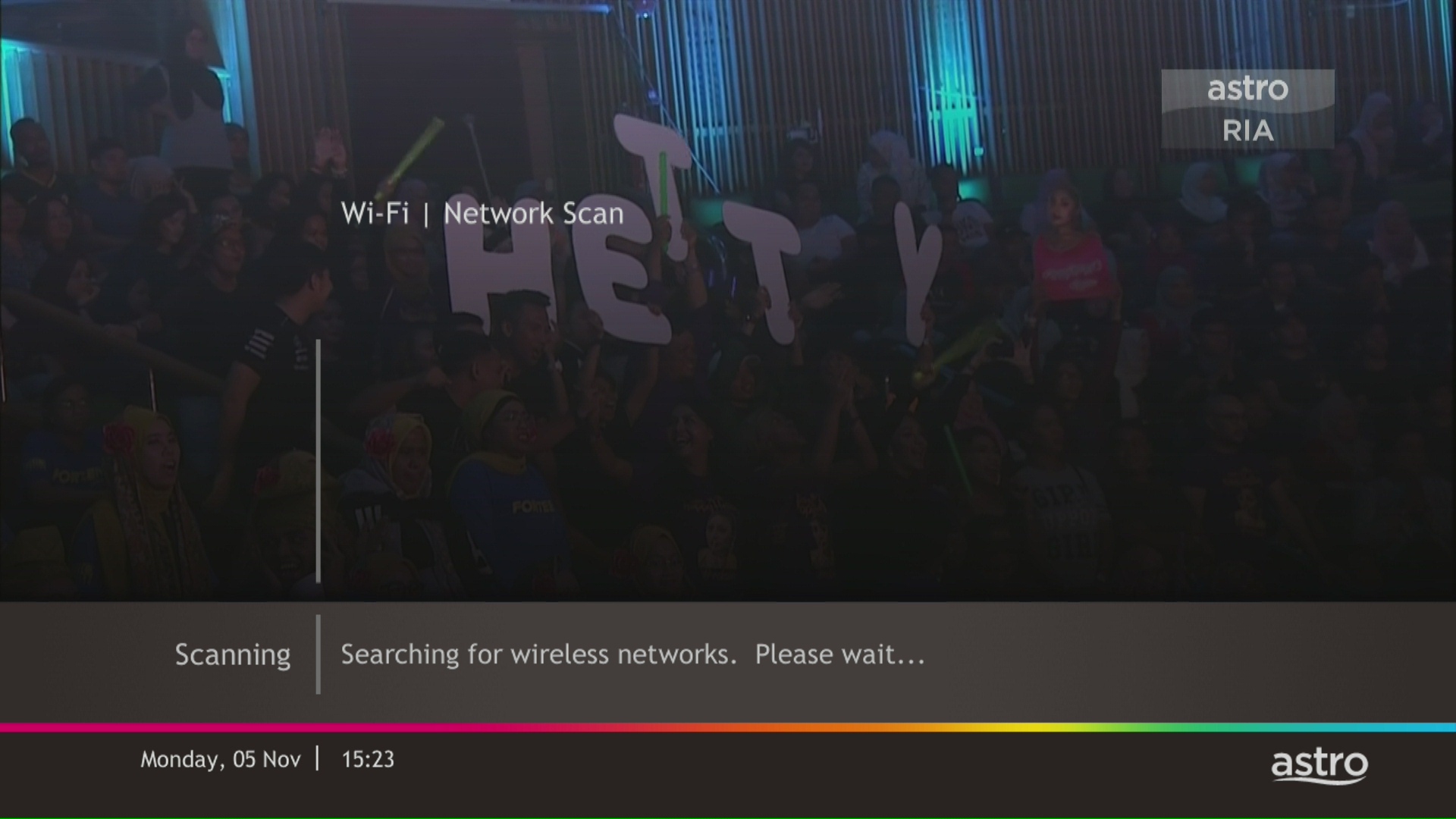
STEP 10
Select your Wi-Fi network and navigate to "Connect".
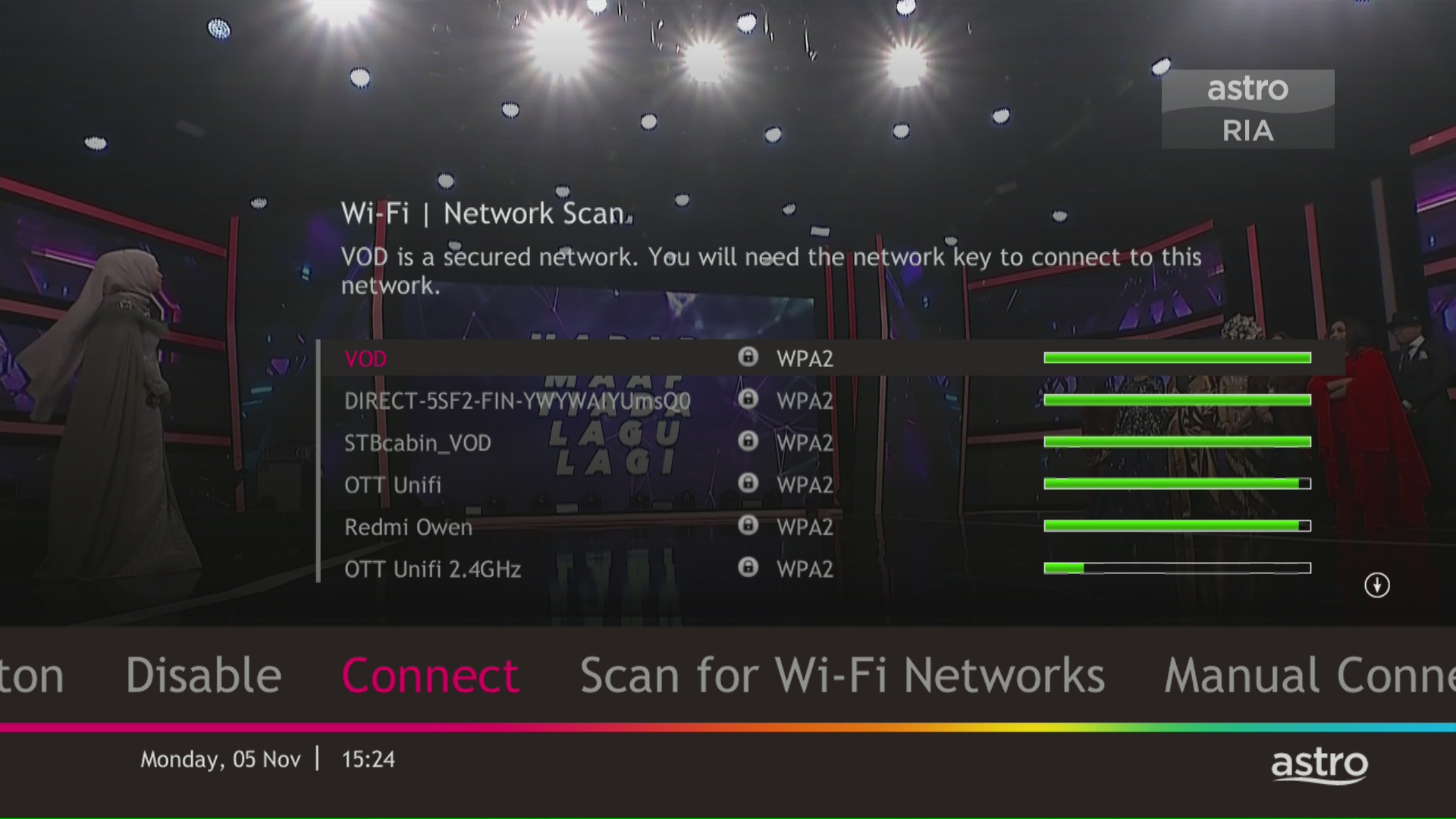
STEP 11
Please enter the password to connect to your network and press "OK".

STEP 12
You are successfully connected when this screen appears.

The Kids Friendly Profile is an enhancement to the Kids User Profile feature with the following major improvements:
These enhancements are available across the Astro GO app, Ultra/Ulti Box, and Multiroom Box/Smart TV app.
Click here to find out more on this new feature and how to use it!
For customers that would like to subscribe to Multiroom with a box installation,
(i) customers on the old packages (example Family Pack, Starter Pack, Value Pack, Super Pack or Super Pack Plus) will have to subscribe to our new packages first by sending "Switch" to 03-9543 3838 via WhatsApp;
(ii) customers on the new Astro packages can subscribe by visiting product.astro.com.my/multiroom or WhatsApp "Hi" to 03-9543 3838.
Astro Rewards is open to all *Active Astro PayTV customers and their immediate family members
* "Active Astro customer" refers to subscriber of the Astro Service and whose account is current and active with no outstanding payments due and owing to Astro and who has not breached the Astro subscription agreement nor given any instructions to terminate and /or suspend his/her subscription to the Astro Service as at the date of winner notification. Winners must remain active Astro customers until the date of collection of prizes.
You can subscribe to new packs via
Should you choose to discontinue/terminate the Astro Fibre Bundle service before the expiry of the contract (24 months), you will be subjected to an early cancelation fee of RM100 x Remaining months of the contract period for your Broadband services and early cancellation fee of New Packs accordingly RM600 (prorated) for Ulti Box or RM1000 (prorated) for Ultra Box.
Any bundle package promotion will be removed, and you will no longer get to enjoy similar promotions upon reconnection.
All Astro Fibre devices provisioned (Fibre modem, WiFi router and Mesh) will need to be returned upon termination. Our team will schedule the collection of equipment after your Broadband services have been terminated.
If equipment is damaged, lost or cannot be retrieved, penalty fees will be applied (excluding Service Tax) accordingly.

