












Nationwide Installation
Applying for
| Astro Njoi UniFi Maxis |
Frequently Asked Questions
Find your answers here.
We provide one stop service to apply Astro and Broadband for you.
You can avoid driving and queuing at the sales counter. We are the dealer that can help you to handle your application from the beginning to the end.
We do not charge you when you apply from us. There is no credit card information required to apply here. Charges are the same as you apply from the sales counter.
First, you can apply online, we will get back to you immediately during business hour. WhatsApp/Email/Fax us your Photocopy of IC (for malaysian) / Passport (for foreigners). When we receive all the information, we will proceed with your application immediately.
Once we receive your application with complete information, we will process your application immediately during business hour. The contractor from the service provider will then contact you for installation appointment once your application is approved.
Enjoy greater savings and hassle-free bill payment in one single bill for both Astro and Broadband. You get to enjoy Astro and Broadband at discounted price every month over the contract period of 24 months.
Astro offers multiple TV packs including Entertainment, Sports, Movies and Kids options. You can choose a pack that matches your viewing preferences and add optional streaming apps where available.
Yes, you may subscribe to Astro TV packs without bundling broadband. However, bundling Astro TV with Fibre Broadband may provide better monthly savings and convenience with a single bill.
For small households with light streaming and browsing, 100Mbps is usually sufficient. Larger families, gamers or heavy streamers may benefit from 500Mbps or 1Gbps plans for smoother performance across multiple devices.
Most Astro TV and Fibre broadband plans come with a 24-month contract. Early termination charges may apply if cancellation is made before the contract ends.
Yes, you may upgrade your TV pack or broadband speed at any time, subject to eligibility and coverage. A new contract period may apply depending on the upgrade.
Your monthly bill will be issued directly by Astro. You may receive it via email or access it through your Astro account. Bundled customers will receive a single combined bill for TV and broadband services.
Payment methods may include online banking, auto debit, credit card or other approved payment channels provided by Astro. Our team can guide you during the registration process.
If you experience any service interruption, you may contact Astro customer support for technical assistance. In many cases, issues can be resolved remotely or a technician will be arranged if necessary.
Yes, relocation is subject to service availability at your new address. Relocation charges and contract adjustments may apply depending on your plan.
No, you do not need a credit card to submit your application. Payment setup will be arranged directly with Astro after your service is approved.
Selected Astro TV packs allow optional add-ons such as streaming services depending on current promotions and availability. Additional monthly charges may apply.
Yes, a WiFi router is typically provided during fibre installation. The router model may vary depending on the selected broadband speed plan.
Yes, we will check the service coverage at your address before proceeding with your application to ensure broadband is available at your location.
For Malaysians, please provide a copy of your MyKad. For foreigners, provide a copy of your passport when submitting your broadband application.
After your application is approved, the service provider typically contacts you within 2 to 7 working days to arrange the broadband installation appointment.
Most Astro Broadband plans come with a 24-month contract starting from your installation date. If you relocate, a new 24-month contract may apply at your new address.
Yes, you can relocate your broadband service, subject to service availability at the new address. Your contract may reset for another 24 months from the new installation date.
Yes, you may request to relocate broadband devices within your home. Non-standard installation charges may apply and are payable to the installer directly after assessment.
Yes, you can switch to Astro Broadband. To avoid service interruption, it is recommended to activate the new service before terminating your current broadband contract.
Standard installations may be free during promotions, but non-standard installations (e.g., device relocation or complex wiring) may incur extra charges payable directly to the installer.
We have discontinued offering the PVR box to our customers. You may opt to take up our latest 4K UHD supported Ultra Box instead. For more information, visit https://product.astro.com.my/box.
Alternatively, you may reach out to us at 03-7481 8000 for further enquiries or to sign up for the Ultra Box.
STEP 1
Press "HOME" button on your remote control.

STEP 2
Navigate to Settings and press "OK".
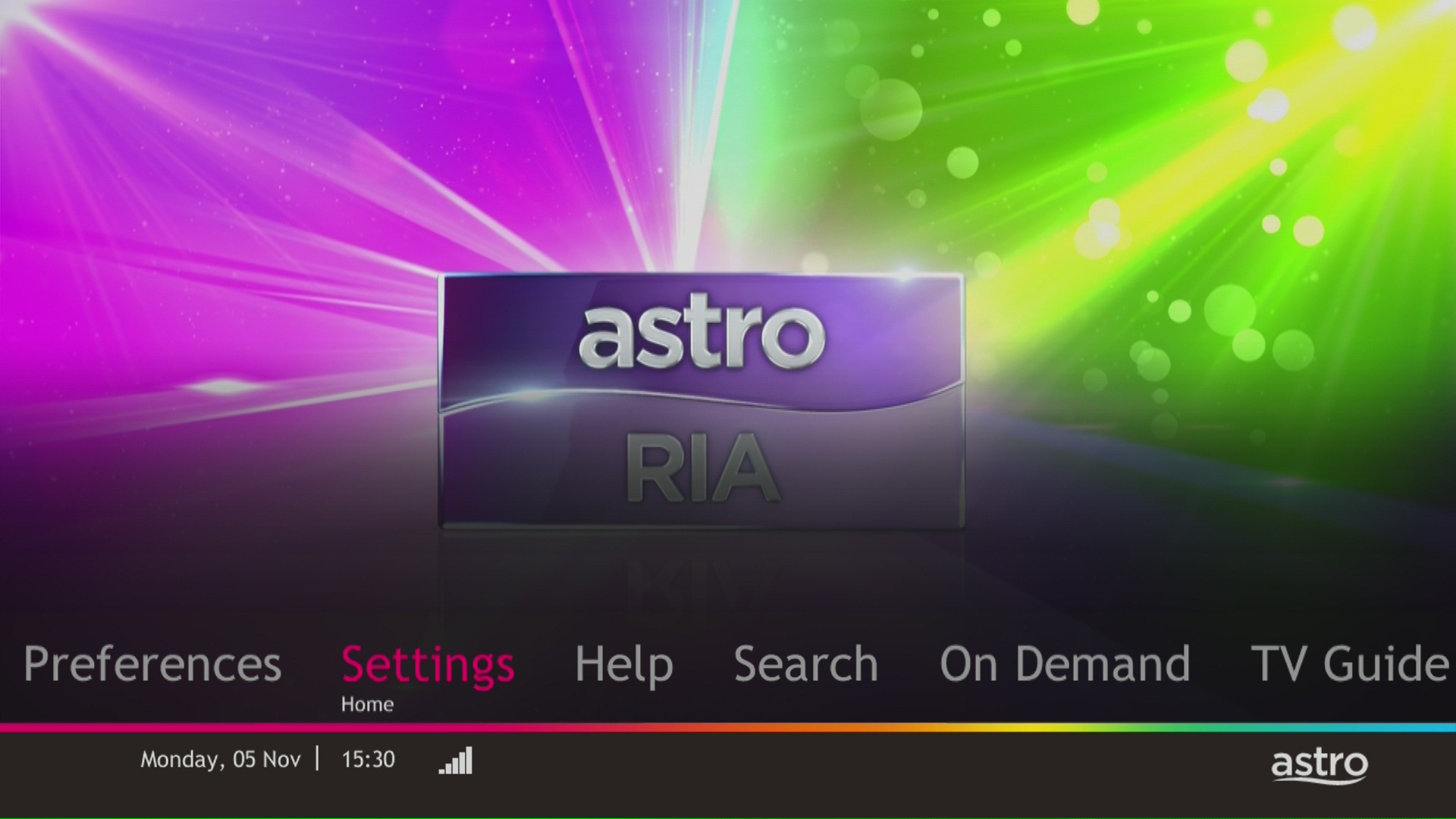
STEP 3
Navigate to STB Diagnostics and press "OK".

STEP 4
Take a look at the HDMI Connection Status.

No. If you are a non-Astro subscriber, you will still be able to create an Astro ID, but access and use of Astro's digital services will be limited. If you are an Astro subscriber, please link your Astro ID to your Astro account number to enjoy exclusive access to all of Astro's digital services.
Astro offers 3 different after-sales service that is made available to the customers:
(1) Express (RM75)
(2) Same Day (RM70)
(3) Regular (RM65)
***Price is inclusive of 6% Service Tax.

Starting 1 April 2024, Astro’s Chinese content offering on our Primary & Family Pack is now bigger than ever with the addition of up to 10 channels featuring the latest Chinese primetime dramas, variety and current affairs programmes as well as great selection of movies and musical shows. These are the channels available in the Primary & Family Pack at no additional cost:
- Celestial Movies (CH309)
- TVB Jade (CH310)
- Astro AOD (CH311)
- TVB Entertainment News (CH317)
- TVB Xing He (CH319)
- TVBS Asia (CH320)
- NHK World (CH398)
Kindly click here to discover all the exciting programmes that are available in these channels.
The Ultra Box is Astro's latest generation of 4K UHD enabled box with Cloud recording feature, redesigned new interface, and UHD resolution. Just connect the all-new Ultra Box to the internet and take control of your entertainment and explore over 110,000 videos that are waiting to be streamed, anytime. With the ability to record as many shows as you want simultaneously.
The new interface on Astro Ultra Box offers an enhanced viewing experience with a brand-new look and feel with features such as:
· New Home Screen - Everything you see is yours
· Discover VOD - Discover 110k videos, stream anytime, anywhere including in 4K UHD
· Search - Search faster and easier
· Play from Start - You missed the start? Just restart
· Stop Here, Continue There - Stop on one screen and continue on another device
· Multi-Screen - Stream seamlessly across any device
· Cloud Recording - Record all the programmes you want at the same time
. **Continuous viewing - Enable to continue watching your favorite shows during raining
Note: ** Except 4K UHD, Astro First and all radio channels
No, if you already have an Ulti box you will not be required to swap the box to enjoy the new packs. However, if you would like to access 4K UHD content, you may upgrade to Ultra Box. Installation and activation fees will be chargeable depending on your package selection.
SST of 6% and 8% will be applied accordingly to your bundle services:
- 8% SST to Astro TV Pack
- 6% SST to Astro Fibre
No additional fees will be charged upon your relocation. However, you are required to notify Astro of your move. Please refer to Astro's General T&Cs for more information.
Unfortunately, your Disney+ Hotstar access with Astro will be terminated as well.
You can add on Astro Fibre, our own internet service to your existing TV Pack for even more value and savings. Please click here to learn more about Astro Fibre.
Please visit any of Astro’s digital platform that you would like to log into, such as Astro’s official website (www.astro.com.my). Then, create a new Astro ID using your email address or mobile number by clicking “No Astro ID? Create Now!”. After creating your new Astro ID, please use it to log into our digital platforms moving forward.
If you have an active Astro subscription, you may also link it to your Astro ID. Please click here for the guide.
Rebates/refunds are not provided. Early termination of the 3-months pass add on is subject to an early termination fee prorated to RM54.90 for the remaining months.
Please note that your request to opt out has been processed, and payment for Disney+ Hotstar is not required. Your bill adjustment will be reflected in your next bill.
Please refer to these FAQs for more information, or click here to learn more and sign up for the Ulti Box. Alternatively, you may call 03-7481 8000 to get in touch with an Astro representative.
Settlement of total outstanding balance is to be made prior to any of the request.
The notification you receive will depend on the payment method you choose:
(i) My Astro Portal: e-receipt will indicate payment confirmation.
(ii) IVR: Payment status will be notified over the IVR and an SMS notification will be sent for successful transactions.
(iii) SMS: Payment status will be notified via SMS.
(iv) Call: Payment status will be notified via SMS.
(v) Customer Service Centre: Physical receipt will indicate payment confirmation.
Access Astro GO via:
- Astro GO app
- Download the Astro GO app on your device by clicking here. Please ensure that you have the latest updated version to enjoy new features.
- For Huawei devices, head over to App Gallery to download the Astro GO app. Currently the supported devices and operating systems are as below:
- Device Support: Huawei P40
- Platform requirement: EMUI 10.1 & above
- Astro GO on web browser
- Astro GO is also available for streaming directly via your computer or laptop at astrogo.astro.com.my
- Access Astro GO app via a QR code on Channel 200 from your Astro Box
- Turn on your Astro Box*, go to Channel 200, scroll down to the Astro GO tab and scan your unique QR code**. Click here for additional information on this feature.
- *Channel 200 is only available for non-Plug & Play Astro Boxes.
- ** We encourage use of your Device's built-in camera to scan the QR code where available. If using a QR code scanner app, use only from a trusted 3rd party provider. You are solely responsible for use of any code scanner on a Device and Astro shall not be liable to you for any reason whatsoever for any kind of loss or damage that you may suffer.
Create Astro ID and secure your ID by linking it to your Astro Account.
Upon launching Astro GO app, you will be required to login with your Astro ID. If you do not have an Astro ID, please follow the steps below to create one.


Log in with your Astro ID and start streaming.
Please note that Astro GO is exclusive for Astro customers.
Astro is an official distributor of Disney+ Hotstar, the dedicated streaming home of global, and Malaysian Hits. Astro customers can now subscribe to Disney+ Hotstar through our Movies, Premium 1, Premium 3 or Platinum Pack and enjoy award-winning entertainment with Disney+ Hotstar alongside Astro's much-loved local content for even better value and savings. Now, customers can enjoy Disney+ Hotstar on their Ultra or Ulti Box, mobile app or web! In addition, customers who have multiple primary Astro accounts will be entitled to multiple entitlements to Disney+ Hotstar.
Only the account holder is allowed to manage the auto-debit facility. However, a third-party card holder has the right to withdraw their registered card from the linked-account with proper validation.
Astro is continuously improving our user interface and introducing new features to our platforms to ensure that your Astro experience is more seamless, efficient and user-friendly.
For details on our latest interface, Picture-in-Picture mode and auto-start interactive mode on Astro GO, please click here. For enhancements to the Title Information Page, the ability to disable the Profile Selection Screen and adjustable auto-standby timing, please click here.
In addition, we have also recently introduced an infinite scrolling feature at the title information page and the ability to select the video quality directly from the video player. For more information, please click here.
Create your Astro ID anytime by following these simple steps:
- Step 1: Fill in your details at astro.com.my/astroID
Visit our page to find out about our new packs.

1. Please connect your computer or laptop to your Astro Fibre router using WiFi or LAN cable. Your LAN cable must be connected from the yellow port of Astro Fibre router (Any available port).
2. Once connected, open any web browser such as Google Chrome, Internet Explorer, Mozilla Firefox and etc.
3. On the address bar, type http://192.168.100.254 and below page will appear.

Login using your username and password if you have changed the router login setting. Otherwise, your default router login is as per below.
Username: user
Password: user
4. Once you have successfully logged in, the router's web-based setup page will appear.

5. At the top of the page, click WLAN to configure the WiFi parameters.

6. You may change the Primary SSID (WiFI Name) and the WPA Passphrase (WiFi Password) to follow your preferences for 2.4G Wi-Fi Settings, then click "Save & Apply" for the changes to take place.

7. You may make the same changes for 5G Settings by change the Primary SSID (WiFI Name) and the WPA Passphrase (WiFi Password) to follow your preferences, then click "Save & Apply" for the changes to take place.

The new packs come with 200 hours of Cloud recording by default. If your current recordings exceed 200 hours, the system will delete the exceeded hours once your package has been changed, starting with the oldest recordings first.
If you would like to retain the previous recordings which exceed 200 hours, you may opt for a selection of 400 or 1500 Cloud Recording hours at a chargeable rate of RM12 or RM15 per month (excl. govt tax) respectively. Or else, you may subscribe to the Platinum pack which comes with complimentary access to 1500 hours of Cloud Recording.
Yes, Astro is bounded by the PDPA act. All information received will be used in accordance with our Privacy Notice.
Your purchase will be reflected on your next monthly Astro bill. For example, if you rented a movie for RM 15.00 for 2 days and your next bill statement is in 2 weeks. RM 15.00 will be reflected in your Astro subscription bill in two weeks' time.
STEP 1
Check on the adapter's power light.
If the adapter's power light is ON, please refer to Blank Screen troubleshooting steps here.
Otherwise, if the adapter's power light is OFF, switch off the power for your box.

STEP 2
Ensure power cable is connected tightly.
Plug in power cable to different power socket and switch on the plug.
You should no longer be experiencing this problem.
If issue remains, proceed to STEP 3.

STEP 3
Try a different power socket to connect the equipment.
Turn on the power socket and check the adapter's power light.

If there is no light on your power adaptor's, please submit the issue on our Feedback Form and attach a picture of your smart card number for assistance.
Please indicate in the form if any lightning strike/thunderstorm/power trip occurred.
Yes. Astro customers will soon be able to enjoy seamless access to Netflix on their connected Ultra and Ulti Boxes. Look out for more details then! Register your interest via https://astro.com.my/Netflix
1. Ensure power cable is connected tightly.
2. Try to use another power socket / power source to eliminate faulty power sockets/power sources which could cause the issue.

3. If the issue persists, submit your feedback form for further assistance.
Please contact the courier agent directly to change the retrieval date from the initially agreed date and time.
Wider WiFi coverage:
-All areas across the house will enjoy optimal coverage with multiple Mesh WiFi units located in areas with sub-optimal coverage to form a larger WiFi network.
Stable connection;
-Consistent coverage of optimal WiFi signal will ensure a stable connection as the Mesh unit will automatically connect your devices to the strongest WiFi signal around your house.
Yes, an existing IPTV customer is eligible to switch to Astro Fibre. However, your IPTV services will be switched to a Plug & Play service, and your existing Astro PVR / B.yond Box will be upgraded to the Ultra/Ulti box. There is no additional charge for the Astro Ultra/Ulti upgrade. Please note that you will be re-contracted for 24 months upon installation.
Astro Fibre WiFi router is a dual-band edge Residential Gateway which supports two frequency bands 2.4GHz and 5GHz.
You can track your ticket status by contacting us via WhatsApp or call us at 03-9543 3838.
You can request for a password reset by clicking on "Forgot My Password' at the login page.
Disney+ Hotstar is available on Chromecast (Gen 2 onwards, firmware 1.43 & above) and with the latest version of the Disney+ Hotstar app on iPhone, iPad and Android mobile.
Follow these instructions to cast your film/series:
- Make sure your mobile device and your Chromecast are on the same WiFi network
- Log into your Disney+ Hotstar app
- Select a film/series that you want to cast
- Press "Play'
- Once the film/series has started, tap on the casting icon
- Select the screen you wish to cast to
- The film/series should then be cast onto your screen
By default, all Astro Fibre customers will receive a Private IPv4 or IPv6 address. However, customers who would like to subscribe to a fixed IP service can do so by contacting our Customer Service Centre at 03-9543 3838 for Astro Fibre’s Fixed IP service for only RM5/month.
You may use the same feedback form and choose below options.
Category: I would like to request for refund
Sub Category: Request for Refund
No, your rewards cannot be transferred to another person or exchanged for cash.
My Astro is an easy-to-use, free mobile phone app and responsive web portal that helps Astro customers to manage their Astro accounts. My Astro allows customers to manage their accounts, pay bills, and get any support they need. In addition, customers can find and purchase the latest shows to be viewed on their Astro Box or on Astro GO. Customers can also receive news about Astro's latest products and content offerings.
For any technical issues, you may visit Astro's Help & Support page or contact Astro via WhatsApp at 03-9543 3838 by typing PNP.
Please check if you are streaming on a supported device. Astro GO is only applicable within the supported platforms; mobile devices (phones and tablets) and web browsers.
If you are still having issues, proceed to submit report via WhatsApp or Feedback Form.
Yes, customers whose accounts are suspended but resumed within 24 months from their offer period start date will still be able to enjoy the internet speed upgrade upon service resumption. However, the speed upgrade offer period will not be extended despite the suspension period.
Unfortunately, customers whose accounts are suspended but resumed after 24 months from their offer period start date will not be able to receive the free speed upgrade.
There are no switching fees apply when existing Astro customer move to new packs.
Once your Plug & Play Box has been activated, a courier service will reach out to you within TWO (2) weeks for a time for them to pick up the old Astro box and SIM card/Smartcard.
- Ensure that all cables have been plugged out of the old Astro box. To remove the white satellite cable from your old Astro box, simply hold the cable, twist, and gently pull.
- Set aside these items to be ready for our delivery partner to pick up from you:
- Old Astro Box
- Old Astro Smartcard/SIM Card (leave this in your Astro Box)
- When a courier arrives at your residence, do confirm that they are collecting items on behalf of Astro.
- Allow the courier to check the serial number of the Astro box.
- Hand them all the items for return, and you're done!
Yes, all Astro customers with a Disney+ Hotstar subscription can access the app on the Ultra/Ulti Box. To access the app, please refer here.
This error indicates that you have reached the maximum number of simultaneous video streams across devices for one (1) account. To stop seeing this error, please stop streaming on one of your other devices.
• If you have recently purchased your Astro pack or made any changes to your pack on or after 9th November you can stream on two (2) concurrent screens
• If you have not made any changes you can stream on four (4) concurrent screens.
If you are still having issues, proceed to submit report via WhatsApp or Feedback Form.
Please ensure that your Astro subscription comes with access to Disney+ Hotstar. You may visit astro.com.my/disney to learn more about the Packs that come with Disney+ Hotstar or to check if your Disney+ Hotstar access is activated.
Upon confirmation that your subscription comes with access to Disney+ Hotstar, if you still see an error screen on your TV with your Ultra or Ulti Box when logging in to Disney+ Hotstar, please call our Customer Contact Centre at 03 9543 3838 and an Astro agent will be available to assist you immediately.
You will be contacted by Astro via SMS/call at the end of your 24 months speed upgrade period. Customers who choose to remain the upgraded speed after 24 months will be charged as per the monthly subscription fee of the upgraded speed plan from the next month onwards and customers who choose to downgrade to their initial subscribed speed plan will not be charged any additional fees.
Situation 1:
Customer is subscribed to the 50Mbps Astro Fibre plan and is entitled to receive a free 100Mbps speed upgrade for 24 months. If the customer chooses to downgrade back to 50Mbps at the end of the 24-month period, no additional charges will apply.
Situation 2:
Customer is subscribed to the 100Mbps Astro Fibre plan and is entitled to receive a free 500Mbps speed upgrade for 24 months at RM129/month. If the customer chooses to remain with the upgraded speed of 500Mbps at the end of the 24-month period, they will be charged RM189/month* from the 25th month onwards.
*This price might differ depending on the offer or promotion

