












Nationwide Installation
Applying for
| Astro Njoi UniFi Maxis |
Frequently Asked Questions
Find your answers here.
We provide one stop service to apply Astro and Broadband for you.
You can avoid driving and queuing at the sales counter. We are the dealer that can help you to handle your application from the beginning to the end.
We do not charge you when you apply from us. There is no credit card information required to apply here. Charges are the same as you apply from the sales counter.
First, you can apply online, we will get back to you immediately during business hour. WhatsApp/Email/Fax us your Photocopy of IC (for malaysian) / Passport (for foreigners). When we receive all the information, we will proceed with your application immediately.
Once we receive your application with complete information, we will process your application immediately during business hour. The contractor from the service provider will then contact you for installation appointment once your application is approved.
Enjoy greater savings and hassle-free bill payment in one single bill for both Astro and Broadband. You get to enjoy Astro and Broadband at discounted price every month over the contract period of 24 months.
Astro offers multiple TV packs including Entertainment, Sports, Movies and Kids options. You can choose a pack that matches your viewing preferences and add optional streaming apps where available.
Yes, you may subscribe to Astro TV packs without bundling broadband. However, bundling Astro TV with Fibre Broadband may provide better monthly savings and convenience with a single bill.
For small households with light streaming and browsing, 100Mbps is usually sufficient. Larger families, gamers or heavy streamers may benefit from 500Mbps or 1Gbps plans for smoother performance across multiple devices.
Most Astro TV and Fibre broadband plans come with a 24-month contract. Early termination charges may apply if cancellation is made before the contract ends.
Yes, you may upgrade your TV pack or broadband speed at any time, subject to eligibility and coverage. A new contract period may apply depending on the upgrade.
Your monthly bill will be issued directly by Astro. You may receive it via email or access it through your Astro account. Bundled customers will receive a single combined bill for TV and broadband services.
Payment methods may include online banking, auto debit, credit card or other approved payment channels provided by Astro. Our team can guide you during the registration process.
If you experience any service interruption, you may contact Astro customer support for technical assistance. In many cases, issues can be resolved remotely or a technician will be arranged if necessary.
Yes, relocation is subject to service availability at your new address. Relocation charges and contract adjustments may apply depending on your plan.
No, you do not need a credit card to submit your application. Payment setup will be arranged directly with Astro after your service is approved.
Selected Astro TV packs allow optional add-ons such as streaming services depending on current promotions and availability. Additional monthly charges may apply.
Yes, a WiFi router is typically provided during fibre installation. The router model may vary depending on the selected broadband speed plan.
Yes, we will check the service coverage at your address before proceeding with your application to ensure broadband is available at your location.
For Malaysians, please provide a copy of your MyKad. For foreigners, provide a copy of your passport when submitting your broadband application.
After your application is approved, the service provider typically contacts you within 2 to 7 working days to arrange the broadband installation appointment.
Most Astro Broadband plans come with a 24-month contract starting from your installation date. If you relocate, a new 24-month contract may apply at your new address.
Yes, you can relocate your broadband service, subject to service availability at the new address. Your contract may reset for another 24 months from the new installation date.
Yes, you may request to relocate broadband devices within your home. Non-standard installation charges may apply and are payable to the installer directly after assessment.
Yes, you can switch to Astro Broadband. To avoid service interruption, it is recommended to activate the new service before terminating your current broadband contract.
Standard installations may be free during promotions, but non-standard installations (e.g., device relocation or complex wiring) may incur extra charges payable directly to the installer.
Service will resume within 3 hours after payment is made.
All streaming apps willbe made available on the Ultra Box first, followed by the Ulti Box. If youwould like to upgrade to the Ultra Box, please visit product.astro.com.my/tv or reach us via WhatsApp by typing “Hi” at 03-9543 3838 forassistance.
The promotion period of Astro Fibre’s Speed Upgrade Campaign is from 24 November 2023 until 31 May 2024.
The eKYC link is only valid for 3 days to complete the eKYC verification process. You will be required to submit a fresh Astro account application.
Yes. Astro customers will soon be able to enjoy seamless access to Netflix on their connected Ultra and Ulti Boxes. Look out for more details then! Register your interest via https://astro.com.my/Netflix
Activate your Disney+ Hotstar access with your Astro subscription, using the steps below:
- Step 1 - Create- and verify your Astro ID at astro.com.my/astroID. If you already have an existing Astro ID, go to Step 2.
- Step 2 - Goto astro.com.my/Disney. Login with your Astro ID, activate with your mobile number and verify with a one time passcode (OTP) sent to your mobile number.
- Step 3 - Download the Disney+ Hotstar app or login via web, and sign in with the mobile number provided in Step 2. Start streaming!
No additional fees will be charged upon your relocation. However, you are required to notify Astro of your move. Please refer to Astro's General T&Cs for more information.

Disabling band steering means that there will be two frequency bands available for the users - 2.4GHz and 5GHz.
Note: Band Steering is called Dual-band Combination in the router web interface.
- Please connect your computer or laptop to your Astro Fibre router using LAN cable. Your LAN cable must be connected from the yellow port of Astro Fibre router (Any available port).
- Once connected, open any web browser such as Google Chrome, Internet Explorer, Mozilla Firefox and etc.
- On the address bar, type http://192.168.100.254 and below page will appear.

Login using your username and password if you have changed the router login setting. Otherwise, your default router login is as per below.
Username: user
Password: user
4. Once you have successfully logged in, the router's web-based setup page will appear.

5. At the top of the page, click Wi-Fi to configure the WiFi parameters.

6. Click on Dual-band Combination button to disable the Band Steering.

7. Set the Wi-Fi name and Wi-Fi Password for both 2.4GHz and 5GHz bands based on your preference. Then click "Apply" for the changes to take place.

8. Kindly ensure to reconnect your WiFi according your new WiFi name and password.
No, you will not be charged 8% Service Tax for paper billing option.
Liga Malaysia is available for all customers with a HD enabled box including Zapper, DMT5, Ulti Box and Ultra Box.
Currently, you may only add a maximum of five family members to the Astro Fibre App. However, kindly note that we are working on allowing users to add more family members in the future.
Yes, customers may need to provide additional documents such as bank-in slips or payment receipts. Any incomplete document, customer will be notified by Astro after validation is made.
The Kids Friendly Profile is an enhancement to the Kids User Profile feature with the following major improvements:
- Kid-Friendly Channels, On Demand content & TV Guide: Only Kid-friendly channels and On-Demand content can be viewed in the Kids Profile. Other channels and content are not viewable. The same applies to the Kids TV Guide.
- PIN control for the Kids Profile: When switching from a Kids Profile to an adult profile (i.e.: Father or Mother), a PIN entry will be required.
- Limited Kids Profile Content Search: Only Kids age-appropriate content can be searched and displayed within the Kids Profile.
- Kids Profile Based Recordings: Kids Profiles will have their own personalised age-appropriate recordings without any overlap with other user profiles. This feature will be available from 17th August onwards.
These enhancements are available across the Astro GO app, Ultra/Ulti Box, and Multiroom Box/Smart TV app.
Click here to find out more on this new feature and how to use it!
Refund can only be made by the registered Astro account holders.
However, if you would like to request refunds on behalf of the account holder, you may do so by providing the supporting documents (e.g.: authorization letter, death certificate, 3rd party NRIC copy).
STEP 1
On your remote, press the HOME button and the home menu will be displayed on top of your screen.

STEP 2
Navigate to Guide.

STEP 3
Select the channel you would like to add to favourite list and press "OK".

STEP 4
Select "Add to Favourites" and press "OK".

STEP 5
You are successfully added the channel to favourite list when this screen appears.

STEP 6
Your selected channel will have a heart tagging after added as favourite.
Astro & Broadband comes with 24-month contract commitment.
1. Ensure power cable is connected tightly.
2. Try to use another power socket / power source to eliminate faulty power sockets/power sources which could cause the issue.

3. If the issue persists, submit your feedback form for further assistance.
You will need to bring along all devices to your new place as no new devices will be issued.
Relocation will be subjected to new 24 months recontract and standard relocation fee applies for both Maxis and Allo respectively.
Astro Fibre installation will come with 1 unit of TM fibre modem and 1 WiFi router with 24 months warranty period.
While warranty period for Mesh WiFi will be treated as one-to-one swap for faulty Mesh units at any point of time during your service tenure with active Mesh subscription.
Astro Fibre is only available with Fibre infrastructure and does not support copper wire infrastructure.


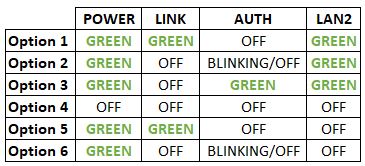

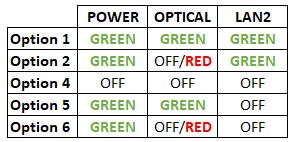


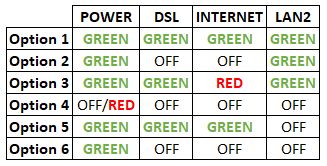
Option 1
1. Please turn off all devices (Modem and Router). By restarting your modem, you can isolate the possibility of overloaded processes in the modem, which would impact its performance.
2. Ensure the fiber cable from your wall socket and modem is securely connected.


Notes: You might be connected to LAN 1 if backbone is Maxis
Router connection

3. Please make sure the LAN cable is connected properly from router (Port 1-4 - Yellow port) to PC/Laptop.
4. If the issue persists, submit your feedback form and attach your modem light indicator picture/video for further assistance.
Option 2/ Option 3/ Option 5/ Option 6
1. Please turn off all devices (Modem and Router). By restarting your modem, you can isolate the possibility of overloaded processes in the modem, which would impact its performance.
2. Ensure the fiber cable from your wall socket and modem is securely connected.

3. Ensure both cables on the Modem (LAN Port 2) and Router (WAN Port - Red port) are properly connected.


Notes: You might be connected to LAN 1 if backbone is Maxis
Router connection

4. Please make sure the LAN cable is connected properly from router (Port 1-4 - Yellow port) to PC/Laptop.
5. Please make sure both cables on Router (Any Yellow port) and Astro Decoder (Network Port behind decoder) are properly inserted.


6. Switch on modem and router and please wait for 2 minutes to stabilise the devices after reboot.
7. If the issue persists, submit your feedback form and attach your modem light indicator picture/video for further assistance.
Option 4
1. Ensure Modem/Router are connected tightly to the power socket.

2. Try to use another power socket / power source to eliminate faulty power sockets/power sources which could cause the issue.
3. If the issue persists, submit your feedback form for further assistance.

1. Please connect your computer or laptop to your Astro Fibre router using WiFi or LAN cable. Your LAN cable must be connected from the yellow port of Astro Fibre router (Any available port).
2. Once connected, open any web browser such as Google Chrome, Internet Explorer, Mozilla Firefox and etc.
3. On the address bar, type http://192.168.100.254 and below page will appear.

Login using your username and password if you have changed the router login setting. Otherwise, your default router login is as per below.
Username: user
Password: user
4. Once you have successfully logged in, the router's web-based setup page will appear.

5. At the top of the page, click WLAN to configure the WiFi parameters.

6. You may change the Primary SSID (WiFI Name) and the WPA Passphrase (WiFi Password) to follow your preferences for 2.4G Wi-Fi Settings, then click "Save & Apply" for the changes to take place.

7. You may make the same changes for 5G Settings by change the Primary SSID (WiFI Name) and the WPA Passphrase (WiFi Password) to follow your preferences, then click "Save & Apply" for the changes to take place.

What is beIN SPORTS CONNECT?
beIN SPORTS CONNECT is the ultimate live streaming sports service that provides you with access to global sporting events both LIVE and on-demand such as major European football leagues and over 3,000 hours of live tennis via Astro's Ultra Box, Ulti Box, mobile app or web.
How do I access the beIN SPORTS CONNECT app on the Ultra/Ulti Box?
On the beIN SPORTS CONNECT mobile app:
Step 1: Open the "beIN SPORTS CONNECT" app and go to your Profile
Step 2: Select "Sign in with Astro" and log in with your Astro ID
Step 3: Go to "Settings" and select the TV Login option
Step 4: A QR code scanner will appear.
Follow the steps below to pair the mobile app with your TV screenOn the Astro Ultra/Ulti Box:
Step 1: At Astro Home, go to the app rail and select "beIN SPORTS CONNECT"
Step 2: Go to the Profile icon at the top of your screen and click "OK"
Step 3: A QR code will be presented on your screen. Use the in-app QR code scanner on your mobile device to scan the QR code
Step 4: Your TV screen will refresh automatically and you will be able to enjoy the beIN SPORTS CONNECT app on your TV!
Who is entitled to access the beIN SPORTS CONNECT app on the Ultra/Ulti Box?
Only Astro customers with the Sports subscription as part of their Astro TV Pack (Bundle or add-on) will be able to enjoy the beIN SPORTS CONNECT app on their Ultra/Ulti Box. For further enquiries, please WhatsApp "Get beIN" to our Customer Contact Center at 03-9543 3838.
What are the content available in the beIN SPORTS CONNECT app?
Customers can enjoy major European football leagues, over 3,000 hours of live tennis and other global sporting events LIVE and on-demand on the app. You may check out the complete list of competitions available on the app here: beIN SPORTS CONNECT | Live Leagues and Competitions | LaLiga, Serie A, Ligue
Can I stream on more than one device at the same time?
No, you can only stream the beIN SPORTS CONNECT app on one device at a time.
How many devices can I use to watch beIN SPORTS CONNECT?
You can have up to five (5) devices registered to your account at any given time. However, you can only stream from one (1) device at a time.
Can I download content for offline viewing?
Unfortunately, downloading of content is not a feature that is currently available.
Are subtitles or dubbing available for the content on beIN SPORTS CONNECT?
Unfortunately, subtitles and dubbing options are currently not available.
How can I subscribe to beIN SPORTS CONNECT via Astro?
The beIN SPORTS CONNECT app is not available as an add-to-bill option. Please visit www.product.astro.com.my/tv to sign up to one of our TV Packs with the Sports subscription.
Can I access the beIN SPORTS CONNECT app outside of Malaysia?
No, you will not be able to watch beIN SPORTS CONNECT content outside of Malaysia as the app is geo-blocked for each country.
How do I register for an Astro ID?
Download the beIN SPORTS CONNECT app > Select "Login with Astro"> Click "Do not have an Astro ID? Click here".
Can I update my email address/mobile number for my Astro ID?
Yes, please visit Astro's Self Service Portal via myastro.astro.com.my to update your email address or mobile number.
I have forgotten my password; what should I do?
Step 1: Click "Log in" and click "Forgot my password"
Step 2: Enter your email address and click "Submit"
Step 3: An email will be sent to your registered email address with further instructions on how to reset your password
How do I unlock a locked user account?
You may contact Astro's Customer Service by:
- Submitting a feedback form here: https://support.astro.com.my/feedback-form
- Reaching out to us via WhatsApp by typing "Hi" at 03-95433838 for assistance
The beIN SPORTS CONNECT app won't load after I pressed "cancel" when logging in; what do I do now?
Step 1: Close the "Astro ID Login" tab in your browser, then close your mobile app browser (Safari, Google Chrome, Mozilla Firefox etc).
Step 2: Close the beIN SPORTS CONNECT app on your mobile device.
Step 3 Reopen the beIN SPORTS CONNECT app and try to log in again.
Will my personal information be protected?
Yes, Astro is bounded by the PDPA act. All information received will be used in accordance with our Privacy Notice.
Astro Fibre is Astro’s own internet service that enables you to enjoy Astro content while staying connected with high-speed fibre broadband. Customers can enjoy substantial savings by choosing your desired broadband speed to accompany your Astro TV packages. Customers can choose from two types of Astro Fibre offering:
- Astro Fibre Bundle offers the best value proposition of 50Mbps to 800Mbps high-speed broadband bundled with Astro TV content packages including access to leading streaming services, creating a one-stop entertainment solution for its customers.
- Astro Fibre is a standalone high-speed broadband service of 100Mbps to 800Mbps offering a powerful WiFi system leveraging the latest WiFi 6 router and a flexible mesh proposition.
To set up a Mesh WiFi network around your house, the Mesh unit will need to be paired with the WiFi router. Steps to pair these two devices are as follows:
i. Place the Mesh unit close to the WiFi router (within 2 meters) and power it on
ii. After the Mesh unit starts up, press and hold the WPS buttons of the Mesh unit and the WiFi router for 3 - 5 seconds in turn within 2 minutes
iii. After the WLAN and Internet indicators of the Mesh turns steady blue, the Mesh is connected to the Internet
iv. Move the Mesh to the desired place where you need to expand WiFi and power it on. After the Internet indicator turns steady blue, WiFi is expanded successfully.
Please ensure to put your box on standby mode to refresh the signal.
a. Using IVR
1. Dial 03-95433838 and select you preferred language.
2. Select Account Related.
4. Select Refresh Smartcard.
b. Using MyAstro web
STEP 1
Go to https://myastro.astro.com.my/ in your web browser.
STEP 2
Keyin your Email / Mobile number and password. Then, press "LOG IN".

STEP 3
Click on TV pack.

STEP 4
Choose Main Room for the Primary Box; else choose Multiroom (If any).

STEP 5
Click on "Refresh" to refresh signal on your box.
For Main Box 
For Multiroom
STEP 6
After tap the Refresh, below notification will be displayed as below.
For Main Box 
For Multiroom
c. Using My Astro App
STEP 1
Open My Astro App and click "Login".

STEP 2
Keyin your Email / Mobile number and password. Then, press "LOG IN".

STEP 3
Go to "Account".

STEP 4
Scroll down to "TV pack" and click on it.

STEP 5
Choose Main Room for the Main Box; else choose Multiroom (If any).

STEP 6
Tap on "Refresh" to refresh signal on your box.

STEP 7
After tap the Refresh, below notification will be displayed as below.

Access Astro GO via:
- Astro GO app
- Download the Astro GO app on your device by clicking here. Please ensure that you have the latest updated version to enjoy new features.
- For Huawei devices, head over to App Gallery to download the Astro GO app. Currently the supported devices and operating systems are as below:
- Device Support: Huawei P40
- Platform requirement: EMUI 10.1 & above
- Astro GO on web browser
- Astro GO is also available for streaming directly via your computer or laptop at astrogo.astro.com.my
- Access Astro GO app via a QR code on Channel 200 from your Astro Box
- Turn on your Astro Box*, go to Channel 200, scroll down to the Astro GO tab and scan your unique QR code**. Click here for additional information on this feature.
- *Channel 200 is only available for non-Plug & Play Astro Boxes.
- ** We encourage use of your Device's built-in camera to scan the QR code where available. If using a QR code scanner app, use only from a trusted 3rd party provider. You are solely responsible for use of any code scanner on a Device and Astro shall not be liable to you for any reason whatsoever for any kind of loss or damage that you may suffer.
Create Astro ID and secure your ID by linking it to your Astro Account.
Upon launching Astro GO app, you will be required to login with your Astro ID. If you do not have an Astro ID, please follow the steps below to create one.


Log in with your Astro ID and start streaming.
Please note that Astro GO is exclusive for Astro customers.
It will begin on 1st March 2024 and onwards.
1. Power reset (on & off) your TV, Astro Decoder, Modem and Router.
2. Ensure standard physical connection (No 3rd party devices connected to decoder and modem).
3. Please ensure at all-time your router is 0.5 meter away from your Astro Decoder to avoid signal interferences.
4. Please standby computer/laptop to access to the internet and connection must be via LAN (cable) [connect the LAN (cable) at any LAN port at router and direct to computer/laptop].
5. You may open any web browser such as Google Chrome, Internet Explorer, Mozilla Firefox and etc.
6. On the address bar, please go to http://www.speedtest.net/ and below page will appear.

7. Click "Change Server" to edit the settings preferred by Internet Service Provider (ISP).
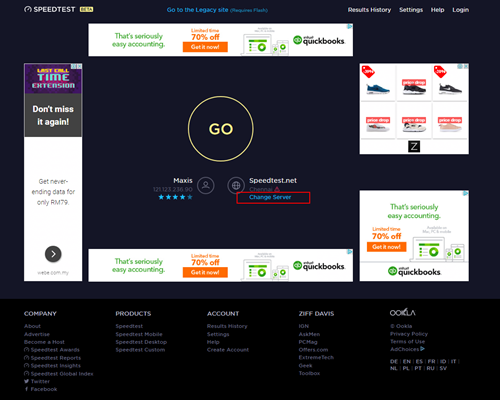
8. Edit the server settings by search and select the required server required by ISP.
For Maxis provider - Select Subang Jaya - Maxis server.
For TIME provider - Select Shah Alam - TIME dotcom Bhd server.
For Allo provider - Select Cyberjaya - Global Forway Sdn Bhd server.

9.Click "GO", and the test will begin.

The test is completed once both download and upload speeds are displayed.
Sample of the Speedtest result is shown below.

**Please ensure the snapshot includes a time stamp and network used either LAN cable or wireless (as per picture above)
10. Kindly screenshot or take a picture of the result, name it as "LAN Speedtest".
11. Repeat the test once again using Wi-Fi connection (Please unplug your LAN cable and connect via wireless connection using your SSID).
12. Screenshot or take a picture of the result, name it as "WiFi Speedtest".
Yes, you can switch to Astro Fibre and all the devices provisioned will be maintained (Fibre modem & WiFi router) with the new Astro Fibre subscription. However, your Astro TV package will be removed/terminated.
An early cancellation fee will be applied if you are still within the 24-month contract. Please refer to the Astro Fibre's cancellation details.
For Ultra/Ulti Plug & Play Box installation, it is recommended that you attempt to self-install by following the installation guide here, but there is an option to request for an installer to install the box at your premise. However, there will be a separate fee for this service request.
Yes, an existing IPTV customer is eligible to switch to Astro Fibre. However, your IPTV services will be switched to a Plug & Play service, and your existing Astro PVR / B.yond Box will be upgraded to the Ultra/Ulti box. There is no additional charge for the Astro Ultra/Ulti upgrade. Please note that you will be re-contracted for 24 months upon installation.
The speeds shown under “My Network Map†are the WiFi speeds of your connected devices based on factors such as signal strength, distance of devices from your router, obstructing objects etc. This function allows users to know the signal strengths achievable from every room in their house or any distance from their router, giving users accurate indication If additional mesh is needed or if the placement of their router requires adjustment.
However, the speeds shown under “My Devices†are the recent WiFi consumption of your connected devices, which allows you to monitor every user’s internet consumption in your household.
For information about the Disney+ Hotstar app functions and specifications, please visit help.hotstar.com or email disneyplus.my@hotstar.com.
Should there be any changes in plans we will keep our customers informed on any new development.
This convenient option allows you to complete your registration without the need to provide hard copy documents physically to the sales agent. The identity verification process helps to secure your Account and protect it from unauthorised usage.
You must subscribe to an Astro subscription (NJOI customers are not eligible) in order to get the Ulti Box.
The eligibility criteria for the Ulti Box are as follows:
New Customers
All new Astro customers with a monthly subscription fee of below RM100 will be entitled to select the Ulti Box upon signing up for Astro’s packages.
Existing Customers (Box Upgrade for Primary or Multiroom)
Existing customers are required to have an internet connection at home with a recommended internet speed of 10Mbps and above in order to upgrade your existing box to Ulti Box.
Note:
· Existing Ultra Box customers are not eligible for a swap to the Ulti Box.
· If your existing box is a PVR, you will lose access to all the recordings stored in the PVR
Multiroom (New subscription)
Customers subscribing for an additional multiroom subscription are entitled to select the Ulti Box as part of the subscription.
Connect your Ultra Box/Ulti Box today and get the full value for your subscription. We believe we can provide you the best entertainment experience in Malaysia, and it all starts with connecting your box to the internet.
Want to enjoy these features for free?
- Continue watching Astro even when it’s raining.
- Binge-watch and catch-up to 110,000 videos on-demand from Malaysia, Hollywood, Korea, China, Bollywood and more anytime.
- Create multiple profiles in your house to enjoy a personalized Astro experience, with shows recommended to you based on your interest. There is a Kids-friendly version for your little ones as well.
- Rewind, pause and fast-forward shows and matches so that you will never miss another moment.
STEP 1
On your remote, press the HOME button and the home menu will be displayed on top of your screen.

STEP 2
Navigate to Settings.

STEP 3
Scroll to Network Settings and press "OK". Select New Wi-Fi Connection and press "OK".


STEP 4
Select your Wi-Fi network and press "OK". Please enter the password to connect to your network.


STEP 5
You have successfully connected when this screen appears.

Yes, penalty fee of RM200/Mesh WiFi will be imposed if customer fails to return the device(s). The courier company would make two attempts to retrieve the Mesh WiFi unit within a period of 30 days, failing which the penalty would be imposed.
Please switch your current subscriptions to our new Astro packs to subscribe to Multiroom (Smart TV). To sign up, WhatsApp "SWITCH" to 03-9543 3838 and an agent will assist you.
Find out more of our new packs at https://product.astro.com.my/tv
Please contact Astro Customer Call Center via 03-95433838
If you accidently clicked “delete my account†on the Astro Fibre app, you will bedirected to submit a request via Feedback Form as the image below.

If you submit a request, our Astro representative will get back to you within 3 business days to learn more about the issue(s) you are currently facing with the app. Customers may proceed to permanently delete their account during the call if they wish. Once complete, your Astro ID will be deleted and you will be unlinked from all Astro apps and services including partner apps that are associated with your Astro ID including Astro GO, My Astro, Astro Awani, Syok, beIN SPORTS CONNECT, iQIYI, TVBAnywhere+,HBO GO, Gempak, XUAN, Astro Ulagam etc.
You may create another Astro ID by following the steps here and re-link your new account to all Astro apps and services, including partner apps.
No, this change in due date will not impact your monthly bill subscription.
- Bundle Packs with Chinese Favourites: If you are currently on the Chinese Favourites selection, your selection will switch to Viu Premium at no additional cost progressively from 1 April 2024. Not to worry, you may still manually switch to other Asian Favourite selections if you wish via the My Astro app.
- Chinese Favourites Add-ons: There will not be any changes to your current subscription pricing. Furthermore, your subscription will now include additional channels on a free preview basis.
- Old Packs: There will not be any changes to your current subscription pricing. However, as we have recently made adjustments to the channel lineup in our packs, please call us at 03-7481 1000 (Monday to Friday, 9AM – 6PM exclude public holidays) to find out how you get more value from your subscription.
The new packs and access to Netflix on the Ultra Box and Ulti Box is available for Astro IPTV customers.
The charge for your Disney+ Hotstar subscription is reflected in your Astro subscription, and not on the Disney+ Hotstar app/website. For details on your subscription, please call our Customer Contact Centre or WhatsApp us "DH Help
Unfortunately, you cannot link your direct Disney+ Hotstar subscription to your Astro account. Please ensure that the mobile number used for your direct subscription to Disney+ Hotstar is different from the mobile number used to activate Disney+ Hotstar entitlement via your Astro subscription. If you do not have an alternative mobile number to nominate, kindly contact Disney+ Hotstar's customer service directly at disneyplus.my@hotstar.com for details on how to cancel your direct subscription.
Disney+ Hotstar app is now available to Astro customers on the Ultra and Ulti Box will be able to enjoy the app on the big screen and stream all their favourite blockbuster movies from Hollywood to Hallyu and award-winning shows from Disney, Marvel, Star Wars, Pixar, National Geographic, FX and 20th Century Studios!
You can add on Astro Fibre, our own internet service to your existing TV Pack for even more value and savings. Please click here to learn more about Astro Fibre.
· Bill
· Log into your Astro Self-Service (location)

