












Nationwide Installation
Applying for
| Astro Njoi UniFi Maxis |
Frequently Asked Questions
Find your answers here.
We provide one stop service to apply Astro and Broadband for you.
You can avoid driving and queuing at the sales counter. We are the dealer that can help you to handle your application from the beginning to the end.
We do not charge you when you apply from us. There is no credit card information required to apply here. Charges are the same as you apply from the sales counter.
First, you can apply online, we will get back to you immediately during business hour. WhatsApp/Email/Fax us your Photocopy of IC (for malaysian) / Passport (for foreigners). When we receive all the information, we will proceed with your application immediately.
Once we receive your application with complete information, we will process your application immediately during business hour. The contractor from the service provider will then contact you for installation appointment once your application is approved.
Enjoy greater savings and hassle-free bill payment in one single bill for both Astro and Broadband. You get to enjoy Astro and Broadband at discounted price every month over the contract period of 24 months.
Astro offers multiple TV packs including Entertainment, Sports, Movies and Kids options. You can choose a pack that matches your viewing preferences and add optional streaming apps where available.
Yes, you may subscribe to Astro TV packs without bundling broadband. However, bundling Astro TV with Fibre Broadband may provide better monthly savings and convenience with a single bill.
For small households with light streaming and browsing, 100Mbps is usually sufficient. Larger families, gamers or heavy streamers may benefit from 500Mbps or 1Gbps plans for smoother performance across multiple devices.
Most Astro TV and Fibre broadband plans come with a 24-month contract. Early termination charges may apply if cancellation is made before the contract ends.
Yes, you may upgrade your TV pack or broadband speed at any time, subject to eligibility and coverage. A new contract period may apply depending on the upgrade.
Your monthly bill will be issued directly by Astro. You may receive it via email or access it through your Astro account. Bundled customers will receive a single combined bill for TV and broadband services.
Payment methods may include online banking, auto debit, credit card or other approved payment channels provided by Astro. Our team can guide you during the registration process.
If you experience any service interruption, you may contact Astro customer support for technical assistance. In many cases, issues can be resolved remotely or a technician will be arranged if necessary.
Yes, relocation is subject to service availability at your new address. Relocation charges and contract adjustments may apply depending on your plan.
No, you do not need a credit card to submit your application. Payment setup will be arranged directly with Astro after your service is approved.
Selected Astro TV packs allow optional add-ons such as streaming services depending on current promotions and availability. Additional monthly charges may apply.
Yes, a WiFi router is typically provided during fibre installation. The router model may vary depending on the selected broadband speed plan.
Yes, we will check the service coverage at your address before proceeding with your application to ensure broadband is available at your location.
For Malaysians, please provide a copy of your MyKad. For foreigners, provide a copy of your passport when submitting your broadband application.
After your application is approved, the service provider typically contacts you within 2 to 7 working days to arrange the broadband installation appointment.
Most Astro Broadband plans come with a 24-month contract starting from your installation date. If you relocate, a new 24-month contract may apply at your new address.
Yes, you can relocate your broadband service, subject to service availability at the new address. Your contract may reset for another 24 months from the new installation date.
Yes, you may request to relocate broadband devices within your home. Non-standard installation charges may apply and are payable to the installer directly after assessment.
Yes, you can switch to Astro Broadband. To avoid service interruption, it is recommended to activate the new service before terminating your current broadband contract.
Standard installations may be free during promotions, but non-standard installations (e.g., device relocation or complex wiring) may incur extra charges payable directly to the installer.
We are always updating the Multiroom (Smart TV) app to ensure our customers get to enjoy the best entertainment experience. We will keep you posted if you are able to enjoy more 4K UHD channels in the future!
STEP 1
On your remote, press the HOME button and the home menu will be displayed on top of your screen.

STEP 2
Navigate to SETTINGS.

STEP 3
Navigate to Audio Delay and press "OK".

STEP 4
Navigate to your preferred selection and press “OK”.

- For WiFi connection:
- For Internet speeds up to 300Mbps, the user needs to have minimum WiFi 802.11n (5GHz) capabilities
- For Internet speeds up to 500Mbps, the user needs to have minimum WiFi 802.11ac (5GHz) capabilities
- For Internet speeds up to 800Mbps, the user needs to have minimum WiFi 802.11ax (5GHz) capabilities
- For Wired connection:
- The users need to use Cat5e Network cable or better and have their device equipped with 1Gbit Network Interface Card (NIC)
- A summary of the minimum specifications for devices as tabulated below:

- Number of WiFi antennas in the client device
- Distance and WiFi signal strength between client device and RGW/Mesh AP
- Overall WiFi signal congestion/pollution in area
- Total number of devices connected to the RGW/Mesh AP
Remarks: As a note, even meeting those minimum requirements, it is not a guarantee that devices connected over WiFi will be able to take advantage of the maximum subscribed speeds due to one or more of the following:
- Distance from the RGW/Mesh AP
- Client's Wi-Fi hardware specifications/capabilities
- Overall Wi-Fi signal quality in the area
Please refer to these FAQs for more information, or click here to learn more and sign up for the Ulti Box. Alternatively, you may call 03-7481 8000 to get in touch with an Astro representative.
Connect your Ultra Box/Ulti Box today and get the full value for your subscription. We believe we can provide you the best entertainment experience in Malaysia, and it all starts with connecting your box to the internet.
Want to enjoy these features for free?
- Continue watching Astro even when it’s raining.
- Binge-watch and catch-up to 110,000 videos on-demand from Malaysia, Hollywood, Korea, China, Bollywood and more anytime.
- Create multiple profiles in your house to enjoy a personalized Astro experience, with shows recommended to you based on your interest. There is a Kids-friendly version for your little ones as well.
- Rewind, pause and fast-forward shows and matches so that you will never miss another moment.
STEP 1
On your remote, press the HOME button and the home menu will be displayed on top of your screen.

STEP 2
Navigate to Settings.

STEP 3
Scroll to Network Settings and press "OK". Select New Wi-Fi Connection and press "OK".


STEP 4
Select your Wi-Fi network and press "OK". Please enter the password to connect to your network.


STEP 5
You have successfully connected when this screen appears.

For existing Astro Fibre customers with the WiFi 6 Huawei K562e router, youwould need to upgrade to the latest RG21 router in order to access the AstroFibre with a one-off fee of RM300 (excluding SST). For any enquiries, please contact our Customer ContactCentre at 03 - 9543 1543and an Astro agent will be available to assist you immediately.
There are a few ways you can access Netflix on the Ultra Box as below:
- Access Netflix on the Ultra/Ulti Box via the Home Screen and select the Netflix app from the Apps row.
- Launch the Netflix app directly from their remote control by clicking on the “Netflix” button if it’s available on your remote control.
- Tune into CH 741
IMPORTANT! If you are accessing Netflix on your Ultra/Ulti Box for the first time, please wait for the Netflix activation email from Astro (this may take up to 10 minutes) for the app to be reflected in your account. If you skip this 10-minute period, you may experience double charging by incorrectly signing up for Netflix using your credit card details.
Please ensure that you have subscribed to the mentioned channel.
If you're subscribed to this channel, follow below steps.
STEP 1
You need to refresh the signal on your box.
Refer to Refresh signal of your box guide.
STEP 2
If issue persist after 30 minutes, proceed to submit report via WhatsApp or Feedback Form.
For Astro Fibre, you may choose from a selection of Broadband speeds from 100Mbps to 800Mbps for as low as RM129/month and receive a free WiFi 6 router & Astro Fibre App. On top of this, you will also get to enjoy a complimentary speed upgrade for 24 months. A new 24-month contract will begin upon successful installation and full details of this offer are as follows:
| Astro Fibre Standalone Price per month | ||
| 100Mbps | 500Mbps | 800Mbps |
| RM129 (speed upgrade to 500Mbps for 24 months) | RM189 (speed upgrade to 800Mbps for 24 months) | RM249 |
STEP 1
Press "HOME" button on your remote control.

STEP 2
Navigate to Settings and press "OK".

STEP 3
Navigate to STB Diagnostics and press "OK".

STEP 4
Navigate to IP Diagnostics and press "OK".

STEP 5
IP Diagnostics information will be displayed.


Option 1
- Please turn off all devices (Modem and Router). By restarting your modem, you can isolate the possibility of overloaded processes in the modem, which would impact its performance.
- Ensure both cables on Modem (LAN Port 1) and Router (Internet Port) are properly connected.
Modem connection

Router connection


3. Please make sure the LAN cable is connected properly from router (Port 1-4 - LAN port) to PC/Laptop.
4. If you have change the password in Selfcare Time portal recently, please change the router configuration follows the new password made in Selfcare, but if you didn't make any changes, please go to Step 5.
5. If the issue persists, submit your feedback form and attach your modem light indicator picture/video for further assistance.
Option 2 / Option 3
1. Please turn off all devices (Modem and Router). By restarting your modem, you can isolate the possibility of overloaded processes in the modem, which would impact its performance.
2. Gently remove fiber optic cable and blow / wipe the tip of the fibre cable. This is to clean up the cable in order to avoid any interferences.
3. Re-insert the fiber cable to the optical port behind the modem.
4. Ensure both cables on Modem (LAN Port 1) and Router (Internet Port) are properly connected.
Modem Connection

Router Connection


5. Make Sure both cables on Modem (LAN Port 4 /LAN Port 3 for second decoder) and Astro Decoder (Network Port) are properly inserted.

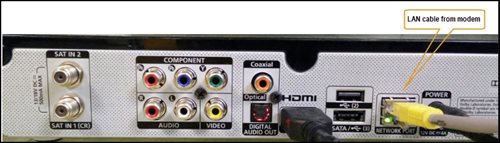
6. Switch on modem and router and please wait for 2 minutes to stabilise the devices after reboot.
5. If the issue persists, submit your feedback form and attach your modem light indicator picture/video for further assistance.
Option 4
1. Ensure Modem/Router are connected tightly to the power socket.

2. Try to use another power socket / power source to eliminate faulty power sockets/ power sources which could cause the issue.
3. If the issue persists, submit your feedback form for further assistance.
Option 5
1. Please ensure LAN cable is directly connected to modem port LAN 1.
2. Please use different LAN port if LAN 1 port is still off / not working.
3. If the issue persists, submit your feedback form for further assistance.
The Astro Fibre app is a newly introduced mobile application exclusively for Astro Fibre customers to allow them to schedule when each user can access the internet, share network access to guests in a secure manner, easy device management, amongst many other features for a better WiFi experience. For more information about this app, please visit here.
Please refer to the Welcome Card inside the Plug & Play Box package and scan the QR code. You may choose to watch either the self-installation video or the Augmented Reality (AR) Installation Video to activate your Plug & Play Box. You can also download the Installation Guide from the Astro Get Started Page.
Please install and activate your Plug & Play Box within 7 days of receiving your Plug & Play Box and Astro SIM card. If you are unable to activate your Plug & Play Box within 7 days, the Plug & Play Box will be automatically activated by Astro on the 8th day.
The billing and warranty of the Plug & Play Box shall begin on the same date of which the Plug & Play Box is activated.
In the event that you have ordered more than one (1) Plug & Play Box, please refer to the Astro SIM card letter (included with the Astro SIM card delivery) to match the right Astro SIM card to the respective Plug & Play Box. Each Astro SIM card has been paired with a specific Plug & Play Box, thus the correct matching of box and SIM card is required for it to work properly.
Photograph or scan your payment receipt, and send it to one of our contact platforms found here.
SST of 6% and 8% will be applied accordingly to your bundle services:
- 8% SST to Astro TV Pack
- 6% SST to Astro Fibre
Information of the PPV CH200 cessation has been announced on CH200 from 1 - 7 October prior to the PPV cessation. Once again, we regret any inconvenience caused.
If your account is suspended or disconnected, you will retain the existing subscription when you reconnect. However, if you plan to make any changes after the reconnection, you can only select from the new packs.
BYOND / PVR / Ultra Box
To dismantle ONLY - FOC
To reinstall ONLY – RM65
To dismantle and reinstall - RM65
Broadband / IPTV
Relocation within 6 months of contract start will be charged a RM500.00 relocation fee, and the contract will be renewed to a new 24-month contract.
Relocation after 6 months of contract start will have their contract renewed to a new 24-month contract.
Note For IPTV Customers:
1. Upon relocation request, all exiting IPTV customers will be converted to our Astro & Broadband service. Customers can choose to have standard Astro service with satellite dish, or unicast Plug & Play without satellite dish.
2. If customers choose to have satellite dish, an additional RM150.00 will be charged for satellite installation. If customers choose to have unicast Plug & Play service, no satellite dish is required, hence no extra charge will be incurred.
*Please note that additional charges may apply if the reinstallation process requires extra cables/fixings.
You do not need to request for a reconnection as our system will detect your payment and process it immediately, provided you paid via a real-time payment channel.
Click here for a full list of our payment channels.
STEP 1
On your remote, press the HOME button and the home menu will be displayed on top of your screen.
STEP 2
Navigate to Settings.
STEP 3
Navigate to S/PDIF Audio and press "OK".

STEP 4
Navigate to your preferred selection and press “OK”.

Mesh WiFi technology greatly improves the WiFi network coverage within your home and virtually eliminates all WiFi “dead spots”. However, like all technologies there are limitations that you should be aware of.
The pairing of Mesh unit to the WiFi router is automatically handled between the WiFi router and the Mesh unit after it calculates its current position in relation to the WiFi router and surrounding Mesh unit (if available) already connected to the WiFi router.
If you are self-installing the mesh at your house, it is advisable for you to always pair the Mesh unit(s) with the WiFi router only regardless of how many Mesh unit available at your house.
Please note that if you have a Mesh connected to another Mesh, the expected performance of the WiFi speed will not perform as optimally as when compared to a Mesh connected directly to the WiFi router. Adding more points (also referred as Number of hops) in between your device to the WiFi router which will cause a reduction in bandwidth and add latency.
Payment via cheque will take 3 - 5 working days to be posted. If you require faster payment posting, we recommend you to pay online via Astro Quick Pay.
Astro Quick Pay is a convenient method to check your Bill Summary, Account Status and pay Astro bills at your convenience with immediate payment posting, right from home. Visit Astro Quick Pay to pay your bill now.
We have taken into account customer feedback when introducing these new packs. While we understand the value customers see in purchasing their preferred channels individually, the packaging of media drives the economies of scale necessary to offer content at an affordable price to all our customers.
Other than the New Astro Packs that offer great value, customers may purchase selected channels or packages as content add-on such as Korean Pack, Horror Pack etc.
This convenient option allows you to complete your registration without the need to provide hard copy documents physically to the sales agent. The identity verification process helps to secure your Account and protect it from unauthorised usage.
Your cloud recording space will revert to 200 hours by default. If your current recordings exceed 200 hours, the system will delete the exceeded hours once you have stopped the Astro GO+ subscription starting with the oldest recordings first.
For Residential Astro Pay TV customers: You may change your contract from e.g., 12-month to 24-month without incurring a switching fee or cancellation fee. However, if you change your contract from e.g., 24-month to 12-month, will be charged a cancellation fee accordingly if still within minimum term (contract) period. No switching fee applicable.
You can proceed with below BTS if the weather is good. Otherwise, you may try again later.
STEP 1
On your remote, press the HOME button and the home menu will be displayed on top of your screen.

STEP 2
Navigate to SETTINGS.

STEP 3
Navigate to Satellite Settings and press “OK”.

STEP 4
Navigate to Diagnostics and press “OK”.

STEP 5
Refer to the signal strength on your screen.
If it is 65 or higher, please take the screenshot and submit your feedback form.
If it is below 65, please go to Step 6.

STEP 6
Switch off the power for your box and make sure that the adapter’s power light is off.

STEP 7
Unscrew the satellite cable from the box and pull it out.

STEP 8
Plug the satellite cable back into the box and screw it back securely.

STEP 9
Switch on the power for your box and make sure that the adapter’s power light is on. Please wait for 5 minutes.

STEP 10
Turn on your box. You should no longer be experiencing this issue.
If issue persist, please submit the issue on our Feedback Form with error details and attach a picture of your General tab of the STB Diagnostics for assistance.
Centralized Dish
If issue persist under a centralized satellite dish, please refer to your respective Building Management before contacting our agents.
Please use your Astro ID that was registered with your Astro Fibre subscription to log in to the Astro Fibre App.
You may report the incident on WhatsApp at 03-9543 3838 by typing PNP and our access our user guide or request for further help from our dedicated agents. Please have your Airway Bill tracking numbers ready for validation. If a replacement box/Astro SIM card is deemed necessary, a new Box and a new Astro SIM card will be couriered to your service address.
Astro continuously reviews its product propositions to ensure we can provide the best customer experience for all our subscribers. We have discontinued the 50% multiroom in order to allow our Astro subscribers with a subscription fee of RM100 or more to only pay a standard RM49.99 (with box setup) to enjoy the Multiroom experience on an Ultra or Ulti Box.
We apologise for any inconvenience.
The speeds shown under “My Network Map†are the WiFi speeds of your connected devices based on factors such as signal strength, distance of devices from your router, obstructing objects etc. This function allows users to know the signal strengths achievable from every room in their house or any distance from their router, giving users accurate indication If additional mesh is needed or if the placement of their router requires adjustment.
However, the speeds shown under “My Devices†are the recent WiFi consumption of your connected devices, which allows you to monitor every user’s internet consumption in your household.
No, the quality of your video depends on the speed and reliability of your internet.
Of course! Please ensure your account is active when requesting for a move.
For customers with Entertainment Plus, Movies Plus, Sports Plus, Premium 2, Premium 3, and Platinum Pack
- Launch Netflix from the home screen or via remote control.
- Click on Get Started
- If you are an existing Netflix customer, please fill in the email address and password associated with your Netflix account. Once successfully completed, all existing settings and watching history on your Netflix account will be brought over. If you are a new Netflix customer, create a new account by filling in your email address and a password for your new Netflix account.
- In the next screen, you will be shown your default Netflix package “Standard”, you can choose to upgrade to “Premium” here.
- The final screen provides a summary of your account including your email. Click Start Watching to enjoy Netflix on your Ultra/Ulti Box.
For Non-Entertainment Plus, Premium 2, Premium 3, and Platinum Pack Pack customers (New Netflix customers)
- Launch Netflix from the home screen or via remote control.
- Click on Join Now
- Create a new account by filling in your email address and a password for your new Netflix account.
- The final screen provides a summary of your account including your email. Click Start Watching to enjoy Netflix on your Ultra/Ulti Box.
Note: The Netflix plan will be defaulted to Premium, you may select ‘Change Plan’ to choose the ‘Standard’ plan.
For Non-Entertainment Plus Pack, Premium 2, Premium 3, and Platinum Pack customers (Existing Netflix customers)
- Launch Netflix from the home screen or via remote control
- Click on Sign-in
- If you are an existing Netflix customer, please fill in the email address and password associated with your Netflix account.
- You will be able to start watching Netflix on your Ultra/Ulti Box once you log in.
1. Unifi netis brand
The following shows an Interface based on Unifi router

- Launch Web Browser and enter the default's gateway's IP address (192.168.1.1) in the address bar.

- Enter Username and Password.
- Username = tmadmin
- Password = Adm@xxxx (xxxx refers to last four digits of MAC address)

- Choose WLAN -> wlan0 (2.4GHz) Basic Setting. Note down on SSID.

- Choose WLAN -> wlan1 (5GHz). Compare SSID with previous SSID.

- If SSID for wlan0 (2.4GHz) and wlan1 (5GHz) are the same. Change wlan1 (5GHz) SSID by adding number 5(i.e. ifuni_5G) to differentiate from 2.4 GHz. Click Apply Changes.
Note: Connection to Wi-Fi may be temporarily loss while the changes is updated.
For Astro Fibre subscription, should you choose to discontinue/terminate the Astro Fibre service before the expiry of the contract (24 months), you will be subjected to an early cancellation fee of RM100 x Remaining months of the contract period for your Broadband services.
All Astro Fibre devices provisioned (Fibre modem, WiFi router and Mesh) will need to be returned upon termination. Our team will schedule the collection of equipment after your Broadband services have been terminated.
If equipment is damaged, lost or cannot be retrieved, penalty fees will be applied (excluding Service Tax) accordingly.
- RM500 for Fibre modem (Broadband Termination Unit)
- RM200 for WiFi router (Residential Gateway)
- RM200/unit for Mesh WiFi
Please be informed that your service will be suspended if there is no payment after 31 days from your bill cycle date. After 62 days of non-payment, your service will be terminated, and an early cancellation fee will be applied if you are still within the 24-month contract.
STEP 1
Switch off the power of your box and make sure that the adapter’s power light is off.
STEP 2
Unplug the HDMI cable from your TV and plug it back in securely to other available HDMI port.
STEP 3
Switch on the power for your box and make sure that the adapter’s power light is on.
Please wait for 5 minutes.
STEP 4
Turn on your box. Do select the correct TV input.
You should no longer be experiencing this problem.

Astro is continuously improving our user interface and introducing new features to our platforms to ensure that your Astro experience is more seamless, efficient and user-friendly.
For details on our latest interface, Picture-in-Picture mode and auto-start interactive mode on Astro GO, please click here.
In addition, we have also recently introduced a new look to the Title Information Page, the ability to disable the Profile Selection Screen and adjustable auto-standby timing. For more information, please click here.
No, you will not be charged 8% Service Tax for paper billing option.
Please refer to these FAQs for more information, or click here to learn more and sign up for the Ultra Box. Alternatively, you may call 03-7481 8000 to get in touch with an Astro representative.
For TV packs only, 24-months contract commitment period. However, if in addition to the TV packs, if you would like to also sign-up for Broadband, the contract commitment will be 24 months as well. If you're an existing customer, your existing remaining contract duration (if any) will not be carried over to the new contract except for existing Disney+ Hotstar (3 Months Pack) and Multiroom subscription contract durations which will be carried over upon the migration to new packs.
Note: If you are subscribing to a bundle pack which includes Netflix or Disney+ Hotstar for the first time, you are required to maintain the respective app as part of your bundle selection for a minimum of 12 months, otherwise a cancellation fee will apply.
No additional fees will be charged upon your relocation. However, you are required to notify Astro of your move. Please refer to Astro's General T&Cs for more information.
Your account may be under suspension. To resolve this issue, proceed to submit report via WhatsApp or Feedback Form.
Please close and re-launc hthe Astro Fibre app, and you will be able to log in.
You will not be able to switch between channels, use the app as a remote control, view favorite channels and programmes, use programme showtime reminder, and remote record feature.
My Astro app and web is currently available in English and Bahasa Malaysia only.
Tap on the "Content' tab on the navigation bar. Select "Channels' and the channel of interest and you may view the scheduled programmes of the day. To switch between days, choose a channel and tap on a particular day (E.g. Mon, Tues, Wed). You may also view the showtimes of the day and up to the next six days.

Surcharge is imposed by 3rd party payment collection partners for services rendered. Kindly note that customers may be charged a surcharge per transaction when bill payments are made via the following methods:-
Bill payments at selected petrol stations, convenience stores, retail/mobile shops, kiosk, and e-wallets may incur a surcharge of up to RM0.50 per transaction by the appointed collection agencies of RMS (formerly known as Razer/MOL), ATX, MobilityOne, and e-Pay.
· To find out more on how to make your bill payments, click here.

