












Nationwide Installation
Applying for
| Astro Njoi UniFi Maxis |
Frequently Asked Questions
Find your answers here.
We provide one stop service to apply Astro and Broadband for you.
You can avoid driving and queuing at the sales counter. We are the dealer that can help you to handle your application from the beginning to the end.
We do not charge you when you apply from us. There is no credit card information required to apply here. Charges are the same as you apply from the sales counter.
First, you can apply online, we will get back to you immediately during business hour. WhatsApp/Email/Fax us your Photocopy of IC (for malaysian) / Passport (for foreigners). When we receive all the information, we will proceed with your application immediately.
Once we receive your application with complete information, we will process your application immediately during business hour. The contractor from the service provider will then contact you for installation appointment once your application is approved.
Enjoy greater savings and hassle-free bill payment in one single bill for both Astro and Broadband. You get to enjoy Astro and Broadband at discounted price every month over the contract period of 24 months.
Astro offers multiple TV packs including Entertainment, Sports, Movies and Kids options. You can choose a pack that matches your viewing preferences and add optional streaming apps where available.
Yes, you may subscribe to Astro TV packs without bundling broadband. However, bundling Astro TV with Fibre Broadband may provide better monthly savings and convenience with a single bill.
For small households with light streaming and browsing, 100Mbps is usually sufficient. Larger families, gamers or heavy streamers may benefit from 500Mbps or 1Gbps plans for smoother performance across multiple devices.
Most Astro TV and Fibre broadband plans come with a 24-month contract. Early termination charges may apply if cancellation is made before the contract ends.
Yes, you may upgrade your TV pack or broadband speed at any time, subject to eligibility and coverage. A new contract period may apply depending on the upgrade.
Your monthly bill will be issued directly by Astro. You may receive it via email or access it through your Astro account. Bundled customers will receive a single combined bill for TV and broadband services.
Payment methods may include online banking, auto debit, credit card or other approved payment channels provided by Astro. Our team can guide you during the registration process.
If you experience any service interruption, you may contact Astro customer support for technical assistance. In many cases, issues can be resolved remotely or a technician will be arranged if necessary.
Yes, relocation is subject to service availability at your new address. Relocation charges and contract adjustments may apply depending on your plan.
No, you do not need a credit card to submit your application. Payment setup will be arranged directly with Astro after your service is approved.
Selected Astro TV packs allow optional add-ons such as streaming services depending on current promotions and availability. Additional monthly charges may apply.
Yes, a WiFi router is typically provided during fibre installation. The router model may vary depending on the selected broadband speed plan.
Yes, we will check the service coverage at your address before proceeding with your application to ensure broadband is available at your location.
For Malaysians, please provide a copy of your MyKad. For foreigners, provide a copy of your passport when submitting your broadband application.
After your application is approved, the service provider typically contacts you within 2 to 7 working days to arrange the broadband installation appointment.
Most Astro Broadband plans come with a 24-month contract starting from your installation date. If you relocate, a new 24-month contract may apply at your new address.
Yes, you can relocate your broadband service, subject to service availability at the new address. Your contract may reset for another 24 months from the new installation date.
Yes, you may request to relocate broadband devices within your home. Non-standard installation charges may apply and are payable to the installer directly after assessment.
Yes, you can switch to Astro Broadband. To avoid service interruption, it is recommended to activate the new service before terminating your current broadband contract.
Standard installations may be free during promotions, but non-standard installations (e.g., device relocation or complex wiring) may incur extra charges payable directly to the installer.
We wish to advise you to make your payment before the following month's bill is generated in order to avoid interruption in your viewing experience. Please note that to reconnect your subscription, there will be a charge of up to RM20 (excl. gov tax) upon reconnection, except for Commercial & Hotel customers.
Find out more about the reconnection fee here.
No, anyone can make payments on your behalf as long as the credit card is used by the owner themselves.
You may reach out to Astro's customer service at 03-95433838 if you think there's an error regarding your redemption or rewards.
Redemption should be done by the account holder. However, if the account holder is unavailable, immediate family members can make the redemption provided that the account holder has given them the permission to redeem using his account credentials.
Yes, you have the option to transfer the credit balance to another active Astro account. It will be considered as payment to that account and is subject to Astro's terms & conditions.
STEP 1
Switch OFF the power of your Ultra / Ulti box and make sure that the adapter's power light is off.

STEP 2
Switch ON the power of your Ultra / Ulti box and make sure that the adapter's power light is on.

STEP 3
On your remote control, press the Home or Standby button repeatedly until the Startup Options appear on TV.
STEP 4
Press "987" to proceed.
Advanced Startup Options will be displayed.
STEP 5
Press "1" to initiate a reset setting.
STEP 6
Press "OK" to continue.
STEP 7
After the factory setting is restored, TV will turn blank.
Please wait until the box completes initiate setup.
STEP 8
Once completed, the following screen will appear on your TV.
Refer to Installation Setup guide to complete the setup.
Click here to follow New Installation Settings guide for Satellite
Click here to follow New Installation Settings guide for Plug and Play
We encourage you to upgrade your Astro experience by switching to our new packs to enjoy more choices, value and flexibility. Starting 9 November 2021, you would need to be subscribed to the new packages to make any changes to your subscription.
Please disregard the reminder if payment had been made and do check if you have any outstanding balance on Astro Quick Pay.
Your existing offers with us will not be affected and will continue until the agreed upon date.
We noticed that you've recently requested for a change in your Astro account.
As this change will affect your overall monthly subscription, the expiry date for your Disney+ Hotstar (3-months Pass) subscription has been deferred to xxx (date) to consolidate the final monthly subscription pricing.
1. Tune to channel 200 on your Astro box and wait for a few seconds. By default, the selector will be on Packs. Press up/down to select your preferable pack, and press "OK"

2. Select the option for Monthly Subscription

3. Send the WhatsApp code as per displayed on the TV screen

STEP 1
On your remote, press the Home button and the home menu will be displayed on top of your screen.

STEP 2
Navigate to Guide.

STEP 3
Select the channel you would like to lock and press "OK".

STEP 4
Select "Lock Channel" and press "OK".

STEP 5
You channel is successfully locked when this screen appears.

STEP 6
Your selected channel will have a lock tagging after being locked.

The notification you receive will depend on the payment method you choose:
(i) My Astro Portal: e-receipt will indicate payment confirmation.
(ii) IVR: Payment status will be notified over the IVR and an SMS notification will be sent for successful transactions.
(iii) SMS: Payment status will be notified via SMS.
(iv) Call: Payment status will be notified via SMS.
(v) Customer Service Centre: Physical receipt will indicate payment confirmation.
If you accidently clicked “delete my account†on the Astro Fibre app, you will bedirected to submit a request via Feedback Form as the image below.

If you submit a request, our Astro representative will get back to you within 3 business days to learn more about the issue(s) you are currently facing with the app. Customers may proceed to permanently delete their account during the call if they wish. Once complete, your Astro ID will be deleted and you will be unlinked from all Astro apps and services including partner apps that are associated with your Astro ID including Astro GO, My Astro, Astro Awani, Syok, beIN SPORTS CONNECT, iQIYI, TVBAnywhere+,HBO GO, Gempak, XUAN, Astro Ulagam etc.
You may create another Astro ID by following the steps here and re-link your new account to all Astro apps and services, including partner apps.
Step 1:
Type ASTRO<space>BARCODE<space>10 digit account number
Example: ASTRO BARCODE 0866603852
Step 2:
Send SMS to 66688
*Standard telco charges and Terms and Conditions apply
No there will not be any penalty.
For the Multiroom subscription on a box setup, if your subscription is within the 24-month contractual period. Then a pro-rated penalty of RM600 will be applied for any Astro box except for Ultra Box, which the penalty will be RM1,000.
Yes. As a Sports Pack customer, you will get access to Liga Malaysia as well as a variety of local and international sporting events as part of your subscription.
To request for a move, you may choose to:
1. Self-serve by logging in to My Astro app and follow the steps below:
Step 1: From Account tab, choose Installation address under Subscription.
Step 2: Click "Relocate”.
Step 3: Verify your identity via OTP.
Step 3: Fill in the OTP that you receive and proceed by clicking "Verify"
Step 4: Confirm the Address, a support ticket will be created.
2. Submit your feedback via below link: https://support.astro.com.my/feedback-form
Step1: Choose Feedback Type
- Type: Technical issues
- Issue: I want to enquire about installation/ relocation
Step2: Fill in the form and click “Submit” support ticket.
1. Ensure power cable is connected tightly.
2. Try to use another power socket / power source to eliminate faulty power sockets/power sources which could cause the issue.

3. If the issue persists, submit your feedback form for further assistance.
From 8 October 2021 onwards, Astro will be ceasing the daily passes (e.g. 3, 5, 7 & 30 days passes). Please subscribe to the relevant packs to continue enjoying your favourite content. Stay tuned for more exciting offers. Thank you.
STEP 1
Check on the adapter's power light.
If the adapter's power light is ON, please refer to Blank Screen troubleshooting steps here.
Otherwise, if the adapter's power light is OFF, switch off the power for your box.

STEP 2
Ensure power cable is connected tightly.
Plug in power cable to different power socket and switch on the plug.
You should no longer be experiencing this problem.
If issue remains, proceed to STEP 3.

STEP 3
Try a different power socket to connect the equipment.
Turn on the power socket and check the adapter's power light.
If there is no light on your power adaptor's, please submit the issue on our Feedback Form with error details and provide your sim card number for assistance.
Please indicate in the form if any lightning strike/thunderstorm/power trip occurred.

For customers with Entertainment Plus, Movies Plus, Sports Plus, Premium 2, Premium 3, and Platinum Pack
- Launch Netflix from the home screen or via remote control.
- Click on Get Started
- If you are an existing Netflix customer, please fill in the email address and password associated with your Netflix account. Once successfully completed, all existing settings and watching history on your Netflix account will be brought over. If you are a new Netflix customer, create a new account by filling in your email address and a password for your new Netflix account.
- In the next screen, you will be shown your default Netflix package “Standard”, you can choose to upgrade to “Premium” here.
- The final screen provides a summary of your account including your email. Click Start Watching to enjoy Netflix on your Ultra/Ulti Box.
For Non-Entertainment Plus, Premium 2, Premium 3, and Platinum Pack Pack customers (New Netflix customers)
- Launch Netflix from the home screen or via remote control.
- Click on Join Now
- Create a new account by filling in your email address and a password for your new Netflix account.
- The final screen provides a summary of your account including your email. Click Start Watching to enjoy Netflix on your Ultra/Ulti Box.
Note: The Netflix plan will be defaulted to Premium, you may select ‘Change Plan’ to choose the ‘Standard’ plan.
For Non-Entertainment Plus Pack, Premium 2, Premium 3, and Platinum Pack customers (Existing Netflix customers)
- Launch Netflix from the home screen or via remote control
- Click on Sign-in
- If you are an existing Netflix customer, please fill in the email address and password associated with your Netflix account.
- You will be able to start watching Netflix on your Ultra/Ulti Box once you log in.
"Payment Due Date" refers to the payment deadline for your Astro bills each month.
Please be sure to take your decoder, satellite dish, smartcard, remote control and all other fixtures after dismantling is done by the technician.
Astro Fibre is Astro’s own internet service that enables you to enjoy Astro content while staying connected with high-speed fibre broadband. Customers can enjoy substantial savings by choosing your desired broadband speed to accompany your Astro TV packages. Customers can choose from two types of Astro Fibre offering:
- Astro Fibre Bundle offers the best value proposition of 50Mbps to 800Mbps high-speed broadband bundled with Astro TV content packages including access to leading streaming services, creating a one-stop entertainment solution for its customers.
- Astro Fibre is a standalone high-speed broadband service of 100Mbps to 800Mbps offering a powerful WiFi system leveraging the latest WiFi 6 router and a flexible mesh proposition.
No, the quality of your video depends on the speed and reliability of your internet.
No, there is no penalty or switching fee if you decide to cancel your Multiroom (Smart TV) subscription.
STEP 1
Press "HOME" button on your remote control.

STEP 2
Navigate to Settings and press "OK".

STEP 3
Navigate to Digital Audio and press "OK".

STEP 4
Choose your preferred selection and press “OK”.

STEP 5
Select Yes, continue and press "OK" to confirm on the changes.
Otherwise, select No, go back to cancel.

If you sign up for Maxis 30/100/300Mbps broadband speeds, you are not entitled for the complimentary mesh WiFi devices. However, you may walk into any Maxis Retail Stores to purchase the mesh WiFi devices.
No, you can remain in your current pack, however starting 9 November 2021, you would need to subscribe to the new packages to make any changes to your subscription. We strongly encourage customers to switch to the new packs to enjoy the best content experience from Astro.
Yes, the current service tax law does not exempt services provided to customers residing in Labuan, Langkawi, and Tioman.
Please see the table below for the offers available for residential customers.

Notes:
· Installation fee includes Government tax.
· Monthly subscription fee does not include Government tax.
· The Ulti Box offers in the table above include a contract Period of 24 months with a pro-rated early termination fee of RM600 (excluding Government tax).
· The installation fees listed in the table above applies for a standard installation of the Ulti Box in your home. Additional charges may apply for non-standard installation.
· * Existing customers with monthly pack >RM100 are recommended to select Ultra Box @ FREE Installation fee with 24 months contract.
· ** New customers with monthly pack >RM100 are recommended to select Ultra box @ RM99 installation fee with 24 months contract.
· You may visit https://product.astro.com.my/box to find out more details about Astro Ultra Box.
· Ulti Box installation is free for Astro & Broadband customers for Starter Pack and above. A separate list of TNC’s will be applicable for this offer.
By default, all Astro Fibre customers will receive a Private IPv4 or IPv6 address. However, customers who would like to subscribe to a fixed IP service can do so by contacting our Customer Service Centre at 03-9543 3838 for Astro Fibre’s Fixed IP service for only RM5/month.
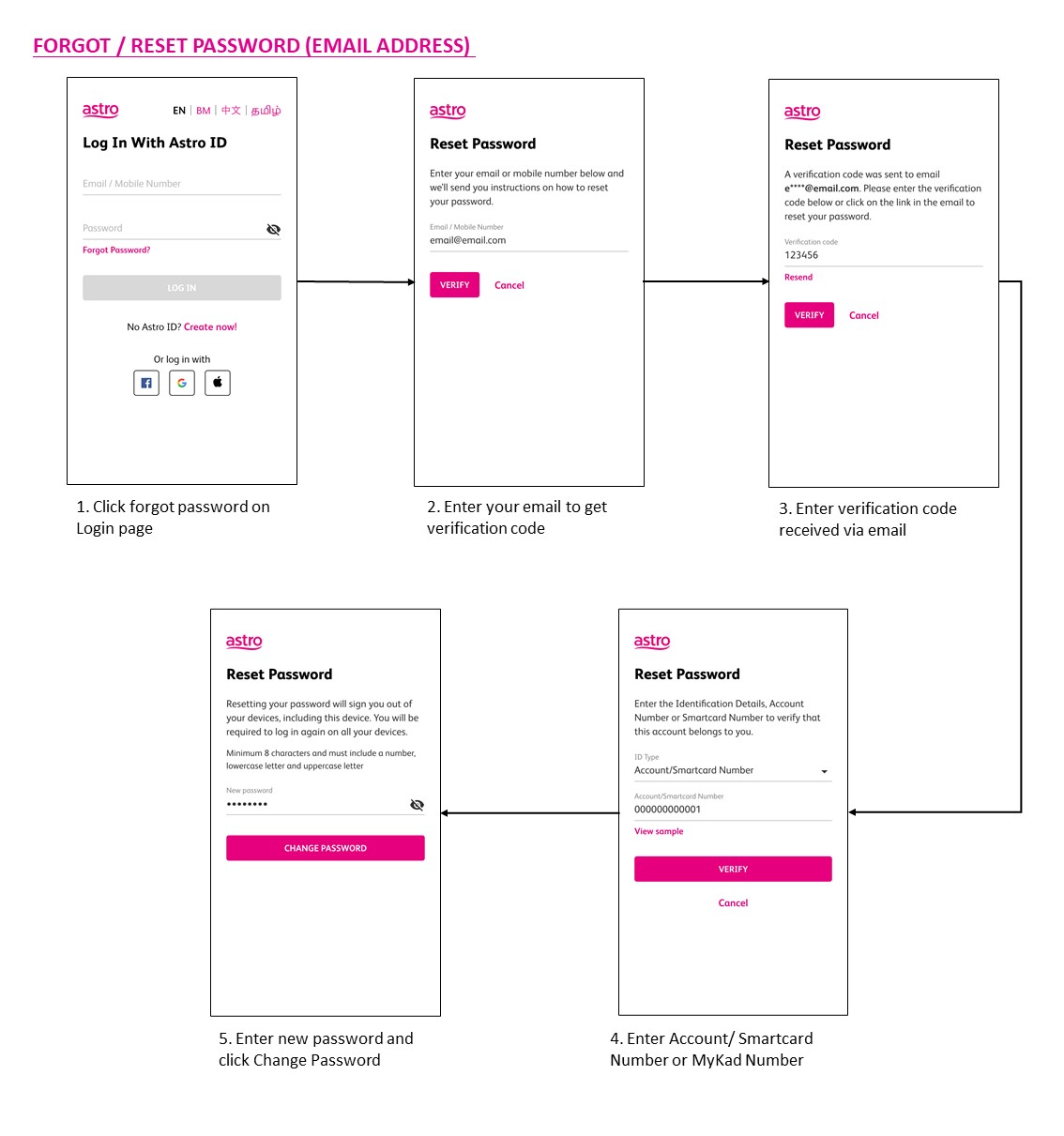
You may use the 'forgot password' recovery feature on the login page. Just enter the email address/ mobile number you signed up with and we will send you a recovery email.

Absolutely not. Astro wants to give our members the convenience of having all their favourite series, exciting originals, vernacular signatures, live sports and local blockbuster movies all in one place.
Yes, from now till 31 May 2022, new customers who sign up for the Platinum Pack on a 24-month contract get to enjoy 60 days on Astro including complimentary access to Sports Extra for 24 months.
For further details on Platinum Pack, please click bit.ly/PlatinumPack60DaysOnUs. Alternatively, new customers on the Movies Pack can enjoy 30 days access to the pack on us.
For more details, please click bit.ly/MoviesPack30DaysOnUs.
You can be assured that your data are safe with us. Astro implemented sufficient security measures to protect customer data and fully comply to Personal Data Protection Act
1. Ensure power cable is connected tightly.
2. Try to use another power socket / power source to eliminate faulty power sockets/power sources which could cause the issue.

3. If the issue persists, submit your feedback form for further assistance.
· Bill
· Log into your Astro Self-Service (location)
Astro ID and / or account deletion is permanent. Upon deletion, it will be unlinked from your TV subscription account and you will be logged out from all the associated Astro apps and / or services connected including the partner apps that you have logged in using the same Astro ID. If you have any queries regarding Astro ID or would like to request for Astro ID account deletion, click on submit your request here, fill in the required details and our Astro representative will get back to you within 3 business days for security verification purposes.
This Disney+ Hotstar software update will be rolled out progressively to all Ulti Box customers starting 23 August 2022. Please be assured that you will be able to access the Disney+ Hotstar app on your Ulti Box soon.
If you need further assistance, please call our Customer Contact Centre or WhatsApp "DH Help
Yes, customers will be charged a fixed Paper Bill Fee of RM10.00 per bill every month for each account.
For all new Astro Fibre customers with the RG21 router, the Astro Fibre App will be installed on your mobile device for you during installation. Alternatively,you may refer to the user guide here for self-installation.
Successful payment via JomPAY will be posted real time.
All Astro customers and non-customers who have an Astro ID will no longer be able to log in to our digital platforms using their usernames. Users will experience this change if they currently do not use an email address or mobile number to login, for example: johndoe2023.
STEP 1
On your remote, press the HOME button and the home menu will be displayed on top of your screen.
STEP 2
Navigate to Settings.

STEP 3
Navigate to Standby Mode and press "OK".

STEP 4
Navigate to your preferred selection and press "OK".

STEP 5
Navigate to Save and press "OK" to confirm your selection.

Further details on pricing, billing and availability will be confirmed in coming months. Look out for more details and register your interest via https://astro.com.my/Netflix
You will receive two SMS notifications with tracking numbers separately from the courier service, one for the Plug & Play Box and one for the Astro SIM card. Please expect these SMS notifications to be sent to you within 2-3 working days upon successful order submission (online or via retailer).
STEP 1
Press "HOME" button on your remote control.

STEP 2
Navigate to Preferences and press "OK".

STEP 3
Navigate to Auto Standby and press "OK".
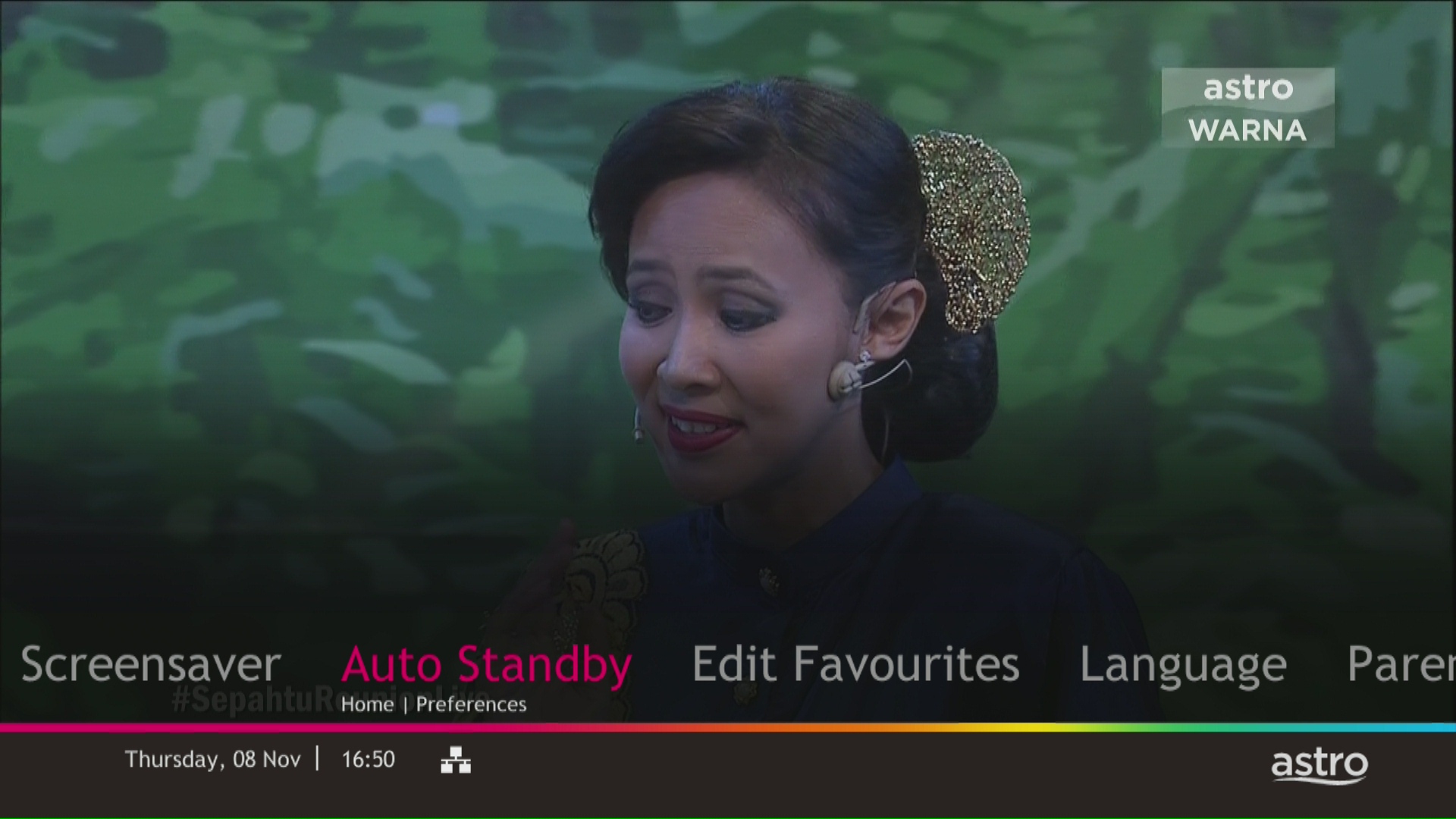
STEP 4
Navigate to your preferred selection and press “OK”.
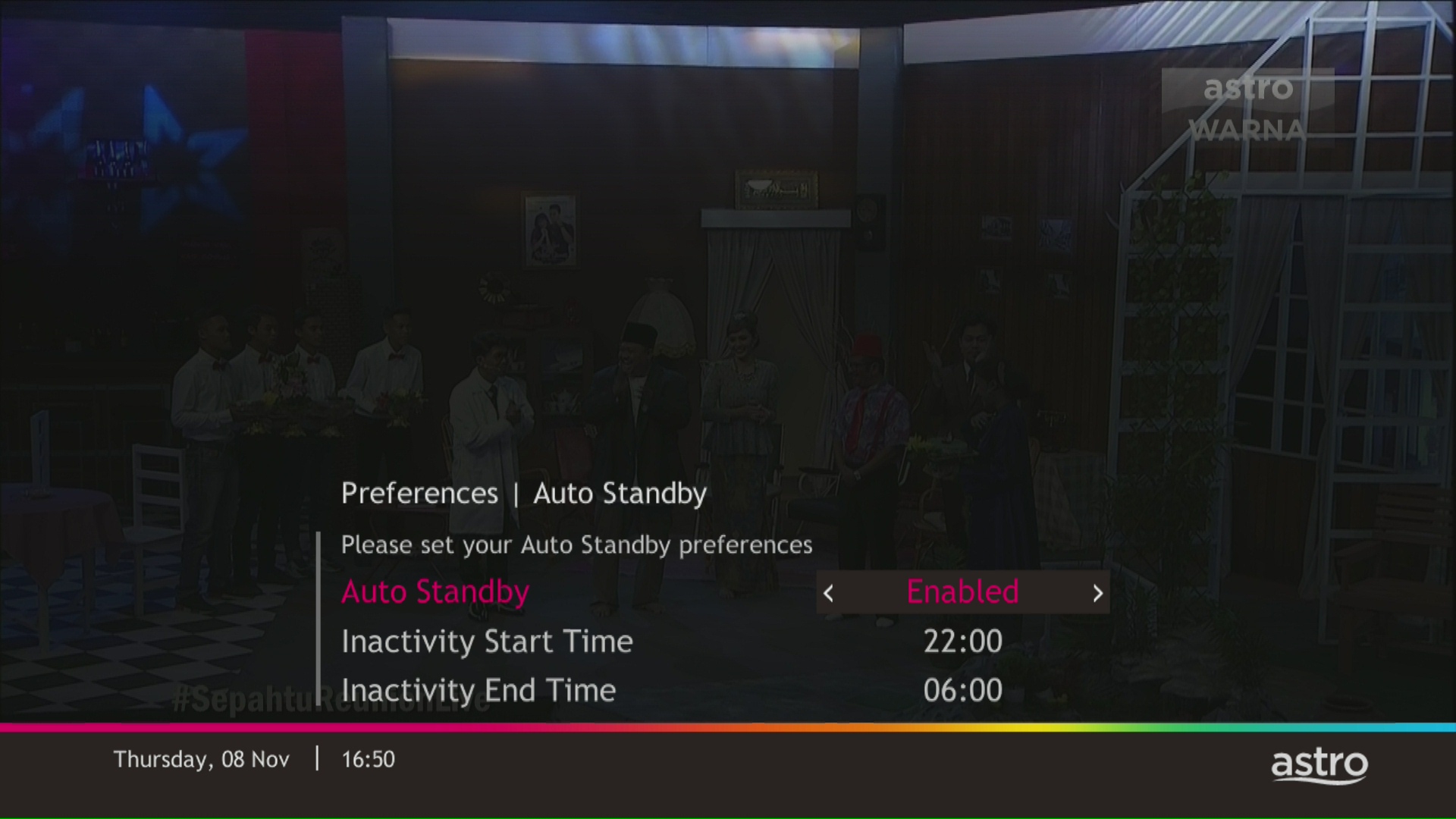
STEP 5
Select Yes, continue and then press "OK" to confirm on the changes.
Otherwise, select No, go back to cancel.

STEP 1
On your remote, press the HOME button.

STEP 2
Navigate to SETTINGS icon and press "OK".

STEP 3
Navigate to Manage Satellite Frequency and press “OK”.

STEP 4
Choose to Update Satellite Frequency and press “OK”.

STEP 5
Choose "Confirm" to continue Satellite Frequency Update and press “OK”.

STEP 6
Satellite Frequency Update progress screen will be displayed.
The updates will take approximately 20 minutes.

STEP 7
The status will be displayed once update is complete.


