












Nationwide Installation
Applying for
| Astro Njoi UniFi Maxis |
Frequently Asked Questions
Find your answers here.
We provide one stop service to apply Astro and Broadband for you.
You can avoid driving and queuing at the sales counter. We are the dealer that can help you to handle your application from the beginning to the end.
We do not charge you when you apply from us. There is no credit card information required to apply here. Charges are the same as you apply from the sales counter.
First, you can apply online, we will get back to you immediately during business hour. WhatsApp/Email/Fax us your Photocopy of IC (for malaysian) / Passport (for foreigners). When we receive all the information, we will proceed with your application immediately.
Once we receive your application with complete information, we will process your application immediately during business hour. The contractor from the service provider will then contact you for installation appointment once your application is approved.
Enjoy greater savings and hassle-free bill payment in one single bill for both Astro and Broadband. You get to enjoy Astro and Broadband at discounted price every month over the contract period of 24 months.
Astro offers multiple TV packs including Entertainment, Sports, Movies and Kids options. You can choose a pack that matches your viewing preferences and add optional streaming apps where available.
Yes, you may subscribe to Astro TV packs without bundling broadband. However, bundling Astro TV with Fibre Broadband may provide better monthly savings and convenience with a single bill.
For small households with light streaming and browsing, 100Mbps is usually sufficient. Larger families, gamers or heavy streamers may benefit from 500Mbps or 1Gbps plans for smoother performance across multiple devices.
Most Astro TV and Fibre broadband plans come with a 24-month contract. Early termination charges may apply if cancellation is made before the contract ends.
Yes, you may upgrade your TV pack or broadband speed at any time, subject to eligibility and coverage. A new contract period may apply depending on the upgrade.
Your monthly bill will be issued directly by Astro. You may receive it via email or access it through your Astro account. Bundled customers will receive a single combined bill for TV and broadband services.
Payment methods may include online banking, auto debit, credit card or other approved payment channels provided by Astro. Our team can guide you during the registration process.
If you experience any service interruption, you may contact Astro customer support for technical assistance. In many cases, issues can be resolved remotely or a technician will be arranged if necessary.
Yes, relocation is subject to service availability at your new address. Relocation charges and contract adjustments may apply depending on your plan.
No, you do not need a credit card to submit your application. Payment setup will be arranged directly with Astro after your service is approved.
Selected Astro TV packs allow optional add-ons such as streaming services depending on current promotions and availability. Additional monthly charges may apply.
Yes, a WiFi router is typically provided during fibre installation. The router model may vary depending on the selected broadband speed plan.
Yes, we will check the service coverage at your address before proceeding with your application to ensure broadband is available at your location.
For Malaysians, please provide a copy of your MyKad. For foreigners, provide a copy of your passport when submitting your broadband application.
After your application is approved, the service provider typically contacts you within 2 to 7 working days to arrange the broadband installation appointment.
Most Astro Broadband plans come with a 24-month contract starting from your installation date. If you relocate, a new 24-month contract may apply at your new address.
Yes, you can relocate your broadband service, subject to service availability at the new address. Your contract may reset for another 24 months from the new installation date.
Yes, you may request to relocate broadband devices within your home. Non-standard installation charges may apply and are payable to the installer directly after assessment.
Yes, you can switch to Astro Broadband. To avoid service interruption, it is recommended to activate the new service before terminating your current broadband contract.
Standard installations may be free during promotions, but non-standard installations (e.g., device relocation or complex wiring) may incur extra charges payable directly to the installer.
Service will resume within 3 hours after payment is made.
For existing Astro Fibre customers with the WiFi 6 Huawei K562e router, youwould need to upgrade to the latest RG21 router in order to access the AstroFibre with a one-off fee of RM300 (excluding SST). For any enquiries, please contact our Customer ContactCentre at 03 - 9543 1543and an Astro agent will be available to assist you immediately.
This error indicates that you are streaming on Astro GO while being connected to a VPN. Please close your VPN application and try streaming again.
If you are still having issues, proceed to submit report via WhatsApp or Feedback Form.
In your first Astro bill, the first month's bill will be deducted accordingly excluding tax. You will still need to pay the full tax amount for your first month as per your first month's bill.
Note: Advance payment is only applicable to Astro TV pack purchases. If you subscribe to an Astro Fibre + TV bundle, only one month of your TV subscription fee (excluding tax) is required to be paid upon sign-up. The full tax amount and the first-month subscription fee for Astro Fibre will be paid on your first month's bill.
Some of our payment partners require payees to scan the barcode on the statement to make payment. Always bring your Astro bill statement when making payment over the counter.
The notification you receive will depend on the payment method you choose:
(i) My Astro Portal: e-receipt will indicate payment confirmation.
(ii) IVR: Payment status will be notified over the IVR and an SMS notification will be sent for successful transactions.
(iii) SMS: Payment status will be notified via SMS.
(iv) Call: Payment status will be notified via SMS.
(v) Customer Service Centre: Physical receipt will indicate payment confirmation.
At this point in time, 4K UHD content from Disney+ Hotstar is not available on the Ultra or Ulti Box. We are working to enable this on the Ultra Box in a future update.
STEP 1
On your remote, press the HOME button and the home menu will be displayed on top of your screen.

STEP 2
Navigate to Settings.

STEP 3
Navigate to STB Diagnostics and press "OK".

STEP 4
Select Advanced Diagnostics and press "OK".

STEP 5
Details information of Advanced Diagnostics screen will be displayed.

STEP 6
Press down arrow on your remote to get more information.

New and existing Astro customers will enjoy rebates up to RM39/month for 24 months when they subscribe to selected Astro Fibre TV bundles and a FREE speed upgrade for all customers who subscribe within the promotion period.
In the new bill layout, there are three tax indicators for customer to refer: S1 (8%), S2 (6%), and N (non-taxable item). Each item list will be marked in accordance with the tax indicator below:
Please update your auto-debit payment details via My Astro Portal.
You would have to create a new Astro ID with your email address or mobile number and link your Astro subscription. Please follow the steps in the link here


Option 1
- Please turn off all devices (Modem and Router). By restarting your modem, you can isolate the possibility of overloaded processes in the modem, which would impact its performance.
- Ensure both cables on Modem (LAN Port 1) and Router (Internet Port) are properly connected.
Modem connection

Router connection


3. Please make sure the LAN cable is connected properly from router (Port 1-4 - LAN port) to PC/Laptop.
4. If you have change the password in Selfcare Time portal recently, please change the router configuration follows the new password made in Selfcare, but if you didn't make any changes, please go to Step 5.
5. If the issue persists, submit your feedback form and attach your modem light indicator picture/video for further assistance.
Option 2 / Option 3
1. Please turn off all devices (Modem and Router). By restarting your modem, you can isolate the possibility of overloaded processes in the modem, which would impact its performance.
2. Gently remove fiber optic cable and blow / wipe the tip of the fibre cable. This is to clean up the cable in order to avoid any interferences.
3. Re-insert the fiber cable to the optical port behind the modem.
4. Ensure both cables on Modem (LAN Port 1) and Router (Internet Port) are properly connected.
Modem Connection

Router Connection


5. Make Sure both cables on Modem (LAN Port 4 /LAN Port 3 for second decoder) and Astro Decoder (Network Port) are properly inserted.

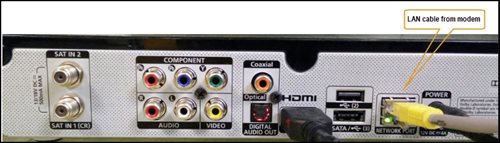
6. Switch on modem and router and please wait for 2 minutes to stabilise the devices after reboot.
5. If the issue persists, submit your feedback form and attach your modem light indicator picture/video for further assistance.
Option 4
1. Ensure Modem/Router are connected tightly to the power socket.

2. Try to use another power socket / power source to eliminate faulty power sockets/ power sources which could cause the issue.
3. If the issue persists, submit your feedback form for further assistance.
Option 5
1. Please ensure LAN cable is directly connected to modem port LAN 1.
2. Please use different LAN port if LAN 1 port is still off / not working.
3. If the issue persists, submit your feedback form for further assistance.
You may access it by pressing "200' on your Astro remote control whilst watching TV.
i.Initiate the app on your new Smart TV device, key in the unique code on the TV to your mobile
ii.You will see the list of devices on your mobile and choose the old device to be removed
iii.Your new Smart TV device will be added
STEP 1
Press "HOME" button on your remote control.

STEP 2
Navigate to Preferences and press "OK".

STEP 3
Navigate to Language and press "OK".

STEP 4
Choose your language preferences and press "OK".
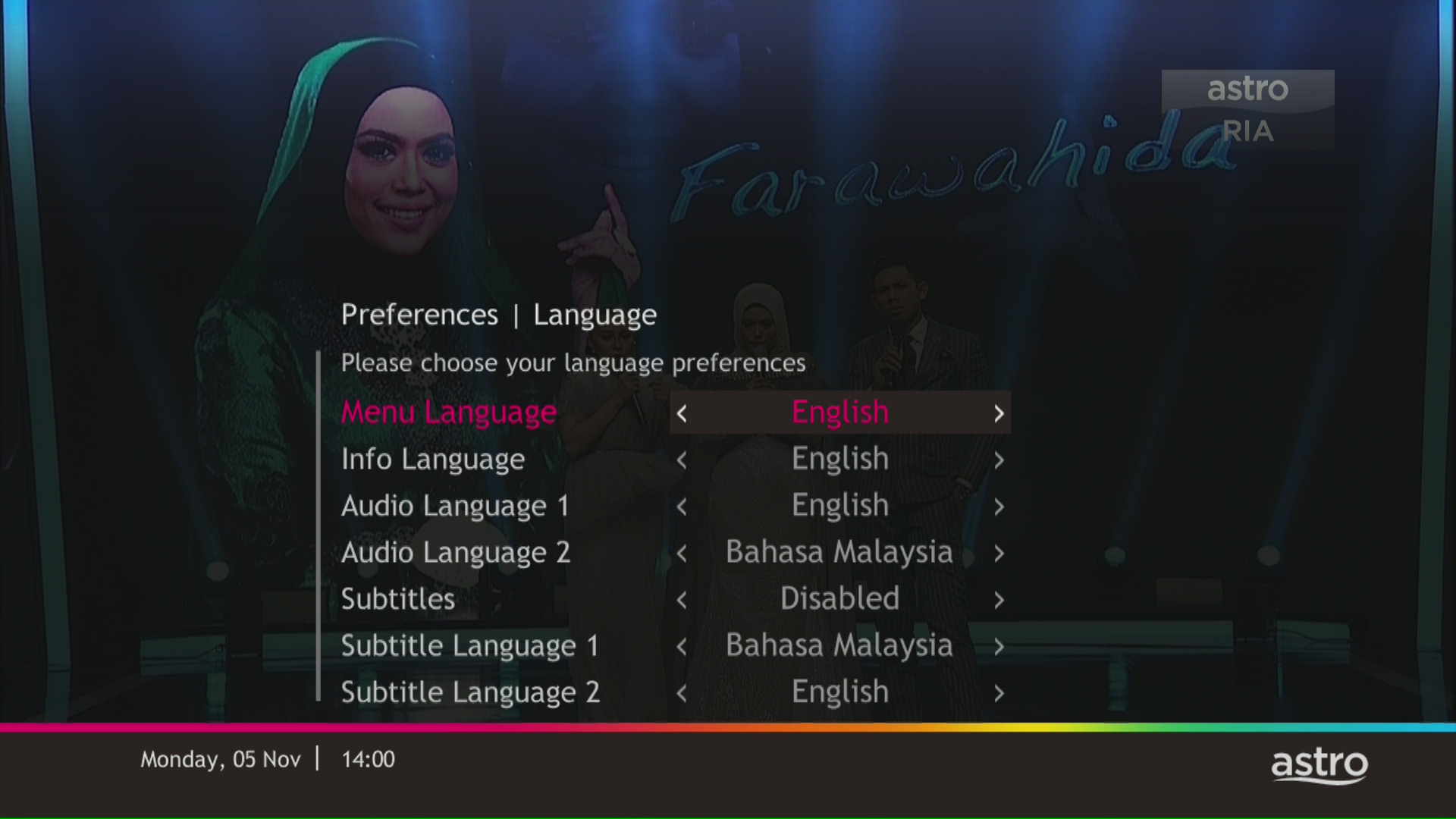
STEP 5
Select Yes, continue and press "OK" to confirm on the changes.
Otherwise, select No, go back to cancel.
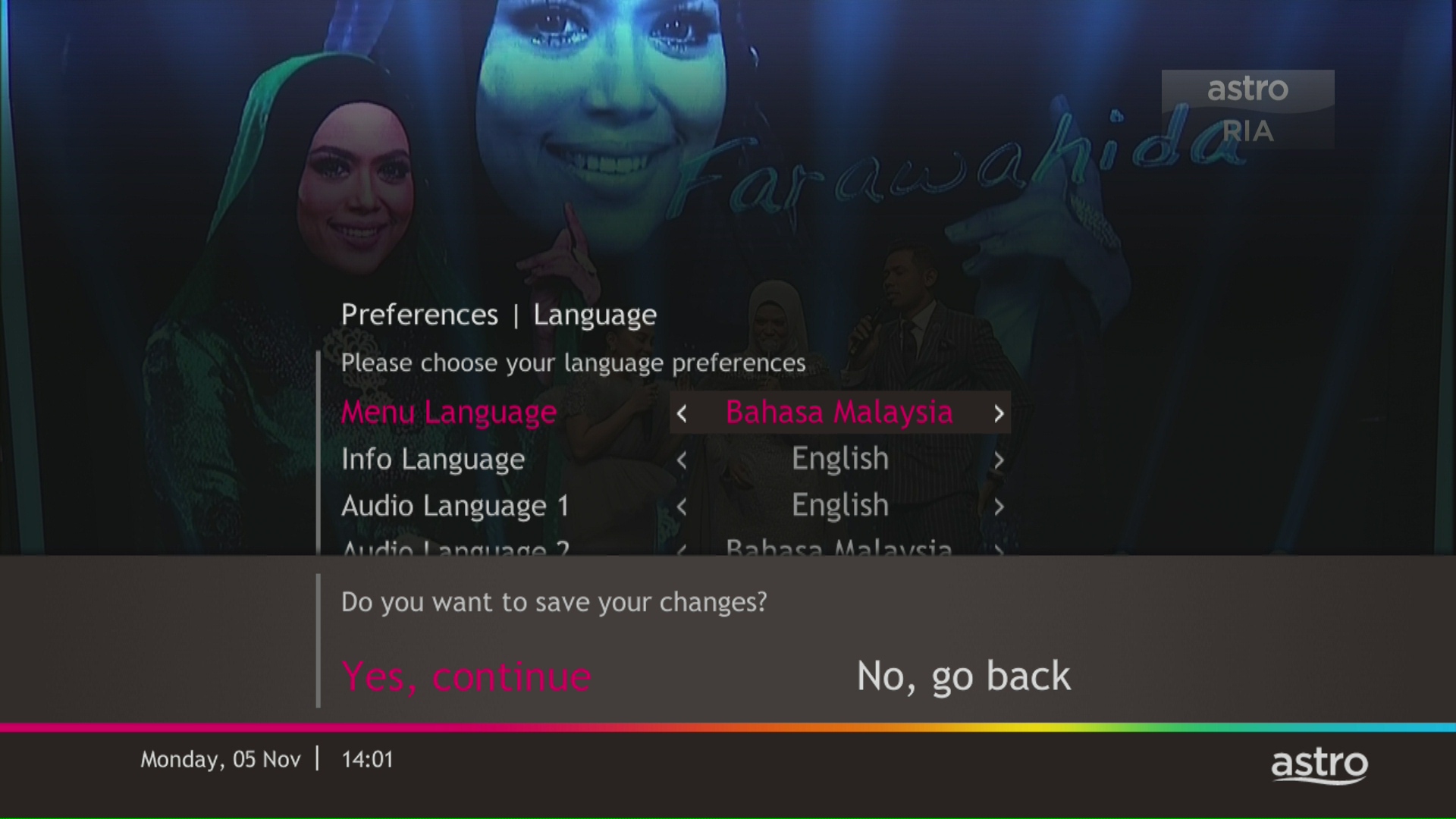
Astro offers 3 different after-sales service that is made available to the customers:
(1) Express (RM75)
(2) Same Day (RM70)
(3) Regular (RM65)
***Price is inclusive of 6% Service Tax.

Yes, you will. Customers who purchased Astro First / Astro Best / Pay-per-View event in February 2024 with a viewing period in March 2024 will be charged an 8% Service Tax in their next bill.
Upon successful subscription, you will be able to view your chosen HD channels within 3 hours by keying in the channel numbers into your remote control. Please note that subscription through Channel 200 will take effect within 24 hours.
You can subscribe to new packs via
- Online - astro.com.my
- WhatsApp GET ASTRO (for new customers) or SWITCH (for existing customers) to 03-9543 3838
- Astro Customer Service Centres.
Please contact us through one of our platforms found here or Self-serve by logging in to Astro Self-Service Portal within 3-7 days before moving out and we will sort everything out for you!
You can proceed with below troubleshooting if the weather is good. Otherwise, you may try again later.
STEP 1
On your remote, press the “HOME” button and the home menu will be displayed at the bottom of your screen.

STEP 2
Navigate to SETTINGS and press “OK”.

STEP 3
Navigate to STB DIAGNOSTICS and press “OK”.

STEP 4
Refer to the signal strength % shown on the top left of your screen.
If it is 65% or higher, please take the screenshot and submit your Feedback Form.
If it is below 65%, please go to Step 5.

STEP 5
Switch off the power for your box and make sure that the adapter’s power light is off.

STEP 6
Unscrew the satellite cable from the box and pull it out.

STEP 7
Plug the satellite cable back into the box and screw it back securely.

STEP 8
Switch on the power for your box and make sure that the adapter’s power light is on.
Please wait for 5 minutes.

STEP 9
Turn on your box. You should no longer be experiencing this issue.
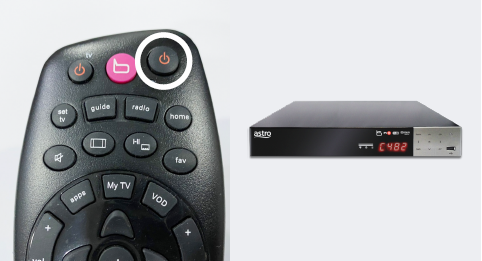
If issue persist, please submit the issue on our Feedback Form and attach a picture of your General tab of the STB Diagnostics for assistance.
Centralized Dish
If issue persist under a centralized satellite dish, please refer to your respective Building Management before contacting our agents.
Astro GO+ is a service add-on that:
- Enables the simultaneous viewing of Astro GO for up to 4 users/devices.
- Increases the cloud recording storage from 200 hours up to 1500 hours.
Check out our user guide for a quick and easy way to get started!
Download our user guide in English
Download our user guide in Malay
Download our user guide in Chinese
Do you need more information? Watch our Astro Ultra How to videos here.
If you are already subscribed to the Movies/Premium 1/Premium 3/Platinum Pack, you are automatically entitled to access Disney+ Hotstar. Therefore, you will not be able to add on the Disney+ Hotstar 3-months pass.
Astro Fibre subscription also comes with a 24-month contract commitment and will NOT be auto renewed at the end of contact period.
Please ensure that your mobile number is up to date in our database to ensure that payment reminders are sent to the right person.
You can do so via:
1. Astro Self-Service Portal
2. Call our Customer Call Centre (CCC)
**Only account holder can update the mobile number
All Astro customers and non-customers who have an Astro ID will no longer be able to log in to our digital platforms using their usernames. Users will experience this change if they currently do not use an email address or mobile number to login, for example: johndoe2023.
There are no switching fees apply when existing Astro customer move to new packs.
Absolutely not. Astro wants to give our members the convenience of having all their favourite series, exciting originals, vernacular signatures, live sports and local blockbuster movies all in one place.
No. However, if you cancel your Astro Pay TV services but resubscribe at a later date, your duration (year) with us will reset to zero and restart according to your new activation date. Your Astro Rewards tier will reset to Magenta.
Please follow the steps below to verify your Astro ID:

Yes, you may terminate the service, however an early cancellation fee will be applied for termination/cancellation within 24 months. Please refer to the Astro Fibre's cancellation details.
You may call Astro's Contact Centre at 03-9543 3838 or wait for an Astro representative to be in contact with you within 2 working days to assist you with your order.
Customers with a Movies subscription via Movies, Premium 1, Premium 3 and Platinum packs will be able to access Disney+ Hotstar on the Ultra box.
Alternatively, customers can add on the 3-month Disney+ Hotstar pass for RM54.90. Subscribe to Disney+ Hotstar via astro.com.my/Disney.
For more support and options for your subscription, please WhatsApp us at 03 9543 3838 and type DH Help. Alternatively, you may visit astro.com.my/Disney for more information.
No, you can remain in your current pack, however starting 9 November 2021, you would need to subscribe to the new packages to make any changes to your subscription. We strongly encourage customers to switch to the new packs to enjoy the best content experience from Astro.
You may contact Astro's Contact Centre (03 - 9543 1543) to process the cancellation.
The Mesh WiFi device(s) needs to be returned upon service termination via an arranged pick-up by our installers.
1. Please ensure your modem and router power plugs are securely connected to the power socket.

2. Alternatively, try to connect the power plug to a different power socket or power source. This step is to eliminate the possibility of faulty power socket which could cause the issue.

3. If issue persists, submit your Feedback Form for further assistance.
You can proceed with below BTS if the weather is good. Otherwise, you may try again later.
STEP 1
On your remote, press the HOME button and the home menu will be displayed on top of your screen.

STEP 2
Navigate to SETTINGS.

STEP 3
Navigate to Satellite Settings and press “OK”.

STEP 4
Navigate to Diagnostics and press “OK”.

STEP 5
Refer to the signal strength on your screen.
If it is 65 or higher, please take the screenshot and submit your feedback form.
If it is below 65, please go to Step 6.

STEP 6
Switch off the power for your box and make sure that the adapter’s power light is off.

STEP 7
Unscrew the satellite cable from the box and pull it out.

STEP 8
Plug the satellite cable back into the box and screw it back securely.

STEP 9
Switch on the power for your box and make sure that the adapter’s power light is on. Please wait for 5 minutes.

STEP 10
Turn on your box. You should no longer be experiencing this issue.
If issue persist, please submit the issue on our Feedback Form with error details and attach a picture of your General tab of the STB Diagnostics for assistance.
Centralized Dish
If issue persist under a centralized satellite dish, please refer to your respective Building Management before contacting our agents.
Multiroom (Astro Box) requires an Astro box to be setup and can be accessed through the regular satellite feed or streaming on home Wi-Fi. Meanwhile, the Multiroom (Smart TV) only requires a Smart TV and no installation needed. Customers can download the Astro app on the Smart TV and connect to home Wi-Fi to stream.
Regular (DTH) customers can watch Astro without an Internet connection. If you have selected Plug & Play setup option, a minimum speed of 10Mbps/device is required to enjoy a good HD viewing experience on Ultra/Ulti¯Box and 30Mbps/device for 4K UHD viewing on Ultra Box. However, if you have selected the Regular (DTH) option, the internet speeds above are recommended to enjoy a good viewing experience for On Demand and Astro Cloud services.
No, you will not be able to manage your account with the Astro Fibre App. However, you may download the “MyAstro” app on your mobile device now to manage your Astro account in a fast and easy way.
Depending on your service, it is mandatory to return some devices as per our T&Cs, whilst other devices should be disposed of and recycled at collection centres registered under the Department of Environment. To find out what you should do with your devices after service termination, please click here.
No, anyone can make payments on your behalf as long as the credit card is used by the owner themselves.
Astro sends regular payment reminders to customers via SMS until their current charges have been paid. However, we encourage customers to pay their bill as soon as possible to avoid disconnection of Astro service. Please reach out to us here if you require more information about payment reminders or to change your contact details.
Yes, you can switch to Astro Fibre and all the devices provisioned will be maintained (Fibre modem & WiFi router) with the new Astro Fibre subscription. However, your Astro TV package will be removed/terminated.
An early cancellation fee will be applied if you are still within the 24-month contract. Please refer to the Astro Fibre's cancellation details.
Yes, you can upgrade your internet speed. However, speed downgrade is not allowed.
Discover thousands of movies and series you'll love, and we are continuously expanding. If you would like to enjoy more movies on top of your current subscription, press the Home button and select On Demand. Use the arrow keys to scroll to Store. Pick and choose to rent any movie for up to 48hours.
To be eligible, you'll need to be an Active Astro Pay TV customer with a valid Astro ID.
An Active Astro customer refers to a subscriber of the Astro Service, whose account is current and active with no outstanding payments due and who has not breached the Astro subscription agreement nor given any instructions to terminate and/or suspend his/her subscription to the Astro Service.
Each account you hold is entitled to one (1) tier status based on the longest active smartcard.
For information about the Disney+ Hotstar app functions and specifications, please visit help.hotstar.com or email disneyplus.my@hotstar.com.

